cancel
Showing results for 
Show  only  | Search instead for 
Did you mean: 
  • Don’t miss your chance to experience Discovery Summit Europe at our best available rate! Early bird registration through 31 Oct.
  • Image to Table JMP extension imports single or batch images as data tables. Useful to extract curves from pictures or convert image data to curve data to use in analyses like Functional Data Explorer. Download and install the extension.

Discussions

Solve problems, and share tips and tricks with other JMP users.
Choose Language Hide Translation Bar
Hegedus1
Level III

How to interpret nonparametric density on scatterplot

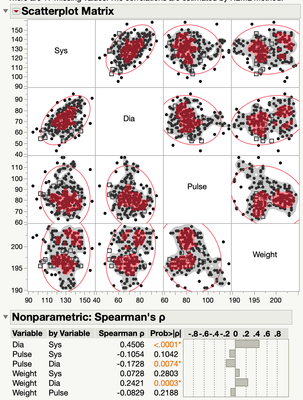
For the scatterplot matrix in the multivariate platform, I have done the Spearman correlation and added the non-parametric density to the plot. How does one interpret it? There are gray regions and black dots and red regions with red dots.  What is the meaning of the coloration?  The manual speaks only about how to add it the graph and is silent on its interpretation.
 

Hegedus1_0-1619796153813.png

Andy


1 REPLY 1

Re: How to interpret nonparametric density on scatterplot

From JMP Help:


Nonpar Density

Shows or hides shaded density contours based on a smooth nonparametric bivariate surface that describes the density of data points. Contours for the 10% and 50% quantiles of the nonparametric surface are shown.

Recommended Articles