- JMP will suspend normal business operations for our Winter Holiday beginning on Wednesday, Dec. 24, 2025, at 5:00 p.m. ET (2:00 p.m. ET for JMP Accounts Receivable).
Regular business hours will resume at 9:00 a.m. EST on Friday, Jan. 2, 2026. - We’re retiring the File Exchange at the end of this year. The JMP Marketplace is now your destination for add-ins and extensions.
- Subscribe to RSS Feed
- Mark Topic as New
- Mark Topic as Read
- Float this Topic for Current User
- Bookmark
- Subscribe
- Mute
- Printer Friendly Page
Discussions
Solve problems, and share tips and tricks with other JMP users.- JMP User Community
- :
- Discussions
- :
- comparison of slopes

- Mark as New
- Bookmark
- Subscribe
- Mute
- Subscribe to RSS Feed
- Get Direct Link
- Report Inappropriate Content
comparison of slopes
After running an ANCOVA model with more than two values of the categorical variable, how can I perform pairwise comparisons of slopes?
Hillary.
- Mark as New
- Bookmark
- Subscribe
- Mute
- Subscribe to RSS Feed
- Get Direct Link
- Report Inappropriate Content
Re: comparison of slopes
Thank you, Karen and Julian, On the Fit Model platform the parameter
estimates table also gives a t-test for each slope as compared to the
average slope. Or one can use the indicator function parametrization and
get a comparison of each slope to that of the last category. But other
specific pairs can only be compared by changing the order of the categories
and rerunning the model: very tedious if you have, say, 10 categories.
From: julian
Sent: Thursday, May 26, 2016 7:27 PM
To: Hillary Voet <hillary.voet@mail.huji.ac.il>
Subject: Re: - comparison of slopes
JMP User Community
<https://community.jmp.com/?utm_source=JIVE&utm_medium=email&utm_campaign=System%20Email%20Tracking>
comparison of slopes
reply from Julian Parris
<https://community.jmp.com/people/julian?et=watches.email.thread> in
Discussions - View the full discussion
<https://community.jmp.com/message/228820?et=watches.email.thread#228820>


 Community Manager
- Mark as New
- Bookmark
- Subscribe
- Mute
- Subscribe to RSS Feed
- Get Direct Link
- Report Inappropriate Content
Re: comparison of slopes
Hi Hillary,
I hope you saw my previous post with the add-in to take some of the tediousness out of rerunning the report. Here's that link again if not:
Compare Simple Slopes in One-Way ANCOVA (w Interaction) add-in
Julian
- Mark as New
- Bookmark
- Subscribe
- Mute
- Subscribe to RSS Feed
- Get Direct Link
- Report Inappropriate Content
Re: comparison of slopes
Thanks, Julian. I'm not familiar with using add-ins.
Hillary.
From: julian
Sent: Thursday, May 26, 2016 9:12 PM
To: Hillary Voet <hillary.voet@mail.huji.ac.il>
Subject: Re: - comparison of slopes
JMP User Community
<https://community.jmp.com/?utm_source=JIVE&utm_medium=email&utm_campaign=System%20Email%20Tracking>
comparison of slopes
reply from Julian Parris
<https://community.jmp.com/people/julian?et=watches.email.thread> in
Discussions - View the full discussion
<https://community.jmp.com/message/228851?et=watches.email.thread#228851>
Community Manager
- Mark as New
- Bookmark
- Subscribe
- Mute
- Subscribe to RSS Feed
- Get Direct Link
- Report Inappropriate Content
Re: comparison of slopes
Add-ins extend the functionality of JMP using the built-in scripting language, JSL. Download the add-in from the page, and when you open it JMP will ask you if you wish to install the add-in. Click yes, and you will see a new menu appear called Add-ins. From that menu you can now select the add-in I wrote.
You'll find many other useful add-ins in the file-exchange section of the user community. It's worth a look around!
Julian
- Mark as New
- Bookmark
- Subscribe
- Mute
- Subscribe to RSS Feed
- Get Direct Link
- Report Inappropriate Content
Re: comparison of slopes
Yes indeed! Thanks for the tip about add ins. However: I installed the Add
In as you instructed and ran the Fit Model. When I click on Add Ins and the
name of your add in I get a message "Select a Fit Model Least Squares
Report". How do I do this?
Hillary.
From: julian
Sent: Thursday, May 26, 2016 9:47 PM
To: Hillary Voet <hillary.voet@mail.huji.ac.il>
Subject: Re: - comparison of slopes
JMP User Community
<https://community.jmp.com/?utm_source=JIVE&utm_medium=email&utm_campaign=System%20Email%20Tracking>
comparison of slopes
reply from Julian Parris
<https://community.jmp.com/people/julian?et=watches.email.thread> in
Discussions - View the full discussion
<https://community.jmp.com/message/228853?et=watches.email.thread#228853>
- Mark as New
- Bookmark
- Subscribe
- Mute
- Subscribe to RSS Feed
- Get Direct Link
- Report Inappropriate Content
Re: comparison of slopes
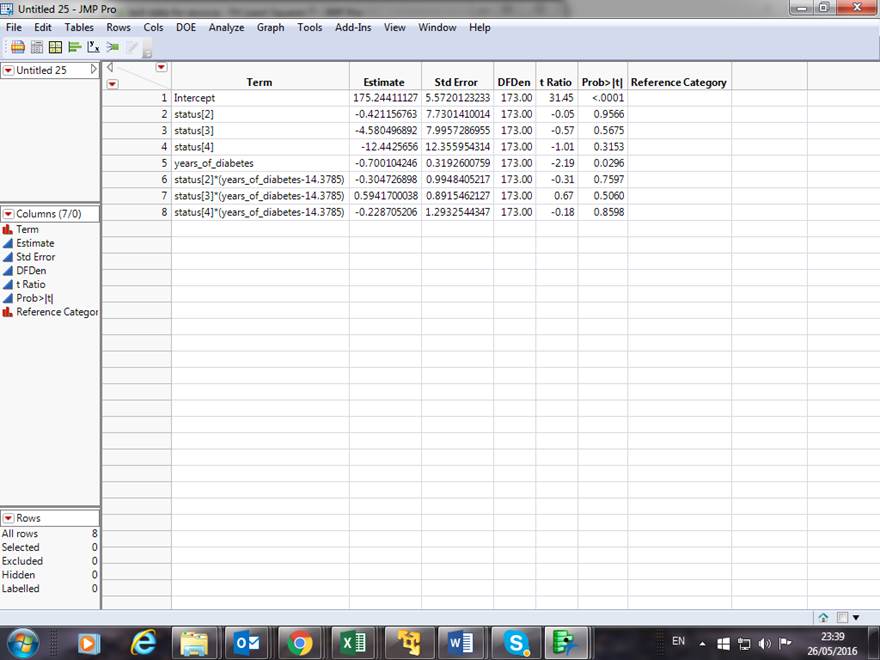
HI Julian,
I see you've uploaded the second version of the Add In and it's working
better. However this is the table I get:
which is different from your description of the Add In" the reference
category isn't listed (should be Status 4) and the table doesn't continue
for other reference categories.
Thanks,
Hillary.
From: julian
Sent: Thursday, May 26, 2016 9:47 PM
To: Hillary Voet <hillary.voet@mail.huji.ac.il>
Subject: Re: - comparison of slopes
JMP User Community
<https://community.jmp.com/?utm_source=JIVE&utm_medium=email&utm_campaign=System%20Email%20Tracking>
comparison of slopes
reply from Julian Parris
<https://community.jmp.com/people/julian?et=watches.email.thread> in
Discussions - View the full discussion
<https://community.jmp.com/message/228853?et=watches.email.thread#228853>
 Community Manager
- Mark as New
- Bookmark
- Subscribe
- Mute
- Subscribe to RSS Feed
- Get Direct Link
- Report Inappropriate Content
Re: comparison of slopes
Hmm, looks like the script is failing somewhere if that's the output you get. I suspect it might have to do with having numbers as the levels of your categorical factor of Status. When the script looks to make a list of those to shuffle the value ordering it appears to take them in as a matrix not a list. I'll find a workaround for this and post a new version.
Community Manager
- Mark as New
- Bookmark
- Subscribe
- Mute
- Subscribe to RSS Feed
- Get Direct Link
- Report Inappropriate Content
Re: comparison of slopes
Hi Hillary,
I believe I fixed the issue. Download v0.03 and reinstall and please let me know if you get the expected output.
Compare Simple Slopes in One-Way ANCOVA (w Interaction) add-in
- Mark as New
- Bookmark
- Subscribe
- Mute
- Subscribe to RSS Feed
- Get Direct Link
- Report Inappropriate Content
Re: comparison of slopes
Hi Julian,
I used v03 but got the same output as before.
Hillary.
From: julian
Sent: Friday, May 27, 2016 12:09 AM
To: Hillary Voet <hillary.voet@mail.huji.ac.il>
Subject: Re: - comparison of slopes
JMP User Community
<https://community.jmp.com/?utm_source=JIVE&utm_medium=email&utm_campaign=System%20Email%20Tracking>
comparison of slopes
reply from Julian Parris
<https://community.jmp.com/people/julian?et=watches.email.thread> in
Discussions - View the full discussion
<https://community.jmp.com/message/228859?et=watches.email.thread#228859>
- Mark as New
- Bookmark
- Subscribe
- Mute
- Subscribe to RSS Feed
- Get Direct Link
- Report Inappropriate Content
Re: comparison of slopes
Hi Julian,
It seems to be the values that are problematical. When I give the
categories names a1, a2, etc. I get the expected output.
Hillary.
From: julian
Sent: Friday, May 27, 2016 12:09 AM
To: Hillary Voet <hillary.voet@mail.huji.ac.il>
Subject: Re: - comparison of slopes
JMP User Community
<https://community.jmp.com/?utm_source=JIVE&utm_medium=email&utm_campaign=System%20Email%20Tracking>
comparison of slopes
reply from Julian Parris
<https://community.jmp.com/people/julian?et=watches.email.thread> in
Discussions - View the full discussion
<https://community.jmp.com/message/228859?et=watches.email.thread#228859>
Recommended Articles
- © 2025 JMP Statistical Discovery LLC. All Rights Reserved.
- Terms of Use
- Privacy Statement
- Contact Us