- JMP will suspend normal business operations for our Winter Holiday beginning on Wednesday, Dec. 24, 2025, at 5:00 p.m. ET (2:00 p.m. ET for JMP Accounts Receivable).
Regular business hours will resume at 9:00 a.m. EST on Friday, Jan. 2, 2026. - We’re retiring the File Exchange at the end of this year. The JMP Marketplace is now your destination for add-ins and extensions.
- Subscribe to RSS Feed
- Mark Topic as New
- Mark Topic as Read
- Float this Topic for Current User
- Bookmark
- Subscribe
- Mute
- Printer Friendly Page
Discussions
Solve problems, and share tips and tricks with other JMP users.- JMP User Community
- :
- Discussions
- :
- adding formula to tabulate

- Mark as New
- Bookmark
- Subscribe
- Mute
- Subscribe to RSS Feed
- Get Direct Link
- Report Inappropriate Content
adding formula to tabulate
Hi, it my first day on JMP, so basicly it is very simple question...
I would like to add a formula row to the tabel.
how can I do that?
Accepted Solutions


- Mark as New
- Bookmark
- Subscribe
- Mute
- Subscribe to RSS Feed
- Get Direct Link
- Report Inappropriate Content
Re: adding formula to tabulate
A formula can not be added directly to the display from the Tabulate Platform. What you need to do, is to go to the Red Triangle in the Tablulate Output, and select "Make into Data Table". Once the table is created, you can then add a formula to the table.


- Mark as New
- Bookmark
- Subscribe
- Mute
- Subscribe to RSS Feed
- Get Direct Link
- Report Inappropriate Content
Re: adding formula to tabulate
Orienting the table differently would make it easier to calculate your percent difference in the manner outlined by txnelson.
Using the data you provided, orient the table this way:
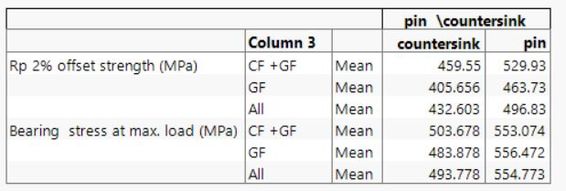
Now right-click and make into data table. Add a column for the formula that you have outlined (pin-countersink)/pin.
I'm sure there are other solutions, but this one does work.
- Mark as New
- Bookmark
- Subscribe
- Mute
- Subscribe to RSS Feed
- Get Direct Link
- Report Inappropriate Content
Re: adding formula to tabulate
A formula can not be added directly to the display from the Tabulate Platform. What you need to do, is to go to the Red Triangle in the Tablulate Output, and select "Make into Data Table". Once the table is created, you can then add a formula to the table.
- Mark as New
- Bookmark
- Subscribe
- Mute
- Subscribe to RSS Feed
- Get Direct Link
- Report Inappropriate Content
Re: adding formula to tabulate
Thanks
so what the best way to build a table like this (built with excel...) ?
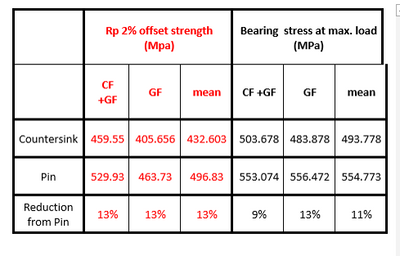
the columns mean is the results ( of RP2% and Bearing) without separeted to the Variant (GF \ CF+GF)
attached the data file
- Mark as New
- Bookmark
- Subscribe
- Mute
- Subscribe to RSS Feed
- Get Direct Link
- Report Inappropriate Content
Re: adding formula to tabulate
Orienting the table differently would make it easier to calculate your percent difference in the manner outlined by txnelson.
Using the data you provided, orient the table this way:
Now right-click and make into data table. Add a column for the formula that you have outlined (pin-countersink)/pin.
I'm sure there are other solutions, but this one does work.
- Mark as New
- Bookmark
- Subscribe
- Mute
- Subscribe to RSS Feed
- Get Direct Link
- Report Inappropriate Content
Re: adding formula to tabulate
And it is possible to add the data table to Jornal or other report?
- Mark as New
- Bookmark
- Subscribe
- Mute
- Subscribe to RSS Feed
- Get Direct Link
- Report Inappropriate Content
Re: adding formula to tabulate
Yes, If there is an open journal you can click on the report or data table, and the use the key stroke, CNTL/J and it will be copied to the open journal.
All of this is documented in the Using JMP document, available under the Help pull down menu.
Recommended Articles
- © 2025 JMP Statistical Discovery LLC. All Rights Reserved.
- Terms of Use
- Privacy Statement
- Contact Us