- JMP will suspend normal business operations for our Winter Holiday beginning on Wednesday, Dec. 24, 2025, at 5:00 p.m. ET (2:00 p.m. ET for JMP Accounts Receivable).
Regular business hours will resume at 9:00 a.m. EST on Friday, Jan. 2, 2026. - We’re retiring the File Exchange at the end of this year. The JMP Marketplace is now your destination for add-ins and extensions.
- Subscribe to RSS Feed
- Mark Topic as New
- Mark Topic as Read
- Float this Topic for Current User
- Bookmark
- Subscribe
- Mute
- Printer Friendly Page
Discussions
Solve problems, and share tips and tricks with other JMP users.- JMP User Community
- :
- Discussions
- :
- Table summary for out of spec

- Mark as New
- Bookmark
- Subscribe
- Mute
- Subscribe to RSS Feed
- Get Direct Link
- Report Inappropriate Content
Table summary for out of spec
Hello,
I have table with many columns with spec limits as properties.
How can I create table of % out of spec per column.
If possible with option as table summary (to define the groups) and the new column will be %OOS.
* Or three column: below LSL, above USL and total outside (as the "long term Sigma" table in the tribution plot)
Thanks in advance!
Assaf
Accepted Solutions


- Mark as New
- Bookmark
- Subscribe
- Mute
- Subscribe to RSS Feed
- Get Direct Link
- Report Inappropriate Content
Re: Table summary for out of spec
Try this script, it produces the following output
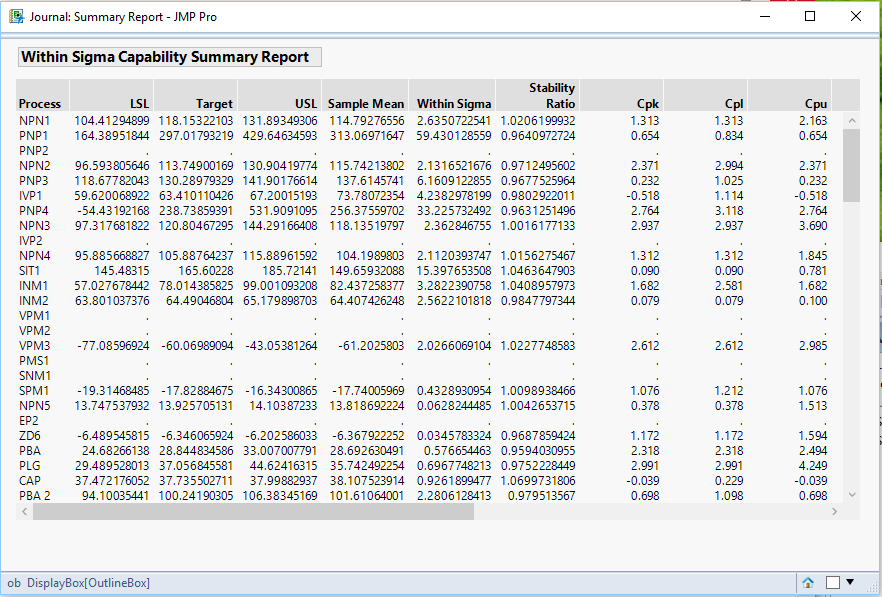
Here is the script
Names Default To Here( 1 );
dt = Open( "$SAMPLE_DATA\Semiconductor Capability.jmp" );

// Get all of the continuous columns
colList = dt << get column names( string, continuous );

// For use as an example, delete some spec limits
For( i = 3, i <= N Items( colList ), i = i + 6,
	Column( dt, colList[i] ) << delete property( "Spec Limits" )
);


// Create the Process Capability Summary Report
PC = Process Capability(
	invisible,
	Process Variables( Eval( colList ) ),
	Spec Limits Dialog( "No (skip columns with no spec limits)" ),
	Capability Box Plots( 0 ),
	Within Sigma Summary Report( 1 ),
	Goal Plot( 0 ),
	Capability Index Plot( 0 )
);

// Get a list of columns processed
processedColList = report(PC)["Within Sigma Capability Summary Report"][String Col Box( 1 )] << get;

// Create an output table
dt2 = Report( PC )["Within Sigma Capability Summary Report"][Table Box( 1 )] << make into data table( invisible );
PC << close window;

// Create a new column that will allow the original order
// of the columns to be listed
dt2 << New Column( "roworder" );

// Process through the data table, and if the column is not found
// in the processed data, add it to the data table
For( i = 1, i <= N Items( colList ), i++,
	If( N Rows( Loc( ProcessedColList, colList[i] ) ) == 1,
		dt2:roworder[Loc( ProcessedColList, colList[i] )[1]] = i,
		dt2 << add rows( 1 );
		dt2:Process[N Rows( dt2 )] = colList[i];
		dt2:roworder[N Rows( dt2 )] = i;
	)
);

// Sort the data into the original order
dt2 = dt2 << sort( by( :roworder ), order( ascending ), replace table( 1 ) );

// Get rid of the no longer needed roworder column
dt2 << delete columns( "roworder" );

// Create the new report
nw = New Window( "Summary Report", <<journal, ob = Outline Box( "Within Sigma Capability Summary Report" ) );
dt2 << journal;
close(dt2,nosave);- Mark as New
- Bookmark
- Subscribe
- Mute
- Subscribe to RSS Feed
- Get Direct Link
- Report Inappropriate Content
Re: Table summary for out of spec
Hi,
With few modifications it's work fine
Thanks for the fast and great support!
Assaf
Col_names = Current Data Table() << Get Column Names();
Num_of_cols = N Items( Col_names );

columnsWithLimList = {};

For( i = 1, i <= Num_of_cols, i++,
	Spec_Lims = Column( Char( Col_Names[i] ) ) << Get Property( "Spec Limits" );

//Spec_USL_num = Num (Word(1,Word (2,Char(Spec_Lims[2]),"("),")"));
	//Spec_LSL_num = Num (Word(1,Word (2,Char(Spec_Lims[1]),"("),")"));

	If( //is missing (Spec_USL_num)!=0 || is missing (Spec_LSL_num)!=0,
		Is Empty( Spec_Lims )
	,
		Continue()
	);
	Insert Into( columnsWithLimList, Char( Col_Names[i] ) );
);

PC = Expr(
	"Process Capability(
invisible,
Process Variables( "
);

For( i = 1, i <= N Items( columnsWithLimList ), i++,
	PC = PC || ",:" || Char( columnsWithLimList[i] )
);

PC = PC ||
"),
Capability Box Plots( 0 ),
Within Sigma Summary Report( 1 ),
Goal Plot( 0 ),
Capability Index Plot( 0 )
)";
Eval( Parse( PC ) );
- Mark as New
- Bookmark
- Subscribe
- Mute
- Subscribe to RSS Feed
- Get Direct Link
- Report Inappropriate Content
Re: Table summary for out of spec
Hi,
if I understand you right, then you only need to use the Analyze>>Quality and Process>>Process Capability.
Within this report you have to select the summary reports. The summary report contains the requested data. If not, you have to customize it by hand with a right click on the table header. Under "Columns" there are all possible options. If you like you can convert this into a new data table.
Grüße,
Marvin
- Mark as New
- Bookmark
- Subscribe
- Mute
- Subscribe to RSS Feed
- Get Direct Link
- Report Inappropriate Content
Re: Table summary for out of spec
Hi,
Thanks for your support!
this option indeed can support with my request.
But (and I don't mention it in the beggining), I've many columns and for some there are no limits - so the process capability not support unless I add the limits.
I'm loking for (probably) JSL that will replace the summary table and when parameter w/o limit - will return empty cell (".")
- Mark as New
- Bookmark
- Subscribe
- Mute
- Subscribe to RSS Feed
- Get Direct Link
- Report Inappropriate Content
Re: Table summary for out of spec
Try this script, it produces the following output
Here is the script
Names Default To Here( 1 );
dt = Open( "$SAMPLE_DATA\Semiconductor Capability.jmp" );

// Get all of the continuous columns
colList = dt << get column names( string, continuous );

// For use as an example, delete some spec limits
For( i = 3, i <= N Items( colList ), i = i + 6,
	Column( dt, colList[i] ) << delete property( "Spec Limits" )
);


// Create the Process Capability Summary Report
PC = Process Capability(
	invisible,
	Process Variables( Eval( colList ) ),
	Spec Limits Dialog( "No (skip columns with no spec limits)" ),
	Capability Box Plots( 0 ),
	Within Sigma Summary Report( 1 ),
	Goal Plot( 0 ),
	Capability Index Plot( 0 )
);

// Get a list of columns processed
processedColList = report(PC)["Within Sigma Capability Summary Report"][String Col Box( 1 )] << get;

// Create an output table
dt2 = Report( PC )["Within Sigma Capability Summary Report"][Table Box( 1 )] << make into data table( invisible );
PC << close window;

// Create a new column that will allow the original order
// of the columns to be listed
dt2 << New Column( "roworder" );

// Process through the data table, and if the column is not found
// in the processed data, add it to the data table
For( i = 1, i <= N Items( colList ), i++,
	If( N Rows( Loc( ProcessedColList, colList[i] ) ) == 1,
		dt2:roworder[Loc( ProcessedColList, colList[i] )[1]] = i,
		dt2 << add rows( 1 );
		dt2:Process[N Rows( dt2 )] = colList[i];
		dt2:roworder[N Rows( dt2 )] = i;
	)
);

// Sort the data into the original order
dt2 = dt2 << sort( by( :roworder ), order( ascending ), replace table( 1 ) );

// Get rid of the no longer needed roworder column
dt2 << delete columns( "roworder" );

// Create the new report
nw = New Window( "Summary Report", <<journal, ob = Outline Box( "Within Sigma Capability Summary Report" ) );
dt2 << journal;
close(dt2,nosave);- Mark as New
- Bookmark
- Subscribe
- Mute
- Subscribe to RSS Feed
- Get Direct Link
- Report Inappropriate Content
Re: Table summary for out of spec
Hi,
With few modifications it's work fine
Thanks for the fast and great support!
Assaf
Col_names = Current Data Table() << Get Column Names();
Num_of_cols = N Items( Col_names );

columnsWithLimList = {};

For( i = 1, i <= Num_of_cols, i++,
	Spec_Lims = Column( Char( Col_Names[i] ) ) << Get Property( "Spec Limits" );

//Spec_USL_num = Num (Word(1,Word (2,Char(Spec_Lims[2]),"("),")"));
	//Spec_LSL_num = Num (Word(1,Word (2,Char(Spec_Lims[1]),"("),")"));

	If( //is missing (Spec_USL_num)!=0 || is missing (Spec_LSL_num)!=0,
		Is Empty( Spec_Lims )
	,
		Continue()
	);
	Insert Into( columnsWithLimList, Char( Col_Names[i] ) );
);

PC = Expr(
	"Process Capability(
invisible,
Process Variables( "
);

For( i = 1, i <= N Items( columnsWithLimList ), i++,
	PC = PC || ",:" || Char( columnsWithLimList[i] )
);

PC = PC ||
"),
Capability Box Plots( 0 ),
Within Sigma Summary Report( 1 ),
Goal Plot( 0 ),
Capability Index Plot( 0 )
)";
Eval( Parse( PC ) );
- Mark as New
- Bookmark
- Subscribe
- Mute
- Subscribe to RSS Feed
- Get Direct Link
- Report Inappropriate Content
Re: Table summary for out of spec
Hello,
New to JMP. I see the output form the script will be very useful. The script mentioned on the post is very specific to a specific data table, do you have a scrip which I can select columns for the same analysis. (Spec limits from column properties)
Thanks
Recommended Articles
- © 2025 JMP Statistical Discovery LLC. All Rights Reserved.
- Terms of Use
- Privacy Statement
- Contact Us