- Don’t miss your chance to experience Discovery Summit Europe at our best available rate! Early bird registration through 31 Oct.
- Image to Table JMP extension imports single or batch images as data tables. Useful to extract curves from pictures or convert image data to curve data to use in analyses like Functional Data Explorer. Download and install the extension.
- Subscribe to RSS Feed
- Mark Topic as New
- Mark Topic as Read
- Float this Topic for Current User
- Bookmark
- Subscribe
- Mute
- Printer Friendly Page
Discussions
Solve problems, and share tips and tricks with other JMP users.- User Community
- :
- Discussions
- :
- Re: Table script - completed?

- Mark as New
- Bookmark
- Subscribe
- Mute
- Subscribe to RSS Feed
- Get Direct Link
- Report Inappropriate Content
Table script - completed?
When triggering a Tables script from another script, how can I check if a table script was completed (without errors)?
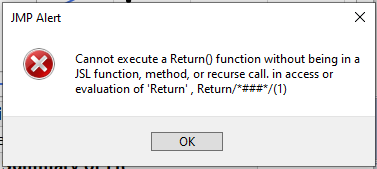
Adding a return function is not allowed:
Names Default To Here( 1 );
dt = Open( "$SAMPLE_DATA/Big Class.jmp" );
dt << run Script( "Bivariate" );
dt << New Script(
	"test", JSL Quote(
		print(1);
		return(1);
),As String( 1 ));


dt << New Script(
	"test2", JSL Quote(
		New Namespace("myScript");
		myScript:finished=0;
print(1);
myScript:finished=1;
),
	As String( 1 )
);

If( Not( dt << run Script( "test" ) ),
	Stop()
);

dt << run Script( "test2" );
If( Not( myScript:finished ),
	Stop()
);
Accepted Solutions


- Mark as New
- Bookmark
- Subscribe
- Mute
- Subscribe to RSS Feed
- Get Direct Link
- Report Inappropriate Content
Re: Table script - completed?
dt = Open( "$SAMPLE_DATA/Big Class.jmp" );

dt << deletescripts( "test" );

dt << New Script(
	"test", JSL Quote(
		if(test<0,
			0 // either this is the last value from the if
		,
			print("ok");
			1 // or this is the last value from the if
		); // the if() value is either 0 or 1
	), // the script's value is the last statement executed value
	As String( 1 )
);

test = 37;
Show( test, dt << run Script( "test" ) ); // "ok",1

test = -42;
Show( test, dt << run Script( "test" ) ); // 0
edit: include() works the same way.
- Mark as New
- Bookmark
- Subscribe
- Mute
- Subscribe to RSS Feed
- Get Direct Link
- Report Inappropriate Content
Re: Table script - completed?
dt = Open( "$SAMPLE_DATA/Big Class.jmp" );

dt << deletescripts( "test" );

dt << New Script(
	"test", JSL Quote(
		if(test<0,
			0 // either this is the last value from the if
		,
			print("ok");
			1 // or this is the last value from the if
		); // the if() value is either 0 or 1
	), // the script's value is the last statement executed value
	As String( 1 )
);

test = 37;
Show( test, dt << run Script( "test" ) ); // "ok",1

test = -42;
Show( test, dt << run Script( "test" ) ); // 0
edit: include() works the same way.
- Mark as New
- Bookmark
- Subscribe
- Mute
- Subscribe to RSS Feed
- Get Direct Link
- Report Inappropriate Content
Re: Table script - completed?
Oh, so simple :)
Thanks @Craige_Hales
- Mark as New
- Bookmark
- Subscribe
- Mute
- Subscribe to RSS Feed
- Get Direct Link
- Report Inappropriate Content
Re: Table script - completed?
For functions there is no difference between the two variants?
testFunc1= Function({},return(1));
testFunc2= Function({},1);

show(testFunc1);
show(testFunc2);- Mark as New
- Bookmark
- Subscribe
- Mute
- Subscribe to RSS Feed
- Get Direct Link
- Report Inappropriate Content
Re: Table script - completed?
return(1) has a major advantage if it is nested inside for loops and if statements: it returns the answer without needing to be otherwise positioned to be the last expression evaluated. The implementation of the return(1) in C++ is slower than just ending with the desired expression; you'll notice on short functions that are called millions of times. So in your example I tend to write
testFunc2= Function({},
 /*return*/ 1
);
with the comment. Or use return(1) if clarity is more important. The break() and continue() statements work much the same. Using them for clarity, or in a way that executes them infrequently is perfect.
- Mark as New
- Bookmark
- Subscribe
- Mute
- Subscribe to RSS Feed
- Get Direct Link
- Report Inappropriate Content
Re: Table script - completed?
Nice idea with the /*return*/ comment.
I already deleted one of my "1"s - because it looked so unnecessary ;)
Some days later, without the direct connection to the deleted "1", it was quite hard to find out what's going wrong ...
Recommended Articles
- © 2026 JMP Statistical Discovery LLC. All Rights Reserved.
- Terms of Use
- Privacy Statement
- Contact Us