cancel
Showing results for 
Show  only  | Search instead for 
Did you mean: 
  • JMP will suspend normal business operations for our Winter Holiday beginning on Wednesday, Dec. 24, 2025, at 5:00 p.m. ET (2:00 p.m. ET for JMP Accounts Receivable).
    Regular business hours will resume at 9:00 a.m. EST on Friday, Jan. 2, 2026.
  • We’re retiring the File Exchange at the end of this year. The JMP Marketplace is now your destination for add-ins and extensions.

Discussions

Solve problems, and share tips and tricks with other JMP users.
%3CLINGO-SUB%20id%3D%22lingo-sub-50251%22%20slang%3D%22en-US%22%20mode%3D%22NONE%22%3EQuellcode-Dokumentation%3C%2FLINGO-SUB%3E%3CLINGO-BODY%20id%3D%22lingo-body-50251%22%20slang%3D%22en-US%22%20mode%3D%22NONE%22%3E%3CP%3EIch%20verwende%20derzeit%20NaturalDocs%2C%20um%20automatisch%20eine%20HTML-basierte%20Dokumentation%20des%20von%20mir%20geschriebenen%20JSL-Codes%20zu%20generieren.Ich%20arbeite%20ziemlich%20gut%20mit%20einfachem%20Kommentar-Markup%20im%20Code%3A%3C%2FP%3E%0A%3CP%3E%26nbsp%3B%3C%2FP%3E%0A%3CP%3E%3CSPAN%20class%3D%22lia-inline-image-display-wrapper%20lia-image-align-inline%22%20image-alt%3D%22naturaldocs.PNG%22%20style%3D%22width%3A%20400px%3B%22%3E%3CSPAN%20class%3D%22lia-inline-image-display-wrapper%22%20image-alt%3D%22naturaldocs.PNG%22%20style%3D%22width%3A%20400px%3B%22%3E%3Cspan%20class%3D%22lia-inline-image-display-wrapper%22%20image-alt%3D%22naturaldocs.PNG%22%20style%3D%22width%3A%20400px%3B%22%3E%3Cimg%20src%3D%22https%3A%2F%2Fcommunity.jmp.com%2Ft5%2Fimage%2Fserverpage%2Fimage-id%2F9060iE6684636CD071039%2Fimage-size%2Fmedium%3Fv%3Dv2%26amp%3Bpx%3D400%22%20role%3D%22button%22%20title%3D%22naturaldocs.PNG%22%20alt%3D%22naturaldocs.PNG%22%20%2F%3E%3C%2Fspan%3E%3C%2FSPAN%3E%3C%2FSPAN%3E%3C%2FP%3E%0A%3CP%3EIch%20richte%20gerade%20eine%20neue%20Entwicklungsumgebung%20ein%20und%20es%20ist%20eine%20Gelegenheit%2C%20die%20Tools%20in%20meinem%20Workflow%20zu%20%C3%BCberpr%C3%BCfen.Ich%20habe%20mich%20nur%20gefragt%2C%20ob%20jemand%20andere%20Gedanken%20zu%20Tools%20zur%20Dokumentationserstellung%20f%C3%BCr%20JSL%20hat%3F%3C%2FP%3E%0A%3CP%3E%26nbsp%3B%3C%2FP%3E%3C%2FLINGO-BODY%3E%3CLINGO-SUB%20id%3D%22lingo-sub-50312%22%20slang%3D%22en-US%22%20mode%3D%22NONE%22%3EBetreff%3A%20Quellcode-Dokumentation%3C%2FLINGO-SUB%3E%3CLINGO-BODY%20id%3D%22lingo-body-50312%22%20slang%3D%22en-US%22%20mode%3D%22NONE%22%3E%3CP%3EIch%20habe%20es%20gerade%20auf%20einem%20neuen%20PC%20installiert%20%E2%80%93%20im%20Anhang%20finden%20Sie%20eine%20Beschreibung%20des%20Vorgangs%3C%2FP%3E%3C%2FLINGO-BODY%3E%3CLINGO-SUB%20id%3D%22lingo-sub-50302%22%20slang%3D%22en-US%22%20mode%3D%22NONE%22%3EBetreff%3A%20Quellcode-Dokumentation%3C%2FLINGO-SUB%3E%3CLINGO-BODY%20id%3D%22lingo-body-50302%22%20slang%3D%22en-US%22%20mode%3D%22NONE%22%3E%3CP%3E%3CA%20href%3D%22https%3A%2F%2Fcommunity.jmp.com%2Ft5%2Fuser%2Fviewprofilepage%2Fuser-id%2F6696%22%20target%3D%22_blank%22%3E%40uday_guntupalli%3C%2FA%3E%20Ich%20werde%20es%20jetzt%20auf%20einem%20neuen%20Computer%20installieren.Gerne%20dokumentiere%20und%20teile%20ich%20den%20Vorgang%2C%20sobald%20er%20abgeschlossen%20ist%20(ich%20musste%20die%20Konfiguration%20erweitern%2C%20um%20die%20JSL-Sprache%20zu%20verarbeiten).%3C%2FP%3E%3C%2FLINGO-BODY%3E%3CLINGO-SUB%20id%3D%22lingo-sub-50290%22%20slang%3D%22en-US%22%20mode%3D%22NONE%22%3EBetreff%3A%20Quellcode-Dokumentation%3C%2FLINGO-SUB%3E%3CLINGO-BODY%20id%3D%22lingo-body-50290%22%20slang%3D%22en-US%22%20mode%3D%22NONE%22%3E%3CP%3E%3CA%20href%3D%22https%3A%2F%2Fcommunity.jmp.com%2Ft5%2Fuser%2Fviewprofilepage%2Fuser-id%2F4536%22%20target%3D%22_blank%22%3E%40David_Burnham%3C%2FA%3E%20%2C%3CBR%20%2F%3E%20Ich%20habe%20versucht%2C%20dem%20Beispiel%20zu%20folgen%20und%20Natural%20Docs%20zu%20installieren.%20Nachdem%20Sie%20es%20wie%20hier%20beschrieben%20eingerichtet%20haben%20(%3CA%20href%3D%22http%3A%2F%2Fwww.naturaldocs.org%2Fgetting_started%2Fgetting_set_up%2F%23starting_a_new_project%22%20target%3D%22_blank%22%20rel%3D%22nofollow%20noopener%20noreferrer%22%3E%20http%3A%2F%2Fwww.naturaldocs.org%2Fgetting_started%2Fgetting_set_up%2F%23starting_a_new_project%3C%2FA%3E%20)%20%2C%20wenn%20ich%20versuche%2C%20configure%20auszuf%C3%BChren%2C%20um%20Dokumentation%20zu%20generieren%2C%20erhalte%20ich%20Folgendes%3CBR%20%2F%3E%3CSPAN%20class%3D%22lia-inline-image-display-wrapper%20lia-image-align-inline%22%20image-alt%3D%22image.png%22%20style%3D%22width%3A%20599px%3B%22%3E%3CSPAN%20class%3D%22lia-inline-image-display-wrapper%22%20image-alt%3D%22image.png%22%20style%3D%22width%3A%20599px%3B%22%3E%3Cspan%20class%3D%22lia-inline-image-display-wrapper%22%20image-alt%3D%22image.png%22%20style%3D%22width%3A%20599px%3B%22%3E%3Cimg%20src%3D%22https%3A%2F%2Fcommunity.jmp.com%2Ft5%2Fimage%2Fserverpage%2Fimage-id%2F9076iF1887065D133E049%2Fimage-size%2Flarge%3Fv%3Dv2%26amp%3Bpx%3D999%22%20role%3D%22button%22%20title%3D%22image.png%22%20alt%3D%22image.png%22%20%2F%3E%3C%2Fspan%3E%3C%2FSPAN%3E%3C%2FSPAN%3E%3CBR%20%2F%3E%20Allerdings%20habe%20ich%20wie%20angewiesen%20den%20Eingabeordner%20und%20den%20Ausgabeordner%20bereitgestellt.%20Haben%20Sie%20eine%20Idee%2C%20was%20ich%20falsch%20gemacht%20habe%3F%3C%2FP%3E%3CP%3E%26nbsp%3B%3C%2FP%3E%3CP%3E%26nbsp%3B%3C%2FP%3E%3C%2FLINGO-BODY%3E%3CLINGO-SUB%20id%3D%22lingo-sub-50270%22%20slang%3D%22en-US%22%20mode%3D%22NONE%22%3EBetreff%3A%20Quellcode-Dokumentation%3C%2FLINGO-SUB%3E%3CLINGO-BODY%20id%3D%22lingo-body-50270%22%20slang%3D%22en-US%22%20mode%3D%22NONE%22%3E%3CP%3ENaturalDocs%20sieht%20sehr%20interessant%20aus.Vielen%20Dank%2C%20dass%20Sie%20uns%20darauf%20aufmerksam%20gemacht%20haben!%3C%2FP%3E%0A%3CP%3E%26nbsp%3B%3C%2FP%3E%0A%3CP%3EKleiner%20Zweig%20zu%20dieser%20Diskussion%3A%20Hier%20sind%20einige%20Open-Source-Dienstprogramme%2C%20die%20ich%20f%C3%BCr%20die%20Programmentwicklung%20unverzichtbar%20halte%3A%3C%2FP%3E%0A%3CP%3E%3CSTRONG%3ETortoiseSVN%3C%2FSTRONG%3E%20%3A%20H%3CSPAN%3E%20elps-Programmierer%20verwalten%20verschiedene%20Versionen%20des%20Quellcodes%20f%C3%BCr%20ihre%20Programme%20(Quellcode-Kontrollsystem).Apache%E2%84%A2%20Subversion%20(SVN)%C2%AE-Client%2C%20implementiert%20als%20Windows-Shell-Erweiterung.%3C%2FSPAN%3E%3C%2FP%3E%0A%3CP%3E%3CSTRONG%3ENotizblock%2B%2B%3A%3C%2FSTRONG%3E%20Windows%20Notepad%20zu%20Steroiden.Syntaxkolorierung%20f%C3%BCr%20die%20meisten%20Sprachen.%3C%2FP%3E%0A%3CP%3E%3CSTRONG%3EKdiff3%3A%3C%2FSTRONG%3E%20Windows-basiertes%20Diff-Programm.Ideal%20zum%20Auffinden%20und%20Zusammenf%C3%BChren%20von%20Unterschieden%20zwischen%20zwei%20oder%20drei%20Dateien%20oder%20Verzeichnissen.%3C%2FP%3E%0A%3CP%3E%26nbsp%3B%3C%2FP%3E%0A%3CP%3E%26nbsp%3B%3C%2FP%3E%3C%2FLINGO-BODY%3E%3CLINGO-SUB%20id%3D%22lingo-sub-50260%22%20slang%3D%22en-US%22%20mode%3D%22NONE%22%3EBetreff%3A%20Quellcode-Dokumentation%3C%2FLINGO-SUB%3E%3CLINGO-BODY%20id%3D%22lingo-body-50260%22%20slang%3D%22en-US%22%20mode%3D%22NONE%22%3E%3CP%3EIch%20habe%20diesen%20Weg%20mit%20DOxygen%20begonnen%20(ich%20verwende%20ein%20Spin-off%2C%20roxygen2%2C%20ausgiebig%20in%20R)%2C%20bin%20aber%20nicht%20weit%20genug%20gekommen%2C%20um%20etwas%20mit%20JSL%20bereitzustellen.%20NaturalDocs%20scheint%20gut%20zu%20passen.%3C%2FP%3E%3C%2FLINGO-BODY%3E
Choose Language Hide Translation Bar
David_Burnham
Super User (Alumni)

Source Code Documentation

I currently use NaturalDocs to automatically generate HTML-based documentation of the JSL code that I write.  I works fairly well with simple comment-markup within the code:
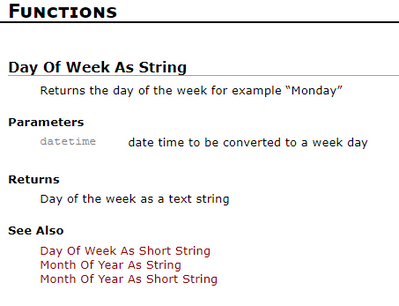
 

naturaldocs.PNG

I'm currently setting up a new dev environment and it's an opportunity to review the tools within my workflow.  I just wondered if anyone has any other thoughts on documentation-generation tools for JSL?

 

-Dave
5 REPLIES 5
ih
Super User (Alumni) ih
Super User (Alumni)

Re: Source Code Documentation

I started down this path with DOxygen (I use a spin off, roxygen2, extensively in R) but didn't get far enough to deploy anything with JSL. NaturalDocs seems like a good fit.

pmroz
Super User

Re: Source Code Documentation

NaturalDocs looks very interesting.  Thanks for making us aware of it!


Slight branch to this discussion: here are some open source utilities that I find indispensable for program development:

TortoiseSVN: Helps programmers manage different versions of the source code for their programs (source code control system).  Apache™ Subversion (SVN)® client, implemented as a Windows shell extension.

Notepad++: Windows Notepad on steroids.  Syntax colorization for most languages.

Kdiff3: Windows-based diff program.  Great for finding and merging differences between two or three files or directories. 



uday_guntupalli
Level VIII

Re: Source Code Documentation

@David_Burnham
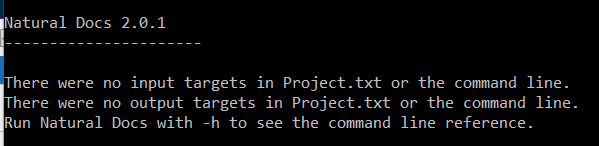
       I tried to take cue and install Natural Docs. After setting it up the way detailed here (http://www.naturaldocs.org/getting_started/getting_set_up/#starting_a_new_project) , when I try to run configure to generate documentation , I get the follow ing 
image.png
However, as instructed , I did provide the input folder and output folder - Any thoughts on what I did wrong ? 


Best
Uday
David_Burnham
Super User (Alumni)

Re: Source Code Documentation

@uday_guntupalli I'm going ahead and installing it on a new computer.  I'm happy to document and share the procedure once it's complete it(I had to extend the configuration to handle the JSL language).

-Dave
David_Burnham
Super User (Alumni)

Re: Source Code Documentation

I've just installed on a new PC - attached is a description of the process

-Dave

Recommended Articles
