- Don’t miss your chance to experience Discovery Summit Europe at our best available rate! Early bird registration through 31 Oct.
- Graph Builder Toolbar streamlines interactive graphing. Creates shortcuts on Report and GraphBuilder Helpers toolbars. Download and install the extension.
- JMP will suspend normal business operations for our Rest and Recharge Day on Friday, October 2, 2026.
Regular business hours will resume on Monday, October 5, 2026.
- Subscribe to RSS Feed
- Mark Topic as New
- Mark Topic as Read
- Float this Topic for Current User
- Bookmark
- Subscribe
- Mute
- Printer Friendly Page
Discussions
Solve problems, and share tips and tricks with other JMP users.- User Community
- :
- Discussions
- :
- Re: Second Y-Axis with different scaling

- Mark as New
- Bookmark
- Subscribe
- Mute
- Subscribe to RSS Feed
- Get Direct Link
- Report Inappropriate Content
Second Y-Axis with different scaling
Hello everybody,
I'm quite new to JMP and have a question regarding plotting your data. Assume you measure a variable that can have different units (e.g. wavelength and energy). I would like to plot the data with one scaling on the left y-axis and the other on the right. I tried inserting a "Formula"-column in the graph builder and move it to the right axis. But that doesn't really do the job, because the axes aren't linked that way.
Thanks for your help!


- Mark as New
- Bookmark
- Subscribe
- Mute
- Subscribe to RSS Feed
- Get Direct Link
- Report Inappropriate Content
Re: Second Y-Axis with different scaling
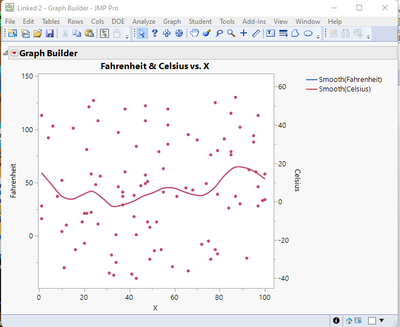
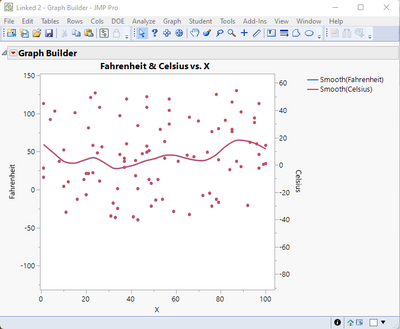
Here is an example where the left and right axes are linked in Graph Builder All that is needed is to add a simple script to Graph Builder which checks for changes either the left or right axes and then resets the linked axes.
Names Default To Here( 1 );

// Create Sample Table
dt = New Table( "Linked",
	Add Rows( 100 ),
	New Column( "Fahrenheit",
		Numeric,
		"Continuous",
		Format( "Best", 12 ),
		Set Values(
			[95, 30, 103, 76, -36, 18, -13, 52, 122, 84, -13, 97, 10, -21, 37, 86,
			102, 10, 38, 56, 81, 91, 21, -13, 47, 34, -22, 28, 41, 88, 58, -8, 22,
			119, 48, 37, 16, -18, 79, 51, 46, 1, 37, 13, -25, 45, 62, 125, 1, 26, 63,
			49, -22, 121, 4, 113, 104, 57, 1, -30, 46, -7, 92, 101, 29, 79, 33, 108,
			11, 60, 21, -35, -33, 39, 80, 8, -29, 113, 130, 41, 76, 60, 108, -17, 43,
			-37, 127, 119, 37, -5, 13, 90, 13, -40, 94, 49, 28, -14, 115, 58]
		)
	),
	New Column( "Celsius",
		Numeric,
		"Continuous",
		Format( "Best", 12 ),
		Formula( (5 * (:Fahrenheit - 32)) / 9 )
	),
	New Column( "X",
		Numeric,
		"Continuous",
		Format( "Best", 12 ),
		Set Values(
			[66, 89, 6, 85, 41, 42, 54, 10, 47, 43, 78, 35, 12, 92, 87, 57, 89, 12,
			42, 27, 21, 82, 21, 16, 45, 100, 49, 97, 37, 95, 100, 72, 23, 57, 25, 37,
			1, 32, 53, 48, 35, 43, 61, 52, 34, 65, 93, 78, 34, 84, 55, 47, 76, 22,
			10, 1, 57, 47, 34, 11, 97, 20, 4, 15, 37, 85, 99, 26, 26, 38, 20, 31, 66,
			79, 79, 49, 59, 97, 87, 55, 76, 96, 47, 79, 68, 33, 24, 38, 8, 75, 19,
			70, 48, 43, 95, 74, 1, 51, 85, 23]
		)
	)
);

// Run Graph Builder
gb = Graph Builder(
	Size( 528, 454 ),
	Show Control Panel( 0 ),
	Variables( X( :X ), Y( :Fahrenheit ), Y( :Celsius, Position( 1 ), Side( "Right" ) ) ),
	Elements(
		Points( X, Y( 1 ), Legend( 14 ) ),
		Smoother( X, Y( 1 ), Legend( 15 ) ),
		Points( X, Y( 2 ), Legend( 16 ) ),
		Smoother( X, Y( 2 ), Legend( 17 ) )
	)
);
gbr = gb << report;

//Initialize the critical axis values
fmax = gbr[axisbox( 2 )] << get max;
fmin = gbr[axisbox( 2 )] << get min;
cmax = gbr[axisbox( 3 )] << get max;
cmin = gbr[axisbox( 3 )] << get min;
fmaxh = fmax;
fminh = fmin;
cmaxh = cmax;
cminh = cmin;

// Check for change and if found, reset alternate axis
gbr[framebox( 1 )] << add graphics script(
	fmax = gbr[axisbox( 2 )] << get max;
	fmin = gbr[axisbox( 2 )] << get min;
	cmax = gbr[axisbox( 3 )] << get max;
	cmin = gbr[axisbox( 3 )] << get min;
	If( cmax != cmaxh | cmin != cminh,
		gbr[axisbox( 2 )] << max( (9 * cmax) / 5 + 32 );
		gbr[axisbox( 2 )] << min( (9 * cmin) / 5 + 32 );
	);
	If( fmax != fmaxh | fmin != fminh,
		gbr[axisbox( 3 )] << max( (5 * (fmax - 32)) / 9 );
		gbr[axisbox( 3 )] << min( (5 * (fmin - 32)) / 9 );
	);
	fmaxh = fmax;
	fminh = fmin;
	cmaxh = cmax;
	cminh = cmin;
)
;
- Mark as New
- Bookmark
- Subscribe
- Mute
- Subscribe to RSS Feed
- Get Direct Link
- Report Inappropriate Content
Re: Second Y-Axis with different scaling
Hello thank you very much for your solution. In general it works, there is only one bug I'm facing: when changing the scale using the mouse key, the axis labels start to flicker. Do you have an idea where this may come from?
- Mark as New
- Bookmark
- Subscribe
- Mute
- Subscribe to RSS Feed
- Get Direct Link
- Report Inappropriate Content
Re: Second Y-Axis with different scaling
Recommended Articles
- © 2026 JMP Statistical Discovery LLC. All Rights Reserved.
- Terms of Use
- Privacy Statement
- Contact Us