- Image to Table JMP extension imports single or batch images as data tables. Useful to extract curves from pictures or convert image data to curve data to use in analyses like Functional Data Explorer. Download and install the extension.
- Subscribe to RSS Feed
- Mark Topic as New
- Mark Topic as Read
- Float this Topic for Current User
- Bookmark
- Subscribe
- Mute
- Printer Friendly Page
Discussions
Solve problems, and share tips and tricks with other JMP users.- User Community
- :
- Discussions
- :
- Re: Script to save prediction formula of PLS

- Mark as New
- Bookmark
- Subscribe
- Mute
- Subscribe to RSS Feed
- Get Direct Link
- Report Inappropriate Content
Script to save prediction formula of PLS
Hello,
I'm using a script to run PLS on my data, but I'm having a hard time getting it to save the prediction formula & values into a column in the data sheet. Is this possible? Here's what I'm using so far:
Names Default To Here( 1 );
<
P = Partial Least Squares(
	Y( :Viability ),
	X( :Name( "976" ), :Name( "778" ), :Name( "973" ), ),
	Validation Method( None, Initial Number of Factors( 15 ) ),
	Fit( Method( NIPALS ), Number of Factors( 15 ) ),

);
P << prediction formula;
>
Thanks
Accepted Solutions


- Mark as New
- Bookmark
- Subscribe
- Mute
- Subscribe to RSS Feed
- Get Direct Link
- Report Inappropriate Content
Re: Script to save prediction formula of PLS
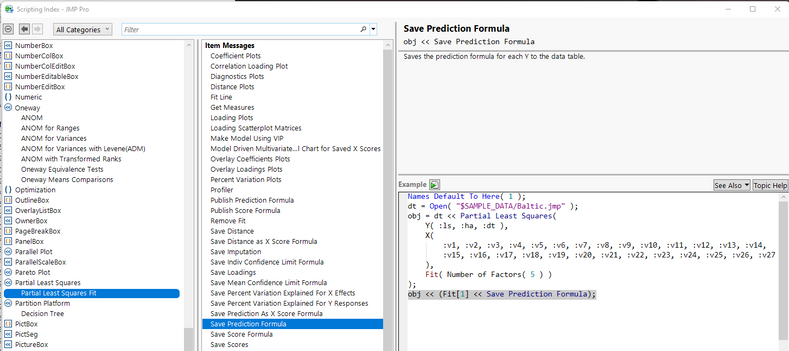
Here is the example from the Scripting Index that shows how to Save Prediction Formula
And here is an example using a slight modification to your code, and using the Semiconductor Capability sample data table
Names Default To Here( 1 );
dt =
// Open Data Table: semiconductor capability.jmp
// → Data Table( "semiconductor capability" )
Open( "$SAMPLE_DATA/semiconductor capability.jmp" );

P = Partial Least Squares(
	Y( :PNP1 ),
	X( :Name( "NPN1" ), :Name( "NPN2" ), :Name( "NPN3" ), ),
	Validation Method( None, Initial Number of Factors( 15 ) ),
	Fit( Method( NIPALS ), Number of Factors( 15 ) ),

);
P << obj << (Fit[1] << Save Prediction Formula);
- Mark as New
- Bookmark
- Subscribe
- Mute
- Subscribe to RSS Feed
- Get Direct Link
- Report Inappropriate Content
Re: Script to save prediction formula of PLS
Here is the example from the Scripting Index that shows how to Save Prediction Formula
And here is an example using a slight modification to your code, and using the Semiconductor Capability sample data table
Names Default To Here( 1 );
dt =
// Open Data Table: semiconductor capability.jmp
// → Data Table( "semiconductor capability" )
Open( "$SAMPLE_DATA/semiconductor capability.jmp" );

P = Partial Least Squares(
	Y( :PNP1 ),
	X( :Name( "NPN1" ), :Name( "NPN2" ), :Name( "NPN3" ), ),
	Validation Method( None, Initial Number of Factors( 15 ) ),
	Fit( Method( NIPALS ), Number of Factors( 15 ) ),

);
P << obj << (Fit[1] << Save Prediction Formula);
- Mark as New
- Bookmark
- Subscribe
- Mute
- Subscribe to RSS Feed
- Get Direct Link
- Report Inappropriate Content
Re: Script to save prediction formula of PLS
Worked like a charm, thanks Jim!

- Mark as New
- Bookmark
- Subscribe
- Mute
- Subscribe to RSS Feed
- Get Direct Link
- Report Inappropriate Content
Re: Script to save prediction formula of PLS
Is there a function to get the prediction formula from a fit as JSL code - without saving it to a column or using a Formula Depot?
Something more robust than
dt = Open( "$SAMPLE_DATA/Big Class.jmp" );
myFit = dt << Fit Model( Y( :height ), Effects( :age, :sex ), Run() );
FormulaExpr=Arg(Arg(myFit << Get Prediction Formula,3))
Recommended Articles
- © 2026 JMP Statistical Discovery LLC. All Rights Reserved.
- Terms of Use
- Privacy Statement
- Contact Us