- Don’t miss your chance to experience Discovery Summit Europe at our best available rate! Early bird registration through 31 Oct.
- Graph Builder Toolbar streamlines interactive graphing. Creates shortcuts on Report and GraphBuilder Helpers toolbars. Download and install the extension.
- Subscribe to RSS Feed
- Mark Topic as New
- Mark Topic as Read
- Float this Topic for Current User
- Bookmark
- Subscribe
- Mute
- Printer Friendly Page
Discussions
Solve problems, and share tips and tricks with other JMP users.- User Community
- :
- Discussions
- :
- Script to save prediction formula of PLS

- Mark as New
- Bookmark
- Subscribe
- Mute
- Subscribe to RSS Feed
- Get Direct Link
- Report Inappropriate Content
Script to save prediction formula of PLS
Hello,
I'm using a script to run PLS on my data, but I'm having a hard time getting it to save the prediction formula & values into a column in the data sheet. Is this possible? Here's what I'm using so far:
Names Default To Here( 1 );
<
P = Partial Least Squares(
	Y( :Viability ),
	X( :Name( "976" ), :Name( "778" ), :Name( "973" ), ),
	Validation Method( None, Initial Number of Factors( 15 ) ),
	Fit( Method( NIPALS ), Number of Factors( 15 ) ),

);
P << prediction formula;
>
Thanks
Accepted Solutions


- Mark as New
- Bookmark
- Subscribe
- Mute
- Subscribe to RSS Feed
- Get Direct Link
- Report Inappropriate Content
Re: Script to save prediction formula of PLS
Here is the example from the Scripting Index that shows how to Save Prediction Formula
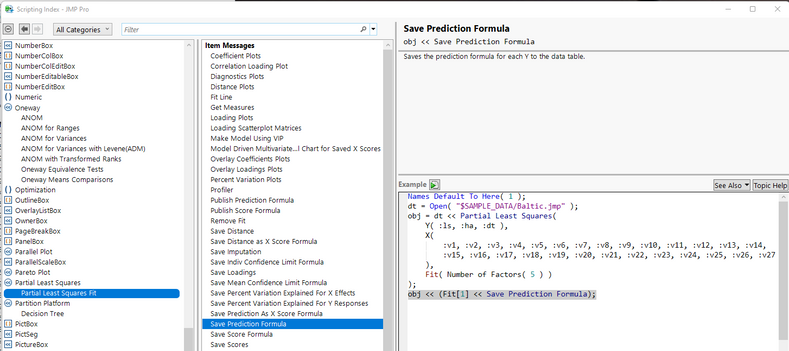
And here is an example using a slight modification to your code, and using the Semiconductor Capability sample data table
Names Default To Here( 1 );
dt =
// Open Data Table: semiconductor capability.jmp
// → Data Table( "semiconductor capability" )
Open( "$SAMPLE_DATA/semiconductor capability.jmp" );

P = Partial Least Squares(
	Y( :PNP1 ),
	X( :Name( "NPN1" ), :Name( "NPN2" ), :Name( "NPN3" ), ),
	Validation Method( None, Initial Number of Factors( 15 ) ),
	Fit( Method( NIPALS ), Number of Factors( 15 ) ),

);
P << obj << (Fit[1] << Save Prediction Formula);
- Mark as New
- Bookmark
- Subscribe
- Mute
- Subscribe to RSS Feed
- Get Direct Link
- Report Inappropriate Content
Re: Script to save prediction formula of PLS
Here is the example from the Scripting Index that shows how to Save Prediction Formula
And here is an example using a slight modification to your code, and using the Semiconductor Capability sample data table
Names Default To Here( 1 );
dt =
// Open Data Table: semiconductor capability.jmp
// → Data Table( "semiconductor capability" )
Open( "$SAMPLE_DATA/semiconductor capability.jmp" );

P = Partial Least Squares(
	Y( :PNP1 ),
	X( :Name( "NPN1" ), :Name( "NPN2" ), :Name( "NPN3" ), ),
	Validation Method( None, Initial Number of Factors( 15 ) ),
	Fit( Method( NIPALS ), Number of Factors( 15 ) ),

);
P << obj << (Fit[1] << Save Prediction Formula);
- Mark as New
- Bookmark
- Subscribe
- Mute
- Subscribe to RSS Feed
- Get Direct Link
- Report Inappropriate Content
Re: Script to save prediction formula of PLS
Worked like a charm, thanks Jim!

- Mark as New
- Bookmark
- Subscribe
- Mute
- Subscribe to RSS Feed
- Get Direct Link
- Report Inappropriate Content
Re: Script to save prediction formula of PLS
Is there a function to get the prediction formula from a fit as JSL code - without saving it to a column or using a Formula Depot?
Something more robust than
dt = Open( "$SAMPLE_DATA/Big Class.jmp" );
myFit = dt << Fit Model( Y( :height ), Effects( :age, :sex ), Run() );
FormulaExpr=Arg(Arg(myFit << Get Prediction Formula,3))
Recommended Articles
- © 2026 JMP Statistical Discovery LLC. All Rights Reserved.
- Terms of Use
- Privacy Statement
- Contact Us