- JMP will suspend normal business operations for our Winter Holiday beginning on Wednesday, Dec. 24, 2025, at 5:00 p.m. ET (2:00 p.m. ET for JMP Accounts Receivable).
Regular business hours will resume at 9:00 a.m. EST on Friday, Jan. 2, 2026. - We’re retiring the File Exchange at the end of this year. The JMP Marketplace is now your destination for add-ins and extensions.
- Subscribe to RSS Feed
- Mark Topic as New
- Mark Topic as Read
- Float this Topic for Current User
- Bookmark
- Subscribe
- Mute
- Printer Friendly Page
Discussions
Solve problems, and share tips and tricks with other JMP users.- JMP User Community
- :
- Discussions
- :
- Saving files as images with high resolution
- Mark as New
- Bookmark
- Subscribe
- Mute
- Subscribe to RSS Feed
- Get Direct Link
- Report Inappropriate Content
Saving files as images with high resolution


- Mark as New
- Bookmark
- Subscribe
- Mute
- Subscribe to RSS Feed
- Get Direct Link
- Report Inappropriate Content
Re: Saving files as images with high resolution
1) Make the graph really big in JMP, including making the fonts, markers and line thicknesses bigger. Save it as an image and call it 300 dpi for the original size. For instance if your original is 2" x 3" (192 x 288 pixels), increase it to 600 x 900 pixels and call it 300 dpi after saving it.
2) Export it from JMP using a resolution-independent format, like EMF, EPS, PDF or SVG. The publisher may be happy with that. If not,you can convert the it to an image at the desired resolution. You can get EMF (Enhanced Meta-File) from copy-paste in Windows. You can get EPS or PDF via a printer driver in Save File mode. You can get SVG directly from Save As in JMP.
- Mark as New
- Bookmark
- Subscribe
- Mute
- Subscribe to RSS Feed
- Get Direct Link
- Report Inappropriate Content
Re: Saving files as images with high resolution

- Mark as New
- Bookmark
- Subscribe
- Mute
- Subscribe to RSS Feed
- Get Direct Link
- Report Inappropriate Content
Re: Saving files as images with high resolution
what kind of image app are you using? i appreciate those image app with high resoluation.

- Mark as New
- Bookmark
- Subscribe
- Mute
- Subscribe to RSS Feed
- Get Direct Link
- Report Inappropriate Content
Re: Saving files as images with high resolution
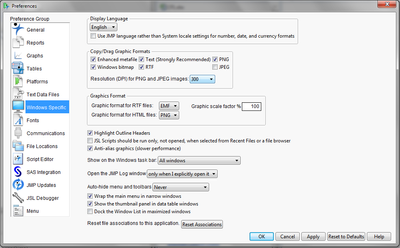
I think you can set that in JMP Preferences in the Windows Specific section. The copy/drag graphic formats will allow you to always have 300 dpi pictures when you copy or drag JMP stuff.

- Mark as New
- Bookmark
- Subscribe
- Mute
- Subscribe to RSS Feed
- Get Direct Link
- Report Inappropriate Content
Re: Saving files as images with high resolution
There is an option to save files with high resolution (300 dpi) on Windows machines. Go to File > Preferences and choose the Windows Specific preference group. In the Copy/Drag Graphics Formats section, select 300 from the drop down menu next to "Resolution (DPI) for PNG and JPEG images."
You may also try the Set Output DPI available on the JMP community file exchange: Set Output DPI.

- Mark as New
- Bookmark
- Subscribe
- Mute
- Subscribe to RSS Feed
- Get Direct Link
- Report Inappropriate Content
Re: Saving files as images with high resolution
I have an easy Mac solution, for those (like me) who are still searching this question and come upon this old thread.
1. Copy the graph in JMP (either the one you've created in Graph Builder or from any analytical output)
2. Open Preveiw (Apple's built in PDF & image viewer).
3. Open a new Preview window (File > New from Clipboard, or use the shorcut ⌘N).
4. Next, choose File > Export
5. Choose your preferred format (options are HEIC, JPEG, JPEG-2000, OpenEXR, PDF, PNG, TIFF as of Sept 2019)
6. You can adjust the quality and/or resolution for all but PDF formats.
Even though this is an old thread, I still had this question this morning (Sept 2019), so I hope this helps other Mac users out there!
Recommended Articles
- © 2026 JMP Statistical Discovery LLC. All Rights Reserved.
- Terms of Use
- Privacy Statement
- Contact Us