- Don’t miss your chance to experience Discovery Summit Europe at our best available rate! Early bird registration through 31 Oct.
- Image to Table JMP extension imports single or batch images as data tables. Useful to extract curves from pictures or convert image data to curve data to use in analyses like Functional Data Explorer. Download and install the extension.
- Subscribe to RSS Feed
- Mark Topic as New
- Mark Topic as Read
- Float this Topic for Current User
- Bookmark
- Subscribe
- Mute
- Printer Friendly Page
Discussions
Solve problems, and share tips and tricks with other JMP users.- User Community
- :
- Discussions
- :
- Re: Remove extra text when exporting graph builder to powerpoint

- Mark as New
- Bookmark
- Subscribe
- Mute
- Subscribe to RSS Feed
- Get Direct Link
- Report Inappropriate Content
Remove extra text when exporting graph builder to powerpoint
I'm trying to remove the extra text that is currently exported along side a graph builder output. Currently it will export the graph as one slide, then an extra slide that looks like this
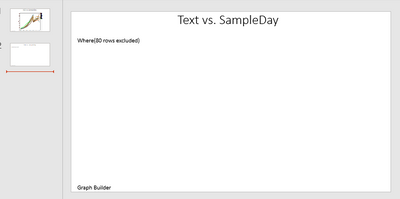
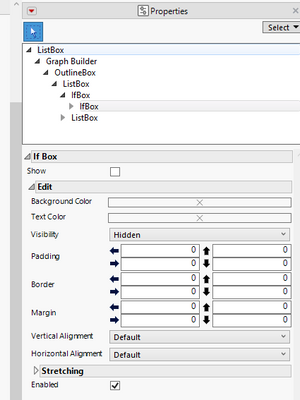
I know that the "Where(xx rows excluded)" text is stored in the IfBox. If I manually remove or hide that, the graph will export without the extra dialogue text, but I can't seem to figure out what is the right code for removing it.
vcdgb = Graph Builder(
	Size( 1200, 1000 ),
	Fit to Window("Off"),
	Show Control Panel( 0 ),
	Variables( X( :SampleDay ), Y( :y condition ), Overlay( :Experiment Cond ) ),
	Elements( Points( X, Y, Legend( 8 ) ), Line( X, Y, Legend( 10 ) ) ),
);


vcdgb << Save Presentation("C:\JMP Summary.pptx");
Open("C:\JMP Summary.pptx");
Thanks!
Accepted Solutions


- Mark as New
- Bookmark
- Subscribe
- Mute
- Subscribe to RSS Feed
- Get Direct Link
- Report Inappropriate Content
Re: Remove extra text when exporting graph builder to powerpoint
You should be able to remove the text box with Where.. text with Xpath:
Names Default To Here(1);
dt = Open("$SAMPLE_DATA/Big Class.jmp");

dt << Select Where(:sex == "M") << Hide and Exclude(1) << Clear Select;

obj = dt << Graph Builder(
	Variables(X(:Sex), Y(:Height), Group X(:Age)),
	Elements(Box Plot(X, Y))
);

wait(1);

(Report(obj) << XPath("//TextBox[contains(text(),'Where(')]")) << delete;- Mark as New
- Bookmark
- Subscribe
- Mute
- Subscribe to RSS Feed
- Get Direct Link
- Report Inappropriate Content
Re: Remove extra text when exporting graph builder to powerpoint
You should be able to remove the text box with Where.. text with Xpath:
Names Default To Here(1);
dt = Open("$SAMPLE_DATA/Big Class.jmp");

dt << Select Where(:sex == "M") << Hide and Exclude(1) << Clear Select;

obj = dt << Graph Builder(
	Variables(X(:Sex), Y(:Height), Group X(:Age)),
	Elements(Box Plot(X, Y))
);

wait(1);

(Report(obj) << XPath("//TextBox[contains(text(),'Where(')]")) << delete;

- Mark as New
- Bookmark
- Subscribe
- Mute
- Subscribe to RSS Feed
- Get Direct Link
- Report Inappropriate Content
Re: Remove extra text when exporting graph builder to powerpoint
This solution directly addresses the request, but I caution about always using the << Delete message to eliminate a display box. There is always the possibility that such action might adversely affect the behavior of the display tree. Rather than delete the object, consider sending the << Visibility( "Collapse" ) message instead.
This suggestion falls under a practice I teach called 'defensive scripting.'
- Mark as New
- Bookmark
- Subscribe
- Mute
- Subscribe to RSS Feed
- Get Direct Link
- Report Inappropriate Content
Re: Remove extra text when exporting graph builder to powerpoint
That worked! Thank you!
Recommended Articles
- © 2026 JMP Statistical Discovery LLC. All Rights Reserved.
- Terms of Use
- Privacy Statement
- Contact Us