- Discovery Summit 2026: Early User Edition - September 23-24.Register. It's free.
- Graph Builder Toolbar streamlines interactive graphing. Creates shortcuts on Report and GraphBuilder Helpers toolbars. Download and install the extension.
- Subscribe to RSS Feed
- Mark Topic as New
- Mark Topic as Read
- Float this Topic for Current User
- Bookmark
- Subscribe
- Mute
- Printer Friendly Page
Discussions
Solve problems, and share tips and tricks with other JMP users.- User Community
- :
- Discussions
- :
- Re: Re-arranging menus in distribution platform

- Mark as New
- Bookmark
- Subscribe
- Mute
- Subscribe to RSS Feed
- Get Direct Link
- Report Inappropriate Content
Re-arranging menus in distribution platform
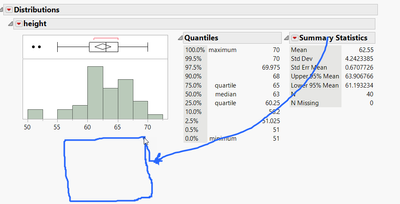
The distribution platform has multiple options and results that can be added, collapsed, and removed.
Is there a simple way to reorganize where they are? For example, moving a table below a graph.
It is common to have the results taking more space than the size of the window.
Accepted Solutions


- Mark as New
- Bookmark
- Subscribe
- Mute
- Subscribe to RSS Feed
- Get Direct Link
- Report Inappropriate Content
Re: Re-arranging menus in distribution platform
You can drag and drop it to create a copy of outline box but you will loose out on the red triangle (and getting the correct place is a bit clunky)
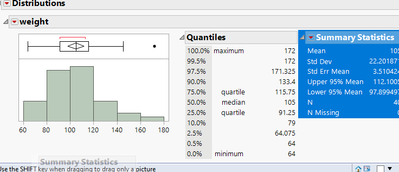
Same does happen when scripting
Names Default To Here(1);

dt = Open("$SAMPLE_DATA/Big Class.jmp");

dist = dt << Distribution(
	Stack(1),
	Continuous Distribution(Column(:weight), Horizontal Layout(1), Vertical(0))
);

rep = Report(dist);

sumstat = rep[OutlineBox("Summary Statistics")];

rep[OutlineBox("weight"), ListBox(2)] << Set Horizontal(0);
rep[OutlineBox("weight"), ListBox(2)] << Append(sumstat << clone box());
sumstat << Visibility("Collapse");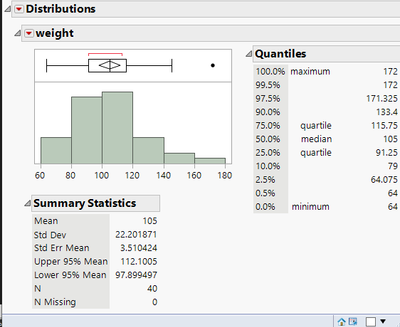
Moving both tables is bit easier as you can change change the List Box properties but I think this isn't captured by JMP either
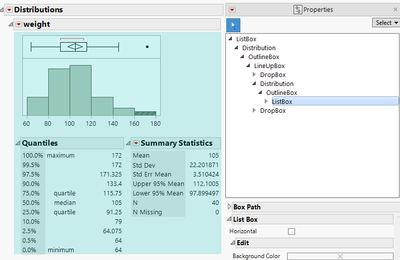
A bit related Is there a way to move the default distributions chart "Quantiles" & "Summary Statistics" into the s...
- Mark as New
- Bookmark
- Subscribe
- Mute
- Subscribe to RSS Feed
- Get Direct Link
- Report Inappropriate Content
Re: Re-arranging menus in distribution platform
You can drag and drop it to create a copy of outline box but you will loose out on the red triangle (and getting the correct place is a bit clunky)
Same does happen when scripting
Names Default To Here(1);

dt = Open("$SAMPLE_DATA/Big Class.jmp");

dist = dt << Distribution(
	Stack(1),
	Continuous Distribution(Column(:weight), Horizontal Layout(1), Vertical(0))
);

rep = Report(dist);

sumstat = rep[OutlineBox("Summary Statistics")];

rep[OutlineBox("weight"), ListBox(2)] << Set Horizontal(0);
rep[OutlineBox("weight"), ListBox(2)] << Append(sumstat << clone box());
sumstat << Visibility("Collapse");
Moving both tables is bit easier as you can change change the List Box properties but I think this isn't captured by JMP either
A bit related Is there a way to move the default distributions chart "Quantiles" & "Summary Statistics" into the s...
- Mark as New
- Bookmark
- Subscribe
- Mute
- Subscribe to RSS Feed
- Get Direct Link
- Report Inappropriate Content
Re: Re-arranging menus in distribution platform
How can you drag and drop using your mouse?
Losing the menus is fine, as this is more for reporting.
- Mark as New
- Bookmark
- Subscribe
- Mute
- Subscribe to RSS Feed
- Get Direct Link
- Report Inappropriate Content
Re: Re-arranging menus in distribution platform
Press "S" or use selection tool from toolbar
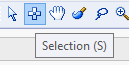
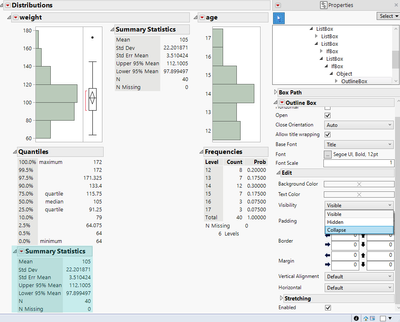
click on the outline box and drag it around. You will also have to hide the original one and I think it is easies to do from properties
Recommended Articles
- © 2026 JMP Statistical Discovery LLC. All Rights Reserved.
- Terms of Use
- Privacy Statement
- Contact Us