cancel
Showing results for 
Show  only  | Search instead for 
Did you mean: 
  • JMP will suspend normal business operations for our Winter Holiday beginning on Wednesday, Dec. 24, 2025, at 5:00 p.m. ET (2:00 p.m. ET for JMP Accounts Receivable).
    Regular business hours will resume at 9:00 a.m. EST on Friday, Jan. 2, 2026.
  • We’re retiring the File Exchange at the end of this year. The JMP Marketplace is now your destination for add-ins and extensions.

Discussions

Solve problems, and share tips and tricks with other JMP users.
%3CLINGO-SUB%20id%3D%22lingo-sub-18585%22%20slang%3D%22en-US%22%20mode%3D%22NONE%22%3EProblema%20con%20el%20ajuste%20del%20n%C3%BAmero%20de%20niveles%20para%20el%20grupo%20Y%20en%20el%20generador%20de%20gr%C3%A1ficos%3C%2FLINGO-SUB%3E%3CLINGO-BODY%20id%3D%22lingo-body-18585%22%20slang%3D%22en-US%22%20mode%3D%22NONE%22%3E%26lt%3Bmeta%20http-equiv%3D%22Content-Type%22%20content%3D%22text%2Fhtml%3B%20charset%3DUTF-8%22%20%2F%26gt%3B%3CP%3ETengo%20un%20problema%20con%20el%20ajuste%20del%20n%C3%BAmero%20de%20niveles%20para%20el%20grupo%20Y%20en%20el%20generador%20de%20gr%C3%A1ficos.%20Tengo%2070%20niveles%20y%20me%20gustar%C3%ADa%20mostrarlos%20todos%20en%20el%20grupo%20y%20en%20el%20lado%20derecho.%20Elijo%20mostrar%20todos%20los%20niveles%20y%20el%20%22n%C3%BAmero%20de%20niveles%22%20como%207%20porque%20me%20gustar%C3%ADa%20que%20se%20muestre%20en%20series%20de%2010%20(1-10%2C%2011-20%2C%2021-30%2C%20etc.)%20hasta%2061-70)%20Siempre%20me%20da%20una%20distribuci%C3%B3n%20impar%20de%20los%20niveles%3A%201-9%2C%209-18%2C%2018-26%2C%2026-32%2C%2032-39%2C%2039-45%2C%2045-70.%20Necesitar%C3%ADa%20esto%20en%20un%20arreglo%20sim%C3%A9trico.%20%C2%BFC%C3%B3mo%20puedo%20conseguir%20esto%3F%20%C2%A1Gracias!%3C%2FP%3E%3CP%3E%3CSPAN%20class%3D%22lia-inline-image-display-wrapper%20lia-image-align-inline%22%20style%3D%22width%3A%20678px%3B%22%3E%3Cspan%20class%3D%22lia-inline-image-display-wrapper%22%20image-alt%3D%2211565_pastedImage_1.png%22%20style%3D%22width%3A%20400px%3B%22%3E%3Cimg%20src%3D%22https%3A%2F%2Fcommunity.jmp.com%2Ft5%2Fimage%2Fserverpage%2Fimage-id%2F3066iF7BFE571E4A93227%2Fimage-size%2Fmedium%3Fv%3Dv2%26amp%3Bpx%3D400%22%20role%3D%22button%22%20title%3D%2211565_pastedImage_1.png%22%20alt%3D%2211565_pastedImage_1.png%22%20%2F%3E%3C%2Fspan%3E%3C%2FSPAN%3E%3C%2FP%3E%3C%2FLINGO-BODY%3E%3CLINGO-SUB%20id%3D%22lingo-sub-18587%22%20slang%3D%22en-US%22%20mode%3D%22NONE%22%3ERe%3A%20Problema%20con%20el%20ajuste%20del%20n%C3%BAmero%20de%20niveles%20para%20el%20grupo%20Y%20en%20el%20generador%20de%20gr%C3%A1ficos%3C%2FLINGO-SUB%3E%3CLINGO-BODY%20id%3D%22lingo-body-18587%22%20slang%3D%22en-US%22%20mode%3D%22NONE%22%3E%3CP%3EGracias%2C%20Jeff.%20Hice%20una%20nueva%20columna%20con%20las%20etiquetas%20y%20mostr%C3%A9%20esta%20columna%20en%20su%20lugar.%20%C2%A1Muestra%20ahora%20lo%20que%20quer%C3%ADa%20ver!%3C%2FP%3E%3CP%3E%C2%A1Muchas%20gracias!%3C%2FP%3E%3C%2FLINGO-BODY%3E%3CLINGO-SUB%20id%3D%22lingo-sub-18586%22%20slang%3D%22en-US%22%20mode%3D%22NONE%22%3ERe%3A%20Problema%20con%20el%20ajuste%20del%20n%C3%BAmero%20de%20niveles%20para%20el%20grupo%20Y%20en%20el%20generador%20de%20gr%C3%A1ficos%3C%2FLINGO-SUB%3E%3CLINGO-BODY%20id%3D%22lingo-body-18586%22%20slang%3D%22en-US%22%20mode%3D%22NONE%22%3E%3CP%3ELos%20niveles%20del%20Grupo%20Graph%20Builder%20X%20e%20Y%20para%20una%20columna%20continua%20se%20basan%20en%20los%20cuantiles%20para%20obtener%20una%20distribuci%C3%B3n%20uniforme%20de%20filas%20en%20cada%20grupo.%3C%2FP%3E%3CP%3E%3C%2FP%3E%3CP%3ESi%20quieres%20definir%20los%20grupos%20por%20ti%20mismo%2C%20tienes%20un%20par%20de%20opciones.%3C%2FP%3E%3CP%3E%3C%2FP%3E%3COL%3E%3CLI%3EPuedes%20crear%20una%20columna%20que%20defina%20los%20grupos.%20Puedes%20usar%20el%20%3CA%20href%3D%22http%3A%2F%2Fwww.jmp.com%2Fsupport%2Fhelp%2FFormula_Editor.shtml%2396570%22%20rel%3D%22noopener%20noreferrer%22%20target%3D%22_blank%22%3E%20Editor%20de%20f%C3%B3rmulas%20%3C%2FA%3E%20y%20un%20%3CA%20href%3D%22http%3A%2F%2Fwww.jmp.com%2Fsupport%2Fhelp%2FConditional_Functions.shtml%23114881%22%20rel%3D%22noopener%20noreferrer%22%20target%3D%22_blank%22%3E%3CSTRONG%3E%20Si%20%3C%2FSTRONG%3E%20condicional%20%3C%2FA%3E%20para%20definirlos%20%3CSPAN%20style%3D%22font-size%3A%2010pt%3B%22%3E%20O%20puede%20descargar%20el%20%3C%2FSPAN%3E%3CA%20href%3D%22https%3A%2F%2Fcommunity.jmp.com%2Fdocs%2FDOC-6081%22%20target%3D%22_blank%22%3E%20Binning%20interactivo%20%3C%2FA%3E%3CSPAN%20style%3D%22font-size%3A%2010pt%3B%22%3E%20agregue%20y%20use%20eso%20para%20crear%20la%20columna%20para%20usted.%20%3C%2FSPAN%3E%3C%2FLI%3E%3CLI%3EPuedes%20cambiar%20el%20%3CA%20href%3D%22http%3A%2F%2Fwww.jmp.com%2Fsupport%2Fhelp%2FUnderstanding_Modeling_Types.shtml%22%20rel%3D%22noopener%20noreferrer%22%20target%3D%22_blank%22%3E%20Tipo%20de%20modelado%20%3C%2FA%3E%20de%20la%20columna%20a%20Nominal%20u%20Ordinal%20y%20luego%20use%20una%20%3CA%20href%3D%22http%3A%2F%2Fwww.jmp.com%2Fsupport%2Fhelp%2FExpression_Data.shtml%22%20rel%3D%22noopener%20noreferrer%22%20target%3D%22_blank%22%3E%20Etiqueta%20de%20valor%20%3C%2FA%3E%20Propiedad%20con%20rangos%20para%20definir%20los%20grupos.%3C%2FLI%3E%3C%2FOL%3E%3CP%3E%3C%2FP%3E%3CP%3EProbablemente%20hay%20otras%20formas%20de%20abordar%20esto%20tambi%C3%A9n%2C%20pero%20quiz%C3%A1s%20esto%20te%20ayude%20a%20comenzar.%3C%2FP%3E%3C%2FLINGO-BODY%3E
Choose Language Hide Translation Bar
ahartung
Level I

Problem with adjusting number of levels for group Y in graph builder

I have a problem with adjusting number of levels for group Y in graph builder. I have 70 levels and would like to display all of them in the y group on the right side. I choose to show all levels and "number of levels" as 7 because I would like it to display it in sets of 10 (1-10, 11-20, 21-30, etc. up to 61-70) It always gives me some odd arrangement of the levels: 1-9, 9-18, 18-26, 26-32, 32-39, 39-45, 45-70. I would need this in a symmetrical arrangement. How can I achieve this? Thank you!
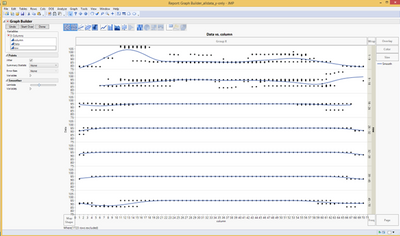

11565_pastedImage_1.png

2 REPLIES 2
Jeff_Perkinson
Community Manager Community Manager

Re: Problem with adjusting number of levels for group Y in graph builder

The Graph Builder X and Y Group levels for a continuous column are based on quantiles to get an even distribution of rows in each group.

If you want to define the groups yourself, you've got a couple of options.

  1. You can create a column that defines the groups. You can use the Formula Editor and an If conditional to define them. Or you can download the Interactive Binning​ add-in and use that to create the column for you.
  2. You can change the Modeling Type of the column to Nominal or Ordinal and then use a Value Label property with ranges to define the groups.

There are probably some other ways to tackle this too, but maybe this will get you started.

-Jeff
ahartung
Level I

Re: Problem with adjusting number of levels for group Y in graph builder

Thank you, Jeff. I made a new column with the labels and displayed this column instead. It shows now what I wanted to see!

Thanks a lot!

Recommended Articles