- Don’t miss your chance to experience Discovery Summit Europe at our best available rate! Early bird registration through 31 Oct.
- Image to Table JMP extension imports single or batch images as data tables. Useful to extract curves from pictures or convert image data to curve data to use in analyses like Functional Data Explorer. Download and install the extension.
- Subscribe to RSS Feed
- Mark Topic as New
- Mark Topic as Read
- Float this Topic for Current User
- Bookmark
- Subscribe
- Mute
- Printer Friendly Page
Discussions
Solve problems, and share tips and tricks with other JMP users.- User Community
- :
- Discussions
- :
- Problem with adjusting number of levels for group Y in graph builder

- Mark as New
- Bookmark
- Subscribe
- Mute
- Subscribe to RSS Feed
- Get Direct Link
- Report Inappropriate Content
Problem with adjusting number of levels for group Y in graph builder
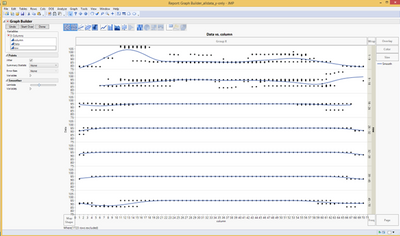
I have a problem with adjusting number of levels for group Y in graph builder. I have 70 levels and would like to display all of them in the y group on the right side. I choose to show all levels and "number of levels" as 7 because I would like it to display it in sets of 10 (1-10, 11-20, 21-30, etc. up to 61-70) It always gives me some odd arrangement of the levels: 1-9, 9-18, 18-26, 26-32, 32-39, 39-45, 45-70. I would need this in a symmetrical arrangement. How can I achieve this? Thank you!


 Community Manager
- Mark as New
- Bookmark
- Subscribe
- Mute
- Subscribe to RSS Feed
- Get Direct Link
- Report Inappropriate Content
Re: Problem with adjusting number of levels for group Y in graph builder
The Graph Builder X and Y Group levels for a continuous column are based on quantiles to get an even distribution of rows in each group.
If you want to define the groups yourself, you've got a couple of options.
- You can create a column that defines the groups. You can use the Formula Editor and an If conditional to define them. Or you can download the Interactive Binning add-in and use that to create the column for you.
- You can change the Modeling Type of the column to Nominal or Ordinal and then use a Value Label property with ranges to define the groups.
There are probably some other ways to tackle this too, but maybe this will get you started.
- Mark as New
- Bookmark
- Subscribe
- Mute
- Subscribe to RSS Feed
- Get Direct Link
- Report Inappropriate Content
Re: Problem with adjusting number of levels for group Y in graph builder
Thank you, Jeff. I made a new column with the labels and displayed this column instead. It shows now what I wanted to see!
Thanks a lot!
Recommended Articles
- © 2026 JMP Statistical Discovery LLC. All Rights Reserved.
- Terms of Use
- Privacy Statement
- Contact Us