- JMP will suspend normal business operations for our Winter Holiday beginning on Wednesday, Dec. 24, 2025, at 5:00 p.m. ET (2:00 p.m. ET for JMP Accounts Receivable).
Regular business hours will resume at 9:00 a.m. EST on Friday, Jan. 2, 2026. - We’re retiring the File Exchange at the end of this year. The JMP Marketplace is now your destination for add-ins and extensions.
- Subscribe to RSS Feed
- Mark Topic as New
- Mark Topic as Read
- Float this Topic for Current User
- Bookmark
- Subscribe
- Mute
- Printer Friendly Page
Discussions
Solve problems, and share tips and tricks with other JMP users.- JMP User Community
- :
- Discussions
- :
- Pie Chart Labels organisation

- Mark as New
- Bookmark
- Subscribe
- Mute
- Subscribe to RSS Feed
- Get Direct Link
- Report Inappropriate Content
Pie Chart Labels organisation
I try to dig in the community to find my answer but couldn't.
I have a script generating monthly report as a pie chart. I moved the labels on first one to make them readable and copy the position in my script. This is working when using the same data but the répartition of data is not the same over months so labels become overlapping again.
Is there a way to have connecting lines between the pie section and data so they can be spread over the pie while staying visible, without overlapping? I am using JMP 16 to 18.
Thanks for your help
- Tags:
- windows
Accepted Solutions


- Mark as New
- Bookmark
- Subscribe
- Mute
- Subscribe to RSS Feed
- Get Direct Link
- Report Inappropriate Content
Re: Pie Chart Labels organisation
Too bad you cannot get rid of the pie chart (most overused and usually bad way to visualize anything). Below is script which might give some idea what you could do, the calculations definitely aren't optimal but they might work (I don't really remember unit circle and trigonometry anymore)
Names Default To Here(1);

ADJUSTED_LOCATION = 0.8 ; // default is 1

dt = open("$SAMPLE_DATA/Big Class.jmp");

gb = dt << Graph Builder(
	Variables(X(:age), Y(:height)),
	Elements(Pie(X, Y, Legend(2), Summary Statistic("Sum"), Label("Label by Value")))
);

fb = Report(gb)[FrameBox(1)];
pie = fb << Find Seg("Pie Seg");
{x_origo, y_origo} = pie << Get Origin;
radius = pie << Get Radius;

Summarize(dt, groups = By(:age), sums = Sum(:height)); // we must know summary statistic used in pie chart
r_sections = Reverse((sums / Sum(sums)) * 2 * Pi());

angles = {};
For Each({section, idx}, r_sections,
	angle = (section + Pi()) / 2;
	If(idx > 1,
		angle = angle + Sum(r_sections[1::idx - 1]);
	);
	Insert Into(angles, angle);
);


label_locations = {};
For Each({angle, idx}, angles,
	i = N Items(angles) - idx;
	xcoord = x_origo + ADJUSTED_LOCATION * Cos(angle);
	ycoord = y_origo + ADJUSTED_LOCATION * Sin(angle);

	location = Eval List({i, xcoord, ycoord});
	Insert Into(label_locations, Eval List({location}));
);

For Each({location}, label_locations,
	Eval(EvalExpr(
		pie << Set Label Offset(Expr(location));
	));
);
default
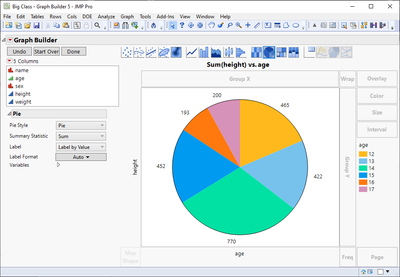
ADJUSTED_LOCATION = 0.8
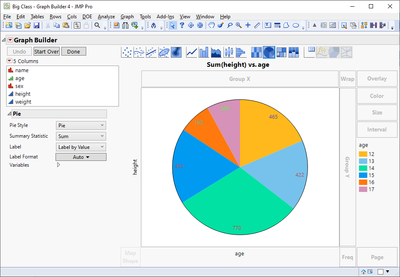
ADJUSTED_LOCATION = 1.1
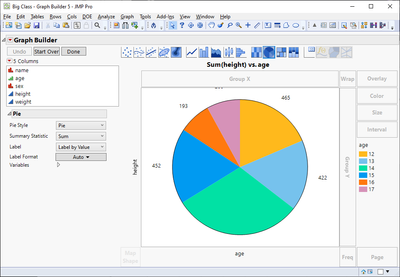
This could be turned into a function which would be able to add lines to the labels.
- Mark as New
- Bookmark
- Subscribe
- Mute
- Subscribe to RSS Feed
- Get Direct Link
- Report Inappropriate Content
Re: Pie Chart Labels organisation
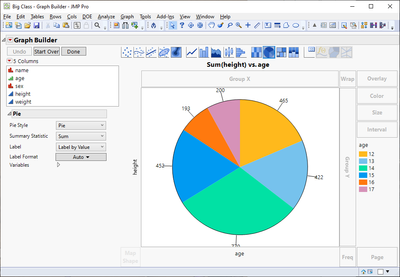
Example how lines could be added
Names Default To Here(1);

ADJUSTED_LOCATION = 1 ; // default is 1

dt = open("$SAMPLE_DATA/Big Class.jmp");

gb = dt << Graph Builder(
	Variables(X(:age), Y(:height)),
	Elements(Pie(X, Y, Legend(2), Summary Statistic("Sum"), Label("Label by Value")))
);

calculate_pie_graph_angles = Function({gb}, {Default Local},
	dt = gb << Get Data Table;

	// Get X and Y columns (doesn't currently support Overlay)
	vars = gb << Get Variables;
	xcol = Empty();
	ycol = Empty();
	For Each({var}, vars,
		role = var["Role"];
		If(role == "X",
			xcol = Arg(var, 1) << get name; // I don't use references
		, role == "Y",
			ycol = Arg(var, 1) << get name; // I don't use references
		);
	);

	// Get summary statistic
	elements = gb << Get Elements(1, 1);
	summary_stat = Try(elements[1]["Summary Statistic"], "Mean"); // We assume Mean is the default one

	// Calculate groups and segments
	// I'm lazy and use Evil Parse here
	stat = Eval Insert("^summary_stat^(Eval(ycol))");
	Eval(EvalExpr(
		dt_summary = dt << Summary(
			Group(Eval(xcol)),
			Expr(Parse(stat)),
			Freq("None"),
			Weight("None"),
			statistics column name format("column"),
			Link to original data table(0),
			invisible
		);
	));

	groups = dt_summary[0, 1]; // 2 is N Rows
	stats = dt_summary[0, 3];
	Close(dt_summary, no save);

	// calculate segments
	r_sections = Reverse((stats / Sum(stats)) * 2 * Pi());

	angles = {};
	For Each({section, idx}, r_sections,
		angle = (section + Pi()) / 2;
		If(idx > 1,
			angle = angle + Sum(r_sections[1::idx - 1]);
		);
		Insert Into(angles, angle);
	);

	Return(Reverse(angles));
);


get_segment_locations = Function({pie, angles, radius = 1}, {Default Local},
	{x_origo, y_origo} = pie << Get Origin;
	pie_radius = pie << Get Radius;

	label_locations = {};
	For Each({angle, idx}, angles,
		i = idx - 1;
		xcoord = x_origo + radius * Cos(angle);
		ycoord = y_origo + radius * Sin(angle);

		location = Eval List({i, xcoord, ycoord});
		Insert Into(label_locations, Eval List({location}));
	);

	return(label_locations);
);

fb = Report(gb)[FrameBox(1)];
pie = fb << Find Seg("Pie Seg");

angles = calculate_pie_graph_angles(gb);
offsets1 = get_segment_locations(pie, angles, 1.05);

For Each({location}, offsets,
	Eval(EvalExpr(
		pie << Set Label Offset(Expr(location));
	));
);

offsets2 = get_segment_locations(pie, angles, 0.9);
offsets3 = get_segment_locations(pie, angles, 1.02);
For Each({{start, end}}, Across(offsets2, offsets3),
	Eval(EvalExpr(
		x = start[2] || end[2];
		y = start[3] || end[3];
		fb << Add Graphics Script(
			Line(
				Expr(x), Expr(y)
			);
		);
	));
);
- Mark as New
- Bookmark
- Subscribe
- Mute
- Subscribe to RSS Feed
- Get Direct Link
- Report Inappropriate Content
Re: Pie Chart Labels organisation
I don't know of a way of adding such lines to pie chart easily. You could calculate those lines and add them with a script or perform some calculations and set the offsets by script.
- Mark as New
- Bookmark
- Subscribe
- Mute
- Subscribe to RSS Feed
- Get Direct Link
- Report Inappropriate Content
Re: Pie Chart Labels organisation
As my data are changing every month and all categories are not always present it is hard for me to code all of this, even the offset mais not be for every month.
As an alternative I can put the labels on sections of pie chart and alternate the distance to the center of the pie to ensure they are not overlapping. Do you know if the option existes or do I need to script that?
Thanks again
- Mark as New
- Bookmark
- Subscribe
- Mute
- Subscribe to RSS Feed
- Get Direct Link
- Report Inappropriate Content
Re: Pie Chart Labels organisation
I would most likely use something else than Pie Chart (much easier than start scripting Pie segments, even the documentation in Scripting Index is wrong in most of the cases for that...), but this seems like a nice challenge so I'll try to write some sort of a script for this.
- Mark as New
- Bookmark
- Subscribe
- Mute
- Subscribe to RSS Feed
- Get Direct Link
- Report Inappropriate Content
Re: Pie Chart Labels organisation
I tried to make my supervisor change her mind for another graphic representation but she wants a pie chart unfortunately :pensive_face:, this is not my favourite.
I will write something on the wish list too because it is true that scripting index is not good for this.
Thanks again
- Mark as New
- Bookmark
- Subscribe
- Mute
- Subscribe to RSS Feed
- Get Direct Link
- Report Inappropriate Content
Re: Pie Chart Labels organisation
Too bad you cannot get rid of the pie chart (most overused and usually bad way to visualize anything). Below is script which might give some idea what you could do, the calculations definitely aren't optimal but they might work (I don't really remember unit circle and trigonometry anymore)
Names Default To Here(1);

ADJUSTED_LOCATION = 0.8 ; // default is 1

dt = open("$SAMPLE_DATA/Big Class.jmp");

gb = dt << Graph Builder(
	Variables(X(:age), Y(:height)),
	Elements(Pie(X, Y, Legend(2), Summary Statistic("Sum"), Label("Label by Value")))
);

fb = Report(gb)[FrameBox(1)];
pie = fb << Find Seg("Pie Seg");
{x_origo, y_origo} = pie << Get Origin;
radius = pie << Get Radius;

Summarize(dt, groups = By(:age), sums = Sum(:height)); // we must know summary statistic used in pie chart
r_sections = Reverse((sums / Sum(sums)) * 2 * Pi());

angles = {};
For Each({section, idx}, r_sections,
	angle = (section + Pi()) / 2;
	If(idx > 1,
		angle = angle + Sum(r_sections[1::idx - 1]);
	);
	Insert Into(angles, angle);
);


label_locations = {};
For Each({angle, idx}, angles,
	i = N Items(angles) - idx;
	xcoord = x_origo + ADJUSTED_LOCATION * Cos(angle);
	ycoord = y_origo + ADJUSTED_LOCATION * Sin(angle);

	location = Eval List({i, xcoord, ycoord});
	Insert Into(label_locations, Eval List({location}));
);

For Each({location}, label_locations,
	Eval(EvalExpr(
		pie << Set Label Offset(Expr(location));
	));
);
default
ADJUSTED_LOCATION = 0.8
ADJUSTED_LOCATION = 1.1
This could be turned into a function which would be able to add lines to the labels.
- Mark as New
- Bookmark
- Subscribe
- Mute
- Subscribe to RSS Feed
- Get Direct Link
- Report Inappropriate Content
Re: Pie Chart Labels organisation
Example how lines could be added
Names Default To Here(1);

ADJUSTED_LOCATION = 1 ; // default is 1

dt = open("$SAMPLE_DATA/Big Class.jmp");

gb = dt << Graph Builder(
	Variables(X(:age), Y(:height)),
	Elements(Pie(X, Y, Legend(2), Summary Statistic("Sum"), Label("Label by Value")))
);

calculate_pie_graph_angles = Function({gb}, {Default Local},
	dt = gb << Get Data Table;

	// Get X and Y columns (doesn't currently support Overlay)
	vars = gb << Get Variables;
	xcol = Empty();
	ycol = Empty();
	For Each({var}, vars,
		role = var["Role"];
		If(role == "X",
			xcol = Arg(var, 1) << get name; // I don't use references
		, role == "Y",
			ycol = Arg(var, 1) << get name; // I don't use references
		);
	);

	// Get summary statistic
	elements = gb << Get Elements(1, 1);
	summary_stat = Try(elements[1]["Summary Statistic"], "Mean"); // We assume Mean is the default one

	// Calculate groups and segments
	// I'm lazy and use Evil Parse here
	stat = Eval Insert("^summary_stat^(Eval(ycol))");
	Eval(EvalExpr(
		dt_summary = dt << Summary(
			Group(Eval(xcol)),
			Expr(Parse(stat)),
			Freq("None"),
			Weight("None"),
			statistics column name format("column"),
			Link to original data table(0),
			invisible
		);
	));

	groups = dt_summary[0, 1]; // 2 is N Rows
	stats = dt_summary[0, 3];
	Close(dt_summary, no save);

	// calculate segments
	r_sections = Reverse((stats / Sum(stats)) * 2 * Pi());

	angles = {};
	For Each({section, idx}, r_sections,
		angle = (section + Pi()) / 2;
		If(idx > 1,
			angle = angle + Sum(r_sections[1::idx - 1]);
		);
		Insert Into(angles, angle);
	);

	Return(Reverse(angles));
);


get_segment_locations = Function({pie, angles, radius = 1}, {Default Local},
	{x_origo, y_origo} = pie << Get Origin;
	pie_radius = pie << Get Radius;

	label_locations = {};
	For Each({angle, idx}, angles,
		i = idx - 1;
		xcoord = x_origo + radius * Cos(angle);
		ycoord = y_origo + radius * Sin(angle);

		location = Eval List({i, xcoord, ycoord});
		Insert Into(label_locations, Eval List({location}));
	);

	return(label_locations);
);

fb = Report(gb)[FrameBox(1)];
pie = fb << Find Seg("Pie Seg");

angles = calculate_pie_graph_angles(gb);
offsets1 = get_segment_locations(pie, angles, 1.05);

For Each({location}, offsets,
	Eval(EvalExpr(
		pie << Set Label Offset(Expr(location));
	));
);

offsets2 = get_segment_locations(pie, angles, 0.9);
offsets3 = get_segment_locations(pie, angles, 1.02);
For Each({{start, end}}, Across(offsets2, offsets3),
	Eval(EvalExpr(
		x = start[2] || end[2];
		y = start[3] || end[3];
		fb << Add Graphics Script(
			Line(
				Expr(x), Expr(y)
			);
		);
	));
);- Mark as New
- Bookmark
- Subscribe
- Mute
- Subscribe to RSS Feed
- Get Direct Link
- Report Inappropriate Content
Re: Pie Chart Labels organisation
Thanks a lot Jarmo this do the job perfectly

- Mark as New
- Bookmark
- Subscribe
- Mute
- Subscribe to RSS Feed
- Get Direct Link
- Report Inappropriate Content
Re: Pie Chart Labels organisation
Echoing the other comments, don't use pie charts - I'm more emphatic than others on this point. But here is a very good presentation illustrating why it is always better to use a bar chart (or similar alternatives) than a pie chart: https://speakerdeck.com/cherdarchuk/data-looks-better-naked-pie-chart-edition. I'd view this a chance to educate your supervisor.
- Mark as New
- Bookmark
- Subscribe
- Mute
- Subscribe to RSS Feed
- Get Direct Link
- Report Inappropriate Content
Re: Pie Chart Labels organisation
Thanks for the link. I will try to educate them but they have pretty strong feelings for pie chart. I will make the parallel with other visualisation to try to convince them.
Recommended Articles
- © 2025 JMP Statistical Discovery LLC. All Rights Reserved.
- Terms of Use
- Privacy Statement
- Contact Us