- Don’t miss your chance to experience Discovery Summit Europe at our best available rate! Early bird registration through 31 Oct.
- Graph Builder Toolbar streamlines interactive graphing. Creates shortcuts on Report and GraphBuilder Helpers toolbars. Download and install the extension.
- Subscribe to RSS Feed
- Mark Topic as New
- Mark Topic as Read
- Float this Topic for Current User
- Bookmark
- Subscribe
- Mute
- Printer Friendly Page
Discussions
Solve problems, and share tips and tricks with other JMP users.- User Community
- :
- Discussions
- :
- Re: Operation Rows

- Mark as New
- Bookmark
- Subscribe
- Mute
- Subscribe to RSS Feed
- Get Direct Link
- Report Inappropriate Content
Operation Rows
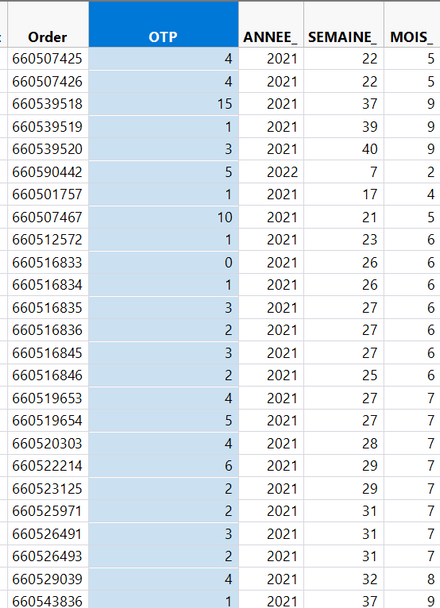
Hello everyone, I would like to know how to count the number of "OTPs" that are equal to 0 and make the division on the total number of LINES of OTP ? Thank you for your help
Accepted Solutions


- Mark as New
- Bookmark
- Subscribe
- Mute
- Subscribe to RSS Feed
- Get Direct Link
- Report Inappropriate Content
Re: Operation Rows
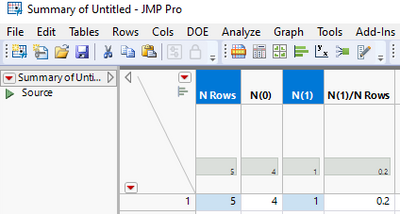
Create new formula column such as
:OTP == 0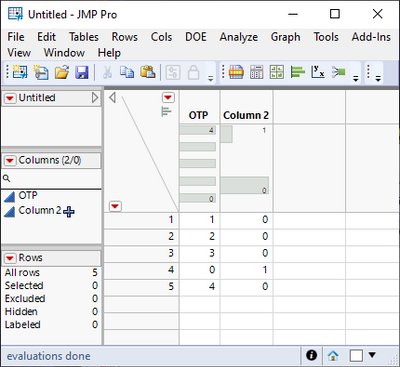
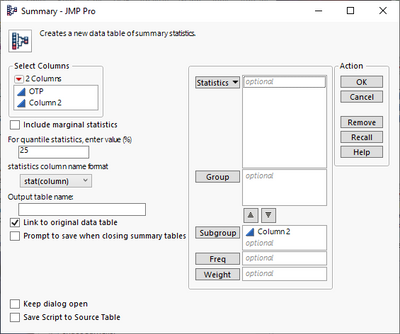
then use summary to create new table using the new column as Subgroup (remove link to original data table if you don't need it)
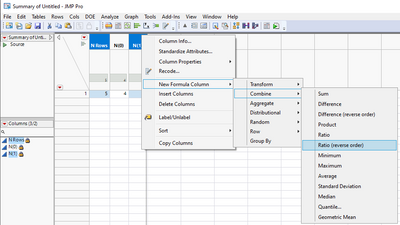
select N Rows and N(1) columns and create new formula column with right click menu:

- Mark as New
- Bookmark
- Subscribe
- Mute
- Subscribe to RSS Feed
- Get Direct Link
- Report Inappropriate Content
Re: Operation Rows
Here's how you get the number of rows where OTP is equal to zero (see also here:(
dt = current data table () << select where (:OTP == 0); // suggest to have only the one table of interest for you open when testing this

num_selected = nrows(dt << get selected rows); // num_selected is now the number of rows where :OTP is equal to zero
Another way is via point & click:
- Convert the OTP column to Data Type "Character" under Column Info.
- Run a distribution analysis of the OTP column. This will show you how many rows with OTP equal to 0 there are.
Can you elaborate a little on the second part of the task, i.e., "...make the division on the total number of LINES of OTP."? I don't understand this. (Sorry.)
- Mark as New
- Bookmark
- Subscribe
- Mute
- Subscribe to RSS Feed
- Get Direct Link
- Report Inappropriate Content
Re: Operation Rows
Create new formula column such as
:OTP == 0then use summary to create new table using the new column as Subgroup (remove link to original data table if you don't need it)
select N Rows and N(1) columns and create new formula column with right click menu:
Recommended Articles
- © 2026 JMP Statistical Discovery LLC. All Rights Reserved.
- Terms of Use
- Privacy Statement
- Contact Us