- JMP will suspend normal business operations for our Winter Holiday beginning on Wednesday, Dec. 24, 2025, at 5:00 p.m. ET (2:00 p.m. ET for JMP Accounts Receivable).
Regular business hours will resume at 9:00 a.m. EST on Friday, Jan. 2, 2026. - We’re retiring the File Exchange at the end of this year. The JMP Marketplace is now your destination for add-ins and extensions.
- Subscribe to RSS Feed
- Mark Topic as New
- Mark Topic as Read
- Float this Topic for Current User
- Bookmark
- Subscribe
- Mute
- Printer Friendly Page
Discussions
Solve problems, and share tips and tricks with other JMP users.- JMP User Community
- :
- Discussions
- :
- Multiple spec limits on chart

- Mark as New
- Bookmark
- Subscribe
- Mute
- Subscribe to RSS Feed
- Get Direct Link
- Report Inappropriate Content
Multiple spec limits on chart
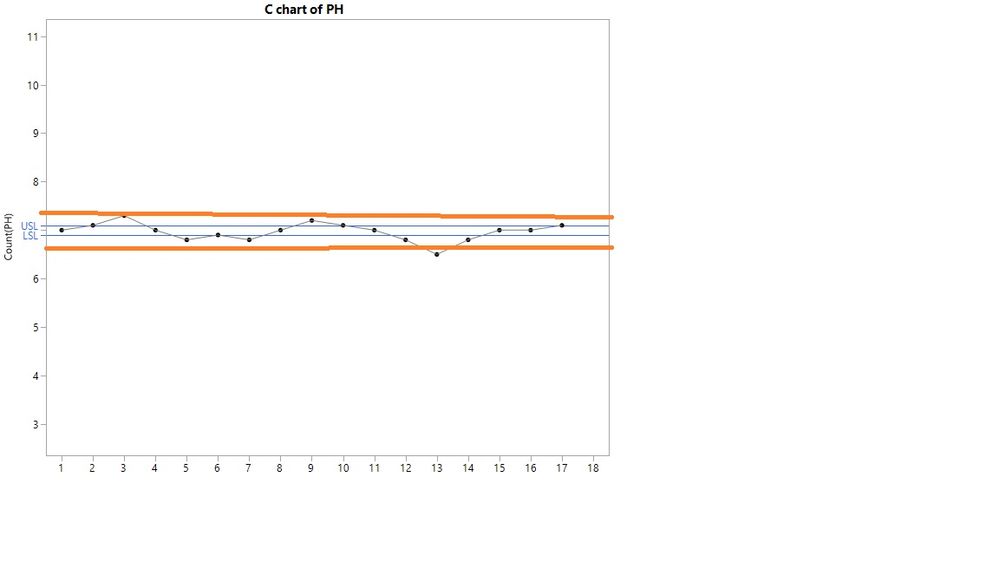
How can I add multiple spec limits to control chart builder? I have incleded an example of what I would like my chart to look like. I am not intrested in UCL and lower control limt but rather the spec limits.
Accepted Solutions


- Mark as New
- Bookmark
- Subscribe
- Mute
- Subscribe to RSS Feed
- Get Direct Link
- Report Inappropriate Content
Re: Multiple spec limits on chart
If you are not using a control chart, then you might make a run chart with Graph Builder and add reference lines for the specifications.
- Mark as New
- Bookmark
- Subscribe
- Mute
- Subscribe to RSS Feed
- Get Direct Link
- Report Inappropriate Content
Re: Multiple spec limits on chart
If you are not using a control chart, then you might make a run chart with Graph Builder and add reference lines for the specifications.
- Mark as New
- Bookmark
- Subscribe
- Mute
- Subscribe to RSS Feed
- Get Direct Link
- Report Inappropriate Content
Re: Multiple spec limits on chart
Is there another way to do it do, so that I do not have to add every reference line for every spec limit? Just wondering because I have many charts and each one will need 4 reference lines.


- Mark as New
- Bookmark
- Subscribe
- Mute
- Subscribe to RSS Feed
- Get Direct Link
- Report Inappropriate Content
Re: Multiple spec limits on chart
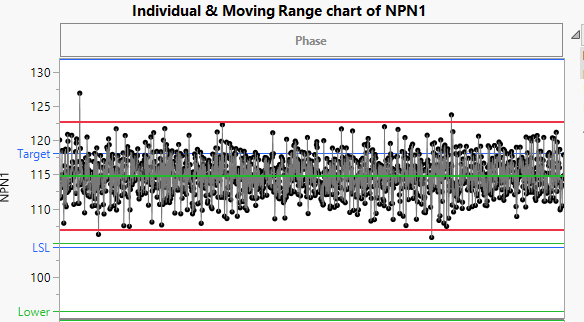
You can actually use column properties, "Spec Limits" and specify "Show Limits" to display one set of limits on your Control Chart, and set your other set of limits to the column property "Response Limits" and also set those limits to be shown on the graph as reference lines. That may get you what you want
- Mark as New
- Bookmark
- Subscribe
- Mute
- Subscribe to RSS Feed
- Get Direct Link
- Report Inappropriate Content
Re: Multiple spec limits on chart
Thank you for the response,
I found that the easiest way was to use the graph bulder add the reference lines and then copy the script but changing the varibels.
Recommended Articles
- © 2025 JMP Statistical Discovery LLC. All Rights Reserved.
- Terms of Use
- Privacy Statement
- Contact Us