cancel
Showing results for 
Show  only  | Search instead for 
Did you mean: 
  • JMP will suspend normal business operations for our Winter Holiday beginning on Wednesday, Dec. 24, 2025, at 5:00 p.m. ET (2:00 p.m. ET for JMP Accounts Receivable).
    Regular business hours will resume at 9:00 a.m. EST on Friday, Jan. 2, 2026.
  • We’re retiring the File Exchange at the end of this year. The JMP Marketplace is now your destination for add-ins and extensions.

Discussions

Solve problems, and share tips and tricks with other JMP users.
%3CLINGO-SUB%20id%3D%22lingo-sub-459541%22%20slang%3D%22en-US%22%20mode%3D%22NONE%22%3E%E3%80%8C%E3%82%B0%E3%83%AB%E3%83%BC%E3%83%97Y%E3%80%8D%E3%82%92%E3%82%B0%E3%83%A9%E3%83%95%E3%83%93%E3%83%AB%E3%83%80%E3%83%BC%E3%81%AE%E3%82%B0%E3%83%A9%E3%83%95%E3%83%97%E3%83%AD%E3%83%83%E3%83%88%E3%81%AE%E5%B7%A6%E5%81%B4%E3%81%AB%E7%A7%BB%E5%8B%95%E3%81%97%E3%81%BE%E3%81%99%3C%2FLINGO-SUB%3E%3CLINGO-BODY%20id%3D%22lingo-body-459541%22%20slang%3D%22en-US%22%20mode%3D%22NONE%22%3E%3CP%3E%E3%82%B0%E3%83%A9%E3%83%95%E3%83%93%E3%83%AB%E3%83%80%E3%83%BC%E3%81%A7%E3%80%8C%E3%82%B0%E3%83%AB%E3%83%BC%E3%83%97Y%E3%80%8D%E3%82%92%E7%A7%BB%E5%8B%95%E3%81%97%E3%81%A6%E3%80%81%E3%82%B0%E3%83%A9%E3%83%95%E3%81%AE%E5%8F%B3%E5%81%B4%EF%BC%88%E3%83%87%E3%83%95%E3%82%A9%E3%83%AB%E3%83%88%E3%81%AE%E5%A0%B4%E6%89%80%EF%BC%89%E3%81%A7%E3%81%AF%E3%81%AA%E3%81%8F%E5%B7%A6%E5%81%B4%E3%81%AB%E9%85%8D%E7%BD%AE%E3%81%99%E3%82%8B%E6%96%B9%E6%B3%95%E3%81%AF%E3%81%82%E3%82%8A%E3%81%BE%E3%81%99%E3%81%8B%EF%BC%9F%3C%2FP%3E%3C%2FLINGO-BODY%3E%3CLINGO-LABS%20id%3D%22lingo-labs-459541%22%20slang%3D%22en-US%22%20mode%3D%22NONE%22%3E%3CLINGO-LABEL%3E%E3%82%B0%E3%83%A9%E3%83%95%E3%82%A3%E3%83%83%E3%82%AF%E3%82%B9%3C%2FLINGO-LABEL%3E%3CLINGO-LABEL%3E%E3%82%B9%E3%82%AF%E3%83%AA%E3%83%97%E3%83%86%E3%82%A3%E3%83%B3%E3%82%B0%3C%2FLINGO-LABEL%3E%3C%2FLINGO-LABS%3E%3CLINGO-SUB%20id%3D%22lingo-sub-459562%22%20slang%3D%22en-US%22%20mode%3D%22NONE%22%3ERe%EF%BC%9A%E3%80%8C%E3%82%B0%E3%83%AB%E3%83%BC%E3%83%97Y%E3%80%8D%E3%82%92%E3%82%B0%E3%83%A9%E3%83%95%E3%83%93%E3%83%AB%E3%83%80%E3%83%BC%E3%81%AE%E3%82%B0%E3%83%A9%E3%83%95%E3%83%97%E3%83%AD%E3%83%83%E3%83%88%E3%81%AE%E5%B7%A6%E5%81%B4%E3%81%AB%E7%A7%BB%E5%8B%95%E3%81%97%E3%81%BE%E3%81%99%3C%2FLINGO-SUB%3E%3CLINGO-BODY%20id%3D%22lingo-body-459562%22%20slang%3D%22en-US%22%20mode%3D%22NONE%22%3E%3CP%3E%E3%83%87%E3%83%BC%E3%82%BF%E3%83%86%E3%83%BC%E3%83%96%E3%83%AB%E3%82%92%E3%82%B0%E3%83%AB%E3%83%BC%E3%83%97Y%E3%81%A7%E5%88%86%E5%89%B2%E3%81%97%E3%80%81%E5%88%86%E5%89%B2%E3%81%95%E3%82%8C%E3%81%9FY%E5%88%97%E3%82%92Y%E8%BB%B8%E3%81%AB%E5%80%8B%E5%88%A5%E3%81%AE%E5%88%97%E3%81%A8%E3%81%97%E3%81%A6%E3%83%97%E3%83%AD%E3%83%83%E3%83%88%E3%81%97%E3%80%81%E5%88%86%E5%89%B2%E3%81%95%E3%82%8C%E3%81%9FX%E5%88%97%E3%82%92X%E8%BB%B8%E3%81%AB%E7%B5%90%E5%90%88%E3%81%95%E3%82%8C%E3%81%9F%E5%88%97%E3%81%A8%E3%81%97%E3%81%A6%E3%83%97%E3%83%AD%E3%83%83%E3%83%88%E3%81%99%E3%82%8B%E3%81%93%E3%81%A8%E3%81%A7%E3%80%81%E5%BF%85%E8%A6%81%E3%81%AA%E6%93%8D%E4%BD%9C%E3%82%92%E5%AE%9F%E8%A1%8C%E3%81%A7%E3%81%8D%E3%81%BE%E3%81%99%E3%80%82%3C%2FP%3E%0A%3CP%3E%3CSPAN%20class%3D%22lia-inline-image-display-wrapper%20lia-image-align-inline%22%20image-alt%3D%22txnelson_0-1644423890578.png%22%20style%3D%22width%3A%20571px%3B%22%3E%3Cspan%20class%3D%22lia-inline-image-display-wrapper%22%20image-alt%3D%22txnelson_0-1644423890578.png%22%20style%3D%22width%3A%20571px%3B%22%3E%3Cimg%20src%3D%22https%3A%2F%2Fcommunity.jmp.com%2Ft5%2Fimage%2Fserverpage%2Fimage-id%2F39809i2B7E04733F2F54E0%2Fimage-dimensions%2F571x440%3Fv%3Dv2%22%20width%3D%22571%22%20height%3D%22440%22%20role%3D%22button%22%20title%3D%22txnelson_0-1644423890578.png%22%20alt%3D%22txnelson_0-1644423890578.png%22%20%2F%3E%3C%2Fspan%3E%3C%2FSPAN%3E%3C%2FP%3E%0A%3CPRE%3E%3CCODE%20class%3D%22%20language-jsl%22%3Enames%20default%20to%20here(1)%3B%0A%2F%2F%20Open%20Data%20Table%3A%20Big%20Class.jmp%0A%2F%2F%20%E2%86%92%20Data%20Table(%20%22Big%20Class%22%20)%0AOpen(%20%22%2FC%3A%2FProgram%20Files%2FSAS%2FJMPPRO%2F12%2FSamples%2FData%2FBig%20Class.jmp%22%20)%3B%0A%0A%2F%2F%20Split%20data%20table%0A%2F%2F%20%E2%86%92%20Data%20Table(%20%22Untitled%2013%22%20)%0AData%20Table(%20%22Big%20Class%22%20)%20%26lt%3B%26lt%3B%20Split(%0A%20Split%20By(%20%3Asex%20)%2C%0A%20Split(%20%3Aheight%2C%20%3Aweight%20)%2C%0A%20Group(%20%3Aname%2C%20%3Asex%20)%2C%0A%20Remaining%20Columns(%20Drop%20All%20)%2C%0A%20Sort%20by%20Column%20Property%2C%0A%20Output%20Table(%20%22Split%20Table%22%20)%0A)%3B%0A%0AData%20Table(%20%22Split%20Table%22%20)%20%26lt%3B%26lt%3B%20Graph%20Builder(%0A%20Size(%20525%2C%20454%20)%2C%0A%20Show%20Control%20Panel(%200%20)%2C%0A%20Variables(%0A%20%20X(%20%3Aweight%20F%20)%2C%0A%20%20X(%20%3Aweight%20M%2C%20Position(%201%20)%20)%2C%0A%20%20Y(%20%3Aheight%20F%20)%2C%0A%20%20Y(%20%3Aheight%20M%20)%0A%20)%2C%0A%20Elements(%0A%20%20Position(%201%2C%201%20)%2C%0A%20%20Points(%20X(%201%20)%2C%20X(%202%20)%2C%20Y%2C%20Legend(%2025%20)%20)%2C%0A%20%20Smoother(%20X(%201%20)%2C%20X(%202%20)%2C%20Y%2C%20Legend(%2026%20)%20)%0A%20)%2C%0A%20Elements(%0A%20%20Position(%201%2C%202%20)%2C%0A%20%20Points(%20X(%201%20)%2C%20X(%202%20)%2C%20Y%2C%20Legend(%2027%20)%20)%2C%0A%20%20Smoother(%20X(%201%20)%2C%20X(%202%20)%2C%20Y%2C%20Legend(%2028%20)%20)%0A%20)%0A)%3C%2FCODE%3E%3C%2FPRE%3E%3C%2FLINGO-BODY%3E%3CLINGO-SUB%20id%3D%22lingo-sub-459566%22%20slang%3D%22en-US%22%20mode%3D%22NONE%22%3ERe%EF%BC%9A%E3%80%8C%E3%82%B0%E3%83%AB%E3%83%BC%E3%83%97Y%E3%80%8D%E3%82%92%E3%82%B0%E3%83%A9%E3%83%95%E3%83%93%E3%83%AB%E3%83%80%E3%83%BC%E3%81%AE%E3%82%B0%E3%83%A9%E3%83%95%E3%83%97%E3%83%AD%E3%83%83%E3%83%88%E3%81%AE%E5%B7%A6%E5%81%B4%E3%81%AB%E7%A7%BB%E5%8B%95%E3%81%97%E3%81%BE%E3%81%99%3C%2FLINGO-SUB%3E%3CLINGO-BODY%20id%3D%22lingo-body-459566%22%20slang%3D%22en-US%22%20mode%3D%22NONE%22%3E%3CP%3E%E3%82%B0%E3%83%AB%E3%83%BC%E3%83%97%E5%8C%96%E3%82%92%E5%8F%B3%E3%82%AF%E3%83%AA%E3%83%83%E3%82%AF%E3%81%99%E3%82%8B%E3%81%A8%E3%80%81Y%E3%82%B0%E3%83%AB%E3%83%BC%E3%83%97%E3%82%A8%E3%83%83%E3%82%B8%E3%81%8B%E3%82%89%E3%82%B0%E3%83%AB%E3%83%BC%E3%83%97%E5%8C%96%E5%81%B4%E3%82%92%E5%A4%89%E6%9B%B4%E3%81%A7%E3%81%8D%E3%81%BE%E3%81%99%3C%2FP%3E%0A%3CP%3E%26nbsp%3B%3C%2FP%3E%0A%3CP%3E%3CSPAN%20class%3D%22lia-inline-image-display-wrapper%20lia-image-align-inline%22%20image-alt%3D%22jthi_0-1644424411771.png%22%20style%3D%22width%3A%20400px%3B%22%3E%3Cspan%20class%3D%22lia-inline-image-display-wrapper%22%20image-alt%3D%22jthi_0-1644424411771.png%22%20style%3D%22width%3A%20400px%3B%22%3E%3Cimg%20src%3D%22https%3A%2F%2Fcommunity.jmp.com%2Ft5%2Fimage%2Fserverpage%2Fimage-id%2F39810i73D7B2AC8ABDACF6%2Fimage-size%2Fmedium%3Fv%3Dv2%26amp%3Bpx%3D400%22%20role%3D%22button%22%20title%3D%22jthi_0-1644424411771.png%22%20alt%3D%22jthi_0-1644424411771.png%22%20%2F%3E%3C%2Fspan%3E%3C%2FSPAN%3E%3C%2FP%3E%0A%3CP%3E%26nbsp%3B%3C%2FP%3E%0A%3CP%3E%3CSPAN%20class%3D%22lia-inline-image-display-wrapper%20lia-image-align-inline%22%20image-alt%3D%22jthi_1-1644424453308.png%22%20style%3D%22width%3A%20400px%3B%22%3E%3Cspan%20class%3D%22lia-inline-image-display-wrapper%22%20image-alt%3D%22jthi_1-1644424453308.png%22%20style%3D%22width%3A%20400px%3B%22%3E%3Cimg%20src%3D%22https%3A%2F%2Fcommunity.jmp.com%2Ft5%2Fimage%2Fserverpage%2Fimage-id%2F39811i25FA22EE5A10990A%2Fimage-size%2Fmedium%3Fv%3Dv2%26amp%3Bpx%3D400%22%20role%3D%22button%22%20title%3D%22jthi_1-1644424453308.png%22%20alt%3D%22jthi_1-1644424453308.png%22%20%2F%3E%3C%2Fspan%3E%3C%2FSPAN%3E%3C%2FP%3E%0A%3CP%3E%26nbsp%3B%3C%2FP%3E%0A%3CP%3E%26nbsp%3B%3C%2FP%3E%3C%2FLINGO-BODY%3E
Choose Language Hide Translation Bar
Raybob
Level II

Move "Group Y" to the left side of the graph plot in Graph Builder

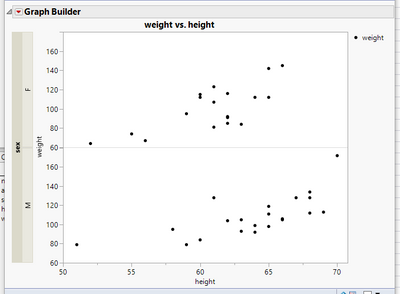
Is there a way I can move the "Group Y" in Graph builder so it is on the left side of my graph, rather than the right side (default location)?

4 REPLIES 4
txnelson
Super User

Re: Move "Group Y" to the left side of the graph plot in Graph Builder

See @jthi response below for the correct answer


You can do what you want by splitting the data table by your Group Y and then plotting the split Y columns as separate columns on the Y axis, and the split X columns as combined columns on the X axis.
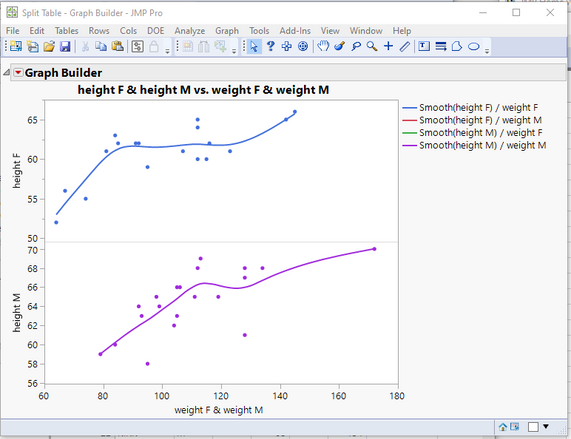
txnelson_0-1644423890578.png

names default to here(1);
// Open Data Table: Big Class.jmp
// → Data Table( "Big Class" )
Open( "/C:/Program Files/SAS/JMPPRO/12/Samples/Data/Big Class.jmp" );

// Split data table
// → Data Table( "Untitled 13" )
Data Table( "Big Class" ) << Split(
	Split By( :sex ),
	Split( :height, :weight ),
	Group( :name, :sex ),
	Remaining Columns( Drop All ),
	Sort by Column Property,
	Output Table( "Split Table" )
);

Data Table( "Split Table" ) << Graph Builder(
	Size( 525, 454 ),
	Show Control Panel( 0 ),
	Variables(
		X( :weight F ),
		X( :weight M, Position( 1 ) ),
		Y( :height F ),
		Y( :height M )
	),
	Elements(
		Position( 1, 1 ),
		Points( X( 1 ), X( 2 ), Y, Legend( 25 ) ),
		Smoother( X( 1 ), X( 2 ), Y, Legend( 26 ) )
	),
	Elements(
		Position( 1, 2 ),
		Points( X( 1 ), X( 2 ), Y, Legend( 27 ) ),
		Smoother( X( 1 ), X( 2 ), Y, Legend( 28 ) )
	)
) 



Jim
jthi
Super User

Re: Move "Group Y" to the left side of the graph plot in Graph Builder

Right click on grouping and from Y Group Edge you can change grouping side
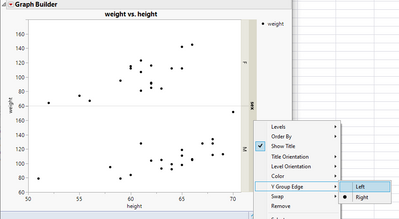
 

jthi_0-1644424411771.png


jthi_1-1644424453308.png


-Jarmo
txnelson
Super User

Re: Move "Group Y" to the left side of the graph plot in Graph Builder

Wow @jthi I was not aware of that option...Once again, I learn something new with JMP every week.

Jim
Raybob
Level II

Re: Move "Group Y" to the left side of the graph plot in Graph Builder

 @jthi Thank you! I wonder if there is a way to just jsl to move the group y into the graph plot so it's not outside of the plot? I assumed there wasn't a path forward with this, but it doesn't hurt to try!

Recommended Articles