- JMP will suspend normal business operations for our Winter Holiday beginning on Wednesday, Dec. 24, 2025, at 5:00 p.m. ET (2:00 p.m. ET for JMP Accounts Receivable).
Regular business hours will resume at 9:00 a.m. EST on Friday, Jan. 2, 2026. - We’re retiring the File Exchange at the end of this year. The JMP Marketplace is now your destination for add-ins and extensions.
- Subscribe to RSS Feed
- Mark Topic as New
- Mark Topic as Read
- Float this Topic for Current User
- Bookmark
- Subscribe
- Mute
- Printer Friendly Page
Discussions
Solve problems, and share tips and tricks with other JMP users.- JMP User Community
- :
- Discussions
- :
- Linear Contrast in Fit Model

- Mark as New
- Bookmark
- Subscribe
- Mute
- Subscribe to RSS Feed
- Get Direct Link
- Report Inappropriate Content
Linear Contrast in Fit Model
I've noticed that when using Fit Model (even for a simple one-way ANOVA), that the Linear Contrast is not correctly saved when I save the script to the data file to re-execute at a later time. Also, since I'm creating (attempting) several contrasts, is there an easy way to label/title each constrast?
Accepted Solutions


- Mark as New
- Bookmark
- Subscribe
- Mute
- Subscribe to RSS Feed
- Get Direct Link
- Report Inappropriate Content
Re: Linear Contrast in Fit Model
Hi Steve!
This is a bug in version 13 of JMP. Updating to 13.2 will fix the problem.
From the 13.2 release notes on fixes made:
Standard Least Squares • When you create an LSMeans Contrast and then save the script for the analysis, the LSMeans Contrast is saved correctly in the script. • The Contrast Specification boxes are aligned correctly
As for the labeling of the contrasts, I don't know of any way to easily do that.
- Mark as New
- Bookmark
- Subscribe
- Mute
- Subscribe to RSS Feed
- Get Direct Link
- Report Inappropriate Content
Re: Linear Contrast in Fit Model
I'm not seeing a problem. Which version of JMP are you using? Can you show the script that is saved along with the output that the script SHOULD be producing?
- Mark as New
- Bookmark
- Subscribe
- Mute
- Subscribe to RSS Feed
- Get Direct Link
- Report Inappropriate Content
Re: Linear Contrast in Fit Model
Hi Dan, I'm using JMP PRO 13.0 (64-bit). I can't email JMP files (security blockage at company). SO I've attached a PPT file that shows a simple data table, with the script. It also shows the original output, and the output when the script is re-executed.
Thanks,
Steve
- Mark as New
- Bookmark
- Subscribe
- Mute
- Subscribe to RSS Feed
- Get Direct Link
- Report Inappropriate Content
Re: Linear Contrast in Fit Model
Hi Steve!
This is a bug in version 13 of JMP. Updating to 13.2 will fix the problem.
From the 13.2 release notes on fixes made:
Standard Least Squares • When you create an LSMeans Contrast and then save the script for the analysis, the LSMeans Contrast is saved correctly in the script. • The Contrast Specification boxes are aligned correctly
As for the labeling of the contrasts, I don't know of any way to easily do that.

- Mark as New
- Bookmark
- Subscribe
- Mute
- Subscribe to RSS Feed
- Get Direct Link
- Report Inappropriate Content
Re: Linear Contrast in Fit Model


 Community Manager
- Mark as New
- Bookmark
- Subscribe
- Mute
- Subscribe to RSS Feed
- Get Direct Link
- Report Inappropriate Content
Re: Linear Contrast in Fit Model
Hi @crofut,
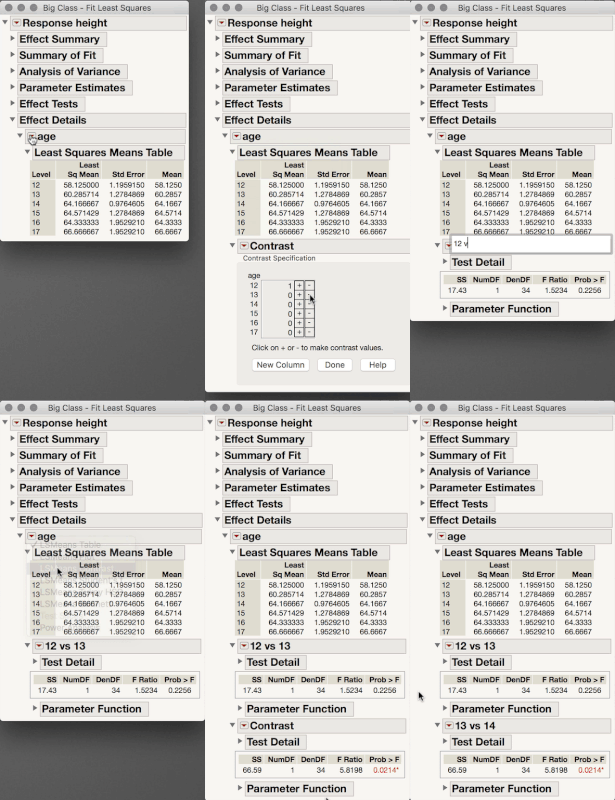
It looks like Dan addressed your main issue, but with regard to labeling, when I need to keep track of several contrasts I find it's helpful to simply rename the outline boxes (i.e. double click on the outline box title). This renaming is preserved in the script you save for the report.
I hope this helps!
Julian
Recommended Articles
- © 2025 JMP Statistical Discovery LLC. All Rights Reserved.
- Terms of Use
- Privacy Statement
- Contact Us