- Discovery Summit 2026: Early User Edition - September 23-24.Register. It's free.
- Graph Builder Toolbar streamlines interactive graphing. Creates shortcuts on Report and GraphBuilder Helpers toolbars. Download and install the extension.
- Subscribe to RSS Feed
- Mark Topic as New
- Mark Topic as Read
- Float this Topic for Current User
- Bookmark
- Subscribe
- Mute
- Printer Friendly Page
Discussions
Solve problems, and share tips and tricks with other JMP users.- User Community
- :
- Discussions
- :
- Re: Limits in graph Builder

- Mark as New
- Bookmark
- Subscribe
- Mute
- Subscribe to RSS Feed
- Get Direct Link
- Report Inappropriate Content
Limits in graph Builder
Hello
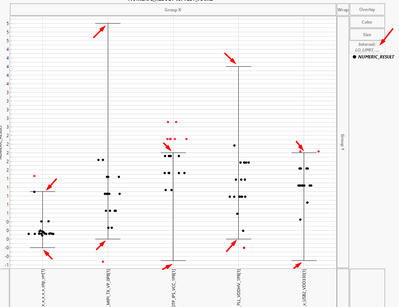
Sometimes I use limits in graph builder, which shows me the limit lines on the graph
but I didn't find the option to show me the number of limits (minimum and maximum) in this graph.
Can you address how I can show the number of the data of the limits on my graph?
Accepted Solutions


- Mark as New
- Bookmark
- Subscribe
- Mute
- Subscribe to RSS Feed
- Get Direct Link
- Report Inappropriate Content
Re: Limits in graph Builder
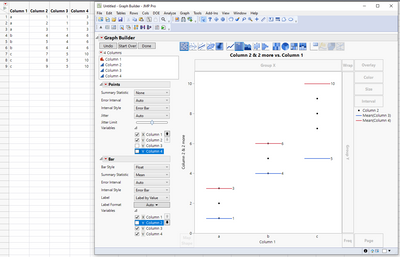
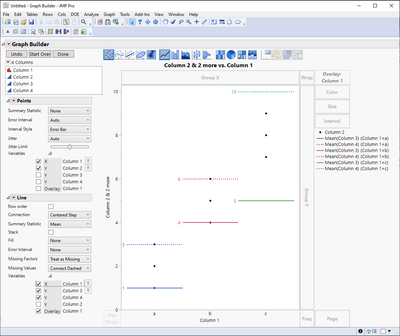
One more option is to use float bar chart (or line chart) for the limits

- Mark as New
- Bookmark
- Subscribe
- Mute
- Subscribe to RSS Feed
- Get Direct Link
- Report Inappropriate Content
Re: Limits in graph Builder
I think, if you could share a copy of a data table including the graph builder table script, that would be really useful.

- Mark as New
- Bookmark
- Subscribe
- Mute
- Subscribe to RSS Feed
- Get Direct Link
- Report Inappropriate Content
Re: Limits in graph Builder
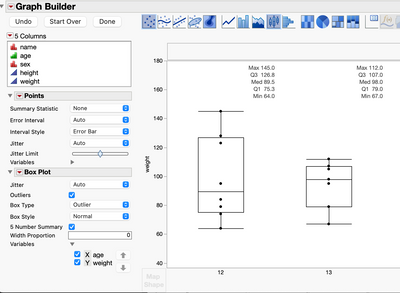
Does the '5 Number Summary' give you what you want?
- Mark as New
- Bookmark
- Subscribe
- Mute
- Subscribe to RSS Feed
- Get Direct Link
- Report Inappropriate Content
Re: Limits in graph Builder
Hello Ian,
It's not assisting me because I needn't a plot box.
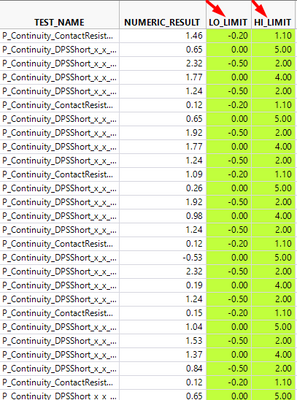
For example, I have a lot of test names, and each test name has its own limit.
Actually, I have found the option to add limits lines by graph builder > interval
But the graph just adds limits lines and not the info of LO_LIMIT and HI_LIMIT on these lines.
I will very much appreciate it if you can address me where I can add the info to my graph which limits it is?
- Mark as New
- Bookmark
- Subscribe
- Mute
- Subscribe to RSS Feed
- Get Direct Link
- Report Inappropriate Content
Re: Limits in graph Builder
OK. So is this the kind of thing you are after, please?
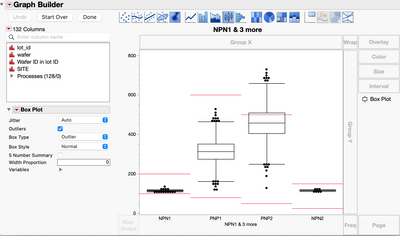
If so, you can get it with a graphics script that uses 'HLine()' appropriately. Run this code, then right click on the FrameBox() of Graph Builder, select 'Customize . . .' then pick 'Spec Limits' from the list on the left:
NamesDefaultToHere(1);

dt = Open("$SAMPLE_DATA/Semiconductor Capability.jmp");
gb = dt << Graph Builder(
				Variables(
					X( :NPN1 ),
					X( :PNP1, Position( 1 ) ),
					X( :PNP2, Position( 1 ) ),
					X( :NPN2, Position( 1 ) )
				),
				Elements( Box Plot( X( 1 ), X( 2 ), X( 3 ), X( 4 ), Legend( 10 ) ) ),
				SendToReport(
					Dispatch(
						{},
						"",
						ScaleBox,
						{Min( -6.61851837529382 ), Max( 828.849379963722 ), Inc( 200 ),
						Minor Ticks( 3 )}
					),
					Dispatch(
						{},
						"Graph Builder",
						FrameBox,
						{Add Graphics Script(
							3,
							Description( "Spec Limits" ),
							Pen Color( "Red" );
							// Parameter 1
							H Line( -0.5, 0.5, 100 );
							H Line( -0.5, 0.5, 200 );
							// Parameter 2
							H Line( 0.5, 1.5, 80 );
							H Line( 0.5, 1.5, 600 );
							// Parameter 3
							H Line( 1.5, 2.5, 50 );
							H Line( 1.5, 2.5, 500 );
							// Parameter 4
							H Line( 2.5, 3.5, 25 );
							H Line( 2.5, 3.5, 150 );
						)}
					)
				)
			);
With a bit of work you could add the necessary graphics script programatically, reading values from the column properties or from a table like the one you show above.
- Mark as New
- Bookmark
- Subscribe
- Mute
- Subscribe to RSS Feed
- Get Direct Link
- Report Inappropriate Content
Re: Limits in graph Builder
One more option is to use float bar chart (or line chart) for the limits
Recommended Articles
- © 2026 JMP Statistical Discovery LLC. All Rights Reserved.
- Terms of Use
- Privacy Statement
- Contact Us