- JMP will suspend normal business operations for our Winter Holiday beginning on Wednesday, Dec. 24, 2025, at 5:00 p.m. ET (2:00 p.m. ET for JMP Accounts Receivable).
Regular business hours will resume at 9:00 a.m. EST on Friday, Jan. 2, 2026. - We’re retiring the File Exchange at the end of this year. The JMP Marketplace is now your destination for add-ins and extensions.
- Subscribe to RSS Feed
- Mark Topic as New
- Mark Topic as Read
- Float this Topic for Current User
- Bookmark
- Subscribe
- Mute
- Printer Friendly Page
Discussions
Solve problems, and share tips and tricks with other JMP users.- JMP User Community
- :
- Discussions
- :
- JMP 17 NewWindow() Function Opening to Bottom of Window

- Mark as New
- Bookmark
- Subscribe
- Mute
- Subscribe to RSS Feed
- Get Direct Link
- Report Inappropriate Content
JMP 17 NewWindow() Function Opening to Bottom of Window
There seems to be a small discrepancy in the NewWindow() function when it is used in JMP17 vs JMP16. In JMP16 whenever I used this function it would open a series of plots and it would open up to the first graph at the top of the window. In JMP17 this function is creating the same series of plots but is opening at the bottom of the window showing the last graph. Is there a workaround to have the window open at the top of the new window (showing the first plot)? Or some way to manually scroll to the top of the window using scripting?
Accepted Solutions


- Mark as New
- Bookmark
- Subscribe
- Mute
- Subscribe to RSS Feed
- Get Direct Link
- Report Inappropriate Content
Re: JMP 17 NewWindow() Function Opening to Bottom of Window
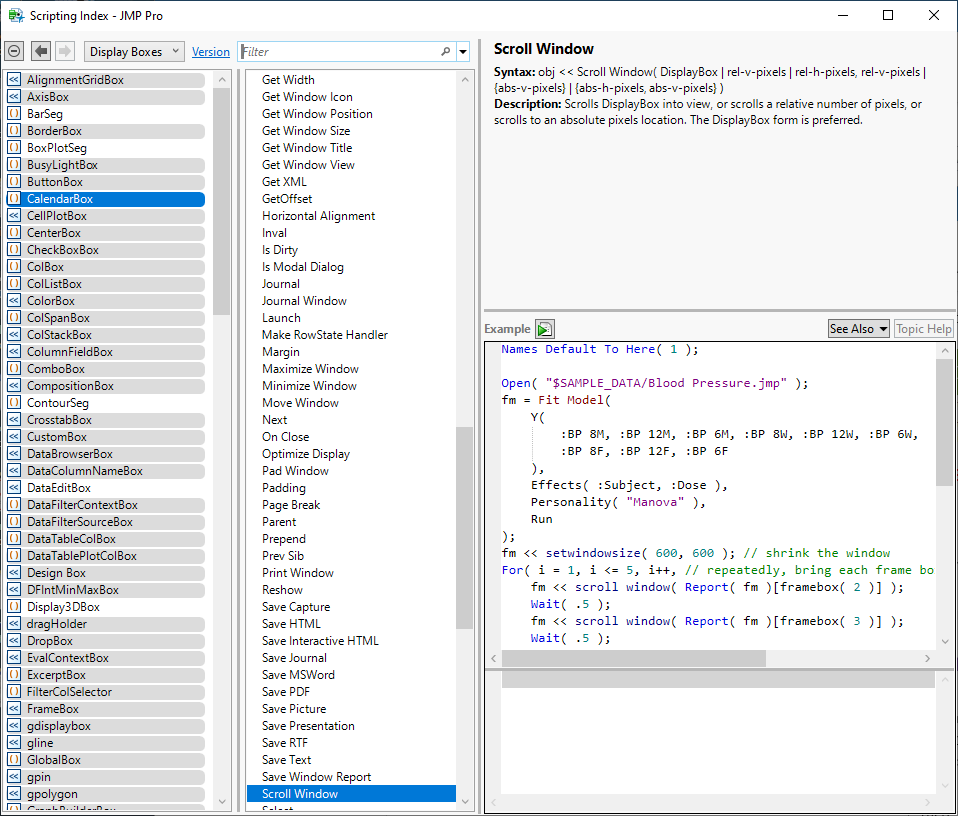
I do not know why this behavior changed. You can scroll the window with JSL. See this entry in the Help > Scripting Index. The example should help you set it up.
- Mark as New
- Bookmark
- Subscribe
- Mute
- Subscribe to RSS Feed
- Get Direct Link
- Report Inappropriate Content
Re: JMP 17 NewWindow() Function Opening to Bottom of Window
I do not know why this behavior changed. You can scroll the window with JSL. See this entry in the Help > Scripting Index. The example should help you set it up.
- Mark as New
- Bookmark
- Subscribe
- Mute
- Subscribe to RSS Feed
- Get Direct Link
- Report Inappropriate Content
Re: JMP 17 NewWindow() Function Opening to Bottom of Window
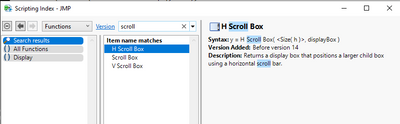
The function "Scroll Window()" is not available in JMP17. It's not in the scripting index.
- Mark as New
- Bookmark
- Subscribe
- Mute
- Subscribe to RSS Feed
- Get Direct Link
- Report Inappropriate Content
Re: JMP 17 NewWindow() Function Opening to Bottom of Window
Change the browser to search Display Boxes instead of Functions.

- Mark as New
- Bookmark
- Subscribe
- Mute
- Subscribe to RSS Feed
- Get Direct Link
- Report Inappropriate Content
Re: JMP 17 NewWindow() Function Opening to Bottom of Window
Thanks for reporting this @joh13213 - the scrolling change was not intentional, and we are looking into it. And thanks to @Mark_Bailey for the workaround - it seems to work well to embed the <<ScrollWindow message directly into the New Window() call:
dt=Open("$SAMPLE_DATA/Big Class.jmp");
New Window("test",
	dt << Run Script("Bivariate"),
	dt << Run Script("Oneway"),
	dt << Run Script("Distribution"),
	<<Scroll Window(0,0)
);Recommended Articles
- © 2026 JMP Statistical Discovery LLC. All Rights Reserved.
- Terms of Use
- Privacy Statement
- Contact Us