cancel
Showing results for 
Show  only  | Search instead for 
Did you mean: 
  • JMP will suspend normal business operations for our Winter Holiday beginning on Wednesday, Dec. 24, 2025, at 5:00 p.m. ET (2:00 p.m. ET for JMP Accounts Receivable).
    Regular business hours will resume at 9:00 a.m. EST on Friday, Jan. 2, 2026.
  • We’re retiring the File Exchange at the end of this year. The JMP Marketplace is now your destination for add-ins and extensions.

Discussions

Solve problems, and share tips and tricks with other JMP users.
%3CLINGO-SUB%20id%3D%22lingo-sub-529890%22%20slang%3D%22en-US%22%20mode%3D%22NONE%22%3EIs%20it%20possible%20to%20customize%20the%20Add%20Formula%20Column%20menu%20to%20include%20customize%20functions%3F%3C%2FLINGO-SUB%3E%3CLINGO-BODY%20id%3D%22lingo-body-529890%22%20slang%3D%22en-US%22%20mode%3D%22NONE%22%3E%3CP%3EHi%20JMP%20Community%2C%3C%2FP%3E%0A%3CP%3EI%20want%20to%20customize%20the%20Add%20Formula%20Column%20menu%20with%20a%20few%20functions%20I%20frequently%20use.%20Is%20this%20menu%20modifiable%2C%20and%20if%20it%20is%2C%20what%20is%20the%20correct%20method%20to%20do%20so%3F%3C%2FP%3E%0A%3CP%3EThank%20you.%3C%2FP%3E%0A%3CP%3EBest%2C%3C%2FP%3E%0A%3CP%3ETS%3C%2FP%3E%3C%2FLINGO-BODY%3E%3CLINGO-LABS%20id%3D%22lingo-labs-529890%22%20slang%3D%22en-US%22%20mode%3D%22NONE%22%3E%3CLINGO-LABEL%3EMass%20Customization%3C%2FLINGO-LABEL%3E%3CLINGO-LABEL%3EWindows%3C%2FLINGO-LABEL%3E%3C%2FLINGO-LABS%3E%3CLINGO-SUB%20id%3D%22lingo-sub-678069%22%20slang%3D%22en-US%22%20mode%3D%22NONE%22%3ERe%3A%20Is%20it%20possible%20to%20customize%20the%20Add%20Formula%20Column%20menu%20to%20include%20customize%20functions%3F%3C%2FLINGO-SUB%3E%3CLINGO-BODY%20id%3D%22lingo-body-678069%22%20slang%3D%22en-US%22%20mode%3D%22NONE%22%3E%3CP%3EOne%20one%20hand%2C%20it's%20very%20cool%20that%26nbsp%3B%3C%2FP%3E%3CPRE%3E%3CCODE%20class%3D%22%20language-jsl%22%3EAdd%20Custom%20Functions(%0A%20New%20Custom%20Function(%0A%20%20%22custom%22%2C%20%20%2F%2F%20namespace%20in%20which%20new%20function%20resides%0A%20%20%22x1000%22%2C%20%20%2F*%20function%20name.%20The%20completely%20scoped%20name%20is%0A%20%20%20%22custom%3Ax1000%22.*%2F%0A%20%0A%20%20Function(%20%7Bx%7D%2C%20x%20*%201000%20)%2C%2F%2F%20function%20definition%0A%20%0A%2F%2F%20optional%20message%20to%20enables%20this%20as%20a%20custom%20transform%0A%0A%20%20%26lt%3B%3CTRANSFORM%20category%3D%22%22%3E%3C%2FTRANSFORM%3E%3C%2FCODE%3E%3C%2FPRE%3E%3CP%3Eputs%20MY%20OWN%20formula%20into%20jmp%20and%20that%20it%20really%20shows%20up%20in%20the%20Formula%20editor%3A%3C%2FP%3E%3CP%3E%3CSPAN%20class%3D%22lia-inline-image-display-wrapper%20lia-image-align-inline%22%20image-alt%3D%22hogi_0-1694781137991.png%22%20style%3D%22width%3A%20400px%3B%22%3E%3CSPAN%20class%3D%22lia-inline-image-display-wrapper%22%20image-alt%3D%22hogi_0-1694781137991.png%22%20style%3D%22width%3A%20234px%3B%22%3E%3CSPAN%20class%3D%22lia-inline-image-display-wrapper%22%20image-alt%3D%22hogi_0-1694781137991.png%22%20style%3D%22width%3A%20234px%3B%22%3E%3CSPAN%20class%3D%22lia-inline-image-display-wrapper%22%20image-alt%3D%22hogi_0-1694781137991.png%22%20style%3D%22width%3A%20234px%3B%22%3E%3CSPAN%20class%3D%22lia-inline-image-display-wrapper%22%20image-alt%3D%22hogi_0-1694781137991.png%22%20style%3D%22width%3A%20234px%3B%22%3E%3Cspan%20class%3D%22lia-inline-image-display-wrapper%22%20image-alt%3D%22hogi_0-1694781137991.png%22%20style%3D%22width%3A%20234px%3B%22%3E%3Cimg%20src%3D%22https%3A%2F%2Fcommunity.jmp.com%2Ft5%2Fimage%2Fserverpage%2Fimage-id%2F56667iE7114B7433D71D31%2Fimage-size%2Fmedium%3Fv%3Dv2%26amp%3Bpx%3D400%22%20role%3D%22button%22%20title%3D%22hogi_0-1694781137991.png%22%20alt%3D%22hogi_0-1694781137991.png%22%20%2F%3E%3C%2Fspan%3E%3C%2FSPAN%3E%3C%2FSPAN%3E%3C%2FSPAN%3E%3C%2FSPAN%3E%3C%2FSPAN%3E%3C%2FP%3E%3CP%3E%26nbsp%3B%3C%2FP%3E%3CP%3E%26nbsp%3Band%20not%26nbsp%3B%3C%2FP%3E%3CP%3E%3CSPAN%20class%3D%22lia-inline-image-display-wrapper%20lia-image-align-inline%22%20image-alt%3D%22hogi_1-1694781166921.png%22%20style%3D%22width%3A%20400px%3B%22%3E%3CSPAN%20class%3D%22lia-inline-image-display-wrapper%22%20image-alt%3D%22hogi_1-1694781166921.png%22%20style%3D%22width%3A%20226px%3B%22%3E%3CSPAN%20class%3D%22lia-inline-image-display-wrapper%22%20image-alt%3D%22hogi_1-1694781166921.png%22%20style%3D%22width%3A%20226px%3B%22%3E%3CSPAN%20class%3D%22lia-inline-image-display-wrapper%22%20image-alt%3D%22hogi_1-1694781166921.png%22%20style%3D%22width%3A%20226px%3B%22%3E%3CSPAN%20class%3D%22lia-inline-image-display-wrapper%22%20image-alt%3D%22hogi_1-1694781166921.png%22%20style%3D%22width%3A%20226px%3B%22%3E%3Cspan%20class%3D%22lia-inline-image-display-wrapper%22%20image-alt%3D%22hogi_1-1694781166921.png%22%20style%3D%22width%3A%20226px%3B%22%3E%3Cimg%20src%3D%22https%3A%2F%2Fcommunity.jmp.com%2Ft5%2Fimage%2Fserverpage%2Fimage-id%2F56668iA1EA2FB9DBD1BE43%2Fimage-size%2Fmedium%3Fv%3Dv2%26amp%3Bpx%3D400%22%20role%3D%22button%22%20title%3D%22hogi_1-1694781166921.png%22%20alt%3D%22hogi_1-1694781166921.png%22%20%2F%3E%3C%2Fspan%3E%3C%2FSPAN%3E%3C%2FSPAN%3E%3C%2FSPAN%3E%3C%2FSPAN%3E%3C%2FSPAN%3E%3C%2FP%3E%3CP%3E%26nbsp%3B%3C%2FP%3E%3CP%3EBut%20actually%2C%20I%20would%20prefer%20the%20latter%20one.%3CBR%20%2F%3ENext%20time%20Jmp%20is%20started%2C%20the%20new%20function%20will%20be%20gone.%20Same%20for%20the%20computer%20of%20my%20colleague%20or%20the%20computer%20of%20the%20person%20%40%20Jmp%20support.%3C%2FP%3E%3CP%3E%26nbsp%3B%3C%2FP%3E%3CP%3EIs%20there%20a%20way%20to%20get%20a%20command%20into%20the%20New%20formula%20Column%20right%20click%20menu%20which%20produces%20a%20column%20with%20the%20second%20formula%3F%3CBR%20%2F%3Ee.g.%20via%20an%20additional%20argument%20for%3CCODE%20class%3D%22%20language-jsl%22%3EAdd%20Custom%20Functions(%20%3C%2FCODE%3Eor%26nbsp%3B%3CCODE%20class%3D%22%20language-jsl%22%3ENew%20Custom%20Function(%3CBR%20%2F%3E%3C%2FCODE%3E%3C%2FP%3E%3C%2FLINGO-BODY%3E%3CLINGO-SUB%20id%3D%22lingo-sub-572471%22%20slang%3D%22en-US%22%20mode%3D%22NONE%22%3ERe%3A%20Is%20it%20possible%20to%20customize%20the%20Add%20Formula%20Column%20menu%20to%20include%20customize%20functions%3F%3C%2FLINGO-SUB%3E%3CLINGO-BODY%20id%3D%22lingo-body-572471%22%20slang%3D%22en-US%22%20mode%3D%22NONE%22%3E%3CP%3E%3CA%20href%3D%22https%3A%2F%2Fcommunity.jmp.com%2Ft5%2Fuser%2Fviewprofilepage%2Fuser-id%2F41931%22%20target%3D%22_blank%22%3E%40Jonas_Rinne%3C%2FA%3E%26nbsp%3B%3C%2FP%3E%3C%2FLINGO-BODY%3E%3CLINGO-SUB%20id%3D%22lingo-sub-530542%22%20slang%3D%22en-US%22%20mode%3D%22NONE%22%3ERe%3A%20Is%20it%20possible%20to%20customize%20the%20Add%20Formula%20Column%20menu%20to%20include%20customize%20functions%3F%3C%2FLINGO-SUB%3E%3CLINGO-BODY%20id%3D%22lingo-body-530542%22%20slang%3D%22en-US%22%20mode%3D%22NONE%22%3E%3CP%3EWhen%20I%20define%20a%20custom%20function%2C%20is%26nbsp%3B%20it%20possible%20to%20access%20the%20columns%20that%20were%20previously%20selected%20by%20NewFormulaColumn%2FGroupBy%20and%20use%20them%20as%20well%20as%20group%20by%20entries%3F%3C%2FP%3E%3C%2FLINGO-BODY%3E%3CLINGO-SUB%20id%3D%22lingo-sub-529999%22%20slang%3D%22en-US%22%20mode%3D%22NONE%22%3ERe%3A%20Is%20it%20possible%20to%20customize%20the%20Add%20Formula%20Column%20menu%20to%20include%20customize%20functions%3F%3C%2FLINGO-SUB%3E%3CLINGO-BODY%20id%3D%22lingo-body-529999%22%20slang%3D%22en-US%22%20mode%3D%22NONE%22%3E%3CP%3EI%20am%20blind%2C%20it%20is%20right%20there%20under%20Custom%20Transform.%26nbsp%3B%20Thanks!%3C%2FP%3E%0A%3CP%3E%26nbsp%3B%3C%2FP%3E%0A%3CP%3E%3CSTRIKE%3E%3CA%20href%3D%22https%3A%2F%2Fcommunity.jmp.com%2Ft5%2Fuser%2Fviewprofilepage%2Fuser-id%2F11634%22%20target%3D%22_blank%22%3E%40Thierry_S%3C%2FA%3E%26nbsp%3Bare%20you%20referring%20to%20the%20menu%20presented%20when%20right%20clicking%20on%20a%20column%20header%3F%20If%20so%20I%20don't%20know%20of%20a%20way%20to%20do%20that%2C%26nbsp%3B%3CA%20href%3D%22https%3A%2F%2Fcommunity.jmp.com%2Ft5%2Fuser%2Fviewprofilepage%2Fuser-id%2F5358%22%20target%3D%22_blank%22%3E%40Mark_Bailey%3C%2FA%3E%26nbsp%3Bif%20it%20is%20in%20that%20reference%20I%20must%20be%20blind%20because%20I%20am%20missing%20it!%3C%2FSTRIKE%3E%3C%2FP%3E%0A%3CP%3E%26nbsp%3B%3C%2FP%3E%0A%3CP%3EThis%20is%20the%20menu%20I%20think%26nbsp%3B%3CA%20href%3D%22https%3A%2F%2Fcommunity.jmp.com%2Ft5%2Fuser%2Fviewprofilepage%2Fuser-id%2F11634%22%20target%3D%22_blank%22%3E%40Thierry_S%3C%2FA%3E%26nbsp%3Brefers%20to%3A%3C%2FP%3E%0A%3CP%3E%3CSPAN%20class%3D%22lia-inline-image-display-wrapper%20lia-image-align-inline%22%20image-alt%3D%22ih_0-1659556335928.png%22%20style%3D%22width%3A%20400px%3B%22%3E%3CSPAN%20class%3D%22lia-inline-image-display-wrapper%22%20image-alt%3D%22ih_0-1659556335928.png%22%20style%3D%22width%3A%20366px%3B%22%3E%3CSPAN%20class%3D%22lia-inline-image-display-wrapper%22%20image-alt%3D%22ih_0-1659556335928.png%22%20style%3D%22width%3A%20366px%3B%22%3E%3CSPAN%20class%3D%22lia-inline-image-display-wrapper%22%20image-alt%3D%22ih_0-1659556335928.png%22%20style%3D%22width%3A%20366px%3B%22%3E%3CSPAN%20class%3D%22lia-inline-image-display-wrapper%22%20image-alt%3D%22ih_0-1659556335928.png%22%20style%3D%22width%3A%20366px%3B%22%3E%3Cspan%20class%3D%22lia-inline-image-display-wrapper%22%20image-alt%3D%22ih_0-1659556335928.png%22%20style%3D%22width%3A%20366px%3B%22%3E%3Cimg%20src%3D%22https%3A%2F%2Fcommunity.jmp.com%2Ft5%2Fimage%2Fserverpage%2Fimage-id%2F44546i0BA0DA7A7F554358%2Fimage-size%2Fmedium%3Fv%3Dv2%26amp%3Bpx%3D400%22%20role%3D%22button%22%20title%3D%22ih_0-1659556335928.png%22%20alt%3D%22ih_0-1659556335928.png%22%20%2F%3E%3C%2Fspan%3E%3C%2FSPAN%3E%3C%2FSPAN%3E%3C%2FSPAN%3E%3C%2FSPAN%3E%3C%2FSPAN%3E%3C%2FP%3E%0A%3CP%3EExample%20from%20help%3A%3C%2FP%3E%0A%3CPRE%3E%3CCODE%20class%3D%22%20language-jsl%22%3EAdd%20Custom%20Functions(%0A%20New%20Custom%20Function(%0A%20%20%22custom%22%2C%20%20%2F%2F%20namespace%20in%20which%20new%20function%20resides%0A%20%20%22x1000%22%2C%20%20%2F*%20function%20name.%20The%20completely%20scoped%20name%20is%0A%20%20%20%22custom%3Ax1000%22.*%2F%0A%20%0A%20%20Function(%20%7Bx%7D%2C%20x%20*%201000%20)%2C%2F%2F%20function%20definition%0A%20%0A%2F%2F%20optional%20message%20to%20enables%20this%20as%20a%20custom%20transform%0A%0A%20%20%26lt%3B%3CTRANSFORM%20category%3D%22%22%3E%3C%2FTRANSFORM%3E%3C%2FCODE%3E%3C%2FPRE%3E%0A%3CDIV%20id%3D%22tinyMceEditor_d9611f2e2f39c6ih_1%22%20class%3D%22mceNonEditable%20lia-copypaste-placeholder%22%3E%26nbsp%3B%3C%2FDIV%3E%0A%3CP%3E%3CSPAN%20class%3D%22lia-inline-image-display-wrapper%20lia-image-align-inline%22%20image-alt%3D%22ih_2-1659556522856.png%22%20style%3D%22width%3A%20400px%3B%22%3E%3CSPAN%20class%3D%22lia-inline-image-display-wrapper%22%20image-alt%3D%22ih_2-1659556522856.png%22%20style%3D%22width%3A%20400px%3B%22%3E%3CSPAN%20class%3D%22lia-inline-image-display-wrapper%22%20image-alt%3D%22ih_2-1659556522856.png%22%20style%3D%22width%3A%20400px%3B%22%3E%3CSPAN%20class%3D%22lia-inline-image-display-wrapper%22%20image-alt%3D%22ih_2-1659556522856.png%22%20style%3D%22width%3A%20400px%3B%22%3E%3CSPAN%20class%3D%22lia-inline-image-display-wrapper%22%20image-alt%3D%22ih_2-1659556522856.png%22%20style%3D%22width%3A%20400px%3B%22%3E%3Cspan%20class%3D%22lia-inline-image-display-wrapper%22%20image-alt%3D%22ih_2-1659556522856.png%22%20style%3D%22width%3A%20400px%3B%22%3E%3Cimg%20src%3D%22https%3A%2F%2Fcommunity.jmp.com%2Ft5%2Fimage%2Fserverpage%2Fimage-id%2F44547i00CC66F0E67BADB0%2Fimage-size%2Fmedium%3Fv%3Dv2%26amp%3Bpx%3D400%22%20role%3D%22button%22%20title%3D%22ih_2-1659556522856.png%22%20alt%3D%22ih_2-1659556522856.png%22%20%2F%3E%3C%2Fspan%3E%3C%2FSPAN%3E%3C%2FSPAN%3E%3C%2FSPAN%3E%3C%2FSPAN%3E%3C%2FSPAN%3E%3C%2FP%3E%0A%3CP%3E%26nbsp%3B%3C%2FP%3E%3C%2FLINGO-BODY%3E%3CLINGO-SUB%20id%3D%22lingo-sub-529981%22%20slang%3D%22en-US%22%20mode%3D%22NONE%22%3ERe%3A%20Is%20it%20possible%20to%20customize%20the%20Add%20Formula%20Column%20menu%20to%20include%20customize%20functions%3F%3C%2FLINGO-SUB%3E%3CLINGO-BODY%20id%3D%22lingo-body-529981%22%20slang%3D%22en-US%22%20mode%3D%22NONE%22%3E%3CP%3EI%20do%20not%20see%20why%20not%20after%20reading%20the%20on-line%20help%20starting%20%3CA%20href%3D%22https%3A%2F%2Fwww.jmp.com%2Fsupport%2Fhelp%2Fen%2F16.2%2F%23page%2Fjmp%2Fcreate-custom-functions-transforms-and-formats.shtml%22%20target%3D%22_self%22%20rel%3D%22noopener%20noreferrer%22%3Ehere%3C%2FA%3E.%3C%2FP%3E%3C%2FLINGO-BODY%3E%3CLINGO-SUB%20id%3D%22lingo-sub-767683%22%20slang%3D%22en-US%22%20mode%3D%22UPDATE%22%3ERe%3A%20Is%20it%20possible%20to%20customize%20the%20Add%20Formula%20Column%20menu%20to%20include%20customize%20functions%3F%3C%2FLINGO-SUB%3E%3CLINGO-BODY%20id%3D%22lingo-body-767683%22%20slang%3D%22en-US%22%20mode%3D%22UPDATE%22%3E%3CBLOCKQUOTE%3E%3CHR%20%2F%3E%3CA%20href%3D%22https%3A%2F%2Fcommunity.jmp.com%2Ft5%2Fuser%2Fviewprofilepage%2Fuser-id%2F5358%22%20target%3D%22_blank%22%3E%40Mark_Bailey%3C%2FA%3E%26nbsp%3Bwrote%3A%3CBR%20%2F%3E%3CP%3EI%20do%20not%20see%20why%20not%20after%20reading%20the%20on-line%20help%20starting%20%3CA%20href%3D%22https%3A%2F%2Fwww.jmp.com%2Fsupport%2Fhelp%2Fen%2F16.2%2F%23page%2Fjmp%2Fcreate-custom-functions-transforms-and-formats.shtml%22%20target%3D%22_self%22%20rel%3D%22noopener%20noreferrer%22%3Ehere%3C%2FA%3E.%3C%2FP%3E%3CHR%20%2F%3E%3C%2FBLOCKQUOTE%3E%3CP%3EBesides%20adding%20new%20custom%20functions%20....%3CBR%20%2F%3EIs%20there%20a%20functionality%20to%20add%20existing%20functions%3F%3CBR%20%2F%3E%3CBR%20%2F%3Ee.g.%3A%20can%20I%20add%26nbsp%3B%20%22%3CFONT%20face%3D%22courier%20new%2Ccourier%22%3Eis%20missing%3C%2FFONT%3E%22%20to%20the%20new%20formula%20column%20menu%3F%3C%2FP%3E%3CP%3EThe%20target%3A%20via%20right%20click%20menu%20generate%20a%20column%3C%2FP%3E%3CP%3E%26nbsp%3B%3C%2FP%3E%3CPRE%3E%3CCODE%20class%3D%22%20language-jsl%22%3ENew%20Column(%20%22missing(name)%22%2C%09Formula(%20Is%20Missing(%20%3Aname%20)%20))%3C%2FCODE%3E%3C%2FPRE%3E%3CP%3E%26nbsp%3B%3C%2FP%3E%3CP%3Eup%20to%20now%20I%20just%20managed%20to%20generate%20a%20column%26nbsp%3B%3C%2FP%3E%3CPRE%3E%3CCODE%20class%3D%22%20language-jsl%22%3ENew%20Column(%20%22my%20is%20missing%5Bname%5D%22%2C%09Formula(%20hogi%3Amy%20is%20missing(%20%3Aname%20)%20))%3C%2FCODE%3E%3C%2FPRE%3E%3CP%3E%5Bsame%20functionality%2C%20but%20less%20useful%5D%3C%2FP%3E%3CP%3Evia%3C%2FP%3E%3CPRE%3E%3CCODE%20class%3D%22%20language-jsl%22%3EAdd%20Custom%20Functions(%0A%09New%20Custom%20Function(%0A%09%09%22hogi%22%2C%0A%09%09%22my%20is%20missing%22%2C%0A%09%09Function(%20%7Bcol%7D%2Cis%20missing(col)%09)%2C%20%0A%09%09%26lt%3B%3CTRANSFORM%20category%3D%22%22%3E%3C%2FTRANSFORM%3E%3C%2FCODE%3E%3C%2FPRE%3E%3CP%3E%26nbsp%3B%3C%2FP%3E%3CP%3ESo%2C%20with%20other%20words%2C%20is%20there%20are%20%3CSTRONG%3E%3CEM%3Etransform%20category%3C%2FEM%3E%3C%2FSTRONG%3E%20functionality%20outside%20of%20the%20context%20of%20%3CSTRONG%3Enew%20custom%20functions%3C%2FSTRONG%3E%3F%3C%2FP%3E%3C%2FLINGO-BODY%3E%3CLINGO-SUB%20id%3D%22lingo-sub-771055%22%20slang%3D%22en-US%22%20mode%3D%22CREATE%22%3ERe%3A%20Is%20it%20possible%20to%20customize%20the%20Add%20Formula%20Column%20menu%20to%20include%20customize%20functions%3F%3C%2FLINGO-SUB%3E%3CLINGO-BODY%20id%3D%22lingo-body-771055%22%20slang%3D%22en-US%22%20mode%3D%22CREATE%22%3E%3CP%3EJMP%20Support%3A%26nbsp%3B%20TS-00152405%3CBR%20%2F%3E%3CBR%20%2F%3E%3CBR%20%2F%3E%3CEM%3E%3CSTRONG%3EExisting%20functions%20cannot%20be%20added%20to%20the%20menu%20by%20name.%26nbsp%3B%20You%20will%20need%20to%20create%20a%20custom%20function%20that%20utilizes%20the%20existing%20function%20as%20you%20have%20already%20done.%3C%2FSTRONG%3E%3C%2FEM%3E%3CBR%20%2F%3E%3CBR%20%2F%3E%3C%2FP%3E%3C%2FLINGO-BODY%3E
Choose Language Hide Translation Bar
Thierry_S
Super User

Is it possible to customize the Add Formula Column menu to include customize functions?

Hi JMP Community,

I want to customize the Add Formula Column menu with a few functions I frequently use. Is this menu modifiable, and if it is, what is the correct method to do so?

Thank you.

Best,

TS

Thierry R. Sornasse
2 ACCEPTED SOLUTIONS

Accepted Solutions

Re: Is it possible to customize the Add Formula Column menu to include customize functions?

I do not see why not after reading the on-line help starting here.

View solution in original post

ih
Super User (Alumni) ih
Super User (Alumni)

Re: Is it possible to customize the Add Formula Column menu to include customize functions?

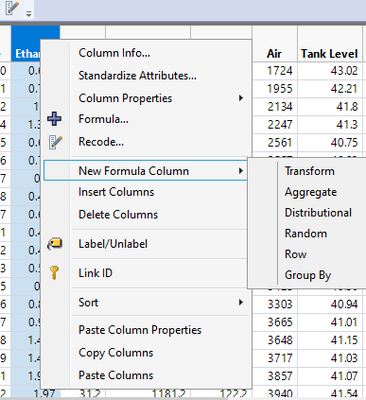
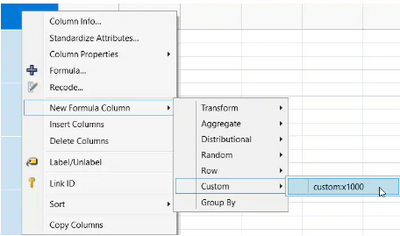
I am blind, it is right there under Custom Transform.  Thanks!


@Thierry_S are you referring to the menu presented when right clicking on a column header? If so I don't know of a way to do that, @Mark_Bailey if it is in that reference I must be blind because I am missing it!


This is the menu I think @Thierry_S refers to:

ih_0-1659556335928.png

Example from help:

Add Custom Functions(
	New Custom Function(
		"custom", 	// namespace in which new function resides
		"x1000", 	/* function name. The completely scoped name is
			"custom:x1000".*/
 
		Function( {x}, x * 1000 ),// function definition
 
// optional message to enables this as a custom transform

		<<Transform Category( 1 )
		)
);
 

ih_2-1659556522856.png


View solution in original post

7 REPLIES 7

Re: Is it possible to customize the Add Formula Column menu to include customize functions?

I do not see why not after reading the on-line help starting here.

hogi
Level XIII

Re: Is it possible to customize the Add Formula Column menu to include customize functions?


@Mark_Bailey wrote:

I do not see why not after reading the on-line help starting here.


Besides adding new custom functions ....
Is there a functionality to add existing functions?

e.g.: can I add  "is missing" to the new formula column menu?

The target: via right click menu generate a column


New Column( "missing(name)",	Formula( Is Missing( :name ) ))


up to now I just managed to generate a column 

New Column( "my is missing[name]",	Formula( hogi:my is missing( :name ) ))

[same functionality, but less useful]

via

Add Custom Functions(
	New Custom Function(
		"hogi",
		"my is missing",
		Function( {col},is missing(col)	), 
		<<Transform Category( "hogi" ),
		<<Description( "is missing for the new column formula menu" )
	)
);


So, with other words, is there are transform category functionality outside of the context of new custom functions?

hogi
Level XIII

Re: Is it possible to customize the Add Formula Column menu to include customize functions?

JMP Support:  TS-00152405


Existing functions cannot be added to the menu by name.  You will need to create a custom function that utilizes the existing function as you have already done.

ih
Super User (Alumni) ih
Super User (Alumni)

Re: Is it possible to customize the Add Formula Column menu to include customize functions?

I am blind, it is right there under Custom Transform.  Thanks!


@Thierry_S are you referring to the menu presented when right clicking on a column header? If so I don't know of a way to do that, @Mark_Bailey if it is in that reference I must be blind because I am missing it!


This is the menu I think @Thierry_S refers to:
ih_0-1659556335928.png

Example from help:

Add Custom Functions(
	New Custom Function(
		"custom", 	// namespace in which new function resides
		"x1000", 	/* function name. The completely scoped name is
			"custom:x1000".*/
 
		Function( {x}, x * 1000 ),// function definition
 
// optional message to enables this as a custom transform

		<<Transform Category( 1 )
		)
);
 

ih_2-1659556522856.png


hogi
Level XIII

Re: Is it possible to customize the Add Formula Column menu to include customize functions?

When I define a custom function, is  it possible to access the columns that were previously selected by NewFormulaColumn/GroupBy and use them as well as group by entries?

hogi
Level XIII

Re: Is it possible to customize the Add Formula Column menu to include customize functions?

hogi
Level XIII

Re: Is it possible to customize the Add Formula Column menu to include customize functions?

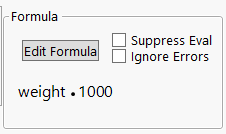
One one hand, it's very cool that 

Add Custom Functions(
	New Custom Function(
		"custom", 	// namespace in which new function resides
		"x1000", 	/* function name. The completely scoped name is
			"custom:x1000".*/
 
		Function( {x}, x * 1000 ),// function definition
 
// optional message to enables this as a custom transform

		<<Transform Category( 1 )
		)
);

puts MY OWN formula into jmp and that it really shows up in the Formula editor:
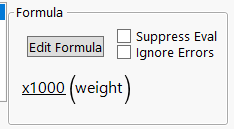
hogi_0-1694781137991.png


 and not 

hogi_1-1694781166921.png


But actually, I would prefer the latter one.
Next time Jmp is started, the new function will be gone. Same for the computer of my colleague or the computer of the person @ Jmp support.


Is there a way to get a command into the New formula Column right click menu which produces a column with the second formula?
e.g. via an additional argument forAdd Custom Functions( or New Custom Function(

Recommended Articles