- Don’t miss your chance to experience Discovery Summit Europe at our best available rate! Early bird registration through 31 Oct.
- Graph Builder Toolbar streamlines interactive graphing. Creates shortcuts on Report and GraphBuilder Helpers toolbars. Download and install the extension.
- Subscribe to RSS Feed
- Mark Topic as New
- Mark Topic as Read
- Float this Topic for Current User
- Bookmark
- Subscribe
- Mute
- Printer Friendly Page
Discussions
Solve problems, and share tips and tricks with other JMP users.- User Community
- :
- Discussions
- :
- Re: Is it possible to customize the Add Formula Column menu to include customize...


- Mark as New
- Bookmark
- Subscribe
- Mute
- Subscribe to RSS Feed
- Get Direct Link
- Report Inappropriate Content
Is it possible to customize the Add Formula Column menu to include customize functions?
Hi JMP Community,
I want to customize the Add Formula Column menu with a few functions I frequently use. Is this menu modifiable, and if it is, what is the correct method to do so?
Thank you.
Best,
TS
Accepted Solutions


- Mark as New
- Bookmark
- Subscribe
- Mute
- Subscribe to RSS Feed
- Get Direct Link
- Report Inappropriate Content
Re: Is it possible to customize the Add Formula Column menu to include customize functions?
I do not see why not after reading the on-line help starting here.


- Mark as New
- Bookmark
- Subscribe
- Mute
- Subscribe to RSS Feed
- Get Direct Link
- Report Inappropriate Content
Re: Is it possible to customize the Add Formula Column menu to include customize functions?
I am blind, it is right there under Custom Transform. Thanks!
@Thierry_S are you referring to the menu presented when right clicking on a column header? If so I don't know of a way to do that, @Mark_Bailey if it is in that reference I must be blind because I am missing it!
This is the menu I think @Thierry_S refers to:
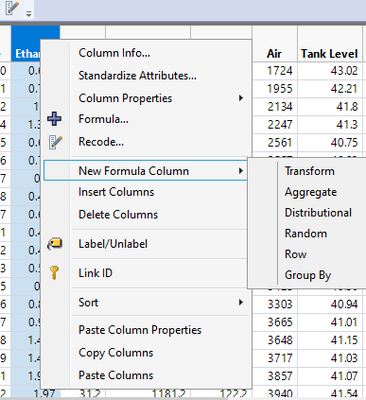
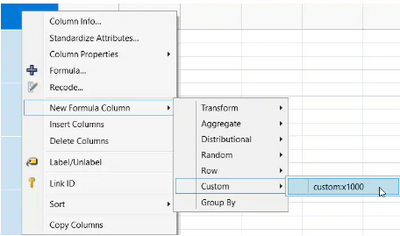
Example from help:
Add Custom Functions(
	New Custom Function(
		"custom", 	// namespace in which new function resides
		"x1000", 	/* function name. The completely scoped name is
			"custom:x1000".*/

		Function( {x}, x * 1000 ),// function definition

// optional message to enables this as a custom transform

		<<Transform Category( 1 )
		)
);
- Mark as New
- Bookmark
- Subscribe
- Mute
- Subscribe to RSS Feed
- Get Direct Link
- Report Inappropriate Content
Re: Is it possible to customize the Add Formula Column menu to include customize functions?
I do not see why not after reading the on-line help starting here.

- Mark as New
- Bookmark
- Subscribe
- Mute
- Subscribe to RSS Feed
- Get Direct Link
- Report Inappropriate Content
Re: Is it possible to customize the Add Formula Column menu to include customize functions?
@Mark_Bailey wrote:I do not see why not after reading the on-line help starting here.
Besides adding new custom functions ....
Is there a functionality to add existing functions?
e.g.: can I add "is missing" to the new formula column menu?
The target: via right click menu generate a column
New Column( "missing(name)", Formula( Is Missing( :name ) ))
up to now I just managed to generate a column
New Column( "my is missing[name]", Formula( hogi:my is missing( :name ) ))[same functionality, but less useful]
via
Add Custom Functions(
	New Custom Function(
		"hogi",
		"my is missing",
		Function( {col},is missing(col)	),
		<<Transform Category( "hogi" ),
		<<Description( "is missing for the new column formula menu" )
	)
);
So, with other words, is there are transform category functionality outside of the context of new custom functions?
- Mark as New
- Bookmark
- Subscribe
- Mute
- Subscribe to RSS Feed
- Get Direct Link
- Report Inappropriate Content
Re: Is it possible to customize the Add Formula Column menu to include customize functions?
JMP Support: TS-00152405
Existing functions cannot be added to the menu by name. You will need to create a custom function that utilizes the existing function as you have already done.
- Mark as New
- Bookmark
- Subscribe
- Mute
- Subscribe to RSS Feed
- Get Direct Link
- Report Inappropriate Content
Re: Is it possible to customize the Add Formula Column menu to include customize functions?
I am blind, it is right there under Custom Transform. Thanks!
@Thierry_S are you referring to the menu presented when right clicking on a column header? If so I don't know of a way to do that, @Mark_Bailey if it is in that reference I must be blind because I am missing it!
This is the menu I think @Thierry_S refers to:
Example from help:
Add Custom Functions(
	New Custom Function(
		"custom", 	// namespace in which new function resides
		"x1000", 	/* function name. The completely scoped name is
			"custom:x1000".*/

		Function( {x}, x * 1000 ),// function definition

// optional message to enables this as a custom transform

		<<Transform Category( 1 )
		)
);
- Mark as New
- Bookmark
- Subscribe
- Mute
- Subscribe to RSS Feed
- Get Direct Link
- Report Inappropriate Content
Re: Is it possible to customize the Add Formula Column menu to include customize functions?
When I define a custom function, is it possible to access the columns that were previously selected by NewFormulaColumn/GroupBy and use them as well as group by entries?
- Mark as New
- Bookmark
- Subscribe
- Mute
- Subscribe to RSS Feed
- Get Direct Link
- Report Inappropriate Content
Re: Is it possible to customize the Add Formula Column menu to include customize functions?
- Mark as New
- Bookmark
- Subscribe
- Mute
- Subscribe to RSS Feed
- Get Direct Link
- Report Inappropriate Content
Re: Is it possible to customize the Add Formula Column menu to include customize functions?
One one hand, it's very cool that
Add Custom Functions(
	New Custom Function(
		"custom", 	// namespace in which new function resides
		"x1000", 	/* function name. The completely scoped name is
			"custom:x1000".*/

		Function( {x}, x * 1000 ),// function definition

// optional message to enables this as a custom transform

		<<Transform Category( 1 )
		)
);
puts MY OWN formula into jmp and that it really shows up in the Formula editor:
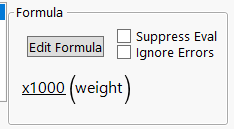
and not
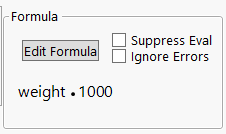
But actually, I would prefer the latter one.
Next time Jmp is started, the new function will be gone. Same for the computer of my colleague or the computer of the person @ Jmp support.
Is there a way to get a command into the New formula Column right click menu which produces a column with the second formula?
e.g. via an additional argument forAdd Custom Functions( or New Custom Function(
Recommended Articles
- © 2026 JMP Statistical Discovery LLC. All Rights Reserved.
- Terms of Use
- Privacy Statement
- Contact Us