- JMP will suspend normal business operations for our Winter Holiday beginning on Wednesday, Dec. 24, 2025, at 5:00 p.m. ET (2:00 p.m. ET for JMP Accounts Receivable).
Regular business hours will resume at 9:00 a.m. EST on Friday, Jan. 2, 2026. - We’re retiring the File Exchange at the end of this year. The JMP Marketplace is now your destination for add-ins and extensions.
- Subscribe to RSS Feed
- Mark Topic as New
- Mark Topic as Read
- Float this Topic for Current User
- Bookmark
- Subscribe
- Mute
- Printer Friendly Page
Discussions
Solve problems, and share tips and tricks with other JMP users.- JMP User Community
- :
- Discussions
- :
- I need to compare several columns

- Mark as New
- Bookmark
- Subscribe
- Mute
- Subscribe to RSS Feed
- Get Direct Link
- Report Inappropriate Content
I need to compare several columns
Hi.
I have a table with several columns with values that represent total votes obtained by political parties. I need a script that finds the greatest values of these columns and obtains the name of the column, i.e. the political party.
Thanks in advance for your help.
Manel
Accepted Solutions


 Community Manager
- Mark as New
- Bookmark
- Subscribe
- Mute
- Subscribe to RSS Feed
- Get Direct Link
- Report Inappropriate Content
Re: I need to compare several columns
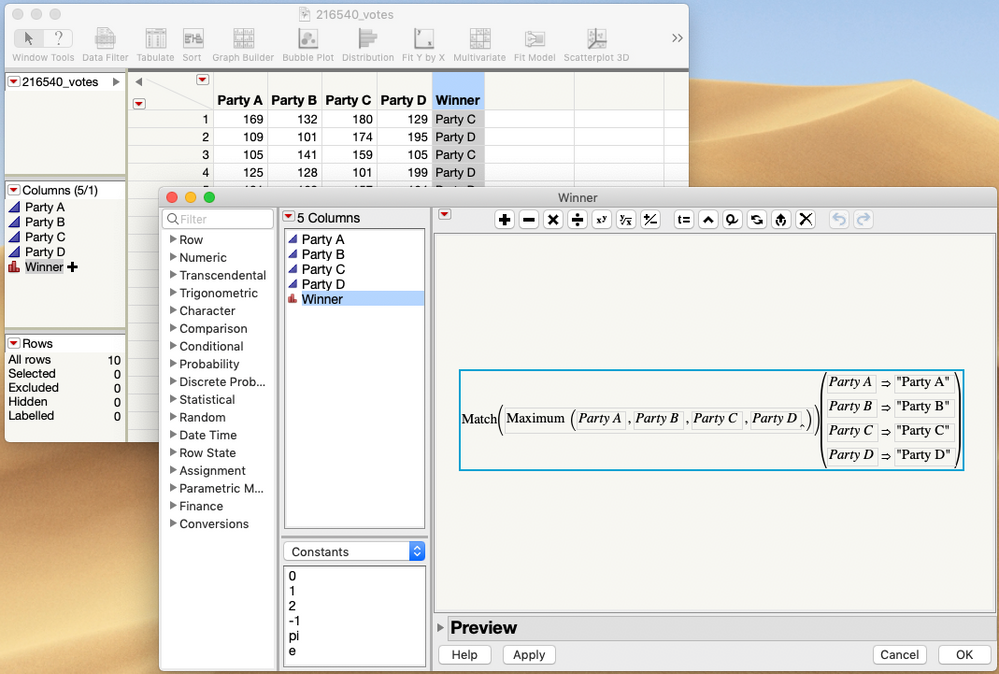
You can do this with the Formula Editor.
Use the Maximum() function to find the max value in the columns and then the Match() function to match it to which column it came from.
The attached data table has the example.
 Community Manager
- Mark as New
- Bookmark
- Subscribe
- Mute
- Subscribe to RSS Feed
- Get Direct Link
- Report Inappropriate Content
Re: I need to compare several columns
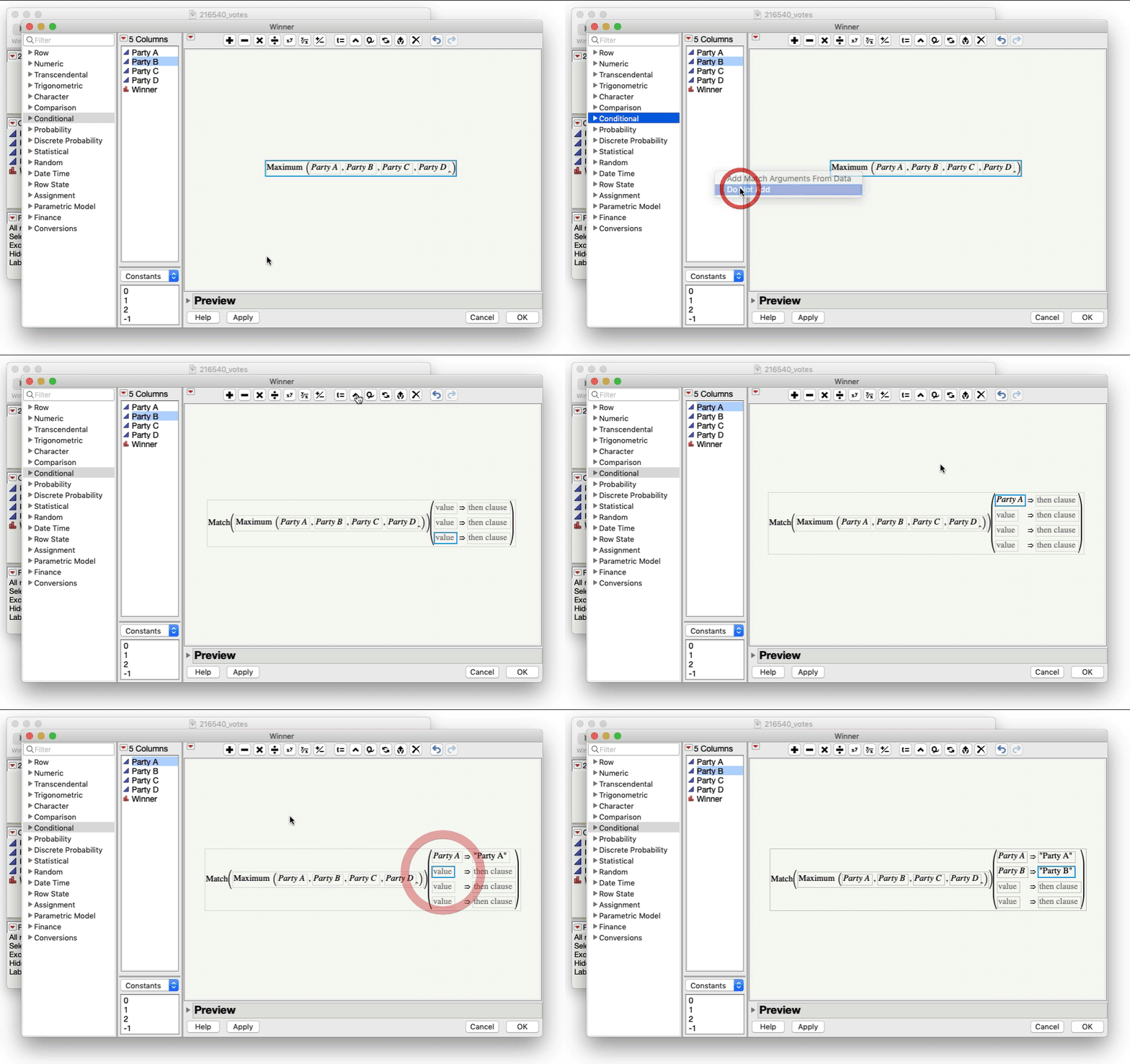
The Match() function is under the Conditionals section of the Formula Editor.
With the Maximum() funtion built and selected in the Editor, click on Conditionals -> Match. You'll be prompted about adding arguments, select "Do Not Add".
Then click on the ^ button in the toolbar to add the four pairs of arguments and then fill them in.
 Community Manager
- Mark as New
- Bookmark
- Subscribe
- Mute
- Subscribe to RSS Feed
- Get Direct Link
- Report Inappropriate Content
Re: I need to compare several columns
You can do this with the Formula Editor.
Use the Maximum() function to find the max value in the columns and then the Match() function to match it to which column it came from.
The attached data table has the example.
- Mark as New
- Bookmark
- Subscribe
- Mute
- Subscribe to RSS Feed
- Get Direct Link
- Report Inappropriate Content
Re: I need to compare several columns
Thanks a lot Jeff,
I have a question.
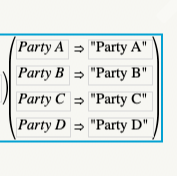
How to do the second part of the formula?
Community Manager
- Mark as New
- Bookmark
- Subscribe
- Mute
- Subscribe to RSS Feed
- Get Direct Link
- Report Inappropriate Content
Re: I need to compare several columns
The Match() function is under the Conditionals section of the Formula Editor.
With the Maximum() funtion built and selected in the Editor, click on Conditionals -> Match. You'll be prompted about adding arguments, select "Do Not Add".
Then click on the ^ button in the toolbar to add the four pairs of arguments and then fill them in.


- Mark as New
- Bookmark
- Subscribe
- Mute
- Subscribe to RSS Feed
- Get Direct Link
- Report Inappropriate Content
Re: I need to compare several columns
In script form :
dt << New Column( "Maximum",
		Character,
		"Nominal",
		Formula(
			Match(
					Maximum(
						:Party A,
						:Party B,
						:Party C,
						:Party D
					),
				:Party A, "Party A",
				:Party B, "Party B",
				:Party C, "Party C",
				:Party D, "Party D"
			)
));Recommended Articles
- © 2025 JMP Statistical Discovery LLC. All Rights Reserved.
- Terms of Use
- Privacy Statement
- Contact Us