- JMP will suspend normal business operations for our Winter Holiday beginning on Wednesday, Dec. 24, 2025, at 5:00 p.m. ET (2:00 p.m. ET for JMP Accounts Receivable).
Regular business hours will resume at 9:00 a.m. EST on Friday, Jan. 2, 2026. - We’re retiring the File Exchange at the end of this year. The JMP Marketplace is now your destination for add-ins and extensions.
- Subscribe to RSS Feed
- Mark Topic as New
- Mark Topic as Read
- Float this Topic for Current User
- Bookmark
- Subscribe
- Mute
- Printer Friendly Page
Discussions
Solve problems, and share tips and tricks with other JMP users.- JMP User Community
- :
- Discussions
- :
- How to use JSL to realize the hanging valley dynamic graph?

- Mark as New
- Bookmark
- Subscribe
- Mute
- Subscribe to RSS Feed
- Get Direct Link
- Report Inappropriate Content
How to use JSL to realize the hanging valley dynamic graph?
grok3
Thanks Experts!
Names Default To Here( 1 );

//----------------------------------------------------------
// 1. Create a data table and add rows
//    We only need 0 to 180 degrees (semi-circle)
//----------------------------------------------------------
dt = New Table( "Radial Mesh Plot" );
dt << Add Rows( 181 );  // 0 to 180 degrees, 181 points

//----------------------------------------------------------
// 2. Add column: theta (in radians)
//    From 0 to π (0 to 180 degrees)
//----------------------------------------------------------
dt << New Column( "theta",
    Numeric,
    "Continuous",
    Formula(
        (Pi() / 180) * (Row() - 1)  // Row() starts at 1, so subtract 1
    )
);

//----------------------------------------------------------
// 3. Outer semi-circle (radius 3)
//    X = 3 * sin(theta)
//    Y = 3 * cos(theta)
//----------------------------------------------------------
dt << New Column( "X_outer",
    Numeric,
    "Continuous",
    Formula(
        3 * Sin( :theta )
    )
);

dt << New Column( "Y_outer",
    Numeric,
    "Continuous",
    Formula(
        3 * Cos( :theta )
    )
);

//----------------------------------------------------------
// 4. Inner curve (teardrop shape, scaled)
//    Cardioid-like equation: r = 1 - cos(theta)
//    Scaled to fit within the outer semi-circle, k = 1
//    X = (1 - cos(theta)) * sin(theta)
//    Y = (1 - cos(theta)) * cos(theta)
//----------------------------------------------------------
dt << New Column( "X_inner",
    Numeric,
    "Continuous",
    Formula(
        (1 - Cos( :theta )) * Sin( :theta )
    )
);

dt << New Column( "Y_inner",
    Numeric,
    "Continuous",
    Formula(
        (1 - Cos( :theta )) * Cos( :theta )
    )
);

//----------------------------------------------------------
// 5. Use Graph Builder to plot the basic graph
//    - Outer semi-circle and inner curve (as boundaries)
//    - Add fill and mesh via Graphics Script later
//----------------------------------------------------------
gb = Graph Builder(
    Size( 600, 600 ),
    Show Control Panel( 0 ),
    Variables(
        X( :X_outer ),
        Y( :Y_outer )
    ),
    Elements(
        Line(
            X( :X_outer ),
            Y( :Y_outer ),
            Legend( "Outer Semi-Circle" ),
            Connect Points( 1 ),
            Line Color( "Blue" ),
            Line Width( 2 )
        ),
        Line(
            X( :X_inner ),
            Y( :Y_inner ),
            Legend( "Inner Teardrop" ),
            Connect Points( 1 ),
            Line Color( "Blue" ),
            Line Width( 2 )
        )
    ),
    SendToReport(
        Dispatch(
            {},
            "X_outer",
            ScaleBox,
            {Min( -3.5 ), Max( 3.5 )}
        ),
        Dispatch(
            {},
            "Y_outer",
            ScaleBox,
            {Min( -1.5 ), Max( 3.5 )}
        )
    )
);

//----------------------------------------------------------
// 6. Add fill and radial mesh
//    Use Graphics Script to draw the filled area and mesh lines
//----------------------------------------------------------
frame = (gb << Report)[FrameBox(1)];
frame << Add Graphics Script(
    // Fill the area (using Polygon)
    Fill Color( "Blue" );
    Transparency( 0.5 );  // Semi-transparent fill
    points = {};
    // Add points from the outer semi-circle
    For( i = 1, i <= 181, i++,
        points[i] = {dt:X_outer[i], dt:Y_outer[i]}
    );
    // Add points from the inner curve (in reverse to close the polygon)
    For( i = 181, i >= 1, i--,
        points[362 - i] = {dt:X_inner[i], dt:Y_inner[i]}
    );
    Polygon( points );

    // Draw radial mesh lines (every 5 degrees)
    Pen Color( "Blue" );
    Pen Size( 1 );
    For( i = 1, i <= 181, i += 5,  // Every 5 degrees
        Line(
            {dt:X_inner[i], dt:Y_inner[i]},
            {dt:X_outer[i], dt:Y_outer[i]}
        )
    );
);
- Tags:
- windows

- Mark as New
- Bookmark
- Subscribe
- Mute
- Subscribe to RSS Feed
- Get Direct Link
- Report Inappropriate Content
Re: How to use JSL to realize the hanging valley dynamic graph?
Is this a suggestion how JSL should look in the future?
- Mark as New
- Bookmark
- Subscribe
- Mute
- Subscribe to RSS Feed
- Get Direct Link
- Report Inappropriate Content
Re: How to use JSL to realize the hanging valley dynamic graph?
Just curious how to draw this motion picture in JSL.
AI writing JSL is still impossible to complete the implementation.
Thanks Experts!
- Mark as New
- Bookmark
- Subscribe
- Mute
- Subscribe to RSS Feed
- Get Direct Link
- Report Inappropriate Content
Re: How to use JSL to realize the hanging valley dynamic graph?
I fixed the Elements command - and got this plot:
Is this a suggestion how JSL should look in the future?
after fixing the arguments of the element function, the plot is generated and looks like this:

Seems that the AI misinterpreted your command.
One can see the "teardrop" which is mentioned in the comments - but it's not there in the input animation.
- Mark as New
- Bookmark
- Subscribe
- Mute
- Subscribe to RSS Feed
- Get Direct Link
- Report Inappropriate Content
Re: How to use JSL to realize the hanging valley dynamic graph?
I just got this code from the AI,
I just gave this GIF to GPT-o1, it supports GIF reading, it writes JSL, but this JSL is not implemented.
grok3 does not support GIF, so I will GPT-o1 written JSL and the existing problems to grok3 to modify.
It was modified to get the JSL above.It doesn't live up to the look I gave the original GIF.
But I wouldn't change it at all.
Thanks Experts!
- Mark as New
- Bookmark
- Subscribe
- Mute
- Subscribe to RSS Feed
- Get Direct Link
- Report Inappropriate Content
Re: How to use JSL to realize the hanging valley dynamic graph?
In some month when the issue with Halluzinations is reduced this new way of writing code will speed up our work tremendously!
- Mark as New
- Bookmark
- Subscribe
- Mute
- Subscribe to RSS Feed
- Get Direct Link
- Report Inappropriate Content
Re: How to use JSL to realize the hanging valley dynamic graph?
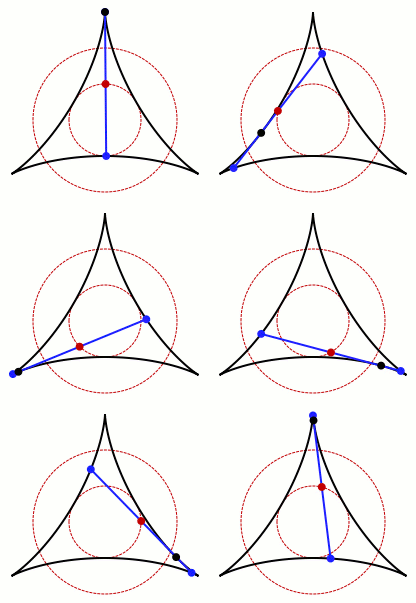
- Mark as New
- Bookmark
- Subscribe
- Mute
- Subscribe to RSS Feed
- Get Direct Link
- Report Inappropriate Content
Re: How to use JSL to realize the hanging valley dynamic graph?
intermediate step via Python:

import numpy as np
import matplotlib.pyplot as plt
from PIL import Image

# Parameters
r_inner = 1  # Radius of the inner circle
r_outer = 3  # Radius of the outer circle
a = 1        # Amplitude factor

# Function of the deltoid curve
def deltoid(t):
    x = (r_outer - r_inner) * np.cos(t) + a * np.cos((r_outer - r_inner) / r_inner * t)
    y = (r_outer - r_inner) * np.sin(t) - a * np.sin((r_outer - r_inner) / r_inner * t)
    return x, y

# 1. Parametric equation of the deltoid curve
t = np.linspace(0, 2 * np.pi, 1000)
x_deltoid, y_deltoid = deltoid(t)
deltoid_coordinates = np.column_stack((x_deltoid, y_deltoid))

# 2. Outer circle
theta_outer = np.linspace(0, 2 * np.pi, 1000)
x_outer = r_outer * np.cos(theta_outer)
y_outer = r_outer * np.sin(theta_outer)

# 3. Inner circle
theta_inner = np.linspace(0, 2 * np.pi, 1000)
x_inner = r_inner * np.cos(theta_inner)
y_inner = r_inner * np.sin(theta_inner)

# Compute the tangent
def tangent(x, slope, intercept):
    return slope * x + intercept

# Compute the derivatives to determine the tangent
def compute_tangent(t0):
    x0, y0 = deltoid(t0)

    h = 1e-5
    dx_dt = deltoid(t0 + h)[0] - deltoid(t0)[0]
    dy_dt = deltoid(t0 + h)[1] - deltoid(t0)[1]

    slope = dy_dt / dx_dt
    intercept = y0 - slope * x0
    return x0, y0, slope, intercept

# Function to compute the squared distance between a point on the tangent and a point on the deltoid
def distance_to_tangent(t, slope, intercept):
    x, y = deltoid(t)
    y_tangent = slope * x + intercept
    return (y - y_tangent)**2

# Function to compute the distance between a point and the tangent
def distance_to_line(point, slope, intercept):
    x, y = point
    # Analytical geometry: Distance of a point (x, y) from a line y = mx + b
    distance = abs(slope * x - y + intercept) / np.sqrt(slope**2 + 1)
    return distance

# Function to compute the two intersection points without scipy
def find_closest_points(slope, intercept):
    # Split the deltoid coordinates into three sections
    split1 = deltoid_coordinates[:len(deltoid_coordinates) // 3]
    split2 = deltoid_coordinates[len(deltoid_coordinates) // 3:2 * len(deltoid_coordinates) // 3]
    split3 = deltoid_coordinates[2 * len(deltoid_coordinates) // 3:]

    # Compute the minimum distance of the tangent point to each split
    split1_min_distance = min([distance_to_line(point, slope, intercept) for point in split1])
    split2_min_distance = min([distance_to_line(point, slope, intercept) for point in split2])
    split3_min_distance = min([distance_to_line(point, slope, intercept) for point in split3])

    # Determine the split with the smallest distance
    min_distances = [split1_min_distance, split2_min_distance, split3_min_distance]
    split_to_remove = np.argmin(min_distances)

    # Remove the split with the smallest distance
    splits = [split1, split2, split3]
    valid_splits = [split for i, split in enumerate(splits) if i != split_to_remove]

    # Find the point with the smallest distance in the remaining splits
    closest_points = []
    for split in valid_splits:
        distances = [distance_to_line(point, slope, intercept) for point in split]
        min_index = np.argmin(distances)
        closest_points.append(split[min_index])

    # Extract the coordinates of the two points
    (x1, y1), (x2, y2) = closest_points

    return (x1, y1), (x2, y2)

# Path to save the GIF animation
gif_path = "SteinerCurve.gif"

# Create images for the GIF animation
images = []
frames = np.linspace(0, 2 * np.pi, 100)

# Add the code in the loop
for t0 in frames:
    # Compute the point and tangent for the current t0
    x0, y0, slope, intercept = compute_tangent(t0)

    # Find the two points on the deltoid closest to the tangent
    (x1, y1), (x2, y2) = find_closest_points(slope, intercept)

    # Compute the distance between the two points
    distance = np.sqrt((x2 - x1)**2 + (y2 - y1)**2)

    # Compute the midpoint between the two points
    midpoint_x = (x1 + x2) / 2
    midpoint_y = (y1 + y2) / 2

    # Create the figure
    fig, ax = plt.subplots(figsize=(8, 8))
    ax.plot(x_deltoid, y_deltoid, label="Deltoid Curve")
    ax.plot(x_outer, y_outer, linestyle="--")
    ax.plot(x_inner, y_inner, linestyle="--")
    ax.plot([x1, x2], [y1, y2], 'ro')  # Mark the two points
    ax.plot(midpoint_x, midpoint_y, 'bo')  # Mark the midpoint
    ax.plot([x1, x2], [y1, y2], color="green")  # Draw the line between the points
    ax.plot(x0, y0, 'ko')  # Mark the tangent point in black

    # Limit the plot area
    ax.set_xlim(-3, 3)
    ax.set_ylim(-3, 3)

    ax.set_aspect('equal', 'box')
    ax.set_xlabel("x")
    ax.set_ylabel("y")
    ax.grid(True)

    # Save the image in a temporary buffer
    fig.canvas.draw()
    image = np.frombuffer(fig.canvas.tostring_argb(), dtype='uint8')
    image = image.reshape(fig.canvas.get_width_height()[::-1] + (4,))
    image = image[:, :, [1, 2, 3]]  # Convert ARGB to RGB
    images.append(Image.fromarray(image))
    plt.close(fig)

# Save the images as a GIF
images[0].save(gif_path, save_all=True, append_images=images[1:], duration=50, loop=0)

print(f"GIF animation saved at: {gif_path}")
- Mark as New
- Bookmark
- Subscribe
- Mute
- Subscribe to RSS Feed
- Get Direct Link
- Report Inappropriate Content
Re: How to use JSL to realize the hanging valley dynamic graph?
Excellent work.
Can experts share this code?
Thank you very much!
- Mark as New
- Bookmark
- Subscribe
- Mute
- Subscribe to RSS Feed
- Get Direct Link
- Report Inappropriate Content
Re: How to use JSL to realize the hanging valley dynamic graph?
second step: JSL

Names Default To Here( 1 );
// Parameters
r_inner = 1;  // Radius of the inner circle
r_outer = 3;  // Radius of the outer circle
a = 1;        // Amplitude factor

// Function for the deltoid curve
deltoid = Function( {t, r_inner, r_outer, a},
	{default local},
	x = (r_outer - r_inner) * Cos( t ) + a * Cos( (r_outer - r_inner) / r_inner * t );
	y = (r_outer - r_inner) * Sin( t ) - a * Sin( (r_outer - r_inner) / r_inner * t );
	Return( Eval List( {x, y} ) );
);

deltoid_coordinates = Transform Each( {i}, As List( Transpose( 1 :: 999 ) ),
	t = 2 * Pi() * (i - 1) / 999;
	deltoid( t, r_inner, r_outer, a );
);

nr = N Items( deltoid_coordinates );
nsplit = Round( nr / 3 );
splits = Eval List( {deltoid_coordinates[1 :: nsplit], deltoid_coordinates[nsplit + 1 :: 2 * nsplit], deltoid_coordinates[2 * nsplit + 1 :: nr]} );

// Function for the outer circle
myCircle = Function( {t, r},
	{default local},
	x = r * Cos( t );
	y = r * Sin( t );
	Return( Eval List( {x, y} ) );
);

// Compute the tangent
compute_tangent = Function( {t0, r_inner, r_outer, a},
	{default local},
	point = deltoid( t0, r_inner, r_outer, a );
	x0 = point[1];
	y0 = point[2];

	h = 1e-5;
	dx_dt = deltoid( t0 + h, r_inner, r_outer, a )[1] - deltoid( t0, r_inner, r_outer, a )[1];
	dy_dt = deltoid( t0 + h, r_inner, r_outer, a )[2] - deltoid( t0, r_inner, r_outer, a )[2];

	slope = dy_dt / dx_dt;
	intercept = y0 - slope * x0;

	Return( Eval List( {x0, y0, slope, intercept} ) );
);

// Function to compute the distance between a point and a line
distance_to_line = Function( {point, slope, intercept},
	{default local},
	x = point[1];
	y = point[2];
	Return( Abs( slope * x - y + intercept ) / Sqrt( slope ^ 2 + 1 ) );
);

// Function to compute intersection points
find_closest_points = Function( {slope, intercept, splits},
	{default local},
    // Split the deltoid coordinates into three sections


	// Compute the minimum distance for each section
	min_distances = Transform Each( {split}, Eval List( splits ),
		Min( Transform Each( {point}, split, distance_to_line( point, slope, intercept ) ) )
	);

	split_to_remove = Loc Min( Matrix( min_distances ) );

    // Select remaining valid sections
	valid_splits = Remove( Eval List( splits ), split_to_remove );

    // Find the closest point with the smallest distance
	closest_points = {};
	For Each( {split}, valid_splits,

		min_pos = Loc Min( Matrix( Transform Each( {point}, split, distance_to_line( point, slope, intercept ) ) ) );
		Insert Into( closest_points, split[min_pos] );
	);

	Return( closest_points );
);

// Create a new table
dt = New Table( "Deltoid Data",
	Add Rows( 999 ),

// Create columns for the table
	New Column( "angle", Numeric ),
	New Column( "x_deltoid", Numeric ),
	New Column( "y_deltoid", Numeric ),
	New Column( "x_inner", Numeric ),
	New Column( "y_inner", Numeric ),
	New Column( "x_outer", Numeric ),
	New Column( "y_outer", Numeric ),
	New Column( "x_0", Numeric ),
	New Column( "y_0", Numeric ),
	New Column( "x_1", Numeric ),
	New Column( "y_1", Numeric ),
	New Column( "x_2", Numeric ),
	New Column( "y_2", Numeric ),
	New Column( "x_center", Numeric ),
	New Column( "y_center", Numeric )
);

angles = 2 * Pi() * (As List( Transpose( 1 :: 999 ) ) - 1) / 999;
dt[0, "angle"] = angles;

dt[0, {"x_deltoid", "y_deltoid"}] = deltoid_coordinates;

dt[0, {"x_inner", "y_inner"}] = Transform Each( {t}, angles, myCircle( t, r_inner ) );
dt[0, {"x_outer", "y_outer"}] = Transform Each( {t}, angles, myCircle( t, r_outer ) );

dt[0, {"x_0", "y_0"}] = Transform Each( {t}, angles, compute_tangent( t, r_inner, r_outer, a )[{1, 2}] );

dt[0, {"x_1", "y_1", "x_2", "y_2"}] = Transform Each( {t}, angles,
	{slope, intersect} = compute_tangent( t, r_inner, r_outer, a )[{3, 4}];
	find_closest_points( slope, intersect, splits );
);

dt[0, "x_center"] = (dt[0, "x_1"] + dt[0, "x_2"]) / 2;
dt[0, "y_center"] = (dt[0, "y_1"] + dt[0, "y_2"]) / 2;

::myrow = 1;

New Window( "deltoid",

	V List Box(

		gb = Graph Builder(
			Size( 466, 471 ),
			Show Control Panel( 0 ),
			Summary Statistic( "Median" ),
			Graph Spacing( 4 ),
			Variables(
				X( :x_0 ),
				X( :x_1, Position( 1 ) ),
				X( :x_center, Position( 1 ) ),
				X( :x_2, Position( 1 ) ),
				Y( :y_0 ),
				Y( :y_1, Position( 1 ) ),
				Y( :y_center, Position( 1 ) ),
				Y( :y_2, Position( 1 ) )
			),
			Elements(
				Line(
					X( 1 ),
					X( 2 ),
					X( 4 ),
					Y( 1 ),
					Y( 2 ),
					Y( 4 ),
					Legend( 33 ),
					Ordering( "Within Row" ),
					Connection( "Arrow" ),
					Summary Statistic( "Mean" )
				),
				Points( X( 1 ), Y( 1 ), Legend( 34 ) ),
				Points( X( 2 ), Y( 2 ), Legend( 35 ) ),
				Points( X( 4 ), Y( 4 ), Legend( 36 ) ),
				Points( X( 3 ), Y( 3 ), Legend( 37 ) )
			),

			SendToReport(
				Dispatch( {}, {:x_0}, ScaleBox, {Min( -2.96728319980322 ), Max( 3.31428686472806 ), Inc( 1 ), Minor Ticks( 4 )} ),
				Dispatch( {}, {:y_0}, ScaleBox, {Min( -3.05132715458842 ), Max( 3.20702958989834 ), Inc( 1 ), Minor Ticks( 1 )} ),
				Dispatch( {}, "400", ScaleBox,
					{Legend Model( 34, Properties( 0, {Marker Size( 12 )}, Item ID( "y_0", 1 ) ) ), Legend Model(
						35,
						Properties( 0, {Marker Size( 12 )}, Item ID( "y_1", 1 ) )
					), Legend Model( 36, Properties( 0, {Marker Size( 12 )}, Item ID( "y_2", 1 ) ) ), Legend Model(
						37,
						Properties( 0, {Marker Size( 12 )}, Item ID( "y_center", 1 ) )
					)}
				),
				Dispatch( {}, "Graph Builder", FrameBox,
					{Marker Drawing Mode( "Outlined" ), Reference Line Order( 3 ), Add Graphics Script(
						2,
						Description( "" ),
						Pen Color( "black" );
						Line( :x_deltoid << get values(), :y_deltoid << get values() );

						Pen Color( "red" );
						XY Function( Cos( x ), Sin( x ), x, Min( 0 ), Max( 2 * Pi() ), inc( 0.001 ) );

						XY Function( 3 * Cos( x ), 3 * Sin( x ), x, Min( 0 ), Max( 2 * Pi() ), inc( 0.001 ) );

						Pen Color( "blue" );
						Pen Size( 3 );

						Line( {:x_1[::myrow], :y_1[::myrow]}, {:x_2[::myrow], :y_2[::myrow]} );
					)}
				)
			)
		)
	)
);


ldf = gb << Local Data Filter( Add Filter( columns( :angle ), Modeling Type( :angle, Nominal ), Where( :angle == 0 ) ) );

f = Function( {a},
	::myrow = Try( (ldf << Get Filtered Rows())[1], 1 )
);

fch = ldf << make filter change handler( f );
Recommended Articles
- © 2026 JMP Statistical Discovery LLC. All Rights Reserved.
- Terms of Use
- Privacy Statement
- Contact Us