- Don’t miss your chance to experience Discovery Summit Europe at our best available rate! Early bird registration through 31 Oct.
- Graph Builder Toolbar streamlines interactive graphing. Creates shortcuts on Report and GraphBuilder Helpers toolbars. Download and install the extension.
- Subscribe to RSS Feed
- Mark Topic as New
- Mark Topic as Read
- Float this Topic for Current User
- Bookmark
- Subscribe
- Mute
- Printer Friendly Page
Discussions
Solve problems, and share tips and tricks with other JMP users.- User Community
- :
- Discussions
- :
- Re: How to set a Column list box to required.

- Mark as New
- Bookmark
- Subscribe
- Mute
- Subscribe to RSS Feed
- Get Direct Link
- Report Inappropriate Content
How to set a Column list box to required.
My application should allow the users to select the required columns to proceed with further evaluation of the data. And I want to set the column list box status to required. But it is still displaying optional in the modal. How to set them to required.
Button box("X Column", colListX<<Append(colListData<<GetSelected)),
colListX = ColListBox(<<set required(1),nLines(1)),
Button box("Y Column", colListY<<Append(colListData<<GetSelected) ),
colListY = Col List Box(<<set required(1),nLines(1)),
Button box("BY Column", colListBy<<Append(colListData<<GetSelected)),
colListBy = Col List Box(nLines(1))
And I even wanted to display an error msg when the required fields are not selected. Can "Isempty" function used to check whether column list box is empty or not.
Error = expr(New Window("JMP ALERT" , <<Modal, Textbox("Please select the required fields."),ButtonBox("OK")));
If(Isempty(colListX) == 1,
Error
);Accepted Solutions


- Mark as New
- Bookmark
- Subscribe
- Mute
- Subscribe to RSS Feed
- Get Direct Link
- Report Inappropriate Content
Re: How to set a Column list box to required.
I typically check to see how many items are found after using the messsage
<< Get Items()
Here is an example from the Scripting Index that I did a slight modification to, to find the number of items returned from the Get Items message
Names Default To Here( 1 );
dt = Open( "$SAMPLE_DATA/Big Class.jmp" );
New Window( "Col List Box Example",
	Col List Box( all, width( 250 ), maxSelected( 1 ) ),
	fontobj = lb = Col List Box()
);
lb << Append( "height" );
nitems(lb << Get Items());- Mark as New
- Bookmark
- Subscribe
- Mute
- Subscribe to RSS Feed
- Get Direct Link
- Report Inappropriate Content
Re: How to set a Column list box to required.
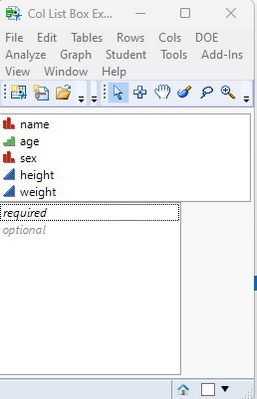
You need to use
<< set Min Items()
to set how many items are required for a given list
.png)
Names Default To Here( 1 );
dt = Open( "$SAMPLE_DATA/Big Class.jmp" );
New Window( "Col List Box Example",
	Col List Box( all, width( 250 ), maxSelected( 1 ) ),
	fontobj = lb = Col List Box()
);
lb << set Min Items(1);
Use the Scripting Index to find what messages can be passed to the Platforms, along with examples
- Mark as New
- Bookmark
- Subscribe
- Mute
- Subscribe to RSS Feed
- Get Direct Link
- Report Inappropriate Content
Re: How to set a Column list box to required.
Yeah, that worked. Thank you so much.
I have another doubt, how can we check whether ColListBox is empty? Can we use "IsEmpty" ? Could you help me with this.
Error = expr(New Window("JMP ALERT" , <<Modal, Textbox("Please select the required fields."),ButtonBox("OK")));
If(Isempty(colListX) == 1,
Error
);- Mark as New
- Bookmark
- Subscribe
- Mute
- Subscribe to RSS Feed
- Get Direct Link
- Report Inappropriate Content
Re: How to set a Column list box to required.
I typically check to see how many items are found after using the messsage
<< Get Items()
Here is an example from the Scripting Index that I did a slight modification to, to find the number of items returned from the Get Items message
Names Default To Here( 1 );
dt = Open( "$SAMPLE_DATA/Big Class.jmp" );
New Window( "Col List Box Example",
	Col List Box( all, width( 250 ), maxSelected( 1 ) ),
	fontobj = lb = Col List Box()
);
lb << Append( "height" );
nitems(lb << Get Items());- Mark as New
- Bookmark
- Subscribe
- Mute
- Subscribe to RSS Feed
- Get Direct Link
- Report Inappropriate Content
Re: How to set a Column list box to required.
Yeah, that worked. Thank you so much.
Recommended Articles
- © 2026 JMP Statistical Discovery LLC. All Rights Reserved.
- Terms of Use
- Privacy Statement
- Contact Us