- Don’t miss your chance to experience Discovery Summit Europe at our best available rate! Early bird registration through 31 Oct.
- Graph Builder Toolbar streamlines interactive graphing. Creates shortcuts on Report and GraphBuilder Helpers toolbars. Download and install the extension.
- Subscribe to RSS Feed
- Mark Topic as New
- Mark Topic as Read
- Float this Topic for Current User
- Bookmark
- Subscribe
- Mute
- Printer Friendly Page
Discussions
Solve problems, and share tips and tricks with other JMP users.- User Community
- :
- Discussions
- :
- Actual by Predicted plot.- expand x/y axis for confidence region

- Mark as New
- Bookmark
- Subscribe
- Mute
- Subscribe to RSS Feed
- Get Direct Link
- Report Inappropriate Content
Actual by Predicted plot.- expand x/y axis for confidence region
Hi,
I'm trying to build a model using the "Fit Model" platform and expand the x and y range of the Actual by Predicted plot. However, once I do that, I get to a point where the confidence interval and the mean prediction line are no longer shown (see below).
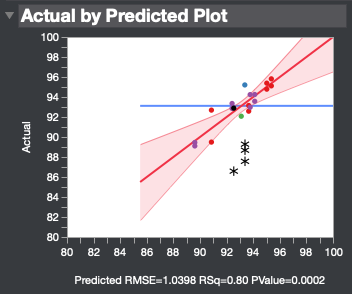
Any thoughts on how to fix this?
Thanks!


- Mark as New
- Bookmark
- Subscribe
- Mute
- Subscribe to RSS Feed
- Get Direct Link
- Report Inappropriate Content
Re: Actual by Predicted plot.- expand x/y axis for confidence region
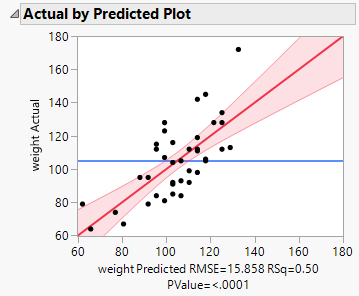
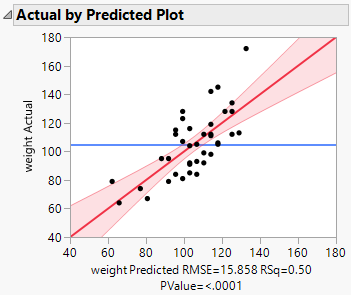
JMP discourages extrapolation of linear regression models. You can, though, achieve the result you want. Force the extrapolation by changing the Minimum value in the axis settings dialog. Double-click the axis and change the minimum value.
Before:
After:
- Mark as New
- Bookmark
- Subscribe
- Mute
- Subscribe to RSS Feed
- Get Direct Link
- Report Inappropriate Content
Re: Actual by Predicted plot.- expand x/y axis for confidence region
Hi Mark,
Thanks for the reply, I've tried doing this. But at some point the (maybe ~50% beyond the mean of the data), the prediction line and confidence regions can't be extrapolated and the plot is blank in that region. This looks like maybe a default in how these two lines are initially calculated. Is there a way to expand the region these are calculated over?
Thanks,
Matt
- Mark as New
- Bookmark
- Subscribe
- Mute
- Subscribe to RSS Feed
- Get Direct Link
- Report Inappropriate Content
Re: Actual by Predicted plot.- expand x/y axis for confidence region
The method I showed you is the only way I know how to extrapolate. You can pursue this issue with JMP Technical Support ([email protected]). Please report any help that they might provide here for others to benefit.
Recommended Articles
- © 2026 JMP Statistical Discovery LLC. All Rights Reserved.
- Terms of Use
- Privacy Statement
- Contact Us