- JMP will suspend normal business operations for our Winter Holiday beginning on Wednesday, Dec. 24, 2025, at 5:00 p.m. ET (2:00 p.m. ET for JMP Accounts Receivable).
Regular business hours will resume at 9:00 a.m. EST on Friday, Jan. 2, 2026. - We’re retiring the File Exchange at the end of this year. The JMP Marketplace is now your destination for add-ins and extensions.
- Subscribe to RSS Feed
- Mark Topic as New
- Mark Topic as Read
- Float this Topic for Current User
- Bookmark
- Subscribe
- Mute
- Printer Friendly Page
Discussions
Solve problems, and share tips and tricks with other JMP users.- JMP User Community
- :
- Discussions
- :
- How to maximise a window
- Mark as New
- Bookmark
- Subscribe
- Mute
- Subscribe to RSS Feed
- Get Direct Link
- Report Inappropriate Content
How to maximise a window
Please forgive me if this is simple but I am fairly new to scripting. How does one get a journal window to be maximised in a script? I am trying to automate some SPC control charts and I get them to a journal which is displayed on the screen of a particular equipment. If I run the script from the script window which is already maximised then the journal is maximised. If I open and the script straight from windows explorer then it does not maximise. Any help would be appreciated.
Thanks


- Mark as New
- Bookmark
- Subscribe
- Mute
- Subscribe to RSS Feed
- Get Direct Link
- Report Inappropriate Content
Re: How to maximise a window
Hi,
You can send the Maximize Window message to the journal. Here is the syntax:
Current Journal() << Maximize Window( 1 );
Hope that helps!
- Mark as New
- Bookmark
- Subscribe
- Mute
- Subscribe to RSS Feed
- Get Direct Link
- Report Inappropriate Content
Re: How to maximise a window
Hi WK,
Unfortunately that doesn't work for me. I am using an older version (4.0.5) of jmp so I wonder if that is the reason.
Regards
- Mark as New
- Bookmark
- Subscribe
- Mute
- Subscribe to RSS Feed
- Get Direct Link
- Report Inappropriate Content
Re: How to maximise a window
Unfortunately, neither Current Journal() nor Maximize Window were available in JMP 4. You could try using the Size Window command to resize the journal window to x pixels wide by y pixels high. You will need a reference to the journal window to make this work. In JMP 4, to get a handle to the journal, you had to save it then re-open it. Here is a simple example:
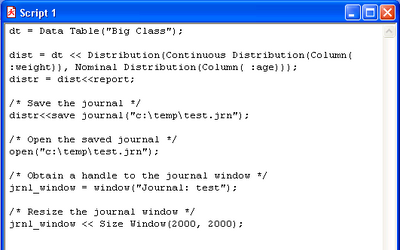
JSL has advanced so much since JMP 4. I definitely recommend upgrading!
Good luck!
Recommended Articles
- © 2025 JMP Statistical Discovery LLC. All Rights Reserved.
- Terms of Use
- Privacy Statement
- Contact Us