- Don’t miss your chance to experience Discovery Summit Europe at our best available rate! Early bird registration through 31 Oct.
- Graph Builder Toolbar streamlines interactive graphing. Creates shortcuts on Report and GraphBuilder Helpers toolbars. Download and install the extension.
- Subscribe to RSS Feed
- Mark Topic as New
- Mark Topic as Read
- Float this Topic for Current User
- Bookmark
- Subscribe
- Mute
- Printer Friendly Page
Discussions
Solve problems, and share tips and tricks with other JMP users.- User Community
- :
- Discussions
- :
- Re: How to make multi-row dashboards with JSL?

- Mark as New
- Bookmark
- Subscribe
- Mute
- Subscribe to RSS Feed
- Get Direct Link
- Report Inappropriate Content
How to make multi-row dashboards with JSL?
I saved the script for manually creating the dashboard to the data table and closed the data table
Reopening the table and executing the script was unsuccessful.
Thanks Experts!
dt=Open("$SAMPLE_DATA/Big Class.jmp");
p1=dt<< Graph Builder(Transform Column("row",Formula(Row())),Size(500,100),Show Control Panel(0),Show Legend(0),Show Title(0),Show Footer(0),Show X Axis(0),Show Y Axis(0),Show X Axis Title(0),Show Y Axis Title(0),Variables(X(:row),Y(:height)),Elements(Line(X,Y,Legend(5))));
p2=dt<< Graph Builder(Transform Column("row",Formula(Row())),Size(500,100),Show Control Panel(0),Show Legend(0),Show Title(0),Show Footer(0),Show X Axis(0),Show Y Axis(0),Show X Axis Title(0),Show Y Axis Title(0),Variables(X(:row),Y(:weight)),Elements(Line(X,Y,Legend(5))));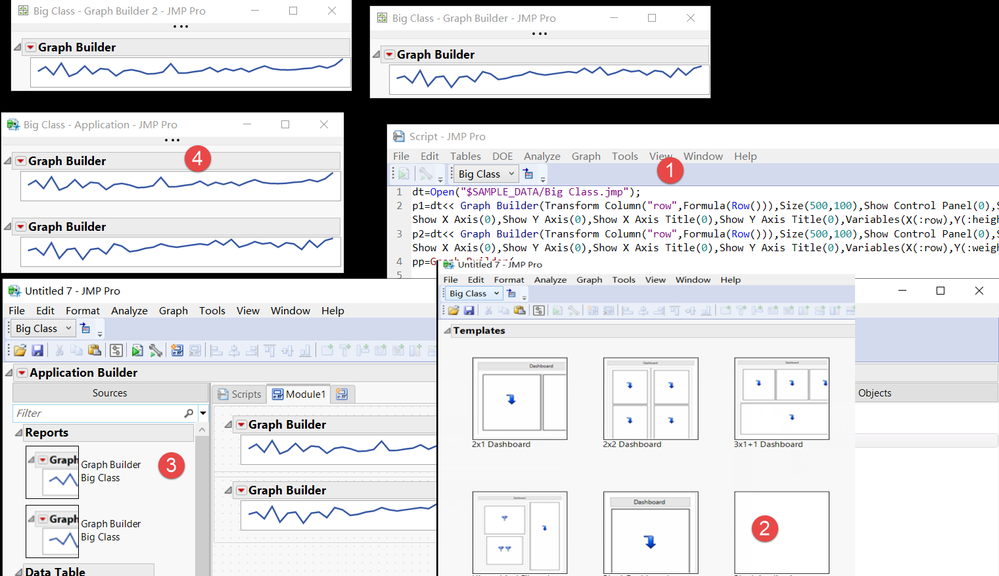
Accepted Solutions


- Mark as New
- Bookmark
- Subscribe
- Mute
- Subscribe to RSS Feed
- Get Direct Link
- Report Inappropriate Content
Re: How to make multi-row dashboards with JSL?
Names Default To Here(1);

dt = Open("$SAMPLE_DATA/Big Class.jmp");
dt << New Column("col1", Numeric, Continuous, Set Formula(Col Shuffle()));
dt << New Column("col2", Numeric, Continuous, Set Formula(Col Shuffle()));
dt << New Column("col3", Numeric, Continuous, Set Formula(Col Shuffle()));
dt << New Column("col4", Numeric, Continuous, Set Formula(Col Shuffle()));
dt << New Column("col5", Numeric, Continuous, Set Formula(Col Shuffle()));
dt << New Column("col6", Numeric, Continuous, Set Formula(Col Shuffle()));
dt << New Column("col7", Numeric, Continuous, Set Formula(Col Shuffle()));
dt << New Column("col8", Numeric, Continuous, Set Formula(Col Shuffle()));

create_report = function({dt, colname}, {Default Local},
	gb = dt << Graph Builder(
		Transform Column("row", Formula(Row())),
		Size(500, 100),
		Show Control Panel(0),
		Show Legend(0),
		Show Title(0),
		Show Footer(0),
		Show X Axis(0),
		Show Y Axis(0),
		Show X Axis Title(0),
		Show Y Axis Title(0),
		Variables(X(:row), Y(Eval(colname))),
		Elements(Line(X, Y, Legend(5))),
		SendToReport(
			Dispatch({}, "Graph Builder", OutlineBox,
				{Set Title(""), Image Export Display(Normal)}
			)
		)
	);

	return(gb);
);

lub = Lineup Box(N Col(1));
cols = {"col1", "col2", "col3", "col4", "col5", "col6", "col7", "col8"};

For Each({colname}, cols,
	lub << Append(create_report(dt, colname));
);

nw = new window("",
	lub
);- Mark as New
- Bookmark
- Subscribe
- Mute
- Subscribe to RSS Feed
- Get Direct Link
- Report Inappropriate Content
Re: How to make multi-row dashboards with JSL?
This is the saved JSL
Graph Builder(
	Size( 401, 40 ),
	Show Control Panel( 0 ),
	Show Legend( 0 ),
	Show Title( 0 ),
	Show Footer( 0 ),
	Show X Axis( 0 ),
	Show Y Axis( 0 ),
	Show X Axis Title( 0 ),
	Show Y Axis Title( 0 ),
	Variables( X( Transform Column( "row", Formula( Row() ) ) ), Y( :weight ) ),
	Elements( Line( X, Y, Legend( 5 ) ) )
)
- Mark as New
- Bookmark
- Subscribe
- Mute
- Subscribe to RSS Feed
- Get Direct Link
- Report Inappropriate Content
Re: How to make multi-row dashboards with JSL?
If my data table has 40 columns and I need to make this form of dashboard, how do I script it
Thanks!

- Mark as New
- Bookmark
- Subscribe
- Mute
- Subscribe to RSS Feed
- Get Direct Link
- Report Inappropriate Content
Re: How to make multi-row dashboards with JSL?
Is it necessary to use Application Builder? It might be easier to just build new window and append reports to that
Names Default To Here(1);

dt = Open("$SAMPLE_DATA/Big Class.jmp");

gb_expr = Expr(dt << Graph Builder(
	Transform Column("row", Formula(Row())),
	Size(500, 100),
	Show Control Panel(0),
	Show Legend(0),
	Show Title(0),
	Show Footer(0),
	Show X Axis(0),
	Show Y Axis(0),
	Show X Axis Title(0),
	Show Y Axis Title(0),
	Variables(X(:row), Y(:height)),
	Elements(Line(X, Y, Legend(5)))
));

lub = Lineup Box(N Col(1));

For(i = 1, i <= 10, i++,
	lub << append(gb_expr)
);

nw = new window("",
	lub
);- Mark as New
- Bookmark
- Subscribe
- Mute
- Subscribe to RSS Feed
- Get Direct Link
- Report Inappropriate Content
Re: How to make multi-row dashboards with JSL?
Thank jthi !
Can this name of each window be hidden?

- Mark as New
- Bookmark
- Subscribe
- Mute
- Subscribe to RSS Feed
- Get Direct Link
- Report Inappropriate Content
Re: How to make multi-row dashboards with JSL?
Yes they can. How you might want to do it depends on your application, below is one option using XPath
(nw << XPath("//OutlineBox[text() = 'Graph Builder']")) << Set Title("");- Mark as New
- Bookmark
- Subscribe
- Mute
- Subscribe to RSS Feed
- Get Direct Link
- Report Inappropriate Content
Re: How to make multi-row dashboards with JSL?
I still haven't succeeded with the full executable JSL
- Thanks Experts!
dt = Open("$SAMPLE_DATA/Big Class.jmp");
dt << New Column( "col1", Numeric, Continuous, Set Formula( Col Shuffle() ) );
dt << New Column( "col2", Numeric, Continuous, Set Formula( Col Shuffle() ) );
dt << New Column( "col3", Numeric, Continuous, Set Formula( Col Shuffle() ) );
dt << New Column( "col4", Numeric, Continuous, Set Formula( Col Shuffle() ) );
dt << New Column( "col5", Numeric, Continuous, Set Formula( Col Shuffle() ) );
dt << New Column( "col6", Numeric, Continuous, Set Formula( Col Shuffle() ) );
dt << New Column( "col7", Numeric, Continuous, Set Formula( Col Shuffle() ) );
dt << New Column( "col8", Numeric, Continuous, Set Formula( Col Shuffle() ) );
//??
gb_expr = Expr(dt << Graph Builder(
Transform Column("row", Formula(Row())),
Size(500, 100),
Show Control Panel(0),
Show Legend(0),
Show Title(0),
Show Footer(0),
Show X Axis(0),
Show Y Axis(0),
Show X Axis Title(0),
Show Y Axis Title(0),
Variables(X(:row), Y(:height)),
Elements(Line(X, Y, Legend(5)))
));
lub = Lineup Box(N Col(1));
p2=dt<< Graph Builder(Transform Column("row",Formula(Row())),Size(500,100),Show Control Panel(0),Show Legend(0),Show Title(0),Show Footer(0),Show X Axis(0),Show Y Axis(0),Show X Axis Title(0),Show Y Axis Title(0),Variables(X(:row),Y(:weight)),Elements(Line(X,Y,Legend(5))));
(p2 << XPath("//OutlineBox[text() = '图形生成器']")) << Set Title("");
lub = Lineup Box(N Col(1));
lub << append(gb_expr)
……
nw = new window("",
lub
);
(nw << XPath("//OutlineBox[text() = '图形生成器']")) << Set Title("");
- Mark as New
- Bookmark
- Subscribe
- Mute
- Subscribe to RSS Feed
- Get Direct Link
- Report Inappropriate Content
Re: How to make multi-row dashboards with JSL?
Report(platform)["图形生成器"]

- Mark as New
- Bookmark
- Subscribe
- Mute
- Subscribe to RSS Feed
- Get Direct Link
- Report Inappropriate Content
Re: How to make multi-row dashboards with JSL?
It can be hidden, but how to write multiple columns in JSL is still not successful.

- Mark as New
- Bookmark
- Subscribe
- Mute
- Subscribe to RSS Feed
- Get Direct Link
- Report Inappropriate Content
Re: How to make multi-row dashboards with JSL?
You have to slow down a little bit, explain what you need in small steps. Currently you are asking for multiple different things which all have different solutions as it seems like the goal is changing all the time just a little (makes providing robust solution very difficult).
Recommended Articles
- © 2026 JMP Statistical Discovery LLC. All Rights Reserved.
- Terms of Use
- Privacy Statement
- Contact Us