- JMP will suspend normal business operations for our Winter Holiday beginning on Wednesday, Dec. 24, 2025, at 5:00 p.m. ET (2:00 p.m. ET for JMP Accounts Receivable).
Regular business hours will resume at 9:00 a.m. EST on Friday, Jan. 2, 2026. - We’re retiring the File Exchange at the end of this year. The JMP Marketplace is now your destination for add-ins and extensions.
- Subscribe to RSS Feed
- Mark Topic as New
- Mark Topic as Read
- Float this Topic for Current User
- Bookmark
- Subscribe
- Mute
- Printer Friendly Page
Discussions
Solve problems, and share tips and tricks with other JMP users.- JMP User Community
- :
- Discussions
- :
- How to get check boxes to be change (or become visible or active) based on a pre...

- Mark as New
- Bookmark
- Subscribe
- Mute
- Subscribe to RSS Feed
- Get Direct Link
- Report Inappropriate Content
How to get check boxes to be change (or become visible or active) based on a previous selection in a modal window?
In the following script, I would like to do the following:
Based on the selection of TestTech, I want the appropriate TestStage check box list to appear (appear is preferred, if not become active if all options need to be visible). So,
- if Tech1 is selected, all TestSages with _Tech1 should be available to the user for selection
- if Tech2 is selected, all TestSages with _Tech2 should be available to the user for selection. This list is commented below
- if Tech3 is selected, all TestSages with _Tech3 should be available to the user for selection. This list is commented below, and so on.
I would also like "Select All" option to be available under each checkbox list.
How to do this?
Names Default To Here( 1 );
Clear Log ();

listInd = {};
returned2 = {};

win = New Window( "Select Tech & TestStage", << modal,

   V List Box (

   tb1=Text Box("Select Tech", << set font style("bold")),

	cb1 = List Box(
		{"Tech1", "Tech2", "Tech3"},
		returned1 = (cb1 << Get Selected());
		listInd= cb1 << Get Selected Indices;
	   ),

	tb1=Text Box("Select one or more TestStage", << set font style("bold")),

	cb2 = Check Box(
		{"Sage1_Tech1", "Sage2_Tech1", "Sage3_Tech1", "Sage4_Tech1", "Sage5_Tech1", "Sage6_Tech1"},
	    //{"Sage1_Tech2", "Sage2_Tech2", "Sage3_Tech2", "Sage4_Tech2", "Sage5_Tech2", "Sage6_Tech2"},
	    //{"Sage1_Tech3", "Sage2_Tech3", "Sage3_Tech3", "Sage4_Tech3", "Sage5_Tech3", "Sage6_Tech3"},
		returned2 = (cb2 << Get Selected());
		),

	tb3=Text Box("Query TestDate (last 6 months selected by default)", << set font style("bold")),

	end_date = Today();
	start_date = Date Increment(end_date, "month", -6, "actual");

	cb3 =	H List Box(
		Text Box("From:"),
		scal = Number Edit Box(
			start_date,
			<<Set Format(Format("yyyy-mm-dd")),
			<<SetFunction(Function({this}, start_date = scal << Get)),
			<<Set Show Spin Box(1)
		),
		Spacer Box(Size(20, 20)),
		Text Box("To:"),
		ecal = Number Edit Box(
			end_date,
			<<Set Format(Format("yyyy-mm-dd")),
			<<SetFunction(Function({this}, end_date = ecal << Get)),
			<<Set Show Spin Box(1)
		),

	);

),

);

Technology = eval (returned1[1]); show (Technology);
TestStages  = eval (returned2); show (TestStages);
TestStageOne  = TestStages[1]; show (TestStageOne );

sdt = Munger( Format Date( start_date, "yyyy-mm-dd" ), 1, "T", " " );
edt = Munger( Format Date( end_date, "yyyy-mm-dd" ), 1, "T", " " );

Show( sdt, edt );
- Tags:
- windows
Accepted Solutions


- Mark as New
- Bookmark
- Subscribe
- Mute
- Subscribe to RSS Feed
- Get Direct Link
- Report Inappropriate Content
Re: How to get check boxes to be change (or become visible or active) based on a previous selection in a modal window?
Names Default To Here(1);

lb_values = {"Tech1", "Tech2", "Tech3"};
cb_values = {"Sage1_Tech1", "Sage2_Tech1", "Sage3_Tech1", "Sage4_Tech1", "Sage5_Tech1", "Sage6_Tech1",
	"Sage1_Tech2", "Sage2_Tech2", "Sage3_Tech2", "Sage4_Tech2", "Sage5_Tech2", "Sage6_Tech2",
	"Sage1_Tech3", "Sage2_Tech3", "Sage3_Tech3", "Sage4_Tech3", "Sage5_Tech3", "Sage6_Tech3"
};

expr_update_cb = Expr(
	cur_sel = lb << get selected;
	cur_cb_values = Filter Each({val}, cb_values,
		cur_tech = Word(2, val, "_");
		Contains(cur_sel, cur_tech);
	);
	cb2 << Set items(cur_cb_values);
);

win = New Window("Select Tech & TestStage", <<modal,
	V List Box(
		tb1 = Text Box("Select Tech", <<set font style("bold")),
		lb = List Box({"Tech1", "Tech2", "Tech3"},
			expr_update_cb;
		),
		tb1 = Text Box("Select one or more TestStage", <<set font style("bold")),
		V List Box(
			cb2 = Check Box({}),
			H List Box(
				Button Box("Select All", cb2 << Set All(1)),
				Button Box("Clear All", cb2 << Set All(0))
			)
		),
		tb3 = Text Box(
			"Query TestDate (last 6 months selected by default)",
			<<set font style("bold")
		),
		end_date = Today();
		start_date = Date Increment(end_date, "month", -6, "actual");
		cb3 = H List Box(
			Text Box("From:"),
			scal = Number Edit Box(
				start_date,
				<<Set Format(Format("yyyy-mm-dd")),
				<<SetFunction(Function({this}, start_date = scal << Get)),
				<<Set Show Spin Box(1)
			),
			Spacer Box(Size(20, 20)),
			Text Box("To:"),
			ecal = Number Edit Box(
				end_date,
				<<Set Format(Format("yyyy-mm-dd")),
				<<SetFunction(Function({this}, end_date = ecal << Get)),
				<<Set Show Spin Box(1)
			)
		);
	)
);
Edit: Copy pasted originally wrong script
- Mark as New
- Bookmark
- Subscribe
- Mute
- Subscribe to RSS Feed
- Get Direct Link
- Report Inappropriate Content
Re: How to get check boxes to be change (or become visible or active) based on a previous selection in a modal window?
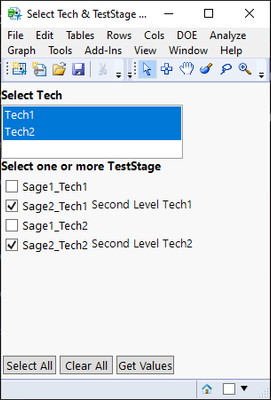
Use associative array to store your different lists, create expressions/functions to create a collector for checkboxes and ifboxes.
This doesn't use modal window, as it is much easier to develop when not using one as you can easily test different gets and such from the script editor
Names Default To Here(1);

tech_options = {"Tech1", "Tech2"};
stages_tech1 = {"Sage1_Tech1", "Sage2_Tech1"};
stages_tech1_text = {"First Level Tech1", "Second Level Tech1"};
stages_tech2 = {"Sage1_Tech2", "Sage2_Tech2"};
stages_tech2_text = {"First Level Tech2", "Second Level Tech2"};


aa_tech = Associative Array();
aa_tech["Tech1"] = Associative Array(stages_tech1, stages_tech1_text);
aa_tech["Tech2"] = Associative Array(stages_tech2, stages_tech2_text);

get_cbs = Expr(
	cbs = cb_lub << XPath("//CheckBoxBox");
);

update_checkboxes = Expr(
	tech_selections = lb << get selected;
	cb_lub = Lineup Box(N Col(2));
	For Each({tech_selection}, tech_selections,
		For Each({{stage, text}}, aa_tech[tech_selection],
			cb_lub << Append(Check Box(stage, << Set Function(function({this},
				(this << sib) << Set(this << get);
			))));
			cb_lub << Append(IfBox(0, Text Box(text)))
		);
	);
	Try((cb_collector << child) << Delete Box());
	cb_collector << Append(cb_lub);
);

win = New Window("Select Tech & TestStage",
	V List Box(
		H List Box(
			Spacer Box(Size(0, 300)), // to force height
			V List Box(
				Spacer Box(Size(300, 0)), // to force width
				tb1 = Text Box("Select Tech", <<set font style("bold")),
				lb = List Box(tech_options,
					update_checkboxes
				),
				tb1 = Text Box("Select one or more TestStage", <<set font style("bold")),
				V List Box(
					cb_collector = V List Box(
						cb_lub = Lineup Box(N Col(2))
					)
				)
			)
		),
		H List Box(
			Button Box("Select All",
				get_cbs;
				If(N Items(cbs),
					cbs << Set All(1, Run Script(1));
				)
			),
			Button Box("Clear All",
				get_cbs;
				If(N Items(cbs),
					cbs << Set All(0, Run Script(1));
				)
			),
			Button Box("Get Values",
				get_cbs;
				If(N Items(cbs),
					cur_selection = {};
					For Each({cb_vals}, cbs << get selected,
						Insert Into(cur_selection, cb_vals)
					);
				,
					cur_selection = {}
				);
			)
		)
	)
);
- Mark as New
- Bookmark
- Subscribe
- Mute
- Subscribe to RSS Feed
- Get Direct Link
- Report Inappropriate Content
Re: How to get check boxes to be change (or become visible or active) based on a previous selection in a modal window?
This might give you some ideas what you could do
Names Default To Here(1);

lb_values = {"Tech1", "Tech2", "Tech3"};
cb_values = {"Sage1_Tech1", "Sage2_Tech1", "Sage3_Tech1", "Sage4_Tech1", "Sage5_Tech1", "Sage6_Tech1",
	"Sage1_Tech2", "Sage2_Tech2", "Sage3_Tech2", "Sage4_Tech2", "Sage5_Tech2", "Sage6_Tech2",
	"Sage1_Tech3", "Sage2_Tech3", "Sage3_Tech3", "Sage4_Tech3", "Sage5_Tech3", "Sage6_Tech3"
};

expr_update_cb = Expr(
	cur_sel = lb << get selected;
	If(N Items(cur_sel),
		cur_cb_values = Filter Each({val}, cb_values,
			cur_tech = Word(2, val, "_");
			Contains(cur_sel, cur_tech);
		);
	,
		cur_cb_values = cb_values;
	);
	cb2 << Set items(cur_cb_values);
);

win = New Window("Select Tech & TestStage", <<modal,
	V List Box(
		tb1 = Text Box("Select Tech", <<set font style("bold")),
		lb = List Box({"Tech1", "Tech2", "Tech3"},
			expr_update_cb;
		),
		tb1 = Text Box("Select one or more TestStage", <<set font style("bold")),
		V List Box(
			cb2 = Check Box(cb_values),
			H List Box(
				Button Box("Select All", cb2 << Set All(1)),
				Button Box("Clear All", cb2 << Set All(0))
			)
		),
		tb3 = Text Box(
			"Query TestDate (last 6 months selected by default)",
			<<set font style("bold")
		),
		end_date = Today();
		start_date = Date Increment(end_date, "month", -6, "actual");
		cb3 = H List Box(
			Text Box("From:"),
			scal = Number Edit Box(
				start_date,
				<<Set Format(Format("yyyy-mm-dd")),
				<<SetFunction(Function({this}, start_date = scal << Get)),
				<<Set Show Spin Box(1)
			),
			Spacer Box(Size(20, 20)),
			Text Box("To:"),
			ecal = Number Edit Box(
				end_date,
				<<Set Format(Format("yyyy-mm-dd")),
				<<SetFunction(Function({this}, end_date = ecal << Get)),
				<<Set Show Spin Box(1)
			)
		);
	)
);- Mark as New
- Bookmark
- Subscribe
- Mute
- Subscribe to RSS Feed
- Get Direct Link
- Report Inappropriate Content
Re: How to get check boxes to be change (or become visible or active) based on a previous selection in a modal window?
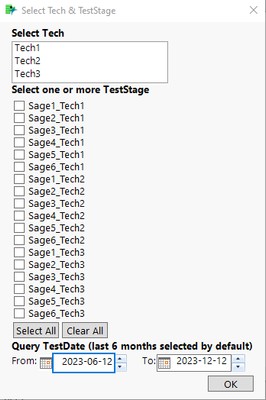
@jthi Thanks. Running your script starts off by showing all TestStages under TestStage by default (pasted below) and then once a Tech is selected, it behaves as needed.
Could the script be modified to not show nothing first under TestStage selection text and then once the Tech is selected, show the appropriate/available TestStages?
- Mark as New
- Bookmark
- Subscribe
- Mute
- Subscribe to RSS Feed
- Get Direct Link
- Report Inappropriate Content
Re: How to get check boxes to be change (or become visible or active) based on a previous selection in a modal window?
You could initialize the check box with empty list instead of cb_values.
- Mark as New
- Bookmark
- Subscribe
- Mute
- Subscribe to RSS Feed
- Get Direct Link
- Report Inappropriate Content
Re: How to get check boxes to be change (or become visible or active) based on a previous selection in a modal window?
@jthi I have already tried with
cb_values = {};but I think I am not placing this correctly. Where should this statement go?
- Mark as New
- Bookmark
- Subscribe
- Mute
- Subscribe to RSS Feed
- Get Direct Link
- Report Inappropriate Content
Re: How to get check boxes to be change (or become visible or active) based on a previous selection in a modal window?
This is the place where you set those values first time
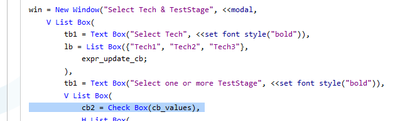
also if you want it to be always empty when no selections are done you will also have to make small modification to expr_update_cb
- Mark as New
- Bookmark
- Subscribe
- Mute
- Subscribe to RSS Feed
- Get Direct Link
- Report Inappropriate Content
Re: How to get check boxes to be change (or become visible or active) based on a previous selection in a modal window?
@jthi . In that case I did place the
cb_values = {};correctly, but did not do the small modification to expr_update_cb. Just placing the above line before cb2= Check Box(... does not do what's needed once Tech is selected. Thinking.......
- Mark as New
- Bookmark
- Subscribe
- Mute
- Subscribe to RSS Feed
- Get Direct Link
- Report Inappropriate Content
Re: How to get check boxes to be change (or become visible or active) based on a previous selection in a modal window?
Initialize Check Box with empty list not cb_values (they are different things).
Within the expression this is the part you have to consider (and understand)
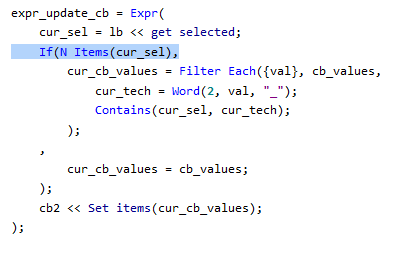
Why is if statement used here? What would happen if we go to else? What would happen if we don't have it, we have an empty list and go to Filter Each?
- Mark as New
- Bookmark
- Subscribe
- Mute
- Subscribe to RSS Feed
- Get Direct Link
- Report Inappropriate Content
Re: How to get check boxes to be change (or become visible or active) based on a previous selection in a modal window?
@jthi Thanks for the pointers, I tried last night but without success so far.
This is how I understand the requirement, if none of the items are selected in under lb then cb2 should not show. cb2 should show only when N Items(cur_sel) ≥1.
However, expr_update_cb fires only when one or more items are selected in lb.
It is not clear to me how to modify expr_update_cb to be executed when nothing is selected under lb.
Should the requirement of not showing anything under cb2 be handled with an if/else statement around lb i.e. if nothing is selected under lb, do not show cb2?
- Mark as New
- Bookmark
- Subscribe
- Mute
- Subscribe to RSS Feed
- Get Direct Link
- Report Inappropriate Content
Re: How to get check boxes to be change (or become visible or active) based on a previous selection in a modal window?
Names Default To Here(1);

lb_values = {"Tech1", "Tech2", "Tech3"};
cb_values = {"Sage1_Tech1", "Sage2_Tech1", "Sage3_Tech1", "Sage4_Tech1", "Sage5_Tech1", "Sage6_Tech1",
	"Sage1_Tech2", "Sage2_Tech2", "Sage3_Tech2", "Sage4_Tech2", "Sage5_Tech2", "Sage6_Tech2",
	"Sage1_Tech3", "Sage2_Tech3", "Sage3_Tech3", "Sage4_Tech3", "Sage5_Tech3", "Sage6_Tech3"
};

expr_update_cb = Expr(
	cur_sel = lb << get selected;
	cur_cb_values = Filter Each({val}, cb_values,
		cur_tech = Word(2, val, "_");
		Contains(cur_sel, cur_tech);
	);
	cb2 << Set items(cur_cb_values);
);

win = New Window("Select Tech & TestStage", <<modal,
	V List Box(
		tb1 = Text Box("Select Tech", <<set font style("bold")),
		lb = List Box({"Tech1", "Tech2", "Tech3"},
			expr_update_cb;
		),
		tb1 = Text Box("Select one or more TestStage", <<set font style("bold")),
		V List Box(
			cb2 = Check Box({}),
			H List Box(
				Button Box("Select All", cb2 << Set All(1)),
				Button Box("Clear All", cb2 << Set All(0))
			)
		),
		tb3 = Text Box(
			"Query TestDate (last 6 months selected by default)",
			<<set font style("bold")
		),
		end_date = Today();
		start_date = Date Increment(end_date, "month", -6, "actual");
		cb3 = H List Box(
			Text Box("From:"),
			scal = Number Edit Box(
				start_date,
				<<Set Format(Format("yyyy-mm-dd")),
				<<SetFunction(Function({this}, start_date = scal << Get)),
				<<Set Show Spin Box(1)
			),
			Spacer Box(Size(20, 20)),
			Text Box("To:"),
			ecal = Number Edit Box(
				end_date,
				<<Set Format(Format("yyyy-mm-dd")),
				<<SetFunction(Function({this}, end_date = ecal << Get)),
				<<Set Show Spin Box(1)
			)
		);
	)
);
Edit: Copy pasted originally wrong script
Recommended Articles
- © 2026 JMP Statistical Discovery LLC. All Rights Reserved.
- Terms of Use
- Privacy Statement
- Contact Us