cancel
Showing results for 
Show  only  | Search instead for 
Did you mean: 
  • JMP will suspend normal business operations for our Winter Holiday beginning on Wednesday, Dec. 24, 2025, at 5:00 p.m. ET (2:00 p.m. ET for JMP Accounts Receivable).
    Regular business hours will resume at 9:00 a.m. EST on Friday, Jan. 2, 2026.
  • We’re retiring the File Exchange at the end of this year. The JMP Marketplace is now your destination for add-ins and extensions.

Discussions

Solve problems, and share tips and tricks with other JMP users.
%3CLINGO-SUB%20id%3D%22lingo-sub-210758%22%20slang%3D%22en-US%22%20mode%3D%22NONE%22%3EClustering%20%26gt%3B%20Hierarchical%20(%E6%A8%99%E6%BA%96%E5%8C%96%E3%81%AA%E3%81%97)%20%E3%81%A7%E3%82%AB%E3%83%A9%E3%83%BC%20%E3%83%9E%E3%83%83%E3%83%97%20%E3%83%AC%E3%83%99%E3%83%AB%E3%82%92%E3%82%AB%E3%82%B9%E3%82%BF%E3%83%9E%E3%82%A4%E3%82%BA%E3%81%99%E3%82%8B%E6%96%B9%E6%B3%95%E3%81%AF%3F%3C%2FLINGO-SUB%3E%3CLINGO-BODY%20id%3D%22lingo-body-210758%22%20slang%3D%22en-US%22%20mode%3D%22NONE%22%3E%3CP%3EClustering%20%26gt%3B%20Hierarchical%20%E3%81%AB%E3%82%88%E3%81%A3%E3%81%A6%E7%94%9F%E6%88%90%E3%81%95%E3%82%8C%E3%81%9F%E3%82%AB%E3%83%A9%E3%83%BC%20%E3%83%9E%E3%83%83%E3%83%97%E3%81%AE%E5%87%A1%E4%BE%8B%E3%81%AE%E8%89%B2%E8%A8%AD%E5%AE%9A%20(%E3%81%A4%E3%81%BE%E3%82%8A%E3%80%81%E3%82%B0%E3%83%A9%E3%83%87%E3%83%BC%E3%82%B7%E3%83%A7%E3%83%B3)%20%E3%82%92%E5%A4%89%E6%9B%B4%E3%81%97%E3%81%9F%E3%81%84%E3%81%A8%E8%80%83%E3%81%88%E3%81%A6%E3%81%84%E3%81%BE%E3%81%99%E3%80%82%20%E5%85%B7%E4%BD%93%E7%9A%84%E3%81%AB%E3%81%AF%E3%80%81%E3%82%AB%E3%83%A9%E3%83%BC%20%E3%82%B0%E3%83%A9%E3%83%87%E3%83%BC%E3%82%B7%E3%83%A7%E3%83%B3%E3%82%92%200%20%E3%81%AB%E4%B8%AD%E5%A4%AE%E6%8F%83%E3%81%88%E3%81%97%E3%80%81%E6%9C%80%E5%A4%A7%E5%80%A4%E3%81%A8%E6%9C%80%E5%B0%8F%E5%80%A4%E3%82%92%E6%89%8B%E5%8B%95%E3%81%A7%E5%89%B2%E3%82%8A%E5%BD%93%E3%81%A6%E3%81%A6%E3%80%81%E3%82%AB%E3%83%A9%E3%83%BC%20%E3%83%9E%E3%83%83%E3%83%97%E3%81%8C%E5%AF%BE%E7%A7%B0%E3%81%AB%E3%81%AA%E3%82%8B%E3%82%88%E3%81%86%E3%81%AB%E3%81%97%E3%81%9F%E3%81%84%E3%81%A8%E8%80%83%E3%81%88%E3%81%A6%E3%81%84%E3%81%BE%E3%81%99%E3%80%82%3C%2FP%3E%3CP%3E%26nbsp%3B%3C%2FP%3E%3CP%3E%E8%89%B2%E3%81%AE%E3%82%B0%E3%83%A9%E3%83%87%E3%83%BC%E3%82%B7%E3%83%A7%E3%83%B3%E3%82%92%E4%BD%BF%E7%94%A8%E3%81%99%E3%82%8B%E4%BB%96%E3%81%AE%E3%81%99%E3%81%B9%E3%81%A6%E3%81%AE%E3%83%97%E3%83%A9%E3%83%83%E3%83%88%E3%83%95%E3%82%A9%E3%83%BC%E3%83%A0%E3%81%A7%E3%81%AF%E3%80%81%E5%87%A1%E4%BE%8B%E3%82%92%E5%8F%B3%E3%82%AF%E3%83%AA%E3%83%83%E3%82%AF%E3%81%97%E3%81%A6%E3%81%9D%E3%81%AE%E3%83%91%E3%83%A9%E3%83%A1%E3%83%BC%E3%82%BF%E3%83%BC%E3%82%92%E7%B7%A8%E9%9B%86%E3%81%99%E3%82%8B%E3%81%A0%E3%81%91%E3%81%A7%E3%81%99%E3%81%8C%E3%80%81%E3%81%93%E3%81%AE%E3%82%AA%E3%83%97%E3%82%B7%E3%83%A7%E3%83%B3%E3%81%AF%E3%82%AF%E3%83%A9%E3%82%B9%E3%82%BF%E3%83%BC%20%E3%83%97%E3%83%A9%E3%83%83%E3%83%88%E3%83%95%E3%82%A9%E3%83%BC%E3%83%A0%E3%81%A7%E3%81%AF%E4%BD%BF%E7%94%A8%E3%81%A7%E3%81%8D%E3%81%BE%E3%81%9B%E3%82%93%E3%80%82%3C%2FP%3E%3CP%3E(JMP14.1.0%E3%80%81Windows10)%3C%2FP%3E%3CP%3E%26nbsp%3B%3C%2FP%3E%3CP%3E%E3%81%94%E5%8D%94%E5%8A%9B%E3%81%82%E3%82%8A%E3%81%8C%E3%81%A8%E3%81%86%E3%81%94%E3%81%96%E3%81%84%E3%81%BE%E3%81%97%E3%81%9F%E3%80%82%3C%2FP%3E%3CP%3E%26nbsp%3B%3C%2FP%3E%3CP%3ETS%3C%2FP%3E%3C%2FLINGO-BODY%3E%3CLINGO-SUB%20id%3D%22lingo-sub-210771%22%20slang%3D%22en-US%22%20mode%3D%22NONE%22%3ERe%3A%20%E3%82%AF%E3%83%A9%E3%82%B9%E3%82%BF%E3%83%AA%E3%83%B3%E3%82%B0%20%26gt%3B%20%E9%9A%8E%E5%B1%A4%20(%E6%A8%99%E6%BA%96%E5%8C%96%E3%81%AA%E3%81%97)%20%E3%81%A7%E3%82%AB%E3%83%A9%E3%83%BC%20%E3%83%9E%E3%83%83%E3%83%97%20%E3%83%AC%E3%83%99%E3%83%AB%E3%82%92%E3%82%AB%E3%82%B9%E3%82%BF%E3%83%9E%E3%82%A4%E3%82%BA%E3%81%99%E3%82%8B%E6%96%B9%E6%B3%95%E3%81%AF%3F%3C%2FLINGO-SUB%3E%3CLINGO-BODY%20id%3D%22lingo-body-210771%22%20slang%3D%22en-US%22%20mode%3D%22NONE%22%3E%3CP%3E%E3%82%84%E3%81%82%3CA%20href%3D%22https%3A%2F%2Fcommunity.jmp.com%2Ft5%2Fuser%2Fviewprofilepage%2Fuser-id%2F11634%22%20target%3D%22_blank%22%3E%40%E3%83%86%E3%82%A3%E3%82%A8%E3%83%AA%E3%83%BC_S%3C%2FA%3E%3C%2FP%3E%0A%3CP%3E%E3%81%AE%E3%82%AB%E3%83%A9%E3%83%BC%E3%83%9E%E3%83%83%E3%83%97%3CSPAN%3EClustering%20%26gt%3B%20Hierarchical%20%E3%81%AF%E3%80%81Graph%20%26gt%3B%20Cell%20Plot%20%E3%81%A8%E3%81%BB%E3%81%A8%E3%82%93%E3%81%A9%E5%90%8C%E3%81%98%E3%82%88%E3%81%86%E3%81%AB%E5%8B%95%E4%BD%9C%E3%81%97%E3%81%BE%E3%81%99%E3%80%82%20%E4%B8%80%E8%88%AC%E7%9A%84%E3%81%AB%E3%81%AF%E3%82%B0%E3%83%A9%E3%83%87%E3%83%BC%E3%82%B7%E3%83%A7%E3%83%B3%E3%82%92%E5%88%B6%E5%BE%A1%E3%81%A7%E3%81%8D%E3%81%BE%E3%81%99%20(%E3%82%AB%E3%83%A9%E3%83%BC%20%E3%83%9E%E3%83%83%E3%83%97%E3%81%AE%E3%82%BB%E3%83%AB%E3%82%92%E5%8F%B3%E3%82%AF%E3%83%AA%E3%83%83%E3%82%AF%20%26gt%3B%20%E3%82%AB%E3%83%A9%E3%83%BC%20%E3%83%86%E3%83%BC%E3%83%9E)%E3%80%82%E3%81%9F%E3%81%A0%E3%81%97%E3%80%81%E3%81%93%E3%81%AE%E5%AE%9F%E8%A3%85%E3%81%AB%E3%81%AF%E3%80%81%E3%81%9F%E3%81%A8%E3%81%88%E3%81%B0%E3%80%81%E3%82%B0%E3%83%A9%E3%83%95%20%26gt%3B%20%E3%82%B0%E3%83%A9%E3%83%95%20%E3%83%93%E3%83%AB%E3%83%80%E3%83%BC%E3%81%AB%E8%A1%A8%E7%A4%BA%E3%81%95%E3%82%8C%E3%82%8B%E3%81%8D%E3%82%81%E7%B4%B0%E3%81%8B%E3%81%84%E5%88%B6%E5%BE%A1%E3%81%8C%E3%81%AA%E3%81%8F%E3%80%81%E3%83%86%E3%83%BC%E3%83%9E%E3%81%A0%E3%81%91%E3%81%A7%E3%81%AA%E3%81%8F%E6%8C%87%E5%AE%9A%E3%81%99%E3%82%8B%E3%81%93%E3%81%A8%E3%82%82%E3%81%A7%E3%81%8D%E3%81%BE%E3%81%99%E3%80%82%20%E3%80%81%E3%81%9F%E3%81%A0%E3%81%97%E3%80%81%E6%98%8E%E5%BA%A6%E3%81%AE%E7%AF%84%E5%9B%B2%E3%80%81%E3%83%AC%E3%83%99%E3%83%AB%E6%95%B0%E3%80%81%E6%9C%80%E5%B0%8F%E3%80%81%E4%B8%AD%E5%A4%AE%E3%80%81%E6%9C%80%E5%A4%A7%E3%81%AA%E3%81%A9%E3%80%82%3C%2FSPAN%3E%3C%2FP%3E%0A%3CP%3E%26nbsp%3B%3C%2FP%3E%0A%3CP%3E%3CSPAN%3E%E3%81%97%E3%81%8B%E3%81%97%E3%80%81%E7%A7%81%E3%81%AF%E3%81%82%E3%81%AA%E3%81%9F%E3%81%AB%E8%89%AF%E3%81%84%E3%83%8B%E3%83%A5%E3%83%BC%E3%82%B9%E3%81%8C%E3%81%82%E3%82%8A%E3%81%BE%E3%81%99%E3%80%82%20Hierarchical%20%E3%81%A7%E3%81%AF%E3%80%81%E5%88%97%E3%81%AE%E3%83%97%E3%83%AD%E3%83%91%E3%83%86%E3%82%A3%20(%E5%88%97%E3%82%92%E5%8F%B3%E3%82%AF%E3%83%AA%E3%83%83%E3%82%AF%20%26gt%3B%20%E5%88%97%E3%81%AE%E3%83%97%E3%83%AD%E3%83%91%E3%83%86%E3%82%A3)%20%E3%81%A7%E5%88%97%E3%81%AB%E8%A8%AD%E5%AE%9A%E3%81%97%E3%81%9F%20Color%20Gradient%20%E3%83%97%E3%83%AD%E3%83%91%E3%83%86%E3%82%A3%E3%81%8C%E9%81%A9%E7%94%A8%E3%81%95%E3%82%8C%E3%81%BE%E3%81%99%E3%80%82%20%E3%81%97%E3%81%9F%E3%81%8C%E3%81%A3%E3%81%A6%E3%80%81%E3%83%86%E3%83%BC%E3%83%9E%E3%81%A0%E3%81%91%E3%81%A7%E3%81%AA%E3%81%8F%E6%9C%80%E5%B0%8F%2F%E6%9C%80%E5%A4%A7%2F%E4%B8%AD%E5%BF%83%E3%82%92%E6%8C%87%E5%AE%9A%E3%81%A7%E3%81%8D%E3%82%8B%E7%89%B9%E5%AE%9A%E3%81%AE%E3%82%B0%E3%83%A9%E3%83%87%E3%83%BC%E3%82%B7%E3%83%A7%E3%83%B3%E3%82%92%E3%81%9D%E3%81%93%E3%81%AB%E8%A8%AD%E5%AE%9A%E3%81%99%E3%82%8B%E3%81%A8%E3%80%81%E9%9A%8E%E5%B1%A4%E3%81%A7%E3%82%AB%E3%83%A9%E3%83%BC%E3%83%9E%E3%83%83%E3%83%97%E3%82%92%E8%A6%81%E6%B1%82%E3%81%99%E3%82%8B%E3%81%A8%E3%80%81%E5%88%97%E3%81%AB%E6%8C%87%E5%AE%9A%E3%81%95%E3%82%8C%E3%81%9F%E3%82%B0%E3%83%A9%E3%83%87%E3%83%BC%E3%82%B7%E3%83%A7%E3%83%B3%E3%81%8C%E5%8F%96%E5%BE%97%E3%81%95%E3%82%8C%E3%81%BE%E3%81%99%20(%E9%9A%8E%E5%B1%A4%E3%81%A7%E9%81%B8%E6%8A%9E%E3%81%97%E3%81%9F%E3%82%82%E3%81%AE%E3%81%AB%E9%96%A2%E4%BF%82%E3%81%AA%E3%81%8F)%E3%80%82%3C%2FSPAN%3E%3C%2FP%3E%0A%3CP%3E%26nbsp%3B%3C%2FP%3E%0A%3CP%3E%3CSPAN%3E%E3%81%93%E3%82%8C%E3%81%8C%E5%BD%B9%E7%AB%8B%E3%81%A4%E3%81%93%E3%81%A8%E3%82%92%E9%A1%98%E3%81%A3%E3%81%A6%E3%81%84%E3%81%BE%E3%81%99%EF%BC%81%3C%2FSPAN%3E%3C%2FP%3E%0A%3CP%3E%3CSPAN%3E%3CA%20href%3D%22https%3A%2F%2Fcommunity.jmp.com%2Ft5%2Fuser%2Fviewprofilepage%2Fuser-id%2F2026%22%20target%3D%22_blank%22%3E%40%E3%82%B8%E3%83%A5%E3%83%AA%E3%82%A2%E3%83%B3%3C%2FA%3E%3C%2FSPAN%3E%3C%2FP%3E%0A%3CP%3E%3CSPAN%20class%3D%22lia-inline-image-display-wrapper%20lia-image-align-center%22%20image-alt%3D%22clusterthemes.png%22%20style%3D%22width%3A%20999px%3B%22%3E%3CSPAN%20class%3D%22lia-inline-image-display-wrapper%22%20image-alt%3D%22clusterthemes.png%22%20style%3D%22width%3A%20999px%3B%22%3E%3Cspan%20class%3D%22lia-inline-image-display-wrapper%22%20image-alt%3D%22clusterthemes.png%22%20style%3D%22width%3A%20999px%3B%22%3E%3Cimg%20src%3D%22https%3A%2F%2Fcommunity.jmp.com%2Ft5%2Fimage%2Fserverpage%2Fimage-id%2F17444i232C60AC373DE07A%2Fimage-size%2Flarge%3Fv%3Dv2%26amp%3Bpx%3D999%22%20role%3D%22button%22%20title%3D%22clusterthemes.png%22%20alt%3D%22clusterthemes.png%22%20%2F%3E%3C%2Fspan%3E%3C%2FSPAN%3E%3C%2FSPAN%3E%3C%2FP%3E%0A%3CP%3E%26nbsp%3B%3C%2FP%3E%3C%2FLINGO-BODY%3E
Choose Language Hide Translation Bar
Thierry_S
Super User

How to customized color map levels in Clustering > Hierarchical (without standardization)?

I would like to modify the color setting (i.e. gradient) for the legend of a color map generated by the Clustering > Hierarchical. Specifically, I would like to center the color gradient to 0 and assign the maximum and minimum values manually so that the color map is symmetrical.


In all other platforms that use color gradients, I just right-click the legend and edit its parameters but this option is not available in the cluster platform

(JMP 14.1.0, Windows 10)


Thank you for your help.


TS

Thierry R. Sornasse
1 ACCEPTED SOLUTION

Accepted Solutions
julian
Community Manager Community Manager

Re: How to customized color map levels in Clustering > Hierarchical (without standardization)?

Hi @Thierry_S

The color map in Clustering > Hierarchical operates in much the same way as the Graph > Cell Plot. There is control over the gradient in general terms (right-click a cell in the color map > color theme), but this implementation lacks the fine-grained control you see in say Graph > Graph Builder, where you can specify not just a theme, but a lightness range, number of levels, min, center, and max, etc.


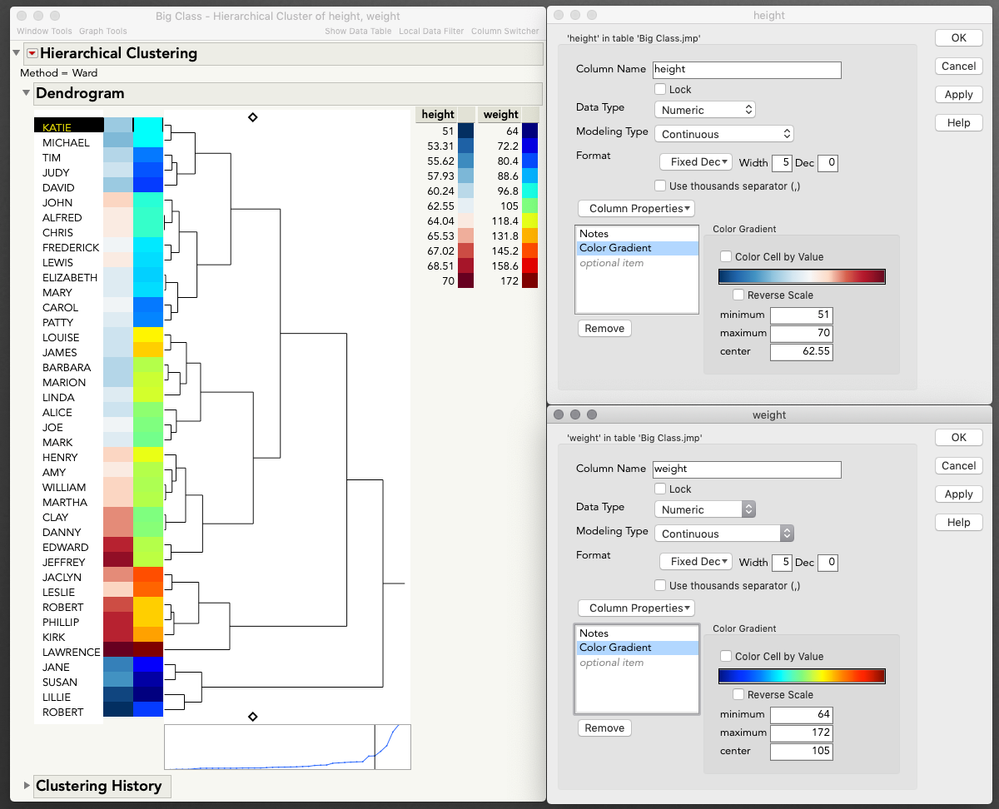
But I have some good news for you. Hierarchical does honor the Color Gradient property that you set for a column in Column Properties (right click column > column properties). So, set your specific gradients there, where you can specify not just theme but min/max/center, and then when you request the color map in Hierarchical you will get your column-specified gradients (regardless of what you pick in Hierarchical). 


I hope this helps!
@julian 

clusterthemes.png


View solution in original post

1 REPLY 1
julian
Community Manager Community Manager

Re: How to customized color map levels in Clustering > Hierarchical (without standardization)?

Hi @Thierry_S

The color map in Clustering > Hierarchical operates in much the same way as the Graph > Cell Plot. There is control over the gradient in general terms (right-click a cell in the color map > color theme), but this implementation lacks the fine-grained control you see in say Graph > Graph Builder, where you can specify not just a theme, but a lightness range, number of levels, min, center, and max, etc.


But I have some good news for you. Hierarchical does honor the Color Gradient property that you set for a column in Column Properties (right click column > column properties). So, set your specific gradients there, where you can specify not just theme but min/max/center, and then when you request the color map in Hierarchical you will get your column-specified gradients (regardless of what you pick in Hierarchical). 


I hope this helps!

@julian 

clusterthemes.png


Recommended Articles
