cancel
Showing results for 
Show  only  | Search instead for 
Did you mean: 
  • JMP will suspend normal business operations for our Winter Holiday beginning on Wednesday, Dec. 24, 2025, at 5:00 p.m. ET (2:00 p.m. ET for JMP Accounts Receivable).
    Regular business hours will resume at 9:00 a.m. EST on Friday, Jan. 2, 2026.
  • We’re retiring the File Exchange at the end of this year. The JMP Marketplace is now your destination for add-ins and extensions.

Discussions

Solve problems, and share tips and tricks with other JMP users.
%3CLINGO-SUB%20id%3D%22lingo-sub-540244%22%20slang%3D%22en-US%22%20mode%3D%22UPDATE%22%3ESo%20erstellen%20Sie%20Ebenen%20im%20Graph%20Builder%3C%2FLINGO-SUB%3E%3CLINGO-BODY%20id%3D%22lingo-body-540244%22%20slang%3D%22en-US%22%20mode%3D%22UPDATE%22%3E%3CP%3EHey%2C%3C%2FP%3E%3CP%3E%20%3C%2FP%3E%3CP%3EIch%20habe%20drei%20S%C3%A4tze%20von%20x-%20und%20y-Daten%20(x1%2C%20x2%2C%20x3%2C%20y1%2C%20y2%2C%20y3)%20und%20m%C3%B6chte%20sie%20in%20einem%20Diagramm%20kombinieren.%20Als%20ich%20Graph%20Builder%20versuchte%2C%20konnte%20ich%20ein%20Diagramm%20f%C3%BCr%20x1%2C%20y1%2C%20y2%2C%20y3%20erstellen.%20Dann%20werden%20die%20Daten%20jedoch%20nicht%20korrekt%20angezeigt%2C%20daher%20muss%20jedes%20Datenpaar%20mit%20seinem%20x-Wert%20kombiniert%20werden.%3C%2FP%3E%3CP%3E%20%3C%2FP%3E%3CP%3EUrspr%C3%BCnglich%20kann%20ich%20Layers%20verwenden%2C%20um%20diese%20drei%20Datens%C3%A4tze%20zu%20kombinieren.%20Gibt%20es%20eine%20M%C3%B6glichkeit%2C%20dies%20auch%20in%20JMP%20zu%20tun%3F%3C%2FP%3E%3CP%3EDanke%3C%2FP%3E%3C%2FLINGO-BODY%3E%3CLINGO-LABS%20id%3D%22lingo-labs-540244%22%20slang%3D%22en-US%22%20mode%3D%22UPDATE%22%3E%3CLINGO-LABEL%3EInhaltsorganisation%3C%2FLINGO-LABEL%3E%3CLINGO-LABEL%3EMassenanpassung%3C%2FLINGO-LABEL%3E%3CLINGO-LABEL%3EQualit%C3%A4ts-%20und%20Verfahrenstechnik%3C%2FLINGO-LABEL%3E%3C%2FLINGO-LABS%3E%3CLINGO-SUB%20id%3D%22lingo-sub-542013%22%20slang%3D%22en-US%22%20mode%3D%22NONE%22%3EBetreff%3A%20Erstellen%20von%20Ebenen%20im%20Graph%20Builder%3C%2FLINGO-SUB%3E%3CLINGO-BODY%20id%3D%22lingo-body-542013%22%20slang%3D%22en-US%22%20mode%3D%22NONE%22%3E%3CP%3EWenn%20Sie%20sich%20die%20beiden%20Kurven%20nur%20kurz%20in%20einem%20kombinierten%20Diagramm%20ansehen%20m%C3%B6chten%20-%20und%20Ihre%20Tabellenstruktur%20daf%C3%BCr%20nicht%20%C3%A4ndern%20m%C3%B6chten%2C%20k%C3%B6nnen%20Sie%20den%20Frame-Inhalt%20kopieren%20und%20einf%C3%BCgen%3A%3CBR%20%2F%3E%3CA%20href%3D%22https%3A%2F%2Fcommunity.jmp.com%2Ft5%2FDiscussions%2FUsing-JSL-to-copy-the-frame-contents-of-one-graph-to-a-different%2Fm-p%2F14227%22%20target%3D%22_blank%22%3E%20https%3A%2F%2Fcommunity.jmp.com%2Ft5%2FDiscussions%2FUsing-JSL-to-copy-the-frame-contents-of-one-graph-to-a-different%2Fmp%2F14227%3C%2FA%3E%3C%2FP%3E%3CP%3EEs%20funktioniert%20sogar%2C%20wenn%20die%20Daten%20aus%20verschiedenen%20Datentabellen%20stammen.%3C%2FP%3E%3CP%3E%26nbsp%3B%3C%2FP%3E%3CP%3EDer%20gro%C3%9Fe%20Nachteil%20dieser%20Vorgehensweise%3A%3CBR%20%2F%3E%20Wenn%20Sie%20den%20Plot%20oder%20das%20Plot-Skript%20speichern%2C%20wird%20nur%20der%20urspr%C3%BCngliche%20Plot%20ohne%20den%20eingef%C3%BCgten%20Inhalt%20gespeichert%3A%3C%2FP%3E%3CP%3E%3CA%20href%3D%22https%3A%2F%2Fcommunity.jmp.com%2Ft5%2FDiscussions%2Fcopied-frame-content-disappears-when-reopening-graph-or-JMP%2Fm-p%2F286153%22%20target%3D%22_blank%22%3Ehttps%3A%2F%2Fcommunity.jmp.com%2Ft5%2FDiscussions%2Fcopied-frame-content-disappears-when-reopening-graph-or-JMP%2Fmp%2F286153%3C%2FA%3E%3C%2FP%3E%3CP%3E%26nbsp%3B%3C%2FP%3E%3CP%3E%26nbsp%3B%3C%2FP%3E%3CP%3E%3CSPAN%20class%3D%22lia-inline-image-display-wrapper%20lia-image-align-inline%22%20image-alt%3D%22HolgerSp_2-1662613779071.png%22%20style%3D%22width%3A%20400px%3B%22%3E%3CSPAN%20class%3D%22lia-inline-image-display-wrapper%22%20image-alt%3D%22HolgerSp_2-1662613779071.png%22%20style%3D%22width%3A%20400px%3B%22%3E%3CSPAN%20class%3D%22lia-inline-image-display-wrapper%22%20image-alt%3D%22HolgerSp_2-1662613779071.png%22%20style%3D%22width%3A%20400px%3B%22%3E%3Cspan%20class%3D%22lia-inline-image-display-wrapper%22%20image-alt%3D%22HolgerSp_2-1662613779071.png%22%20style%3D%22width%3A%20400px%3B%22%3E%3Cimg%20src%3D%22https%3A%2F%2Fcommunity.jmp.com%2Ft5%2Fimage%2Fserverpage%2Fimage-id%2F45278i3D19B77D1E12D745%2Fimage-size%2Fmedium%3Fv%3Dv2%26amp%3Bpx%3D400%22%20role%3D%22button%22%20title%3D%22HolgerSp_2-1662613779071.png%22%20alt%3D%22HolgerSp_2-1662613779071.png%22%20%2F%3E%3C%2Fspan%3E%3C%2FSPAN%3E%3C%2FSPAN%3E%3C%2FSPAN%3E%26nbsp%3B%20%26nbsp%3B%20%26nbsp%3B%20%26nbsp%3B%20%26nbsp%3B%20%26nbsp%3B%20%26nbsp%3B%20%26nbsp%3B%20%26nbsp%3B%20%26nbsp%3B%20%26nbsp%3B%3CSPAN%20class%3D%22lia-inline-image-display-wrapper%20lia-image-align-inline%22%20image-alt%3D%22HolgerSp_3-1662613850867.png%22%20style%3D%22width%3A%20400px%3B%22%3E%3CSPAN%20class%3D%22lia-inline-image-display-wrapper%22%20image-alt%3D%22HolgerSp_3-1662613850867.png%22%20style%3D%22width%3A%20400px%3B%22%3E%3CSPAN%20class%3D%22lia-inline-image-display-wrapper%22%20image-alt%3D%22HolgerSp_3-1662613850867.png%22%20style%3D%22width%3A%20400px%3B%22%3E%3Cspan%20class%3D%22lia-inline-image-display-wrapper%22%20image-alt%3D%22HolgerSp_3-1662613850867.png%22%20style%3D%22width%3A%20400px%3B%22%3E%3Cimg%20src%3D%22https%3A%2F%2Fcommunity.jmp.com%2Ft5%2Fimage%2Fserverpage%2Fimage-id%2F45279iA9AE1526A61504B1%2Fimage-size%2Fmedium%3Fv%3Dv2%26amp%3Bpx%3D400%22%20role%3D%22button%22%20title%3D%22HolgerSp_3-1662613850867.png%22%20alt%3D%22HolgerSp_3-1662613850867.png%22%20%2F%3E%3C%2Fspan%3E%3C%2FSPAN%3E%3C%2FSPAN%3E%3C%2FSPAN%3E%3C%2FP%3E%3CP%3E%26nbsp%3B%3C%2FP%3E%3C%2FLINGO-BODY%3E%3CLINGO-SUB%20id%3D%22lingo-sub-540262%22%20slang%3D%22en-US%22%20mode%3D%22NONE%22%3EBetreff%3A%20Erstellen%20von%20Ebenen%20im%20Graph%20Builder%3C%2FLINGO-SUB%3E%3CLINGO-BODY%20id%3D%22lingo-body-540262%22%20slang%3D%22en-US%22%20mode%3D%22NONE%22%3E%3CP%3EIch%20kenne%20die%20Struktur%20Ihrer%20Daten%20nicht.Vorausgesetzt%20es%20sieht%20so%20aus%3C%2FP%3E%0A%3CP%3E%3CSPAN%20class%3D%22lia-inline-image-display-wrapper%20lia-image-align-inline%22%20image-alt%3D%22txnelson_0-1662213037515.png%22%20style%3D%22width%3A%20400px%3B%22%3E%3CSPAN%20class%3D%22lia-inline-image-display-wrapper%22%20image-alt%3D%22txnelson_0-1662213037515.png%22%20style%3D%22width%3A%20400px%3B%22%3E%3CSPAN%20class%3D%22lia-inline-image-display-wrapper%22%20image-alt%3D%22txnelson_0-1662213037515.png%22%20style%3D%22width%3A%20400px%3B%22%3E%3Cspan%20class%3D%22lia-inline-image-display-wrapper%22%20image-alt%3D%22txnelson_0-1662213037515.png%22%20style%3D%22width%3A%20400px%3B%22%3E%3Cimg%20src%3D%22https%3A%2F%2Fcommunity.jmp.com%2Ft5%2Fimage%2Fserverpage%2Fimage-id%2F45160i5A71D0F7DF3D1A7B%2Fimage-size%2Fmedium%3Fv%3Dv2%26amp%3Bpx%3D400%22%20role%3D%22button%22%20title%3D%22txnelson_0-1662213037515.png%22%20alt%3D%22txnelson_0-1662213037515.png%22%20%2F%3E%3C%2Fspan%3E%3C%2FSPAN%3E%3C%2FSPAN%3E%3C%2FSPAN%3E%3C%2FP%3E%0A%3CP%3ESie%20k%C3%B6nnen%20die%20Daten%20stapeln%20und%20eine%20Tabelle%20erstellen%2C%20die%20wie%20folgt%20aussieht%3C%2FP%3E%0A%3CP%3E%3CSPAN%20class%3D%22lia-inline-image-display-wrapper%20lia-image-align-inline%22%20image-alt%3D%22txnelson_1-1662213109833.png%22%20style%3D%22width%3A%20400px%3B%22%3E%3CSPAN%20class%3D%22lia-inline-image-display-wrapper%22%20image-alt%3D%22txnelson_1-1662213109833.png%22%20style%3D%22width%3A%20343px%3B%22%3E%3CSPAN%20class%3D%22lia-inline-image-display-wrapper%22%20image-alt%3D%22txnelson_1-1662213109833.png%22%20style%3D%22width%3A%20343px%3B%22%3E%3Cspan%20class%3D%22lia-inline-image-display-wrapper%22%20image-alt%3D%22txnelson_1-1662213109833.png%22%20style%3D%22width%3A%20343px%3B%22%3E%3Cimg%20src%3D%22https%3A%2F%2Fcommunity.jmp.com%2Ft5%2Fimage%2Fserverpage%2Fimage-id%2F45161i363A0B62D2C030D3%2Fimage-size%2Fmedium%3Fv%3Dv2%26amp%3Bpx%3D400%22%20role%3D%22button%22%20title%3D%22txnelson_1-1662213109833.png%22%20alt%3D%22txnelson_1-1662213109833.png%22%20%2F%3E%3C%2Fspan%3E%3C%2FSPAN%3E%3C%2FSPAN%3E%3C%2FSPAN%3E%3C%2FP%3E%0A%3CP%3EVon%20dort%20aus%20k%C3%B6nnen%20Sie%20ganz%20einfach%20ein%20mehrfaches%20XY-Diagramm%20mit%203%20Ebenen%20(Overlays)%20erstellen.%3C%2FP%3E%0A%3CP%3E%3CSPAN%20class%3D%22lia-inline-image-display-wrapper%20lia-image-align-inline%22%20image-alt%3D%22txnelson_2-1662213256517.png%22%20style%3D%22width%3A%20400px%3B%22%3E%3CSPAN%20class%3D%22lia-inline-image-display-wrapper%22%20image-alt%3D%22txnelson_2-1662213256517.png%22%20style%3D%22width%3A%20400px%3B%22%3E%3CSPAN%20class%3D%22lia-inline-image-display-wrapper%22%20image-alt%3D%22txnelson_2-1662213256517.png%22%20style%3D%22width%3A%20400px%3B%22%3E%3Cspan%20class%3D%22lia-inline-image-display-wrapper%22%20image-alt%3D%22txnelson_2-1662213256517.png%22%20style%3D%22width%3A%20400px%3B%22%3E%3Cimg%20src%3D%22https%3A%2F%2Fcommunity.jmp.com%2Ft5%2Fimage%2Fserverpage%2Fimage-id%2F45162i624C7BE94E4CF2A8%2Fimage-size%2Fmedium%3Fv%3Dv2%26amp%3Bpx%3D400%22%20role%3D%22button%22%20title%3D%22txnelson_2-1662213256517.png%22%20alt%3D%22txnelson_2-1662213256517.png%22%20%2F%3E%3C%2Fspan%3E%3C%2FSPAN%3E%3C%2FSPAN%3E%3C%2FSPAN%3E%3C%2FP%3E%0A%3CP%3E%26nbsp%3B%3C%2FP%3E%0A%3CP%3E%26nbsp%3B%3C%2FP%3E%3C%2FLINGO-BODY%3E
Choose Language Hide Translation Bar

How to create Layers in Graph Builder

Hey,


I have three sets of x and y (x1,x2,x3,y1,y2,y3) Data and would like to combine them into one Graph. When I tried using Graph Builder, I could generate a graph for x1, y1,y2,y3.  But then the Data is not displayed correctly, hence each pair of data must be combined with its x value. 


In origin I can use Layers to combine these three sets of data, is there a way to do it in JMP as well?

Thx

Es ist ein großer Vorteil im Leben, die Fehler, aus denen man lernen kann, möglichst früh zu begehen.

-Winston Churchill
1 ACCEPTED SOLUTION

Accepted Solutions
txnelson
Super User

Re: How to create Layers in Graph Builder

I do not know the structure of your data.  Assuming it looks like
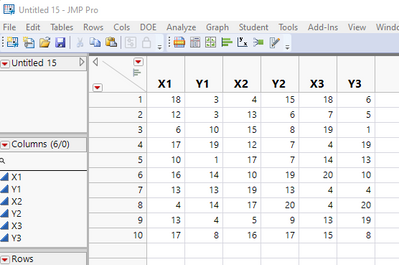
txnelson_0-1662213037515.png

You can stack the data and create a table that looks like
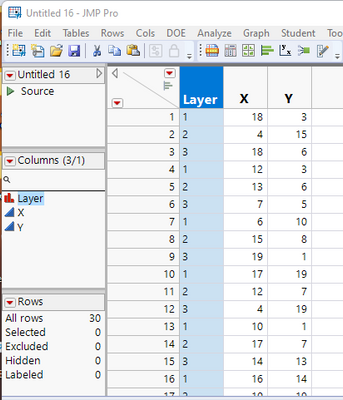
txnelson_1-1662213109833.png

From there you can easily create a multiple X Y chart with 3 layers(Overlays)
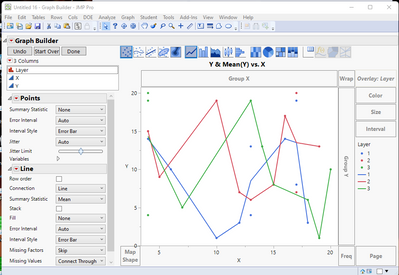
txnelson_2-1662213256517.png


Jim

View solution in original post

2 REPLIES 2
txnelson
Super User

Re: How to create Layers in Graph Builder

I do not know the structure of your data.  Assuming it looks like

txnelson_0-1662213037515.png

You can stack the data and create a table that looks like

txnelson_1-1662213109833.png

From there you can easily create a multiple X Y chart with 3 layers(Overlays)

txnelson_2-1662213256517.png


Jim
hogi
Level XIII

Re: How to create Layers in Graph Builder

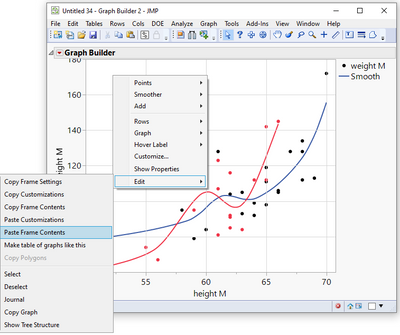
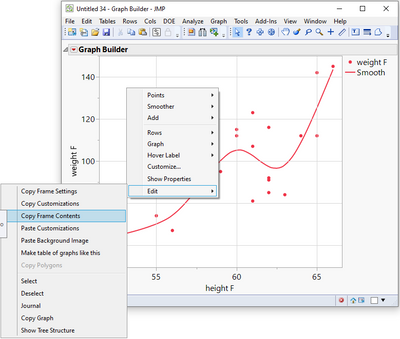
If you just want to take a quick look at the two curves in a combined plot - and don't want to change your table structure for it, you can copy/paste the frame content:
Using JSL to copy the frame contents of one graph to a different graph? 

It even works if the data comes from different data tables.


The huge disadvantage of this approach:
When you save the plot or the plot script, it will just save the original plot without the pasted content:
copied frame content disappears when reopening graph or JMP datatable 
 

HolgerSp_2-1662613779071.png                     HolgerSp_3-1662613850867.png


Recommended Articles