- Don’t miss your chance to experience Discovery Summit Europe at our best available rate! Early bird registration through 31 Oct.
- Graph Builder Toolbar streamlines interactive graphing. Creates shortcuts on Report and GraphBuilder Helpers toolbars. Download and install the extension.
- Subscribe to RSS Feed
- Mark Topic as New
- Mark Topic as Read
- Float this Topic for Current User
- Bookmark
- Subscribe
- Mute
- Printer Friendly Page
Discussions
Solve problems, and share tips and tricks with other JMP users.- User Community
- :
- Discussions
- :
- How to change only sections of a graph's background color


- Mark as New
- Bookmark
- Subscribe
- Mute
- Subscribe to RSS Feed
- Get Direct Link
- Report Inappropriate Content
How to change only sections of a graph's background color
Hi All,
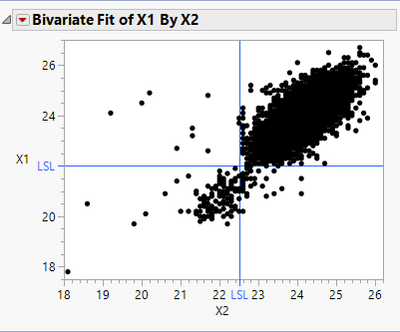
I am interested in scripting a solution that allows me to change sections of a graph's background color. I know how to manually do this with editing the axes of a graph, but this changes everything vertically (or horizontally) over that range. I want to change sections that are bounded in both X and Y.
For example, I want to take the following graph and change it from this:
To something like this:
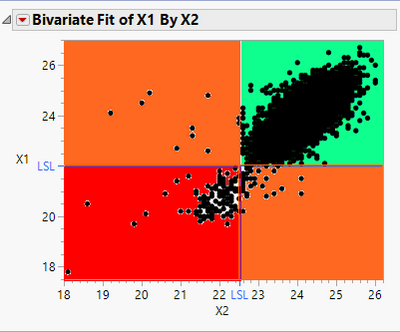
JMP does this with the Process Capability platform and Process Performance Plot, so I'm pretty sure it's possible, but I just don't know how to do it. Preferably, the background colors will change when changing the graph's axes, like it does in the Process Performance Plot.
Any thoughts/feedback is much appreciated.
Thanks!,
DS
Accepted Solutions


- Mark as New
- Bookmark
- Subscribe
- Mute
- Subscribe to RSS Feed
- Get Direct Link
- Report Inappropriate Content
Re: How to change only sections of a graph's background color
The Rect() graphics function can create such colored areas. Be sure to call Rect() before the Marker() function so that the colors do not obscure the points.
Example:
Names Default to Here( 1 );

dt = Open( "$SAMPLE_DATA/Big Class.jmp" );

obj = dt << Bivariate(
	Y( :weight ),
	X( :height ),
	Fit Line( {Line Color( {212, 73, 88} )} ),
	SendToReport(
		Dispatch(
			{},
			"Bivar Plot",
			FrameBox,
			{Add Graphics Script(
				4,
				Description( "" ),
				Fill Color( "blue" );
				Rect( 50, 120, 60, 60, 1 );
			)}
		)
	)
);- Mark as New
- Bookmark
- Subscribe
- Mute
- Subscribe to RSS Feed
- Get Direct Link
- Report Inappropriate Content
Re: How to change only sections of a graph's background color
The Rect() graphics function can create such colored areas. Be sure to call Rect() before the Marker() function so that the colors do not obscure the points.
Example:
Names Default to Here( 1 );

dt = Open( "$SAMPLE_DATA/Big Class.jmp" );

obj = dt << Bivariate(
	Y( :weight ),
	X( :height ),
	Fit Line( {Line Color( {212, 73, 88} )} ),
	SendToReport(
		Dispatch(
			{},
			"Bivar Plot",
			FrameBox,
			{Add Graphics Script(
				4,
				Description( "" ),
				Fill Color( "blue" );
				Rect( 50, 120, 60, 60, 1 );
			)}
		)
	)
);- Mark as New
- Bookmark
- Subscribe
- Mute
- Subscribe to RSS Feed
- Get Direct Link
- Report Inappropriate Content
Re: How to change only sections of a graph's background color

- Mark as New
- Bookmark
- Subscribe
- Mute
- Subscribe to RSS Feed
- Get Direct Link
- Report Inappropriate Content
Re: How to change only sections of a graph's background color
How can the bubble map achieve different backgrounds?
- https://community.jmp.com/t5/Discussions/When-drawing-bubbles-how-can-I-set-the-background-color-to/...
Thank Mark!
Recommended Articles
- © 2026 JMP Statistical Discovery LLC. All Rights Reserved.
- Terms of Use
- Privacy Statement
- Contact Us