- JMP will suspend normal business operations for our Winter Holiday beginning on Wednesday, Dec. 24, 2025, at 5:00 p.m. ET (2:00 p.m. ET for JMP Accounts Receivable).
Regular business hours will resume at 9:00 a.m. EST on Friday, Jan. 2, 2026. - We’re retiring the File Exchange at the end of this year. The JMP Marketplace is now your destination for add-ins and extensions.
- Subscribe to RSS Feed
- Mark Topic as New
- Mark Topic as Read
- Float this Topic for Current User
- Bookmark
- Subscribe
- Mute
- Printer Friendly Page
Discussions
Solve problems, and share tips and tricks with other JMP users.- JMP User Community
- :
- Discussions
- :
- How to add label to red reference line?

- Mark as New
- Bookmark
- Subscribe
- Mute
- Subscribe to RSS Feed
- Get Direct Link
- Report Inappropriate Content
How to add label to red reference line?
Hi,
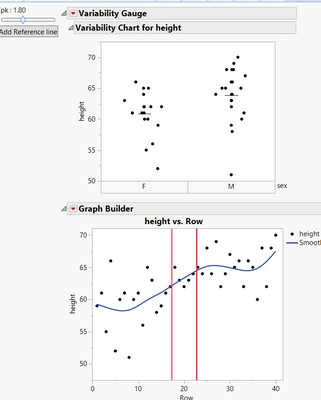
How can I add label to the reference lines?
Here's my code:
Any advice?
Names Default To Here( 1 );

dt = Open( "$SAMPLE_DATA/Big Class.jmp" );
sliderValue = 1;

dothisonchange = Function( {val},
	tb << Set Text( "Cpk : " || Substr( Char( val ), 1, 4 ) )
);

Mean = 60;
std = 0.5;
New Window( "",

	H List Box(
		V List Box(
			tb = Text Box( "Value: " || Char( sliderValue ) ),
			sb = Slider Box(
				1,
				3,
				sliderValue,

				<<Set function(
					Function( {this},


						sliderValue = this << Get;
						LL = Mean - (sliderValue * 3 * std);
						UL = Mean + (sliderValue * 3 * std);
					//Set the slider and call the other function
						sb << Set( sliderValue );
						dothisonchange( sliderValue );
					);

				);
				LL = Mean - (sliderValue * 3 * 0.5);
				UL = Mean + (sliderValue * 3 * std);


				dothisonchange( sliderValue );
			),

			Button Box( "Add Reference line",
				gbfb1 = Report( gb )[Framebox( 1 )];

				gs1 = Expr(

					gbfb1 << AddGraphicsScript(

						Pen Color( "Red" );

						Pen Size( 2 );
						H Line( ::exx = LL );
						H Line( ::exy = UL );
					)
				);

				gs1;

			)
		),
		V List Box(
			gb = dt << Variability Chart( Y( :height ), X( :sex ), Show Range Bars( 0 ), Std Dev Chart( 0 ), Points Jittered( 1 ) );
			gb = dt << Graph Builder(

				Size( 373, 325 ),

				Show Control Panel( 0 ),

				Variables( X( Transform Column( "Row", Formula( Row() ) ) ), Y( :height ) )

			)


			;
		)
	)
);
Accepted Solutions


- Mark as New
- Bookmark
- Subscribe
- Mute
- Subscribe to RSS Feed
- Get Direct Link
- Report Inappropriate Content
Re: How to add label to red reference line?
The Remove Ref Line works fine on my system. The issue with the Revert Axis is that if anything on the axis has been changed, it will go back to the original setting when the Revert Axis is run. So if the actual axis range or increments have been changed, the revert axis moves the axis back to the original. I think the issue you were having is possibly a timing issue, so I have added in a Wait(0) which I believe might fix the issue for you. Also, you were no longer pointing to the correct charts after you added in the Weight column to the Variability Platform. After that change, the Output Display structure is changed. There are now 2 separate reporting branches.
gb[1]
and
gb[2]
Names Default To Here( 1 );

dt = Open( "$SAMPLE_DATA/Big Class.jmp" );
sliderValue = 1;

dothisonchange = Function( {val},
	tb << Set Text( "Cpk : " || Substr( Char( val ), 1, 4 ) )
);

Flag = 0;
Mean = 60;
wMean = 105;
wstd = 2;
std = 0.5;
LL = Mean - (sliderValue * 3 * std);
UL = Mean + (sliderValue * 3 * std);
holdLL = LL;
holdUL = UL;
wLL = wMean - (sliderValue * 3 * wstd);
wUL = wMean + (sliderValue * 3 * wstd);
wholdLL = LL;
wholdUL = UL;
New Window( "",

	H List Box(
		V List Box(
			tb = Text Box( "Value: " || Char( sliderValue ) ),
			sb = Slider Box(
				1,
				3,
				sliderValue,
				sliderValue = sb << Get;
				LL = Mean - (sliderValue * 3 * std);
				UL = Mean + (sliderValue * 3 * std);
				wLL = wMean - (sliderValue * 3 * wstd);
				wUL = wMean + (sliderValue * 3 * wstd);
					//Set the slider and call the other function
				sb << Set( sliderValue );
				gbfb1 = Report( gb[1] )[AxisBox( 1 )];
				gbfb2 = Report( gb[2] )[AxisBox( 1 )];
				LL = Mean - (sliderValue * 3 * std);
				UL = Mean + (sliderValue * 3 * std);
				wLL = wMean - (sliderValue * 3 * wstd);
				wUL = wMean + (sliderValue * 3 * wstd);
				//gbfb1 << revert axis;
				try(gbfb1 << remove ref line(holdLL));
				try(gbfb1 << remove ref line(holdUL));
				try(gbfb2 << remove ref line(wholdLL));
				try(gbfb2 << remove ref line(wholdUL));
				wait(0);
				If( Flag == 1,
					gbfb1 << add ref line( LL, Solid, red, "LL" );
					gbfb1 << add ref line( UL, Solid, red, "UL" );
					gbfb2 << add ref line( wLL, Solid, red, "LL" );
					gbfb2 << add ref line( wUL, Solid, red, "UL" );
				);
				holdLL = LL;
				holdUL = UL;
				wholdLL = wLL;
				wholdUL = wUL;
				dothisonchange( sliderValue );
			),

			Button Box( "Add Reference line",
				If( Flag == 0,
					Flag = 1;
					gbfb1 = Report( gb[1] )[AxisBox( 1 )];
					gbfb2 = Report( gb[2] )[AxisBox( 1 )];
					LL = Mean - (sliderValue * 3 * std);
					UL = Mean + (sliderValue * 3 * std);
					wLL = wMean - (sliderValue * 3 * wstd);
					wUL = wMean + (sliderValue * 3 * wstd);
					try(gbfb1 << remove ref line(holdLL));
					try(gbfb1 << remove ref line(holdUL));
					try(gbfb2 << remove ref line(wholdLL));
					try(gbfb2 << remove ref line(wholdUL));
					gbfb1 << add ref line( LL, Solid, red, "LL" );
					gbfb1 << add ref line( UL, Solid, red, "UL" );
					gbfb2 << add ref line( wLL, Solid, red, "LL" );
					gbfb2 << add ref line( wUL, Solid, red, "UL" );
					dothisonchange( sliderValue );
				)
			)
		)
	),
	V List Box(
		gb = dt << Variability Chart(
			Y( :height, : weight ),
			X( :sex ),
			Show Range Bars( 0 ),
			Std Dev Chart( 0 ),
			Points Jittered( 1 )
		);

	)
);
See the new code for how the change is handled.
- Mark as New
- Bookmark
- Subscribe
- Mute
- Subscribe to RSS Feed
- Get Direct Link
- Report Inappropriate Content
Re: How to add label to red reference line?

- Mark as New
- Bookmark
- Subscribe
- Mute
- Subscribe to RSS Feed
- Get Direct Link
- Report Inappropriate Content
Re: How to add label to red reference line?
maybe this: Add Ref Lines to Graphs


- Mark as New
- Bookmark
- Subscribe
- Mute
- Subscribe to RSS Feed
- Get Direct Link
- Report Inappropriate Content
Re: How to add label to red reference line?
Instead of using the Add Graphics Script code, could you use Add Ref Line to work around the issue?
Graph Builder(
	Transform Column( "Row", Formula( Row() ) ),
	Variables( X( :Row ), Y( :height ) ),
	Elements( Points( X, Y, Legend( 3 ) ), Smoother( X, Y, Legend( 4 ) ) ),
	SendToReport(
		Dispatch(
			{},
			"Row",
			ScaleBox,
			{Add Ref Line( LL, "Solid", "Black", "My Label", 1 )}
		)
	)
);- Mark as New
- Bookmark
- Subscribe
- Mute
- Subscribe to RSS Feed
- Get Direct Link
- Report Inappropriate Content
Re: How to add label to red reference line?
@Jed_Campbell Thanks. I want to dynamically move reference lines using slider box. Add ref lines doesn't move dynamically by varying slider box.

- Mark as New
- Bookmark
- Subscribe
- Mute
- Subscribe to RSS Feed
- Get Direct Link
- Report Inappropriate Content
Re: How to add label to red reference line?
I'm not sure if you can move graphics script outside Frame Box, but if you are ok having the label inside FrameBox
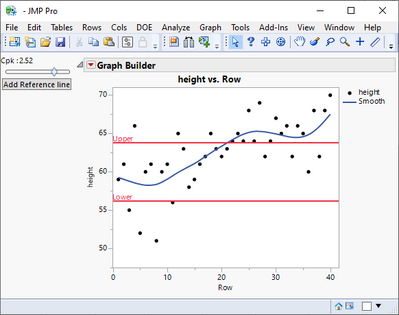
You can add Text to your graphic script
Text Color("Red");
Text({0, LL}, "Lower");
Text({0, UL}, "Upper");
- Mark as New
- Bookmark
- Subscribe
- Mute
- Subscribe to RSS Feed
- Get Direct Link
- Report Inappropriate Content
Re: How to add label to red reference line?
The slider script must remove the previous reference line and add the new line when the variable changes.
- Mark as New
- Bookmark
- Subscribe
- Mute
- Subscribe to RSS Feed
- Get Direct Link
- Report Inappropriate Content
Re: How to add label to red reference line?
Here is a rework of the code that uses add ref line to show the dynamic lines
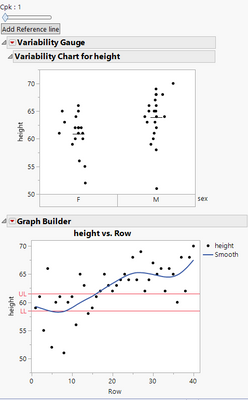
Names Default To Here( 1 );

dt = Open( "$SAMPLE_DATA/Big Class.jmp" );
sliderValue = 1;

dothisonchange = Function( {val},
	tb << Set Text( "Cpk : " || Substr( Char( val ), 1, 4 ) )
);

Flag = 0;
Mean = 60;
std = 0.5;
LL = Mean - (sliderValue * 3 * 0.5);
UL = Mean + (sliderValue * 3 * std);
holdLL = LL;
holdUL = UL;
New Window( "",

	H List Box(
		V List Box(
			tb = Text Box( "Value: " || Char( sliderValue ) ),
			sb = Slider Box(
				1,
				3,
				sliderValue,
				sliderValue = sb << Get;
				LL = Mean - (sliderValue * 3 * std);
				UL = Mean + (sliderValue * 3 * std);
					//Set the slider and call the other function
				sb << Set( sliderValue );
				gbfb1 = Report( gb )["Graph Builder"][AxisBox( 2 )];
				LL = Mean - (sliderValue * 3 * 0.5);
				UL = Mean + (sliderValue * 3 * std);
				Try( gbfb1 << remove ref line( holdLL ) );
				Try( gbfb1 << remove ref line( holdUL ) );
				If( Flag == 1,
					gbfb1 << add ref line( LL, Solid, red, "LL" );
					gbfb1 << add ref line( UL, Solid, red, "UL" );
				);
				holdLL = LL;
				holdUL = UL;
				dothisonchange( sliderValue );
			),

			Button Box( "Add Reference line",
				If( Flag == 0,
					Flag = 1;
					gbfb1 = Report( gb )["Graph Builder"][AxisBox( 2 )];
					LL = Mean - (sliderValue * 3 * 0.5);
					UL = Mean + (sliderValue * 3 * std);
					Try( gbfb1 << remove ref line( holdLL ) );
					Try( gbfb1 << remove ref line( holdUL ) );
					gbfb1 << add ref line( LL, Solid, red, "LL" );
					gbfb1 << add ref line( UL, Solid, red, "UL" );
					dothisonchange( sliderValue );
				)
			)
		)
	),
	V List Box(
		gb = dt << Variability Chart(
			Y( :height ),
			X( :sex ),
			Show Range Bars( 0 ),
			Std Dev Chart( 0 ),
			Points Jittered( 1 )
		);
		gb = dt << Graph Builder(

			Size( 373, 325 ),

			Show Control Panel( 0 ),

			Variables( X( Transform Column( "Row", Formula( Row() ) ) ), Y( :height ) )
		);
	)
);- Mark as New
- Bookmark
- Subscribe
- Mute
- Subscribe to RSS Feed
- Get Direct Link
- Report Inappropriate Content
Re: How to add label to red reference line?
@txnelson Remove ref line doen't work. I came up revert axis.
Another question: If say, I'm running 2 variability charts height and weight, I'd like to add reference line to both of them and vary with the slider box. How could I implement that?
Here's the code with revert axis: I want to add ref line to both the variability charts and vary the ref line with slider box
Names Default To Here( 1 );

dt = Open( "$SAMPLE_DATA/Big Class.jmp" );
sliderValue = 1;

dothisonchange = Function( {val},
	tb << Set Text( "Cpk : " || Substr( Char( val ), 1, 4 ) )
);

Flag = 0;
Mean = 60;
std = 0.5;
LL = Mean - (sliderValue * 3 * 0.5);
UL = Mean + (sliderValue * 3 * std);
holdLL = LL;
holdUL = UL;
New Window( "",

	H List Box(
		V List Box(
			tb = Text Box( "Value: " || Char( sliderValue ) ),
			sb = Slider Box(
				1,
				3,
				sliderValue,
				sliderValue = sb << Get;
				LL = Mean - (sliderValue * 3 * std);
				UL = Mean + (sliderValue * 3 * std);
					//Set the slider and call the other function
				sb << Set( sliderValue );
				gbfb1 = Report( gb )[AxisBox( 1 )];
				LL = Mean - (sliderValue * 3 * std);
				UL = Mean + (sliderValue * 3 * std);
				gbfb1 << revert axis;
				If( Flag == 1,
					gbfb1 << add ref line( LL, Solid, red, "LL" );
					gbfb1 << add ref line( UL, Solid, red, "UL" );
				);
				holdLL = LL;
				holdUL = UL;
				dothisonchange( sliderValue );
			),

			Button Box( "Add Reference line",
				If( Flag == 0,
					Flag = 1;
					gbfb1 = Report( gb )[AxisBox( 1 )];
					LL = Mean - (sliderValue * 3 * 0.5);
					UL = Mean + (sliderValue * 3 * std);
					gbfb1 << revert axis;
					gbfb1 << add ref line( LL, Solid, red, "LL" );
					gbfb1 << add ref line( UL, Solid, red, "UL" );
					dothisonchange( sliderValue );
				)
			)
		)
	),
	V List Box(
		gb = dt << Variability Chart(
			Y( :height, : weight ),
			X( :sex ),
			Show Range Bars( 0 ),
			Std Dev Chart( 0 ),
			Points Jittered( 1 )
		);

	)
);- Mark as New
- Bookmark
- Subscribe
- Mute
- Subscribe to RSS Feed
- Get Direct Link
- Report Inappropriate Content
Re: How to add label to red reference line?
The Remove Ref Line works fine on my system. The issue with the Revert Axis is that if anything on the axis has been changed, it will go back to the original setting when the Revert Axis is run. So if the actual axis range or increments have been changed, the revert axis moves the axis back to the original. I think the issue you were having is possibly a timing issue, so I have added in a Wait(0) which I believe might fix the issue for you. Also, you were no longer pointing to the correct charts after you added in the Weight column to the Variability Platform. After that change, the Output Display structure is changed. There are now 2 separate reporting branches.
gb[1]
and
gb[2]
Names Default To Here( 1 );

dt = Open( "$SAMPLE_DATA/Big Class.jmp" );
sliderValue = 1;

dothisonchange = Function( {val},
	tb << Set Text( "Cpk : " || Substr( Char( val ), 1, 4 ) )
);

Flag = 0;
Mean = 60;
wMean = 105;
wstd = 2;
std = 0.5;
LL = Mean - (sliderValue * 3 * std);
UL = Mean + (sliderValue * 3 * std);
holdLL = LL;
holdUL = UL;
wLL = wMean - (sliderValue * 3 * wstd);
wUL = wMean + (sliderValue * 3 * wstd);
wholdLL = LL;
wholdUL = UL;
New Window( "",

	H List Box(
		V List Box(
			tb = Text Box( "Value: " || Char( sliderValue ) ),
			sb = Slider Box(
				1,
				3,
				sliderValue,
				sliderValue = sb << Get;
				LL = Mean - (sliderValue * 3 * std);
				UL = Mean + (sliderValue * 3 * std);
				wLL = wMean - (sliderValue * 3 * wstd);
				wUL = wMean + (sliderValue * 3 * wstd);
					//Set the slider and call the other function
				sb << Set( sliderValue );
				gbfb1 = Report( gb[1] )[AxisBox( 1 )];
				gbfb2 = Report( gb[2] )[AxisBox( 1 )];
				LL = Mean - (sliderValue * 3 * std);
				UL = Mean + (sliderValue * 3 * std);
				wLL = wMean - (sliderValue * 3 * wstd);
				wUL = wMean + (sliderValue * 3 * wstd);
				//gbfb1 << revert axis;
				try(gbfb1 << remove ref line(holdLL));
				try(gbfb1 << remove ref line(holdUL));
				try(gbfb2 << remove ref line(wholdLL));
				try(gbfb2 << remove ref line(wholdUL));
				wait(0);
				If( Flag == 1,
					gbfb1 << add ref line( LL, Solid, red, "LL" );
					gbfb1 << add ref line( UL, Solid, red, "UL" );
					gbfb2 << add ref line( wLL, Solid, red, "LL" );
					gbfb2 << add ref line( wUL, Solid, red, "UL" );
				);
				holdLL = LL;
				holdUL = UL;
				wholdLL = wLL;
				wholdUL = wUL;
				dothisonchange( sliderValue );
			),

			Button Box( "Add Reference line",
				If( Flag == 0,
					Flag = 1;
					gbfb1 = Report( gb[1] )[AxisBox( 1 )];
					gbfb2 = Report( gb[2] )[AxisBox( 1 )];
					LL = Mean - (sliderValue * 3 * std);
					UL = Mean + (sliderValue * 3 * std);
					wLL = wMean - (sliderValue * 3 * wstd);
					wUL = wMean + (sliderValue * 3 * wstd);
					try(gbfb1 << remove ref line(holdLL));
					try(gbfb1 << remove ref line(holdUL));
					try(gbfb2 << remove ref line(wholdLL));
					try(gbfb2 << remove ref line(wholdUL));
					gbfb1 << add ref line( LL, Solid, red, "LL" );
					gbfb1 << add ref line( UL, Solid, red, "UL" );
					gbfb2 << add ref line( wLL, Solid, red, "LL" );
					gbfb2 << add ref line( wUL, Solid, red, "UL" );
					dothisonchange( sliderValue );
				)
			)
		)
	),
	V List Box(
		gb = dt << Variability Chart(
			Y( :height, : weight ),
			X( :sex ),
			Show Range Bars( 0 ),
			Std Dev Chart( 0 ),
			Points Jittered( 1 )
		);

	)
);
See the new code for how the change is handled.
Recommended Articles
- © 2026 JMP Statistical Discovery LLC. All Rights Reserved.
- Terms of Use
- Privacy Statement
- Contact Us