cancel
Showing results for 
Show  only  | Search instead for 
Did you mean: 
  • JMP will suspend normal business operations for our Winter Holiday beginning on Wednesday, Dec. 24, 2025, at 5:00 p.m. ET (2:00 p.m. ET for JMP Accounts Receivable).
    Regular business hours will resume at 9:00 a.m. EST on Friday, Jan. 2, 2026.
  • We’re retiring the File Exchange at the end of this year. The JMP Marketplace is now your destination for add-ins and extensions.

Discussions

Solve problems, and share tips and tricks with other JMP users.
%3CLINGO-SUB%20id%3D%22lingo-sub-561711%22%20slang%3D%22en-US%22%20mode%3D%22NONE%22%3EComment%20puis-je%20obtenir%20des%20%C3%A9l%C3%A9ments%20d'une%20liste%20pour%20sortir%20une%20valeur%20d'une%20autre%20liste%20%3F%3C%2FLINGO-SUB%3E%3CLINGO-BODY%20id%3D%22lingo-body-561711%22%20slang%3D%22en-US%22%20mode%3D%22NONE%22%3E%3CP%3ESalut%2C%3C%2FP%3E%0A%3CP%3ENouveau%20sur%20JMP%20et%20j'ai%20cherch%C3%A9%20et%20lu%20beaucoup%20d'aide%20et%20j'ai%20tourn%C3%A9%20en%20rond.%20Je%20pense%20que%20ce%20que%20je%20fais%20est%20simple%20et%20direct%2C%20mais%20je%20n'obtiens%20pas%20ce%20sentiment%20de%20JSL.%20J'ai%20une%20table%20de%20donn%C3%A9es%20plus%20compliqu%C3%A9e%2C%20mais%20dans%20le%20but%20d'essayer%20de%20faire%20fonctionner%20mon%20code%2C%20j'ai%20simplifi%C3%A9%20ma%20table.%20J'ai%20une%20table%20avec%205%20colonnes%2C%204%20de%20chacune%20ont%20%22_Yield%22%20dans%20l'en-t%C3%AAte.%2013%20lignes%20se%20composent%20de%201%20et%20de%200%20et%20ce%20que%20j'essaie%20de%20faire%20est%20de%20cr%C3%A9er%20une%20colonne%20pour%20chaque%20ligne%20qui%20affiche%20la%20premi%C3%A8re%20occurrence%20d'un%201%20dans%20les%20colonnes%20de%20rendement.%20J'ai%20besoin%20que%20cela%20soit%20intelligent%20car%20les%20noms%20de%20colonne%20(autres%20que%20ceux%20contenant%20_yield)%20n'auront%20pas%20toujours%20les%20m%C3%AAmes%20noms%20ou%20ne%20se%20trouveront%20pas%20toujours%20aux%20m%C3%AAmes%20emplacements.%20J'ai%20compris%20comment%20regarder%20simplement%20les%20colonnes%20de%20rendement%20et%20l'ai%20converti%20en%20une%20matrice%20o%C3%B9%20je%20peux%20ensuite%20trouver%20les%20valeurs%20que%20je%20recherche.%20Je%20ne%20peux%20tout%20simplement%20pas%20convertir%20ces%20valeurs%20dans%20les%20en-t%C3%AAtes%20de%20colonne.%20La%20colonne%20de%20test%20montre%20la%20position%20dans%20la%20matrice%2C%20la%20colonne%20de%20r%C3%A9sultat%20ci-dessous%20montre%20ce%20que%20je%20devrais%20obtenir%20dans%20la%20colonne%20Aide.Merci%20d'avance.%3C%2FP%3E%0A%3CP%3E%3CSPAN%20class%3D%22lia-inline-image-display-wrapper%20lia-image-align-inline%22%20image-alt%3D%22Shadow_0-1666952766189.png%22%20style%3D%22width%3A%20400px%3B%22%3E%3CSPAN%20class%3D%22lia-inline-image-display-wrapper%22%20image-alt%3D%22Shadow_0-1666952766189.png%22%20style%3D%22width%3A%20400px%3B%22%3E%3Cspan%20class%3D%22lia-inline-image-display-wrapper%22%20image-alt%3D%22Shadow_0-1666952766189.png%22%20style%3D%22width%3A%20400px%3B%22%3E%3Cimg%20src%3D%22https%3A%2F%2Fcommunity.jmp.com%2Ft5%2Fimage%2Fserverpage%2Fimage-id%2F46687i6B4DC07C27F47AB4%2Fimage-size%2Fmedium%3Fv%3Dv2%26amp%3Bpx%3D400%22%20role%3D%22button%22%20title%3D%22Shadow_0-1666952766189.png%22%20alt%3D%22Shadow_0-1666952766189.png%22%20%2F%3E%3C%2Fspan%3E%3C%2FSPAN%3E%3C%2FSPAN%3E%3C%2FP%3E%0A%3CP%3E%3CJSL%3E%3C%2FJSL%3E%3C%2FP%3E%0A%3CPRE%3E%3CCODE%20class%3D%22%20language-jsl%22%3Edt%20%3D%20Current%20Data%20Table()%3B%0Alst%20%3D%20dt%20%26lt%3B%26lt%3B%20Get%20Column%20Names(string)%3B%0Adt%20%26lt%3B%26lt%3B%20clear%20column%20selection%3B%0A%0AFor(i%20%3D%201%2C%20i%20%26lt%3B%3D%20N%20Items(lst)%2C%20i%2B%2B%2C%0A%20If(Contains(lst%5Bi%5D%2C%20%22_Yield%22)%20%26gt%3B%200%2C%0A%20%20Column(dt%2C%20lst%5Bi%5D)%20%26lt%3B%26lt%3B%20set%20selected%3B%0A%20%20selcols%20%3D%20dt%20%26lt%3B%26lt%3B%20get%20selected%20columns%3B%0A%20)%0A)%3B%0A%0AMat2%20%3D%20dt%20%26lt%3B%26lt%3B%20Get%20as%20Matrix(selcols)%3B%0ADesList%20%3D%20List()%3B%0AFor(i%20%3D%201%2C%20i%20%26lt%3B%3D%20N%20Rows(Mat2)%2C%20i%2B%2B%2C%0A%20Pos%20%3D%20Min(Loc(Mat2%5Bi%2C%200%5D))%3B%0A%20Insert%20Into(DesList%2C%20Pos)%3B%0A)%3B%0A%0Adt%20%26lt%3B%26lt%3B%20New%20Column(%22Test%22%2C%20Numeric%2C%20Continuous%2C%20%26lt%3B%3CSET%20values%3D%22%22%3E%3D%201)%3B%0A%20If(%0A%20%20result%20%26gt%3B%3D%201%2C%20(newcolumn%5Bj%5D%20%3D%20selcols)%2C%0A%20%20Is%20Missing(result)%2C%20(newColumn%5Bj%5D%20%3D%20Parse(%22PASS%22))%0A%20)%3B%0A)%3B%3C%2FSET%3E%3C%2FCODE%3E%3C%2FPRE%3E%3C%2FLINGO-BODY%3E%3CLINGO-LABS%20id%3D%22lingo-labs-561711%22%20slang%3D%22en-US%22%20mode%3D%22NONE%22%3E%3CLINGO-LABEL%3EPersonnalisation%20de%20masse%3C%2FLINGO-LABEL%3E%3C%2FLINGO-LABS%3E%3CLINGO-SUB%20id%3D%22lingo-sub-562817%22%20slang%3D%22en-US%22%20mode%3D%22NONE%22%3ERe%26nbsp%3B%3A%20Comment%20obtenir%20des%20%C3%A9l%C3%A9ments%20d'une%20liste%20pour%20g%C3%A9n%C3%A9rer%20une%20valeur%20d'une%20autre%20liste%26nbsp%3B%3F%3C%2FLINGO-SUB%3E%3CLINGO-BODY%20id%3D%22lingo-body-562817%22%20slang%3D%22en-US%22%20mode%3D%22NONE%22%3E%3CP%3ESalut%20jti%2C%3C%2FP%3E%3CP%3EMerci%20pour%20votre%20r%C3%A9ponse.%20Filter%20Each%20n'est%20pas%20une%20fonction%20active%20pour%20moi.%20Peut-%C3%AAtre%20parce%20que%20j'utilise%20V15%20mais%20j'ai%20pu%20utiliser%20ma%20m%C3%A9thode%20actuelle%20de%20s%C3%A9lection%20des%20noms%20de%20colonne%20avec%20votre%20%C3%A9quation%20one_idx%20et%20cela%20fonctionne%20%C3%A0%20merveille.%20J'avais%20eu%20du%20mal%20avec%20la%20fonction%20Loc%20la%20semaine%20derni%C3%A8re%2C%20donc%20cela%20aide%20vraiment.%3C%2FP%3E%3CP%3E%26nbsp%3B%3C%2FP%3E%3C%2FLINGO-BODY%3E%3CLINGO-SUB%20id%3D%22lingo-sub-561727%22%20slang%3D%22en-US%22%20mode%3D%22NONE%22%3ERe%26nbsp%3B%3A%20Comment%20obtenir%20des%20%C3%A9l%C3%A9ments%20d'une%20liste%20pour%20g%C3%A9n%C3%A9rer%20une%20valeur%20d'une%20autre%20liste%26nbsp%3B%3F%3C%2FLINGO-SUB%3E%3CLINGO-BODY%20id%3D%22lingo-body-561727%22%20slang%3D%22en-US%22%20mode%3D%22NONE%22%3E%3CP%3EUn%20exemple%3A%3C%2FP%3E%0A%3CP%3E%26nbsp%3B%3C%2FP%3E%0A%3CPRE%3E%3CCODE%20class%3D%22%20language-jsl%22%3ENames%20Default%20To%20Here(1)%3B%0A%0Adt%20%3D%20New%20Table(%22Untitled%22%2C%0A%20Add%20Rows(3)%2C%0A%20New%20Column(%22Column%201%22%2C%20Numeric%2C%20%22Continuous%22%2C%20Format(%22Best%22%2C%2012)%2C%20Set%20Values(%5B0%2C%200%2C%201%2C%200%5D))%2C%0A%20New%20Column(%22A_YIELD%22%2C%20Numeric%2C%20%22Continuous%22%2C%20Format(%22Best%22%2C%2012)%2C%20Set%20Values(%5B0%2C%200%2C%201%2C%200%5D))%2C%0A%20New%20Column(%22B_YIELD%22%2C%20Numeric%2C%20%22Continuous%22%2C%20Format(%22Best%22%2C%2012)%2C%20Set%20Values(%5B1%2C%200%2C%200%2C%200%5D))%2C%0A%20New%20Column(%22C_YIELD%22%2C%20Numeric%2C%20%22Continuous%22%2C%20Format(%22Best%22%2C%2012)%2C%20Set%20Values(%5B1%2C%201%2C%201%2C%200%5D))%0A)%3B%0A%0A%2F%2F%20Get%20column%20names%20which%20end%20in%20_YIELD%0Ayield_cols%20%3D%20Filter%20Each(%7Bcol_name%7D%2C%20dt%20%26lt%3B%26lt%3B%20Get%20Column%20Names(%22Continuous%22%2C%20%22String%22)%2C%0A%20Ends%20With(col_name%2C%20%22_YIELD%22)%3B%0A)%3B%0A%0A%2F%2F%20create%20new%20column%20to%20get%20_YIELD%20column%20name%0Adt%20%26lt%3B%26lt%3B%20New%20Column(%22RESULT%22%2C%20Character%2C%20Nominal%2C%20%26lt%3B%26lt%3B%20Set%20Each%20Value(%0A%20one_idx%20%3D%20Loc(dt%5BRow()%2C%20yield_cols%5D%2C%201)%3B%0A%20If(N%20Items(one_idx)%2C%0A%20%20yield_cols%5BMin(one_idx)%5D%3B%0A%20%2C%0A%20%20%22PASS%22%0A%20)%3B%0A))%3B%3C%2FCODE%3E%3C%2FPRE%3E%0A%3CP%3E%3CSPAN%20class%3D%22lia-inline-image-display-wrapper%20lia-image-align-inline%22%20image-alt%3D%22jthi_0-1666953606643.png%22%20style%3D%22width%3A%20400px%3B%22%3E%3CSPAN%20class%3D%22lia-inline-image-display-wrapper%22%20image-alt%3D%22jthi_0-1666953606643.png%22%20style%3D%22width%3A%20319px%3B%22%3E%3Cspan%20class%3D%22lia-inline-image-display-wrapper%22%20image-alt%3D%22jthi_0-1666953606643.png%22%20style%3D%22width%3A%20319px%3B%22%3E%3Cimg%20src%3D%22https%3A%2F%2Fcommunity.jmp.com%2Ft5%2Fimage%2Fserverpage%2Fimage-id%2F46689iB0BB4FA3930E683C%2Fimage-size%2Fmedium%3Fv%3Dv2%26amp%3Bpx%3D400%22%20role%3D%22button%22%20title%3D%22jthi_0-1666953606643.png%22%20alt%3D%22jthi_0-1666953606643.png%22%20%2F%3E%3C%2Fspan%3E%3C%2FSPAN%3E%3C%2FSPAN%3E%3C%2FP%3E%0A%3CP%3E%26nbsp%3B%3C%2FP%3E%3C%2FLINGO-BODY%3E
Choose Language Hide Translation Bar
Shadow
Level I

How do I get items from a list to output a value from another list ?

Hi,

New to JMP and have searched and read loads of help and going around in circles. I would think what I am doing is easy and straight forward but not getting that feeling from JSL. I have a more complicated data table but for the purpose of trying to get my code to work I have simplified my table. I have a table with 5 columns, 4 of each have "_Yield" in the heading. 13 rows consist of 1's and 0's and what I am trying to do is create a column for each row that shows the first occurrence of a 1 in the yield columns. I need this to be smart as the column names (other than contain _yield) will not always have the same names or be in the same locations. I have figured out how to just look at the yield columns and have converted this to a matrix where I can then find the values I am looking for. I just cant convert these values into the column headers. The test column shows position in matrix, the result column below shows what I should be getting in the Help column.  Thanks in advance. 

Shadow_0-1666952766189.png

<JSL>

dt = Current Data Table();
lst = dt << Get Column Names(string);
dt << clear column selection;

For(i = 1, i <= N Items(lst), i++,
	If(Contains(lst[i], "_Yield") > 0,
		Column(dt, lst[i]) << set selected;
		selcols = dt << get selected columns;
	)
);

Mat2 = dt << Get as Matrix(selcols);
DesList = List();
For(i = 1, i <= N Rows(Mat2), i++,
	Pos = Min(Loc(Mat2[i, 0]));
	Insert Into(DesList, Pos);
);

dt << New Column("Test", Numeric, Continuous, <<Set Values(DesList));

cols = dt << Get Column Reference(dt << Get Column Names);
dt << New Column("Result",
	formula(
		If(Contains(Eval List(selcols), 1) == 1,
			"B_Yield",
			If(Contains(Eval List(selcols), 1) == 2,
				"C_Yield",
				If(Contains(Eval List(selcols), 1) == 3,
					"D_Yield",
					If(Contains(Eval List(selcols), 1) == 4,
						"E_Yield",
						"PASS"
					)
				)
			)
		)
	)
);

values1 = Column(dt, selcols[1]) << Get Values;
NewColName = "HELP";
dt << New Column(NewColName, Character);
newColumn = Column(NewColName);

For(j = 1, j <= N Items(values1), j++, 
//yield = list box(selcols, << set selected(2,1), Print ("list",yield << get selected, yield << get selected indices));
	result = (Deslist[j] >= 1);
	If(
		result >= 1, (newcolumn[j] = selcols),
		Is Missing(result), (newColumn[j] = Parse("PASS"))
	);
);
1 ACCEPTED SOLUTION

Accepted Solutions
jthi
Super User

Re: How do I get items from a list to output a value from another list ?

One example:


Names Default To Here(1);

dt = New Table("Untitled",
	Add Rows(3),
	New Column("Column 1", Numeric, "Continuous", Format("Best", 12), Set Values([0, 0, 1, 0])),
	New Column("A_YIELD", Numeric, "Continuous", Format("Best", 12), Set Values([0, 0, 1, 0])),
	New Column("B_YIELD", Numeric, "Continuous", Format("Best", 12), Set Values([1, 0, 0, 0])),
	New Column("C_YIELD", Numeric, "Continuous", Format("Best", 12), Set Values([1, 1, 1, 0]))
);

// Get column names which end in _YIELD
yield_cols = Filter Each({col_name}, dt << Get Column Names("Continuous", "String"),
	Ends With(col_name, "_YIELD");
);

// create new column to get _YIELD column name
dt << New Column("RESULT", Character, Nominal, << Set Each Value(
	one_idx = Loc(dt[Row(), yield_cols], 1);
	If(N Items(one_idx),
		yield_cols[Min(one_idx)];
	,
		"PASS"
	);
));
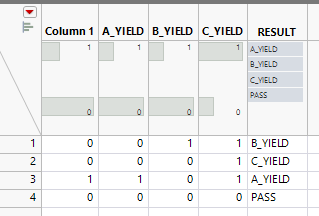
jthi_0-1666953606643.png


-Jarmo

View solution in original post

2 REPLIES 2
jthi
Super User

Re: How do I get items from a list to output a value from another list ?

One example:


Names Default To Here(1);

dt = New Table("Untitled",
	Add Rows(3),
	New Column("Column 1", Numeric, "Continuous", Format("Best", 12), Set Values([0, 0, 1, 0])),
	New Column("A_YIELD", Numeric, "Continuous", Format("Best", 12), Set Values([0, 0, 1, 0])),
	New Column("B_YIELD", Numeric, "Continuous", Format("Best", 12), Set Values([1, 0, 0, 0])),
	New Column("C_YIELD", Numeric, "Continuous", Format("Best", 12), Set Values([1, 1, 1, 0]))
);

// Get column names which end in _YIELD
yield_cols = Filter Each({col_name}, dt << Get Column Names("Continuous", "String"),
	Ends With(col_name, "_YIELD");
);

// create new column to get _YIELD column name
dt << New Column("RESULT", Character, Nominal, << Set Each Value(
	one_idx = Loc(dt[Row(), yield_cols], 1);
	If(N Items(one_idx),
		yield_cols[Min(one_idx)];
	,
		"PASS"
	);
));

jthi_0-1666953606643.png


-Jarmo
Shadow
Level I

Re: How do I get items from a list to output a value from another list ?

Hi jthi,

Thanks for your reply. Filter Each isn't an active function for me. Maybe because I am using V15 but I was able to use my current way of selecting column names with your one_idx  equation and it works a treat. I had been struggling with the Loc function last week so this really helps. 


Recommended Articles
