- JMP will suspend normal business operations for our Winter Holiday beginning on Wednesday, Dec. 24, 2025, at 5:00 p.m. ET (2:00 p.m. ET for JMP Accounts Receivable).
Regular business hours will resume at 9:00 a.m. EST on Friday, Jan. 2, 2026. - We’re retiring the File Exchange at the end of this year. The JMP Marketplace is now your destination for add-ins and extensions.
- Subscribe to RSS Feed
- Mark Topic as New
- Mark Topic as Read
- Float this Topic for Current User
- Bookmark
- Subscribe
- Mute
- Printer Friendly Page
Discussions
Solve problems, and share tips and tricks with other JMP users.- JMP User Community
- :
- Discussions
- :
- How do I enable hover help text?

- Mark as New
- Bookmark
- Subscribe
- Mute
- Subscribe to RSS Feed
- Get Direct Link
- Report Inappropriate Content
How do I enable hover help text?
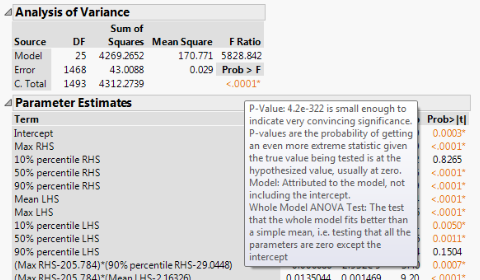
So I noticed that others had the ability to hover over things and a text box would appear with info about the object.
The ‘hover text’ pop-up that you get when you hold the mouse over a field.
However I seem to be missing it, when I hover over stuff nothing pops up, is there way to enable it?
I'm using JMP 13.
Here's an example of the hover text:
Accepted Solutions
- Mark as New
- Bookmark
- Subscribe
- Mute
- Subscribe to RSS Feed
- Get Direct Link
- Report Inappropriate Content
Re: How do I enable hover help text?
Hi,so I checked and that was already checked. I tried hovering over a similar analysis like in that example picture, but no text pops up still.
Nevermind! I realized you have to move the mouse in a circular motion in order for the text to show up.
Thanks!


- Mark as New
- Bookmark
- Subscribe
- Mute
- Subscribe to RSS Feed
- Get Direct Link
- Report Inappropriate Content
Re: How do I enable hover help text?
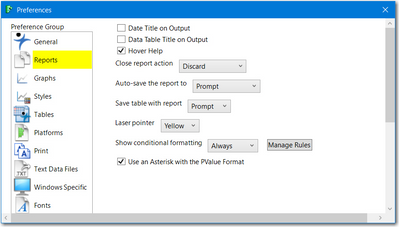
Check your preferences. Main Menu > File > Preferences or CTRL + K, Click on Reports. Make sure Hover Help is checked.
- Mark as New
- Bookmark
- Subscribe
- Mute
- Subscribe to RSS Feed
- Get Direct Link
- Report Inappropriate Content
Re: How do I enable hover help text?
- Mark as New
- Bookmark
- Subscribe
- Mute
- Subscribe to RSS Feed
- Get Direct Link
- Report Inappropriate Content
Re: How do I enable hover help text?
Hi,so I checked and that was already checked. I tried hovering over a similar analysis like in that example picture, but no text pops up still.
Nevermind! I realized you have to move the mouse in a circular motion in order for the text to show up.
Thanks!


 Community Manager
- Mark as New
- Bookmark
- Subscribe
- Mute
- Subscribe to RSS Feed
- Get Direct Link
- Report Inappropriate Content
Re: How do I enable hover help text?
The hover help is triggered by making a small circle over an item in the report.
- Mark as New
- Bookmark
- Subscribe
- Mute
- Subscribe to RSS Feed
- Get Direct Link
- Report Inappropriate Content
Re: How do I enable hover help text?
Below are a couple of things to do to trouble shoot the problem. If they don't work, you should contact JMP Technical Support or you local IT person.
- For p-values, etc, you need to circle your mouse near the reported item. It can be touchy
- Preferences, Report and General, press the Reset to Defaults [just in case task]
- If you are working on Windows and have not rebooted in a long time, reboot and try again.
If you are working on Windows, there are settings that can affect this. You should contact an IT person.
That is all I have.
Recommended Articles
- © 2025 JMP Statistical Discovery LLC. All Rights Reserved.
- Terms of Use
- Privacy Statement
- Contact Us