- Don’t miss your chance to experience Discovery Summit Europe at our best available rate! Early bird registration through 31 Oct.
- Graph Builder Toolbar streamlines interactive graphing. Creates shortcuts on Report and GraphBuilder Helpers toolbars. Download and install the extension.
- Subscribe to RSS Feed
- Mark Topic as New
- Mark Topic as Read
- Float this Topic for Current User
- Bookmark
- Subscribe
- Mute
- Printer Friendly Page
Discussions
Solve problems, and share tips and tricks with other JMP users.- User Community
- :
- Discussions
- :
- Re: How can I select rows based on multiple conditions for the same ID?

- Mark as New
- Bookmark
- Subscribe
- Mute
- Subscribe to RSS Feed
- Get Direct Link
- Report Inappropriate Content
How can I select rows based on multiple conditions for the same ID?
Hello, I need assistance in cleaning up some data. The data in the table contain multiple IDs, dates, and categories. I am interested in IDs with category 1 and 2, or 1 and 2 and 3, or 1 and 3, while retaining only the entries with the maximum date for each category. Could you please provide the best script for this solution? Thank you!
| ID | category | date | costA | costB | costC | costD |
| 1 | 1 | 1/21/16 | 5000 | 0 | 3000 | 500 |
| 1 | 1 | 1/21/16 | 1000 | 5000 | 10000 | 0 |
| 1 | 1 | 1/21/16 | 20000 | 0 | 10 | 50 |
| 1 | 2 | 1/22/16 | 3000 | 0 | 0 | 50000 |
| 1 | 3 | 2/1/16 | 1 | 10 | 900 | 0 |
| 2 | 1 | 4/2/13 | 0 | 100 | 10000 | 5000 |
| 2 | 2 | 4/3/13 | 0 | 0 | 0 | 642.49 |
| 2 | 1 | 4/2/13 | 1 | 10 | 900 | 0 |
| 3 | 2 | 3/6/15 | 50 | 0 | 0 | 259.58 |
Accepted Solutions


- Mark as New
- Bookmark
- Subscribe
- Mute
- Subscribe to RSS Feed
- Get Direct Link
- Report Inappropriate Content
Re: How can I select rows based on multiple conditions for the same ID?
My example from above had Category as a character column. Your example is numeric. I also changed the logic to ensure that there is at least categories 1&2, 1&3 or 1&2&3
Names Default To Here( 1 );
dt = Current Data Table();

For Each Row(
	If( :date == Col Maximum( :date, :ID ),
		currID = :ID;
		cats = Associative Array( dt:category[dt << get rows where( :ID == currID )] ) << get keys;
		show(cats);
		If( Length( cats ) > 1,
			If( cats[1] == 1 & (cats[2] == 2 | cats[2] == 3),
				dt << select rows( Row() )
			)
		);
	)
);

dtNew = dt << subset( selected columns( 0 ), selected rows( 1 ), output table( "Final" ) );- Mark as New
- Bookmark
- Subscribe
- Mute
- Subscribe to RSS Feed
- Get Direct Link
- Report Inappropriate Content
Re: How can I select rows based on multiple conditions for the same ID?
Here is a little script that should work. It finds the rows that meet your definition. Those rows are then subsetted into a new table.
Names Default To Here( 1 );
dt = Current Data Table();

For Each Row(
	If( :date == Col Maximum( :date, :ID ),
		currID = :ID;
		//currID="1"
		cats = Associative Array( dt:category[dt << get rows where( :ID == currID )] ) << get keys;
		If( cats[1] == "1" & Length( cats ) > 1,
			dt << select rows( Row() )
		);
	)
);

dtNew = dt << subset( selected columns(0), selected rows(1),
	output table("Final")
);

// The above code will allow multiple rows within a given ID, when there are
// multiple rows with the same maximum date.  Run the below code to
// get rid of the multiple entries, if that is what is desired

dtNew << select duplicate rows(Match(:ID));
dtNew << delete rows;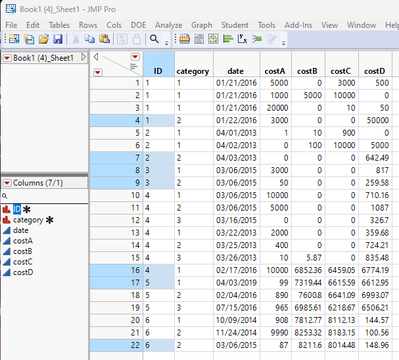
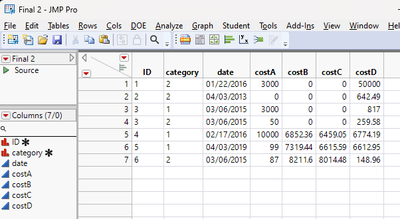
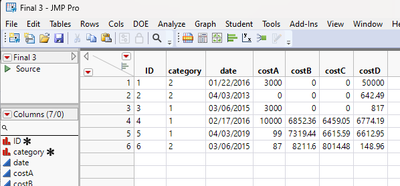
If the last 2 lines of the above script are run, then the duplicate ID rows are deleted.
- Mark as New
- Bookmark
- Subscribe
- Mute
- Subscribe to RSS Feed
- Get Direct Link
- Report Inappropriate Content
Re: How can I select rows based on multiple conditions for the same ID?
ello Jim,
Thank you for your help. I apologize for any confusion. I need each ID that must have category 1 and 2 and/or 3 in the final table. If there are repeated IDs with the same category, I need the row that has the maximum date. The table should be provided here. Thank you for your help in advance.
| ID | category | date | costA | costB | costC | costD |
| 1 | 1 | 1/21/16 | 20000 | 0 | 10 | 50 |
| 1 | 2 | 1/22/16 | 3000 | 0 | 0 | 50000 |
| 2 | 1 | 4/2/13 | 0 | 100 | 10000 | 5000 |
| 2 | 2 | 4/3/13 | 0 | 0 | 0 | 642.49 |
| 3 | 1 | 3/6/15 | 3000 | 0 | 0 | 817 |
| 3 | 2 | 3/6/15 | 50 | 0 | 0 | 259.58 |
| 4 | 1 | 3/6/15 | 10000 | 0 | 0 | 710.16 |
| 4 | 2 | 3/6/15 | 5000 | 0 | 0 | 1087 |
| 4 | 3 | 3/16/15 | 0 | 0 | 0 | 326.7 |
- Mark as New
- Bookmark
- Subscribe
- Mute
- Subscribe to RSS Feed
- Get Direct Link
- Report Inappropriate Content
Re: How can I select rows based on multiple conditions for the same ID?
My example from above had Category as a character column. Your example is numeric. I also changed the logic to ensure that there is at least categories 1&2, 1&3 or 1&2&3
Names Default To Here( 1 );
dt = Current Data Table();

For Each Row(
	If( :date == Col Maximum( :date, :ID ),
		currID = :ID;
		cats = Associative Array( dt:category[dt << get rows where( :ID == currID )] ) << get keys;
		show(cats);
		If( Length( cats ) > 1,
			If( cats[1] == 1 & (cats[2] == 2 | cats[2] == 3),
				dt << select rows( Row() )
			)
		);
	)
);

dtNew = dt << subset( selected columns( 0 ), selected rows( 1 ), output table( "Final" ) );
- Mark as New
- Bookmark
- Subscribe
- Mute
- Subscribe to RSS Feed
- Get Direct Link
- Report Inappropriate Content
Re: How can I select rows based on multiple conditions for the same ID?
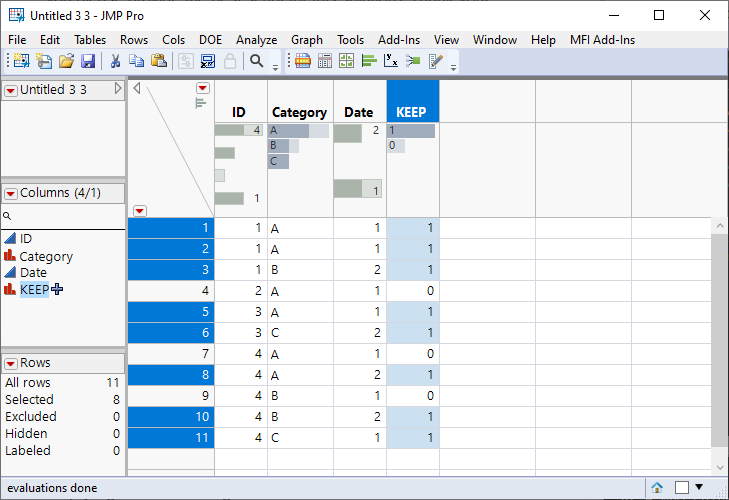
Here is one way you could approach this using Col-functions
Names Default To Here(1);

dt = New Table("Untitled 3",
	Add Rows(11),
	Compress File When Saved(1),
	New Column("ID", Numeric, "Continuous", Format("Best", 12), Set Values([1, 1, 1, 2, 3, 3, 4, 4, 4, 4, 4])),
	New Column("Category", Character, "Nominal", Set Values({"A", "A", "B", "A", "A", "C", "A", "A", "B", "B", "C"})),
	New Column("Date", Numeric, "Continuous", Format("Best", 12), Set Values([1, 1, 2, 1, 1, 2, 1, 2, 1, 2, 1]))
);

dt << New Column("KEEP", Numeric, Nominal, Formula(
	Col Sum(Row() == Col Min(Row(), :category, :id), :id) > 1 & :date == Col Max(:date, :category, :id)
));
Change the formula to << Select Where / << Get Rows Where or use it with subset to take the rows you want to keep.
Edit:
Original version didn't take into account that category 1 could be missing (this assumes that category is numerical column)
New Column("KEEP", Numeric, Nominal, Formula(
	Col Sum(Row() == Col Min(Row(), :category, :id), :id) > 1
	& :date == Col Max(:date, :category, :id)
	& Col Sum(If(:category == 1, 1, .), :id)
));
Recommended Articles
- © 2026 JMP Statistical Discovery LLC. All Rights Reserved.
- Terms of Use
- Privacy Statement
- Contact Us