cancel
Showing results for 
Show  only  | Search instead for 
Did you mean: 
  • JMP will suspend normal business operations for our Winter Holiday beginning on Wednesday, Dec. 24, 2025, at 5:00 p.m. ET (2:00 p.m. ET for JMP Accounts Receivable).
    Regular business hours will resume at 9:00 a.m. EST on Friday, Jan. 2, 2026.
  • We’re retiring the File Exchange at the end of this year. The JMP Marketplace is now your destination for add-ins and extensions.

Discussions

Solve problems, and share tips and tricks with other JMP users.
%3CLINGO-SUB%20id%3D%22lingo-sub-19948%22%20slang%3D%22en-US%22%20mode%3D%22NONE%22%3EComment%20cr%C3%A9er%20un%20fichier%20PDF%20avec%20Jump%3C%2FLINGO-SUB%3E%3CLINGO-BODY%20id%3D%22lingo-body-19948%22%20slang%3D%22en-US%22%20mode%3D%22NONE%22%3E%26lt%3Bmeta%20http-equiv%3D%22Content-Type%22%20content%3D%22text%2Fhtml%3B%20charset%3DUTF-8%22%20%2F%26gt%3B%3CP%3ESalut%20tout%20le%20monde%2C%3C%2FP%3E%3CP%3E%3C%2FP%3E%3CP%3EEn%20fait%2C%20j'ai%20un%20petit%20probl%C3%A8me%20car%20je%20veux%20faire%20un%20fichier%20PDF%20avec%20JMP%20qui%20peut%20%C3%AAtre%20un%20r%C3%A9sum%C3%A9%20de%20certains%20graphiques%20(sauvegarder%20dans%20le%20tableau%20de%20donn%C3%A9es%20JMP)%20et%20un%20tableau%20de%20certaines%20grandeurs%20d'analyse%20(moyenne%2C%20sigma%2C%20min%20et%20max).%3C%2FP%3E%3CP%3E%3C%2FP%3E%3CP%3Eex%20%3A%3C%2FP%3E%3CP%3E%3CSPAN%20class%3D%22lia-inline-image-display-wrapper%20lia-image-align-inline%22%20image-alt%3D%2212438_Capture9898.PNG%22%20style%3D%22width%3A%20636px%3B%22%3E%3CSPAN%20class%3D%22lia-inline-image-display-wrapper%22%20image-alt%3D%2212438_Capture9898.PNG%22%20style%3D%22width%3A%20400px%3B%22%3E%3Cspan%20class%3D%22lia-inline-image-display-wrapper%22%20image-alt%3D%2212438_Capture9898.PNG%22%20style%3D%22width%3A%20400px%3B%22%3E%3Cimg%20src%3D%22https%3A%2F%2Fcommunity.jmp.com%2Ft5%2Fimage%2Fserverpage%2Fimage-id%2F3588iA5FFB66DE23134BA%2Fimage-size%2Fmedium%3Fv%3Dv2%26amp%3Bpx%3D400%22%20role%3D%22button%22%20title%3D%2212438_Capture9898.PNG%22%20alt%3D%2212438_Capture9898.PNG%22%20%2F%3E%3C%2Fspan%3E%3C%2FSPAN%3E%3C%2FSPAN%3E%3C%2FP%3E%3CP%3E%3CSPAN%20class%3D%22lia-inline-image-display-wrapper%20lia-image-align-inline%22%20image-alt%3D%2212439_pastedImage_2.png%22%20style%3D%22width%3A%20655px%3B%22%3E%3CSPAN%20class%3D%22lia-inline-image-display-wrapper%22%20image-alt%3D%2212439_pastedImage_2.png%22%20style%3D%22width%3A%20400px%3B%22%3E%3Cspan%20class%3D%22lia-inline-image-display-wrapper%22%20image-alt%3D%2212439_pastedImage_2.png%22%20style%3D%22width%3A%20400px%3B%22%3E%3Cimg%20src%3D%22https%3A%2F%2Fcommunity.jmp.com%2Ft5%2Fimage%2Fserverpage%2Fimage-id%2F3589iBAF3689AA27C4D57%2Fimage-size%2Fmedium%3Fv%3Dv2%26amp%3Bpx%3D400%22%20role%3D%22button%22%20title%3D%2212439_pastedImage_2.png%22%20alt%3D%2212439_pastedImage_2.png%22%20%2F%3E%3C%2Fspan%3E%3C%2FSPAN%3E%3C%2FSPAN%3E%3C%2FP%3E%3CP%3EJe%20veux%20donc%20faire%20pour%20chaque%20graphique%20son%20tableau%20et%20mettre%20%C3%A7a%20sur%20un%20fichier%20PDF.%3C%2FP%3E%3CP%3E%3C%2FP%3E%3CP%3EJe%20mets%20en%20pi%C3%A8ce%20jointe%20mon%20fichier%20JMP.%3C%2FP%3E%3CP%3E%3C%2FP%3E%3CP%3ENB%20%3A%20le%20pr%C3%A9sent%20tableau%20ne%20correspond%20pas%20au%20graphique%20ci-dessus.%3C%2FP%3E%3CP%3E%3C%2FP%3E%3CP%3EMerci%20pour%20l'aide.%3C%2FP%3E%3CP%3E%3C%2FP%3E%3CP%3EYann%20N.%3C%2FP%3E%3C%2FLINGO-BODY%3E%3CLINGO-SUB%20id%3D%22lingo-sub-19952%22%20slang%3D%22en-US%22%20mode%3D%22NONE%22%3ERe%20%3A%20Comment%20cr%C3%A9er%20un%20fichier%20PDF%20avec%20Jump%3C%2FLINGO-SUB%3E%3CLINGO-BODY%20id%3D%22lingo-body-19952%22%20slang%3D%22en-US%22%20mode%3D%22NONE%22%3E%3CP%3EMerci%20pour%20le%20soutien%2C%20je%20pense%20avoir%20ce%20que%20je%20cherchais.%20Je%20vais%20essayer%20chaque%20solution.%3C%2FP%3E%3CP%3E%3C%2FP%3E%3CP%3EYann%20N.%3C%2FP%3E%3C%2FLINGO-BODY%3E%3CLINGO-SUB%20id%3D%22lingo-sub-19951%22%20slang%3D%22en-US%22%20mode%3D%22NONE%22%3ERe%20%3A%20Comment%20cr%C3%A9er%20un%20fichier%20PDF%20avec%20Jump%3C%2FLINGO-SUB%3E%3CLINGO-BODY%20id%3D%22lingo-body-19951%22%20slang%3D%22en-US%22%20mode%3D%22NONE%22%3E%3CP%3ESalut%20Yann%2C%3C%2FP%3E%3CP%3E%3C%2FP%3E%3CP%3EJ'utilise%20le%20script%20ci-dessous%20pour%20ne%20pas%20avoir%20%C3%A0%20sp%C3%A9cifier%20les%20d%C3%A9tails%20%C3%A0%20chaque%20fois%20que%20j'enregistre%20le%20pdf.%3C%2FP%3E%3COL%3E%3CLI%3ECr%C3%A9er%20un%20journal%3C%2FLI%3E%3CLI%3EEnvoyer%20mes%20graphiques%20au%20journal%3C%2FLI%3E%3CLI%3EAjoutez%20un%20bouton%20de%20sauvegarde%20pdf%20qui%20a%20mes%20pr%C3%A9f%C3%A9rences%20sp%C3%A9cifi%C3%A9es%20(vous%20devrez%20exp%C3%A9rimenter%20avec%20les%20marges%20et%20le%20facteur%20d'%C3%A9chelle)%3C%2FLI%3E%3CLI%3EAppuyez%20sur%20le%20bouton%20pour%20g%C3%A9n%C3%A9rer%20le%20pdf%3C%2FLI%3E%3C%2FOL%3E%3CP%3E%3C%2FP%3E%3CP%3ENote%3A%3CSPAN%20style%3D%22font-size%3A%2013.3333px%3B%22%3E%20si%20le%20dossier%20de%20l'emplacement%20de%20sauvegarde%20n'existe%20pas%20ou%20si%20JMP%20ne%20peut%20pas%20y%20%C3%A9crire%2C%20le%20script%20%C3%A9chouera%20mais%20ne%20vous%20avertira%20pas.%3C%2FSPAN%3E%3C%2FP%3E%3CP%3E%3C%2FP%3E%3CP%3EUtilisez%20%3A%20Journal%20en%20cours()%20%26lt%3B%26lt%3B%20Append(%20H%20List%20Box(%20Page%20Break%20Box()%2C%20)%20pour%20commencer%20une%20nouvelle%20page.%3C%2FP%3E%3CP%3E%3C%2FP%3E%3CP%3ESalutations%2C%3C%2FP%3E%3CP%3E%3C%2FP%3E%3CP%3E%C3%89tienne%3C%2FP%3E%3CP%3E%3C%2FP%3E%3CP%3E%2F%2Fd%C3%A9finir%20les%20propri%C3%A9t%C3%A9s%20du%20fichier%3C%2FP%3E%3CP%3E%2F%2F(si%20l'emplacement%20n'existe%20pas%20ou%20si%20JMP%20ne%20peut%20pas%20y%20%C3%A9crire%2C%20le%20script%20%C3%A9chouera%20silencieusement)%3C%2FP%3E%3CP%3ESaveLocation%20%3D%20%22C%3A%5CRapports%5C%22%26nbsp%3B%3B%3C%2FP%3E%3CP%3EAuteur%20%3D%20%22Mon%20nom%22%26nbsp%3B%3B%3C%2FP%3E%3CP%3ETitre%20%3D%20%22Mon%20rapport%22%26nbsp%3B%3B%3C%2FP%3E%3CP%3E%3C%2FP%3E%3CP%3E%3C%2FP%3E%3CP%3E%2F%2FCr%C3%A9er%20un%20journal%20pour%20recevoir%20la%20sortie%3C%2FP%3E%3CP%3EResultWindow%20%3D%20Nouvelle%20fen%C3%AAtre(%20Titre%2C%20%26lt%3B%3CJOURNAL%3E%3C%2FJOURNAL%3E%3C%2FP%3E%3CP%3E%3C%2FP%3E%3CP%3E%3C%2FP%3E%3CP%3E%2F%2Fajoute%20une%20sortie%3C%2FP%3E%3CP%3EJournal%20actuel()%20%26lt%3B%26lt%3B%20Ajouter(%3C%2FP%3E%3CP%3EG%C3%A9n%C3%A9rateur%20de%20graphiques(%3C%2FP%3E%3CP%3ETaille%20(534%2C%20500)%2C%3C%2FP%3E%3CP%3EAfficher%20le%20panneau%20de%20configuration%20(%200%20)%2C%3C%2FP%3E%3CP%3Evariables(%3C%2FP%3E%3CP%3EX(%20%3APrototype%20)%2C%3C%2FP%3E%3CP%3EY(%20%3ANom(%20%22Sucre%201%2F3%20%5B%25%5D%22%20)%20)%2C%3C%2FP%3E%3CP%3EY(%20%3ANom(%20%22Sucre%202%2F3%20%5B%25%5D%22%20)%2C%20Position(%201%20)%20)%2C%3C%2FP%3E%3CP%3EWrap(%20%3AVoies%20)%3C%2FP%3E%3CP%3E)%3C%2FP%3E%3CP%3E)%3C%2FP%3E%3CP%3E)%3B%3C%2FP%3E%3CP%3E%3C%2FP%3E%3CP%3E%3C%2FP%3E%3CP%3E%2F%2Fajoute%20un%20bouton%20de%20sauvegarde%20%C3%A0%20la%20fen%C3%AAtre%20du%20journal%3C%2FP%3E%3CP%3EJournal%20actuel()%20%26lt%3B%26lt%3B%20Ajouter(%3C%2FP%3E%3CP%3EH%20Zone%20de%20liste(%3C%2FP%3E%3CP%3EBo%C3%AEte%20%C3%A0%20boutons(%20%22Enregistrer%20au%20format%20PDF%22%2C%3C%2FP%3E%3CP%3EthisWin%20%3D%20Fen%C3%AAtre%20actuelle()%3B%3C%2FP%3E%3CP%3EthisWin%20%26lt%3B%26lt%3B%20D%C3%A9finir%20la%20configuration%20de%20la%20page(%3C%2FP%3E%3CP%3Emarges(%200.4%2C%200.4%2C%200.7%2C%200.7%20)%2C%3C%2FP%3E%3CP%3E%C3%A9chelle(%200.7%20)%2C%3C%2FP%3E%3CP%3Eportrait(%201%20)%2C%3C%2FP%3E%3CP%3Eformat%20de%20papier(%20%22A4%22%20)%3C%2FP%3E%3CP%3E)%3B%3C%2FP%3E%3CP%3EthisWin%20%26lt%3B%26lt%3B%20D%C3%A9finir%20les%20pieds%20de%20page%20d'impression%20(%3C%2FP%3E%3CP%3EAuteur%2F*gauche*%2F%2C%3C%2FP%3E%3CP%3E%22%26amp%3Bd%3B%22%2F*centre*%2F%2C%3C%2FP%3E%3CP%3E%22Page%20%26amp%3Bpn%3B%20sur%20%26amp%3Bpc%3B%22%2F*droite*%2F%3C%2FP%3E%3CP%3E)%3B%3C%2FP%3E%3CP%3E%3C%2FP%3E%3CP%3E%3C%2FP%3E%3CP%3Echemin%20%3D%20EnregistrerEmplacement%20%7C%7C%20titre%20%7C%7C%20Char(Date%20longue(%20Aujourd'hui()%20))%20%7C%7C%20%22.pdf%22%26nbsp%3B%3B%3C%2FP%3E%3CP%3EthisWin%20%26lt%3B%26lt%3B%20Enregistrer%20le%20PDF%20(chemin)%3B%3C%2FP%3E%3CP%3E)%2C%3C%2FP%3E%3CP%3E%3C%2FP%3E%3CP%3E%3C%2FP%3E%3CP%3E)%3C%2FP%3E%3CP%3E)%3B%3C%2FP%3E%3C%2FLINGO-BODY%3E%3CLINGO-SUB%20id%3D%22lingo-sub-19950%22%20slang%3D%22en-US%22%20mode%3D%22NONE%22%3ERe%20%3A%20Comment%20cr%C3%A9er%20un%20fichier%20PDF%20avec%20Jump%3C%2FLINGO-SUB%3E%3CLINGO-BODY%20id%3D%22lingo-body-19950%22%20slang%3D%22en-US%22%20mode%3D%22NONE%22%3E%3CP%3EOu%2C%20au%20lieu%20d'imprimer%20le%20journal%20au%20format%20PDF%2C%20vous%20pouvez%20simplement%20enregistrer%20le%20journal%20sous%20et%20choisir%20PDF.%3C%2FP%3E%3C%2FLINGO-BODY%3E%3CLINGO-SUB%20id%3D%22lingo-sub-19949%22%20slang%3D%22en-US%22%20mode%3D%22NONE%22%3ERe%20%3A%20Comment%20cr%C3%A9er%20un%20fichier%20PDF%20avec%20Jump%3C%2FLINGO-SUB%3E%3CLINGO-BODY%20id%3D%22lingo-body-19949%22%20slang%3D%22en-US%22%20mode%3D%22NONE%22%3E%3CP%3ESalut%20Yann%2C%3C%2FP%3E%3CP%3E%3C%2FP%3E%3CP%3EVous%20pouvez%20mettre%20%C3%A0%20la%20fois%20l'analyse%20dans%20un%20journal%20et%20imprimer%20le%20journal%20au%20format%20pdf.%3C%2FP%3E%3CP%3E%3C%2FP%3E%3CP%3ESalutations%2C%3C%2FP%3E%3CP%3EGuillaume%3C%2FP%3E%3C%2FLINGO-BODY%3E
Choose Language Hide Translation Bar
yannntima
Level II

How can I do a PDF files with Jump

Hi all,

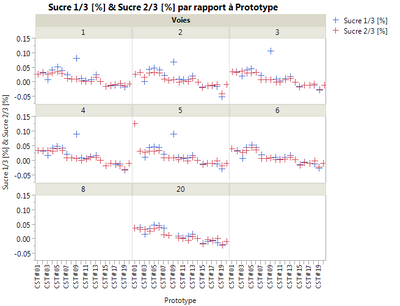
In fact I have a small issue because I want to do a PDF file with JMP that can be a summarized of some graphs (save in datas table JMP) and a table from some greatness of Analysis (average, sigma, min and max).

ex :
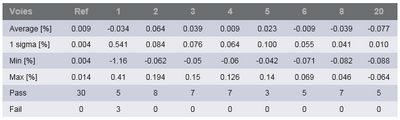
12438_Capture9898.PNG

12439_pastedImage_2.png

So I want do for each graph his tableau and put that on a PDF file.

I put in attachement my JMP file.

NB : the present table does not correspond to the graph above.

Thanks for the help.

Yann N.

1 ACCEPTED SOLUTION

Accepted Solutions

Re: How can I do a PDF files with Jump

Or, instead of printing the journal as PDF, you could just do a Save As of the journal and choose PDF.

Dan Obermiller

View solution in original post

4 REPLIES 4

Re: How can I do a PDF files with Jump

Hi Yann,

You can put both analysis into a journal and print the journal to pdf.

Regards,

Guillaume

Guillaume

Re: How can I do a PDF files with Jump

Or, instead of printing the journal as PDF, you could just do a Save As of the journal and choose PDF.
Dan Obermiller

Re: How can I do a PDF files with Jump

Hi Yann,

I use the script below so I don't have to specify the details each time I save the pdf.

  1. Create a journal
  2. Send my graphs to the journal
  3. Add a save pdf button which has my preferences specified (you will need to experiment with the margins and scale factor)
  4. Press the button to generate the pdf

Note: if the folder for the save location doesn't exist or JMP can't write to it the script will fail but not warn you.

Use: Current Journal() << Append( H List Box( Page Break Box(), ) to start a new page.

Regards,

Stephen

//set file properties

//(if location doesn't exist or JMP can't write to it the script will fail silently)

SaveLocation = "C:\Reports\";

Author = "My Name";

Title = "My Report";

//Create a journal to recieve the output

ResultWindow = New Window( Title, <<journal );

//add output

Current Journal() << Append(

  Graph Builder(

  Size( 534, 500 ),

  Show Control Panel( 0 ),

  Variables(

  X( :Prototype ),

  Y( :Name( "Sucre 1/3 [%]" ) ),

  Y( :Name( "Sucre 2/3 [%]" ), Position( 1 ) ),

  Wrap( :Voies )

  )

  )

);

//add a save button to the Journal Window

Current Journal() << Append(

  H List Box(

  Button Box( "Save As PDF",

  thisWin = Current Window();

  thisWin << Set page setup(

  margins( 0.4, 0.4, 0.7, 0.7 ),

  scale( 0.7 ),

  portrait( 1 ),

  paper size( "A4" )

  );

  thisWin << Set Print Footers(

  Author/*left*/,

  "&d;"/*center*/,

  "Page &pn; of &pc;"/*right*/

  );

  path = SaveLocation || title || Char(Long Date( Today() )) || ".pdf";

  thisWin << Save PDF( path );

  ),

  )

);

yannntima
Level II

Re: How can I do a PDF files with Jump

Thank you for the support, I think I have what I looking for. I wil try each solution.

Yann N

Recommended Articles