- Don’t miss your chance to experience Discovery Summit Europe at our best available rate! Early bird registration through 31 Oct.
- Graph Builder Toolbar streamlines interactive graphing. Creates shortcuts on Report and GraphBuilder Helpers toolbars. Download and install the extension.
- Subscribe to RSS Feed
- Mark Topic as New
- Mark Topic as Read
- Float this Topic for Current User
- Bookmark
- Subscribe
- Mute
- Printer Friendly Page
Discussions
Solve problems, and share tips and tricks with other JMP users.- User Community
- :
- Discussions
- :
- How can I do a PDF files with Jump

- Mark as New
- Bookmark
- Subscribe
- Mute
- Subscribe to RSS Feed
- Get Direct Link
- Report Inappropriate Content
How can I do a PDF files with Jump
Hi all,
In fact I have a small issue because I want to do a PDF file with JMP that can be a summarized of some graphs (save in datas table JMP) and a table from some greatness of Analysis (average, sigma, min and max).
ex :
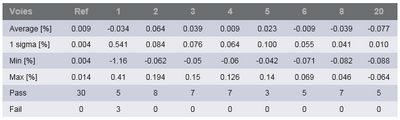
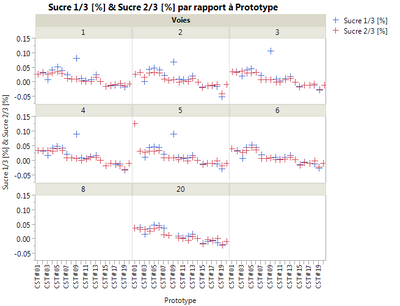
So I want do for each graph his tableau and put that on a PDF file.
I put in attachement my JMP file.
NB : the present table does not correspond to the graph above.
Thanks for the help.
Yann N.
Accepted Solutions


- Mark as New
- Bookmark
- Subscribe
- Mute
- Subscribe to RSS Feed
- Get Direct Link
- Report Inappropriate Content
Re: How can I do a PDF files with Jump
Or, instead of printing the journal as PDF, you could just do a Save As of the journal and choose PDF.

- Mark as New
- Bookmark
- Subscribe
- Mute
- Subscribe to RSS Feed
- Get Direct Link
- Report Inappropriate Content
Re: How can I do a PDF files with Jump
Hi Yann,
You can put both analysis into a journal and print the journal to pdf.
Regards,
Guillaume
- Mark as New
- Bookmark
- Subscribe
- Mute
- Subscribe to RSS Feed
- Get Direct Link
- Report Inappropriate Content
Re: How can I do a PDF files with Jump
Or, instead of printing the journal as PDF, you could just do a Save As of the journal and choose PDF.
- Mark as New
- Bookmark
- Subscribe
- Mute
- Subscribe to RSS Feed
- Get Direct Link
- Report Inappropriate Content
Re: How can I do a PDF files with Jump
Hi Yann,
I use the script below so I don't have to specify the details each time I save the pdf.
- Create a journal
- Send my graphs to the journal
- Add a save pdf button which has my preferences specified (you will need to experiment with the margins and scale factor)
- Press the button to generate the pdf
Note: if the folder for the save location doesn't exist or JMP can't write to it the script will fail but not warn you.
Use: Current Journal() << Append( H List Box( Page Break Box(), ) to start a new page.
Regards,
Stephen
//set file properties
//(if location doesn't exist or JMP can't write to it the script will fail silently)
SaveLocation = "C:\Reports\";
Author = "My Name";
Title = "My Report";
//Create a journal to recieve the output
ResultWindow = New Window( Title, <<journal );
//add output
Current Journal() << Append(
Graph Builder(
Size( 534, 500 ),
Show Control Panel( 0 ),
Variables(
X( :Prototype ),
Y( :Name( "Sucre 1/3 [%]" ) ),
Y( :Name( "Sucre 2/3 [%]" ), Position( 1 ) ),
Wrap( :Voies )
)
)
);
//add a save button to the Journal Window
Current Journal() << Append(
H List Box(
Button Box( "Save As PDF",
thisWin = Current Window();
thisWin << Set page setup(
margins( 0.4, 0.4, 0.7, 0.7 ),
scale( 0.7 ),
portrait( 1 ),
paper size( "A4" )
);
thisWin << Set Print Footers(
Author/*left*/,
"&d;"/*center*/,
"Page &pn; of &pc;"/*right*/
);
path = SaveLocation || title || Char(Long Date( Today() )) || ".pdf";
thisWin << Save PDF( path );
),
)
);
- Mark as New
- Bookmark
- Subscribe
- Mute
- Subscribe to RSS Feed
- Get Direct Link
- Report Inappropriate Content
Re: How can I do a PDF files with Jump
Thank you for the support, I think I have what I looking for. I wil try each solution.
Yann N
Recommended Articles
- © 2026 JMP Statistical Discovery LLC. All Rights Reserved.
- Terms of Use
- Privacy Statement
- Contact Us