- JMP Statement Regarding Critical PHP Remote Code Execution Vulnerabilities (CVE-2026-109618, CVE-2026-109619)
- Don’t miss your chance to experience Discovery Summit Europe at our best available rate! Early bird registration through 31 Oct.
- Graph Builder Toolbar streamlines interactive graphing. Creates shortcuts on Report and GraphBuilder Helpers toolbars. Download and install the extension.
- Subscribe to RSS Feed
- Mark Topic as New
- Mark Topic as Read
- Float this Topic for Current User
- Bookmark
- Subscribe
- Mute
- Printer Friendly Page
Discussions
Solve problems, and share tips and tricks with other JMP users.- User Community
- :
- Discussions
- :
- Re: How Can I Get The Lag Function to "Reset" With Each New Batch?

- Mark as New
- Bookmark
- Subscribe
- Mute
- Subscribe to RSS Feed
- Get Direct Link
- Report Inappropriate Content
How Can I Get The Lag Function to "Reset" With Each New Batch?
Hello,
I have the following data and I want to use the Lag function to calculate the difference between each result and the result prior to it (the data table is also attached to this message).
I am using JMP 16.
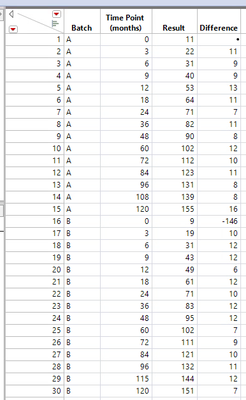
Currently I'm using the following formula in the "Difference" column:

What I can't figure out is how to get the calculation to "reset" once it gets to Batch B. I realize that even with my current formula, only the difference value in row 16 is incorrect, but still I would know to setup the formula so that it works properly within batches.
Does anyone have any suggestions?
Jeff
Accepted Solutions


- Mark as New
- Bookmark
- Subscribe
- Mute
- Subscribe to RSS Feed
- Get Direct Link
- Report Inappropriate Content
Re: How Can I Get The Lag Function to "Reset" With Each New Batch?
change your formula to
If( :"Time Point (months)"n == 0,
	.,
	:Result - Lag( :Result )
)
- Mark as New
- Bookmark
- Subscribe
- Mute
- Subscribe to RSS Feed
- Get Direct Link
- Report Inappropriate Content
Re: How Can I Get The Lag Function to "Reset" With Each New Batch?
change your formula to
If( :"Time Point (months)"n == 0,
	.,
	:Result - Lag( :Result )
)
- Mark as New
- Bookmark
- Subscribe
- Mute
- Subscribe to RSS Feed
- Get Direct Link
- Report Inappropriate Content
Re: How Can I Get The Lag Function to "Reset" With Each New Batch?

- Mark as New
- Bookmark
- Subscribe
- Mute
- Subscribe to RSS Feed
- Get Direct Link
- Report Inappropriate Content
Re: How Can I Get The Lag Function to "Reset" With Each New Batch?
If you need such grouped lag operations frequently, you might have a look at
https://marketplace.jmp.com/appdetails/Normalization+GUI in the Marketplace.
It implemented the N-1 in combination with grouping based on @jthi 's approach:

This takes the pain to remember the exact syntax : )
In addition, the Platform handles Excluded rows automatically.
- Mark as New
- Bookmark
- Subscribe
- Mute
- Subscribe to RSS Feed
- Get Direct Link
- Report Inappropriate Content
Re: How Can I Get The Lag Function to "Reset" With Each New Batch?
Dif() and Lag() formula functions by column group (byVar argument) - great wish by @FN
-> In JMP19, lag() and dif() can be calculated via Col At () - which provides a grouping option.

- Mark as New
- Bookmark
- Subscribe
- Mute
- Subscribe to RSS Feed
- Get Direct Link
- Report Inappropriate Content
Re: How Can I Get The Lag Function to "Reset" With Each New Batch?
You can also utilize Col Moving Average to get the previous value (Data preparation- substract column data by other column )
:Result- (Col Moving Average(:Result, 1, 1, 0, :Lot Number) * 2 - :Result)but in your case using something like Jim suggested is most likely better. Also there is Dif function you can use instead of Lag
If( :"Time Point (months)"n == 0,
	.,
	Dif(:Result, 1)
)Recommended Articles
- © 2026 JMP Statistical Discovery LLC. All Rights Reserved.
- Terms of Use
- Privacy Statement
- Contact Us