- JMP Statement Regarding Critical PHP Remote Code Execution Vulnerabilities (CVE-2026-109618, CVE-2026-109619)
- Don’t miss your chance to experience Discovery Summit Europe at our best available rate! Early bird registration through 31 Oct.
- Graph Builder Toolbar streamlines interactive graphing. Creates shortcuts on Report and GraphBuilder Helpers toolbars. Download and install the extension.
- Subscribe to RSS Feed
- Mark Topic as New
- Mark Topic as Read
- Float this Topic for Current User
- Bookmark
- Subscribe
- Mute
- Printer Friendly Page
Discussions
Solve problems, and share tips and tricks with other JMP users.- User Community
- :
- Discussions
- :
- Re: Formula for FPC elements in functional data explorer

- Mark as New
- Bookmark
- Subscribe
- Mute
- Subscribe to RSS Feed
- Get Direct Link
- Report Inappropriate Content
Formula for FPC elements in functional data explorer
I have a question regarding the FPC elements in the Functional Data Explorer. Is there any way that I can extract the formula for those elements? I can only see the formula for the shape functions when I extract the FPCA Model summaries.
- Tags:
- jmp pro


- Mark as New
- Bookmark
- Subscribe
- Mute
- Subscribe to RSS Feed
- Get Direct Link
- Report Inappropriate Content
Re: Formula for FPC elements in functional data explorer
Hi,
It isn't completely straight forward but can be done in a few steps:
1) First, extract the formula by first saving the summaries:
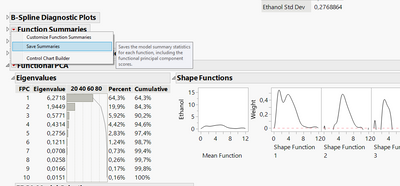
2) From the summary table, you can find all of the Shape Function formulas within the hidden columns of the table:
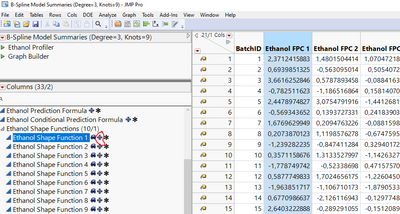
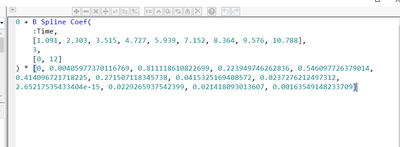
3) Clicking on the + symbol will open the Formula editor for that column, showing the formula. Double-clicking on it will display it in JSL, which can then be selected and copied:
4) Next, create a new column in your original table, or in a new table with the independent variable in another column (in my case, Time):
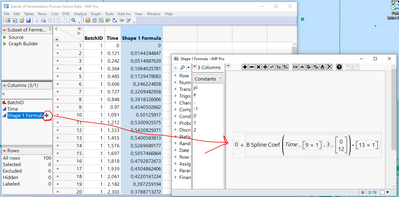
5) You can now explore the function in more detail, for example, by plotting it in Graph Builder if you wanted:
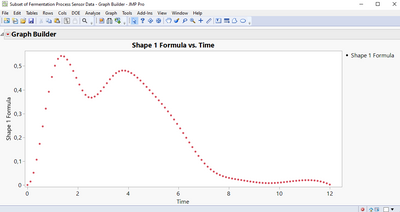
Does this do what you were hoping for?
- Mark as New
- Bookmark
- Subscribe
- Mute
- Subscribe to RSS Feed
- Get Direct Link
- Report Inappropriate Content
Re: Formula for FPC elements in functional data explorer
Thanks for your reply Elodie. But my question was mainly about the FPC components and the formula to calculate them if I know the shape functions. I have a case that I want to extract the shape functions from some historical data and then use that shape functions to calculate the FPC elements of a new batch. Is there any way around it?


- Mark as New
- Bookmark
- Subscribe
- Mute
- Subscribe to RSS Feed
- Get Direct Link
- Report Inappropriate Content
Re: Formula for FPC elements in functional data explorer
Unfortunately I do not know of an easy or straight forward way to do this, although I have many similar use cases.
@Bill_Worley this fits in with our conversation.
Recommended Articles
- © 2026 JMP Statistical Discovery LLC. All Rights Reserved.
- Terms of Use
- Privacy Statement
- Contact Us