cancel
Showing results for 
Show  only  | Search instead for 
Did you mean: 
  • JMP will suspend normal business operations for our Winter Holiday beginning on Wednesday, Dec. 24, 2025, at 5:00 p.m. ET (2:00 p.m. ET for JMP Accounts Receivable).
    Regular business hours will resume at 9:00 a.m. EST on Friday, Jan. 2, 2026.
  • We’re retiring the File Exchange at the end of this year. The JMP Marketplace is now your destination for add-ins and extensions.

Discussions

Solve problems, and share tips and tricks with other JMP users.
%3CLINGO-SUB%20id%3D%22lingo-sub-423390%22%20slang%3D%22en-US%22%20mode%3D%22NONE%22%3EEditar%20diagrama%20de%20caja%20de%20cuantiles%3C%2FLINGO-SUB%3E%3CLINGO-BODY%20id%3D%22lingo-body-423390%22%20slang%3D%22en-US%22%20mode%3D%22NONE%22%3E%3CP%3ESolo%20quiero%20ver%20un%20diagrama%20de%20caja%20de%20cuantiles%20que%20muestre%205%20elementos%2C%20Max%2C%20Min%20y%2075%25%2050%25%2025%25%2C%20no%20todas%20las%20vallas.%20E%20incluir%20valores%20at%C3%ADpicos.%20La%20%C3%BAnica%20opci%C3%B3n%20en%20JMP%2016%20graph%20builder-QUANTILE%20box%20plots%20es%20mostrar%20los%2011%20elementos.%20%C2%BFPuedo%20personalizar%20mi%20propio%20diagrama%20de%20caja%20QUANTILE%3F%20Prefiero%20no%20usar%20secuencias%20de%20comandos.%20%C2%A1Gracias!%3C%2FP%3E%3C%2FLINGO-BODY%3E%3CLINGO-LABS%20id%3D%22lingo-labs-423390%22%20slang%3D%22en-US%22%20mode%3D%22NONE%22%3E%3CLINGO-LABEL%3EGr%C3%A1ficos%3C%2FLINGO-LABEL%3E%3C%2FLINGO-LABS%3E%3CLINGO-SUB%20id%3D%22lingo-sub-423511%22%20slang%3D%22en-US%22%20mode%3D%22NONE%22%3ERe%3A%20Editar%20diagrama%20de%20caja%20de%20cuantiles%3C%2FLINGO-SUB%3E%3CLINGO-BODY%20id%3D%22lingo-body-423511%22%20slang%3D%22en-US%22%20mode%3D%22NONE%22%3E%3CP%3EPuede%20obtener%20lo%20que%20desea%20utilizando%20la%20funci%C3%B3n%20Personalizar%20en%20JMP.%3C%2FP%3E%0A%3CP%3ESi%20genera%20un%20histograma%20utilizando%20Graph%20Builder%2C%20especificando%20no%20dibujar%20las%20vallas%2C%20entonces%20puede%20usar%20Personalizar%20para%20volver%20a%20agregar%20las%20vallas%20que%20desee.%3C%2FP%3E%0A%3CP%3E%3CSPAN%20class%3D%22lia-inline-image-display-wrapper%20lia-image-align-inline%22%20image-alt%3D%22txnelson_0-1633386599042.png%22%20style%3D%22width%3A%20400px%3B%22%3E%3CSPAN%20class%3D%22lia-inline-image-display-wrapper%22%20image-alt%3D%22txnelson_0-1633386599042.png%22%20style%3D%22width%3A%20400px%3B%22%3E%3Cspan%20class%3D%22lia-inline-image-display-wrapper%22%20image-alt%3D%22txnelson_0-1633386599042.png%22%20style%3D%22width%3A%20400px%3B%22%3E%3Cimg%20src%3D%22https%3A%2F%2Fcommunity.jmp.com%2Ft5%2Fimage%2Fserverpage%2Fimage-id%2F36296i9E9A961FF67255A5%2Fimage-size%2Fmedium%3Fv%3Dv2%26amp%3Bpx%3D400%22%20role%3D%22button%22%20title%3D%22txnelson_0-1633386599042.png%22%20alt%3D%22txnelson_0-1633386599042.png%22%20%2F%3E%3C%2Fspan%3E%3C%2FSPAN%3E%3C%2FSPAN%3E%3C%2FP%3E%0A%3CP%3EHaga%20clic%20derecho%20en%20el%20gr%C3%A1fico%20y%20seleccione%20Personalizar.Luego%20haga%20clic%20en%20%2B%20para%20agregar%20un%20script%20y%20copie%20los%20comandos%20de%20script%20simples%20en%20la%20ventana%20Personalizar%20y%20presione%20Aplicar.Agregar%C3%A1%20las%202%20vallas%20que%20desee.%3C%2FP%3E%0A%3CP%3E%3CSPAN%20class%3D%22lia-inline-image-display-wrapper%20lia-image-align-inline%22%20image-alt%3D%22txnelson_1-1633386939623.png%22%20style%3D%22width%3A%20800px%3B%22%3E%3CSPAN%20class%3D%22lia-inline-image-display-wrapper%22%20image-alt%3D%22txnelson_1-1633386939623.png%22%20style%3D%22width%3A%20800px%3B%22%3E%3Cspan%20class%3D%22lia-inline-image-display-wrapper%22%20image-alt%3D%22txnelson_1-1633386939623.png%22%20style%3D%22width%3A%20800px%3B%22%3E%3Cimg%20src%3D%22https%3A%2F%2Fcommunity.jmp.com%2Ft5%2Fimage%2Fserverpage%2Fimage-id%2F36297iC494B874DF8E73BE%2Fimage-dimensions%2F800x282%3Fv%3Dv2%22%20width%3D%22800%22%20height%3D%22282%22%20role%3D%22button%22%20title%3D%22txnelson_1-1633386939623.png%22%20alt%3D%22txnelson_1-1633386939623.png%22%20%2F%3E%3C%2Fspan%3E%3C%2FSPAN%3E%3C%2FSPAN%3E%3C%2FP%3E%0A%3CP%3E%26nbsp%3B%3C%2FP%3E%3C%2FLINGO-BODY%3E%3CLINGO-SUB%20id%3D%22lingo-sub-423470%22%20slang%3D%22en-US%22%20mode%3D%22NONE%22%3ERe%3A%20Editar%20diagrama%20de%20caja%20de%20cuantiles%3C%2FLINGO-SUB%3E%3CLINGO-BODY%20id%3D%22lingo-body-423470%22%20slang%3D%22en-US%22%20mode%3D%22NONE%22%3E%3CP%3EIntente%20cambiar%20el%20Estilo%20de%20caja%20a%20S%C3%B3lido.%20Creo%20que%20eso%20podr%C3%ADa%20ser%20lo%20que%20quieres.%20Realmente%20no%20tiene%20sentido%20para%20m%C3%AD%2C%20pero%20esto%20es%20lo%20que%20obtengo%20con%20el%20cuadro%20Solid%20Quantile.%3C%2FP%3E%0A%3CP%3E%3CSPAN%20class%3D%22lia-inline-image-display-wrapper%20lia-image-align-inline%22%20image-alt%3D%22Dan_Obermiller_0-1633392941290.png%22%20style%3D%22width%3A%20400px%3B%22%3E%3CSPAN%20class%3D%22lia-inline-image-display-wrapper%22%20image-alt%3D%22Dan_Obermiller_0-1633392941290.png%22%20style%3D%22width%3A%20400px%3B%22%3E%3Cspan%20class%3D%22lia-inline-image-display-wrapper%22%20image-alt%3D%22Dan_Obermiller_0-1633392941290.png%22%20style%3D%22width%3A%20400px%3B%22%3E%3Cimg%20src%3D%22https%3A%2F%2Fcommunity.jmp.com%2Ft5%2Fimage%2Fserverpage%2Fimage-id%2F36298iC78BE32B5D058A8A%2Fimage-size%2Fmedium%3Fv%3Dv2%26amp%3Bpx%3D400%22%20role%3D%22button%22%20title%3D%22Dan_Obermiller_0-1633392941290.png%22%20alt%3D%22Dan_Obermiller_0-1633392941290.png%22%20%2F%3E%3C%2Fspan%3E%3C%2FSPAN%3E%3C%2FSPAN%3E%3C%2FP%3E%0A%3CP%3E%26nbsp%3B%3C%2FP%3E%3C%2FLINGO-BODY%3E%3CLINGO-SUB%20id%3D%22lingo-sub-423450%22%20slang%3D%22en-US%22%20mode%3D%22NONE%22%3ERe%3A%20Editar%20diagrama%20de%20caja%20de%20cuantiles%3C%2FLINGO-SUB%3E%3CLINGO-BODY%20id%3D%22lingo-body-423450%22%20slang%3D%22en-US%22%20mode%3D%22NONE%22%3E%3CP%3EIntente%20cambiarlo%20a%20un%20tipo%20de%20cuadro%20at%C3%ADpico%3C%2FP%3E%3C%2FLINGO-BODY%3E%3CLINGO-SUB%20id%3D%22lingo-sub-423433%22%20slang%3D%22en-US%22%20mode%3D%22NONE%22%3ERe%3A%20Editar%20diagrama%20de%20caja%20de%20cuantiles%3C%2FLINGO-SUB%3E%3CLINGO-BODY%20id%3D%22lingo-body-423433%22%20slang%3D%22en-US%22%20mode%3D%22NONE%22%3E%3CP%3E.%20Gracias.%20Pero%20solo%20puedo%20elegir%20ninguna%20valla%20o%20todas%20las%20vallas.%20Solo%20quiero%20cercar%20a%20Max%20y%20Min.%3C%2FP%3E%3C%2FLINGO-BODY%3E%3CLINGO-SUB%20id%3D%22lingo-sub-423414%22%20slang%3D%22en-US%22%20mode%3D%22NONE%22%3ERe%3A%20Editar%20diagrama%20de%20caja%20de%20cuantiles%3C%2FLINGO-SUB%3E%3CLINGO-BODY%20id%3D%22lingo-body-423414%22%20slang%3D%22en-US%22%20mode%3D%22NONE%22%3E%3CP%3ECree%20su%20diagrama%20de%20caja%20y%20luego%20haga%20clic%20derecho%20en%20el%20diagrama%20y%20habr%C3%A1%20una%20serie%20de%20opciones%20para%20usted.%3C%2FP%3E%0A%3CP%3E%3CSPAN%20class%3D%22lia-inline-image-display-wrapper%20lia-image-align-inline%22%20image-alt%3D%22statman_0-1633369684654.png%22%20style%3D%22width%3A%20400px%3B%22%3E%3CSPAN%20class%3D%22lia-inline-image-display-wrapper%22%20image-alt%3D%22statman_0-1633369684654.png%22%20style%3D%22width%3A%20400px%3B%22%3E%3Cspan%20class%3D%22lia-inline-image-display-wrapper%22%20image-alt%3D%22statman_0-1633369684654.png%22%20style%3D%22width%3A%20400px%3B%22%3E%3Cimg%20src%3D%22https%3A%2F%2Fcommunity.jmp.com%2Ft5%2Fimage%2Fserverpage%2Fimage-id%2F36285i2217A29D19753366%2Fimage-size%2Fmedium%3Fv%3Dv2%26amp%3Bpx%3D400%22%20role%3D%22button%22%20title%3D%22statman_0-1633369684654.png%22%20alt%3D%22statman_0-1633369684654.png%22%20%2F%3E%3C%2Fspan%3E%3C%2FSPAN%3E%3C%2FSPAN%3E%3C%2FP%3E%0A%3CP%3E%26nbsp%3B%3C%2FP%3E%3C%2FLINGO-BODY%3E
Choose Language Hide Translation Bar
Isabel26
Level III

Edit quantile box plot

I only want to see Quantile box plot that show 5 elements, Max, Min and 75% 50% 25%, not all fences. And include outliers. The only option in JMP 16 graph builder-QUANTILE box plots is showing all 11 elements. Can I customized my own QUANTILE box plot? prefer no scripting. Thanks! 

1 ACCEPTED SOLUTION

Accepted Solutions
txnelson
Super User

Re: Edit quantile box plot

You can get what you want by using the Customize capability in JMP.

If you generate a histogram using Graph Builder, specifying not to draw the Fences, one can then use the Customize to add back in the Fences you want.
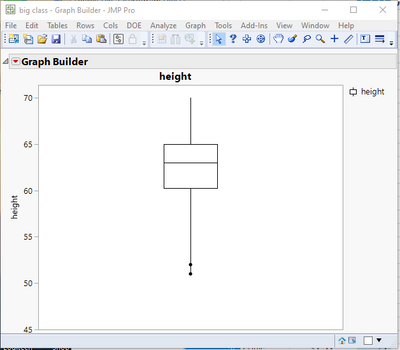
txnelson_0-1633386599042.png

Right click on the graph and select Customize.  Then click on the + to add a script, and copy in the simple script commands into the Customize window, and press Apply.  It will add in the 2 fences you want.
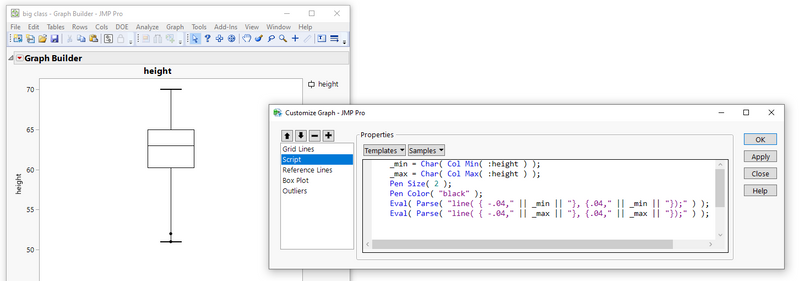
txnelson_1-1633386939623.png


Jim

View solution in original post

5 REPLIES 5
statman
Super User

Re: Edit quantile box plot

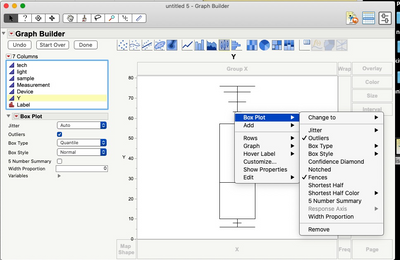
Create your Box plot and then right click on the plot and there will be a number of options for you.

statman_0-1633369684654.png


"All models are wrong, some are useful" G.E.P. Box
Isabel26
Level III

Re: Edit quantile box plot

. Thanks. But I only can choose no fences or all the fences. I want to only fence Max and Min.

statman
Super User

Re: Edit quantile box plot

Try changing it to an outlier Box Type

"All models are wrong, some are useful" G.E.P. Box

Re: Edit quantile box plot

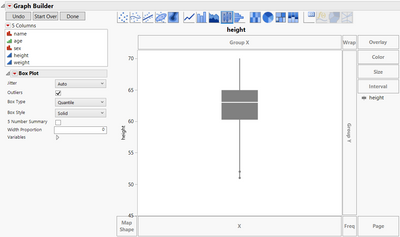
Try changing the Box Style to Solid. I think that might be what you want. It doesn't really make sense to me, but this is what I get with the Solid Quantile box.

Dan_Obermiller_0-1633392941290.png


Dan Obermiller
txnelson
Super User

Re: Edit quantile box plot

You can get what you want by using the Customize capability in JMP.

If you generate a histogram using Graph Builder, specifying not to draw the Fences, one can then use the Customize to add back in the Fences you want.

txnelson_0-1633386599042.png

Right click on the graph and select Customize.  Then click on the + to add a script, and copy in the simple script commands into the Customize window, and press Apply.  It will add in the 2 fences you want.

txnelson_1-1633386939623.png


Jim

Recommended Articles