- JMP will suspend normal business operations for our Winter Holiday beginning on Wednesday, Dec. 24, 2025, at 5:00 p.m. ET (2:00 p.m. ET for JMP Accounts Receivable).
Regular business hours will resume at 9:00 a.m. EST on Friday, Jan. 2, 2026. - We’re retiring the File Exchange at the end of this year. The JMP Marketplace is now your destination for add-ins and extensions.
- Subscribe to RSS Feed
- Mark Topic as New
- Mark Topic as Read
- Float this Topic for Current User
- Bookmark
- Subscribe
- Mute
- Printer Friendly Page
Discussions
Solve problems, and share tips and tricks with other JMP users.- JMP User Community
- :
- Discussions
- :
- Do Not Open CSV File after 'Save As' when scripting

- Mark as New
- Bookmark
- Subscribe
- Mute
- Subscribe to RSS Feed
- Get Direct Link
- Report Inappropriate Content
Do Not Open CSV File after 'Save As' when scripting
Hi,
I need to save tables by scripting both as .csv and then as .jmp.
When the .csv table is saved, it is automatically opened in excel (Win 11, JMP17Pro). Is there a way to set an option (or preference) to prevent the behavior?
Thanks
Sebastien
Accepted Solutions


- Mark as New
- Bookmark
- Subscribe
- Mute
- Subscribe to RSS Feed
- Get Direct Link
- Report Inappropriate Content
Re: Do Not Open CSV File after 'Save As' when scripting
This script does not open the .csv file in Excel on my machine (Win11, JMP17Pro). Does it on yours?
dt = open ("$SAMPLE_DATA/Big Class.jmp");
dt << save as ("$DESKTOP/Big Class.csv");


- Mark as New
- Bookmark
- Subscribe
- Mute
- Subscribe to RSS Feed
- Get Direct Link
- Report Inappropriate Content
Re: Do Not Open CSV File after 'Save As' when scripting
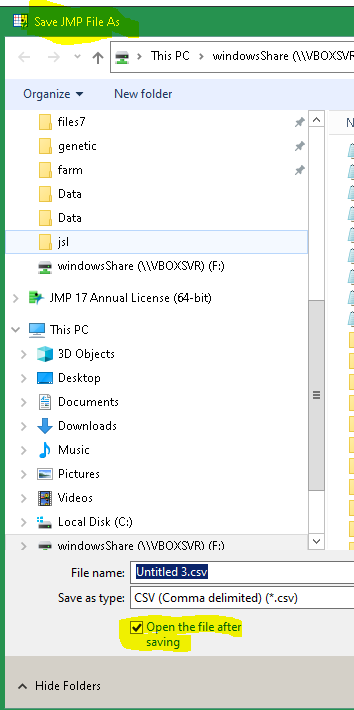
As far as I know, that behavior only happens when saving via the GUI
- Mark as New
- Bookmark
- Subscribe
- Mute
- Subscribe to RSS Feed
- Get Direct Link
- Report Inappropriate Content
Re: Do Not Open CSV File after 'Save As' when scripting
This script does not open the .csv file in Excel on my machine (Win11, JMP17Pro). Does it on yours?
dt = open ("$SAMPLE_DATA/Big Class.jmp");
dt << save as ("$DESKTOP/Big Class.csv");
- Mark as New
- Bookmark
- Subscribe
- Mute
- Subscribe to RSS Feed
- Get Direct Link
- Report Inappropriate Content
Re: Do Not Open CSV File after 'Save As' when scripting
It does not open excel. I ran another test for obviously it's working fine. Not sure why I was experiencing that issue. Thanks for the help nonetheless
- Mark as New
- Bookmark
- Subscribe
- Mute
- Subscribe to RSS Feed
- Get Direct Link
- Report Inappropriate Content
Re: Do Not Open CSV File after 'Save As' when scripting
As far as I know, that behavior only happens when saving via the GUI
Recommended Articles
- © 2025 JMP Statistical Discovery LLC. All Rights Reserved.
- Terms of Use
- Privacy Statement
- Contact Us