- JMP will suspend normal business operations for our Winter Holiday beginning on Wednesday, Dec. 24, 2025, at 5:00 p.m. ET (2:00 p.m. ET for JMP Accounts Receivable).
Regular business hours will resume at 9:00 a.m. EST on Friday, Jan. 2, 2026. - We’re retiring the File Exchange at the end of this year. The JMP Marketplace is now your destination for add-ins and extensions.
- Subscribe to RSS Feed
- Mark Topic as New
- Mark Topic as Read
- Float this Topic for Current User
- Bookmark
- Subscribe
- Mute
- Printer Friendly Page
Discussions
Solve problems, and share tips and tricks with other JMP users.- JMP User Community
- :
- Discussions
- :
- Date Filter on Control Chart

- Mark as New
- Bookmark
- Subscribe
- Mute
- Subscribe to RSS Feed
- Get Direct Link
- Report Inappropriate Content
Date Filter on Control Chart
I am preparing a control chart, but I dont want to show data on 11/02/84 on the chart below. Normally, with graph builder, I will just use a local data filter to filter out the dates I do not want.
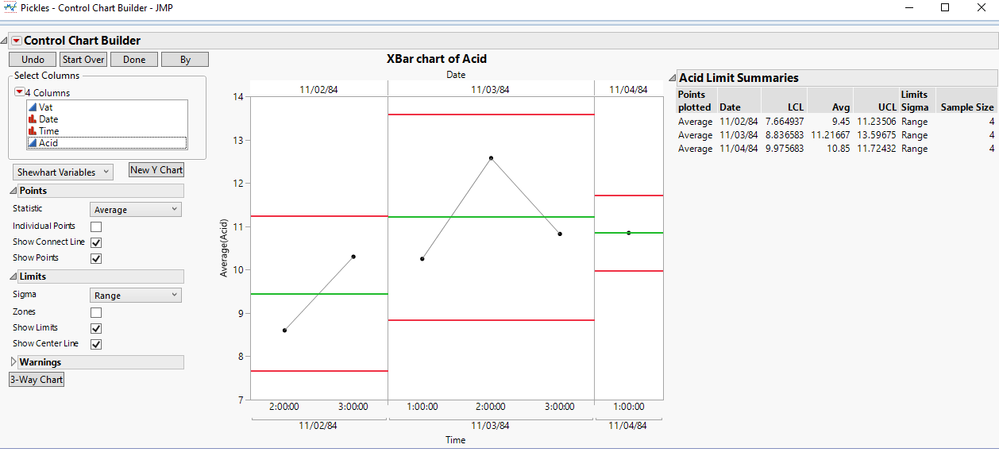
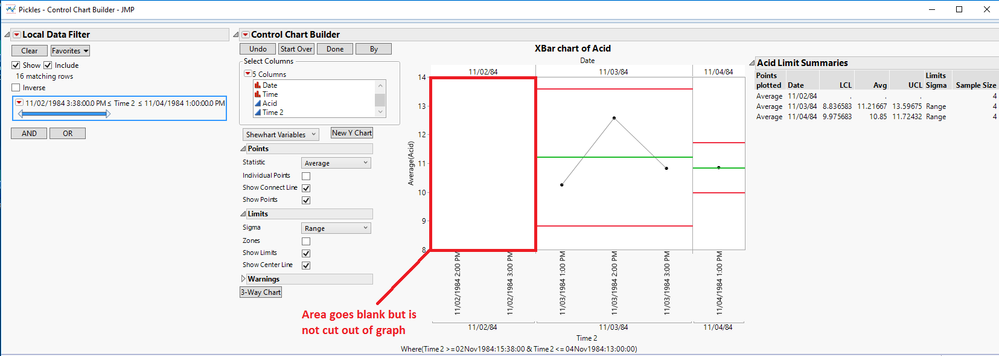
However, with control chart builder, there is a space left where the data has been filtered (see below.) Is there a way to make control chart builder behave like graph builder when using a local data filter? Graph builder will re-fit the X-axis to match the specified data range.
Accepted Solutions


- Mark as New
- Bookmark
- Subscribe
- Mute
- Subscribe to RSS Feed
- Get Direct Link
- Report Inappropriate Content
Re: Date Filter on Control Chart
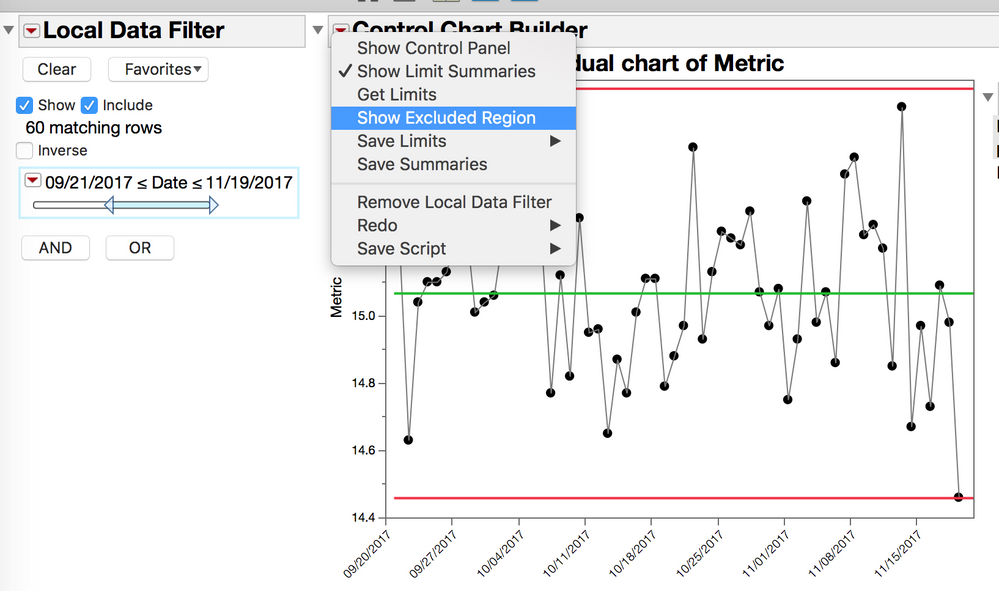
Try rurning off the "Show Excluded Region" option
OSx, JMP 14

- Mark as New
- Bookmark
- Subscribe
- Mute
- Subscribe to RSS Feed
- Get Direct Link
- Report Inappropriate Content
Re: Date Filter on Control Chart
The problem of incorrect phase divider lines with show excluded region turned off was fixed in JMP 14.1. You need to upgrade.
- Mark as New
- Bookmark
- Subscribe
- Mute
- Subscribe to RSS Feed
- Get Direct Link
- Report Inappropriate Content
Re: Date Filter on Control Chart
Try rurning off the "Show Excluded Region" option
OSx, JMP 14
- Mark as New
- Bookmark
- Subscribe
- Mute
- Subscribe to RSS Feed
- Get Direct Link
- Report Inappropriate Content
Re: Date Filter on Control Chart
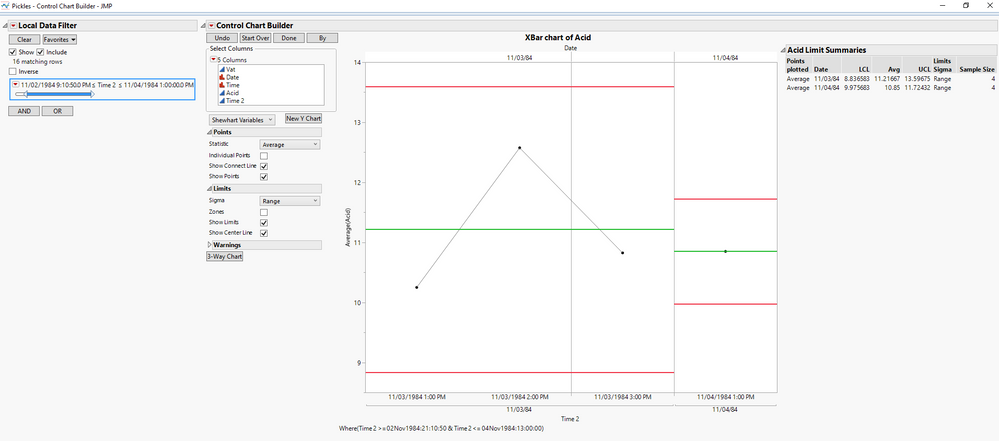
Thanks for the tip! However, for some reason an unnecessary grey vertical line goes onto the graph once I turn off the "Show Excluded Region" option. Do you know what might be happening?
- Mark as New
- Bookmark
- Subscribe
- Mute
- Subscribe to RSS Feed
- Get Direct Link
- Report Inappropriate Content
Re: Date Filter on Control Chart
The problem of incorrect phase divider lines with show excluded region turned off was fixed in JMP 14.1. You need to upgrade.
- Mark as New
- Bookmark
- Subscribe
- Mute
- Subscribe to RSS Feed
- Get Direct Link
- Report Inappropriate Content
Re: Date Filter on Control Chart
Thanks for the tip! Upgrading to JMP 14.1 fixed the problem right away.
Recommended Articles
- © 2025 JMP Statistical Discovery LLC. All Rights Reserved.
- Terms of Use
- Privacy Statement
- Contact Us