- JMP will suspend normal business operations for our Winter Holiday beginning on Wednesday, Dec. 24, 2025, at 5:00 p.m. ET (2:00 p.m. ET for JMP Accounts Receivable).
Regular business hours will resume at 9:00 a.m. EST on Friday, Jan. 2, 2026. - We’re retiring the File Exchange at the end of this year. The JMP Marketplace is now your destination for add-ins and extensions.
- Subscribe to RSS Feed
- Mark Topic as New
- Mark Topic as Read
- Float this Topic for Current User
- Bookmark
- Subscribe
- Mute
- Printer Friendly Page
Discussions
Solve problems, and share tips and tricks with other JMP users.- JMP User Community
- :
- Discussions
- :
- Ctrl+F - find and replace in a formula column

- Mark as New
- Bookmark
- Subscribe
- Mute
- Subscribe to RSS Feed
- Get Direct Link
- Report Inappropriate Content
Ctrl+F - find and replace in a formula column
Accepted Solutions


- Mark as New
- Bookmark
- Subscribe
- Mute
- Subscribe to RSS Feed
- Get Direct Link
- Report Inappropriate Content
Re: Ctrl+F
Find should work.
Modify should NOT work. A formula column's values can't be changed. You can remove the formula by clearing the expression in the formula editor. The last values from the formula remain in the column. Then find/replace will work.

- Mark as New
- Bookmark
- Subscribe
- Mute
- Subscribe to RSS Feed
- Get Direct Link
- Report Inappropriate Content
Re: Ctrl+F
Bonjour @hcarr01,
Normalement vous pouvez toujours rechercher un élément ou une valeur d'une colonne avec "CTRL+F", que la colonne soit sélectionnée ou non. Il faut juste que la table de données sur laquelle vous faîtes la recherche soit bien au "premier-plan".
Raccourcis clavier : Windows and macOS Keyboard Shortcuts (jmp.com)
Après avoir appuyé sur "CTRL+F", cette fenêtre s'affiche :
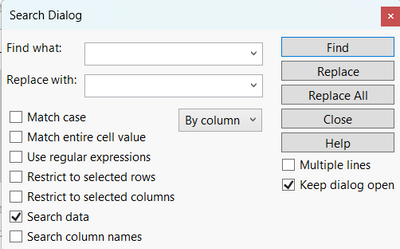
Si vous pouvez donner plus de détails, des captures d'écran montrant éventuellement le problème ou d'autres éléments pouvant orienter et guider la discussion, celà pourrait aider les autres membres de la communauté à vous donner des conseils.
"It is not unusual for a well-designed experiment to analyze itself" (Box, Hunter and Hunter)
- Mark as New
- Bookmark
- Subscribe
- Mute
- Subscribe to RSS Feed
- Get Direct Link
- Report Inappropriate Content
Re: Ctrl+F
- Mark as New
- Bookmark
- Subscribe
- Mute
- Subscribe to RSS Feed
- Get Direct Link
- Report Inappropriate Content
Re: Ctrl+F
Find should work.
Modify should NOT work. A formula column's values can't be changed. You can remove the formula by clearing the expression in the formula editor. The last values from the formula remain in the column. Then find/replace will work.
Recommended Articles
- © 2025 JMP Statistical Discovery LLC. All Rights Reserved.
- Terms of Use
- Privacy Statement
- Contact Us