- Don’t miss your chance to experience Discovery Summit Europe at our best available rate! Early bird registration through 31 Oct.
- Image to Table JMP extension imports single or batch images as data tables. Useful to extract curves from pictures or convert image data to curve data to use in analyses like Functional Data Explorer. Download and install the extension.
- Subscribe to RSS Feed
- Mark Topic as New
- Mark Topic as Read
- Float this Topic for Current User
- Bookmark
- Subscribe
- Mute
- Printer Friendly Page
Discussions
Solve problems, and share tips and tricks with other JMP users.- User Community
- :
- Discussions
- :
- Re: Cpk/Ppk Week over Week trend chart

- Mark as New
- Bookmark
- Subscribe
- Mute
- Subscribe to RSS Feed
- Get Direct Link
- Report Inappropriate Content
Cpk/Ppk Week over Week trend chart
Hi Everyone,
How can we have a plot for CPK/PPK Week over Week trend? I would like to compare the results across weeks to see if the results improves/worsens?
I sample script would be best helpful :)
Thanks!
Accepted Solutions


- Mark as New
- Bookmark
- Subscribe
- Mute
- Subscribe to RSS Feed
- Get Direct Link
- Report Inappropriate Content
Re: Cpk/Ppk Week over Week trend chart
Assuming you have a data table that has a column that indicates the week and a column that contains the measurement values, with the Spec Limits populated as Column Properties for the measurement Column.
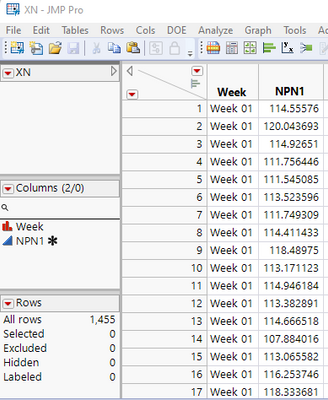
Go to
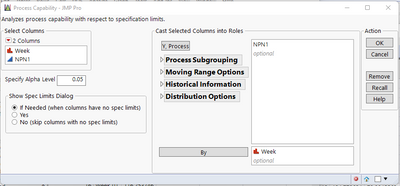
Analyze=>Quality and Process=>Process Capability
Fill in the Y, Process variable and place the column that has your week value into the "By" selection area
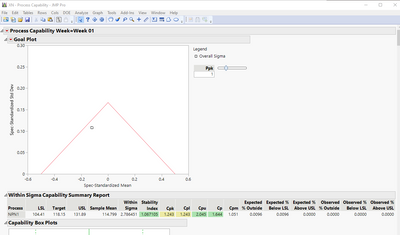
In the output report window, hold down the CNTL key, and then click on the red triangle for the Process Capability, and select
Summary Reports=>Within Sigma Summary Report
Holding down the CNTL key will signal JMP to create the report for all of the Weeks.
Right click on the summary report, and select
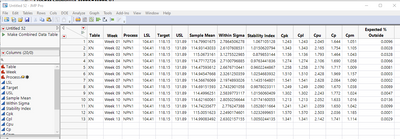
Create Combined Data Table
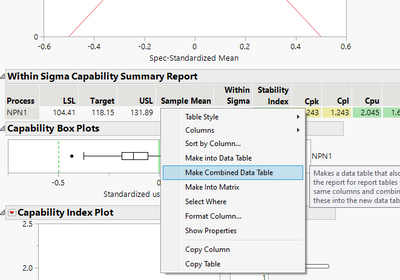
This will create a new data table that has all of the Cp/Cpk information for each week, which you can then use as your report
- Mark as New
- Bookmark
- Subscribe
- Mute
- Subscribe to RSS Feed
- Get Direct Link
- Report Inappropriate Content
Re: Cpk/Ppk Week over Week trend chart
Assuming you have a data table that has a column that indicates the week and a column that contains the measurement values, with the Spec Limits populated as Column Properties for the measurement Column.
Go to
Analyze=>Quality and Process=>Process Capability
Fill in the Y, Process variable and place the column that has your week value into the "By" selection area
In the output report window, hold down the CNTL key, and then click on the red triangle for the Process Capability, and select
Summary Reports=>Within Sigma Summary Report
Holding down the CNTL key will signal JMP to create the report for all of the Weeks.
Right click on the summary report, and select
Create Combined Data Table
This will create a new data table that has all of the Cp/Cpk information for each week, which you can then use as your report
Recommended Articles
- © 2026 JMP Statistical Discovery LLC. All Rights Reserved.
- Terms of Use
- Privacy Statement
- Contact Us