- Don’t miss your chance to experience Discovery Summit Europe at our best available rate! Early bird registration through 31 Oct.
- Graph Builder Toolbar streamlines interactive graphing. Creates shortcuts on Report and GraphBuilder Helpers toolbars. Download and install the extension.
- Image to Table JMP extension imports single or batch images as data tables. Useful to extract curves from pictures or convert image data to curve data to use in analyses like Functional Data Explorer. Download and install the extension.
- Subscribe to RSS Feed
- Mark Topic as New
- Mark Topic as Read
- Float this Topic for Current User
- Bookmark
- Subscribe
- Mute
- Printer Friendly Page
Discussions
Solve problems, and share tips and tricks with other JMP users.- User Community
- :
- Discussions
- :
- Need help with "Add Text Annotation" - not working as expected

- Mark as New
- Bookmark
- Subscribe
- Mute
- Subscribe to RSS Feed
- Get Direct Link
- Report Inappropriate Content
Need help with "Add Text Annotation" - not working as expected
All,
I'm using this script to add text annotation to the plot:
Eval(Parse(Eval Insert(JSL Quote(
biv<<SendToReport(
		Dispatch(
			{},
			"Bivar Plot",
			FrameBox,
			Add Text Annotation(
				Text( "R²=^R2^ \!nSlope=^Slope^" ),
				/*Font( "Segoe UI", 12, "Plain" ),*/
				Fixed Size( 0 ),
				Text Box( 15, 15, 200, 200 ),
				Filled( 1 ),
				Editable( 0 ),
				Background Color( "Light Yellow" ),
				Text Color( "^fitColor^" )

			)
		)
	);
)
)));
I don't change Font in this case.
I get picture that is just fine:
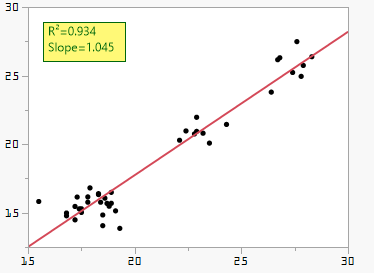
with one exception - it's going to to be imported to a PPTX and font size for that text is too small. I need it bigger.
So then when I uncomment the font line in the script above to change font size to 12, I get this:
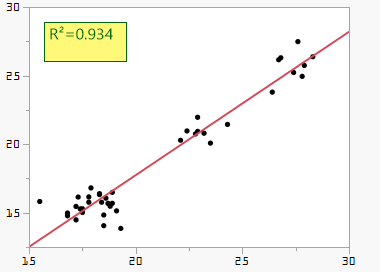
It looks to me that the Text Box ignores the sizes I provide (Text Box( 15, 15, 200, 200 )) and draws box enough to fit the text, but then it only considers the default text font and size, if I increase text size or change font to one that has bigger\wider symbols, text box is not enough anymore. I can manually resize it, but this is part of automated script to produce reports in PPTX.
Any ideas how to make the text bigger and text box not clip it?
Accepted Solutions


- Mark as New
- Bookmark
- Subscribe
- Mute
- Subscribe to RSS Feed
- Get Direct Link
- Report Inappropriate Content
Re: Need help with "Add Text Annotation" - not working as expected
Most likely scripting index can help you with this:
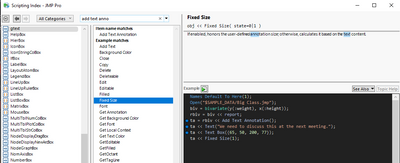
Names Default To Here(1);
Open("$SAMPLE_DATA/Big Class.jmp");
biv = bivariate(y(:weight), x(:height));
rbiv = biv << report;
ta = rbiv << Add Text Annotation();
ta << Text("We need to discuss this at the next meeting.");
ta << Text Box({65, 50, 400, 300});
ta << Font("Times New Roman", 14, "Bold");
ta << Fixed Size(1);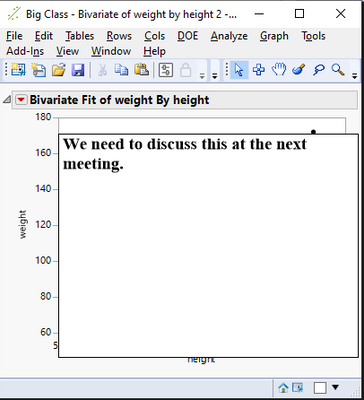
- Mark as New
- Bookmark
- Subscribe
- Mute
- Subscribe to RSS Feed
- Get Direct Link
- Report Inappropriate Content
Re: Need help with "Add Text Annotation" - not working as expected
Most likely scripting index can help you with this:
Names Default To Here(1);
Open("$SAMPLE_DATA/Big Class.jmp");
biv = bivariate(y(:weight), x(:height));
rbiv = biv << report;
ta = rbiv << Add Text Annotation();
ta << Text("We need to discuss this at the next meeting.");
ta << Text Box({65, 50, 400, 300});
ta << Font("Times New Roman", 14, "Bold");
ta << Fixed Size(1);
- Mark as New
- Bookmark
- Subscribe
- Mute
- Subscribe to RSS Feed
- Get Direct Link
- Report Inappropriate Content
Re: Need help with "Add Text Annotation" - not working as expected
Yeah I tried it with different sizes and Fixed Size 1 or 0.
What helped - sending separate messages to the text annotations, not using SendToReport message.
- Mark as New
- Bookmark
- Subscribe
- Mute
- Subscribe to RSS Feed
- Get Direct Link
- Report Inappropriate Content
Re: Need help with "Add Text Annotation" - not working as expected
Answer from @jthi implies the culprit was the Fixed Size(1) - but it wasn't working still. What did help was how @jthi was handling the whole thing.
I initially did <<SendToReport message, while @jthi created Text Annotation explicitly and manipulated it using this style:
ta = rbiv << Add Text Annotation();
ta << Text("We need to discuss this at the next meeting.");
ta << Text Box({65, 50, 400, 300});
ta << Font("Times New Roman", 14, "Bold");
ta << Fixed Size(1);
Ideally there shouldn't be any difference, but there is, apparently.
Recommended Articles
- © 2026 JMP Statistical Discovery LLC. All Rights Reserved.
- Terms of Use
- Privacy Statement
- Contact Us