Turn on suggestions
Auto-suggest helps you quickly narrow down your search results by suggesting possible matches as you type.
- Don’t miss your chance to experience Discovery Summit Europe at our best available rate! Early bird registration through 31 Oct.
- Graph Builder Toolbar streamlines interactive graphing. Creates shortcuts on Report and GraphBuilder Helpers toolbars. Download and install the extension.
Options
- Subscribe to RSS Feed
- Mark Topic as New
- Mark Topic as Read
- Float this Topic for Current User
- Bookmark
- Subscribe
- Mute
- Printer Friendly Page
Discussions
Solve problems, and share tips and tricks with other JMP users.- User Community
- :
- Discussions
- :
- Contour Plot

Level II
- Mark as New
- Bookmark
- Subscribe
- Mute
- Subscribe to RSS Feed
- Get Direct Link
- Report Inappropriate Content
Contour Plot
Aug 11, 2021 02:11 AM
(3728 views)
Please, I humbly ask for help on how to make a contour plot of the type I have attached. 
4 REPLIES 4


Super User
- Mark as New
- Bookmark
- Subscribe
- Mute
- Subscribe to RSS Feed
- Get Direct Link
- Report Inappropriate Content
Re: Contour Plot
Hi,
It is difficult to provide a valid answer without knowing the type and format of your data table. Could you share either the actual data (if it is not confidential) or a mock table showing how your data is organized and formatted.
Best,
TS
Thierry R. Sornasse

Super User
- Mark as New
- Bookmark
- Subscribe
- Mute
- Subscribe to RSS Feed
- Get Direct Link
- Report Inappropriate Content
Re: Contour Plot
Graph Builder(
	Size( 400, 832 ),
	Variables( X( :weight ), Y( :height ), Group X( :sex ), Group Y( :age ) ),
	Elements( Contour( X, Y, Legend( 5 ) ) )
);
Craige
Super User
- Mark as New
- Bookmark
- Subscribe
- Mute
- Subscribe to RSS Feed
- Get Direct Link
- Report Inappropriate Content
Re: Contour Plot
Hi,
Of note: I believe that the original post was about plotting X, Y, and Z values as contours, hence the Frequency field should be used as well
Best,
TS
Thierry R. Sornasse
Super User
- Mark as New
- Bookmark
- Subscribe
- Mute
- Subscribe to RSS Feed
- Get Direct Link
- Report Inappropriate Content
Re: Contour Plot
Hi,
The best option is to use the Contour Plot platform under the Graph menu with your data organized as X, Y, and Z columns
Contour Plot(
	X( :X, :Y ),
	Y( :Z ),
	Show Data Points( 0 ),
	Fill Areas( 1 ),
	Label Contours( 0 ),
	Transform( "None" ),
	Color Theme( "Jet" ),
	Specify Contours( Min( -100 ), Max( 150 ), N( 6 ) ),

);
OUPUT:
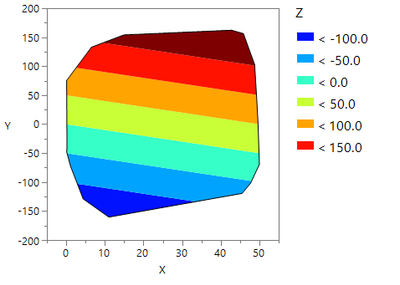
Where Z = X + Y (as an example)
Best,
TS
Thierry R. Sornasse
Recommended Articles
- © 2026 JMP Statistical Discovery LLC. All Rights Reserved.
- Terms of Use
- Privacy Statement
- Contact Us