- Don’t miss your chance to experience Discovery Summit Europe at our best available rate! Early bird registration through 31 Oct.
- Graph Builder Toolbar streamlines interactive graphing. Creates shortcuts on Report and GraphBuilder Helpers toolbars. Download and install the extension.
- Subscribe to RSS Feed
- Mark Topic as New
- Mark Topic as Read
- Float this Topic for Current User
- Bookmark
- Subscribe
- Mute
- Printer Friendly Page
Discussions
Solve problems, and share tips and tricks with other JMP users.- User Community
- :
- Discussions
- :
- Re: Column with a dropdown list

- Mark as New
- Bookmark
- Subscribe
- Mute
- Subscribe to RSS Feed
- Get Direct Link
- Report Inappropriate Content
Column with a dropdown list
I have 2 tables, Table 1 is a summary of the parameters obtained from a set of curves; Table 2 is the x and y column of the curve itself. Both are virtually joined using a "primary/Reference key")
I am classifying the curves in table 2 based on its shape and the associated defects.
I want to create a column in summary table-Table 1 which has a drop down list of certain defects.which repeats ( eg: Low F; Low I, Low V etc). So that I can pick and choose the appropriate one instead of typing it( to avoid mistakes- The examples shown here are simple, but I have lengthier descriptions/combinations of some of the above). I also need an option to modify the drop down list box- where I can add new defects like "One Step" or "kink" etc.
How can I accomplish this?
Accepted Solutions


 Community Manager
- Mark as New
- Bookmark
- Subscribe
- Mute
- Subscribe to RSS Feed
- Get Direct Link
- Report Inappropriate Content
Re: Column with a dropdown list


- Mark as New
- Bookmark
- Subscribe
- Mute
- Subscribe to RSS Feed
- Get Direct Link
- Report Inappropriate Content
Re: Column with a dropdown list
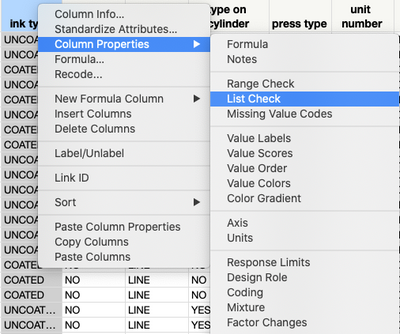
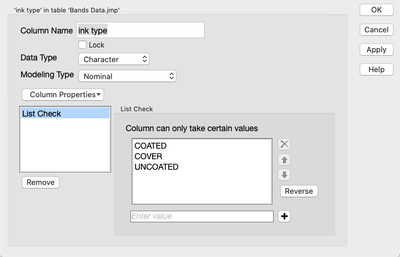
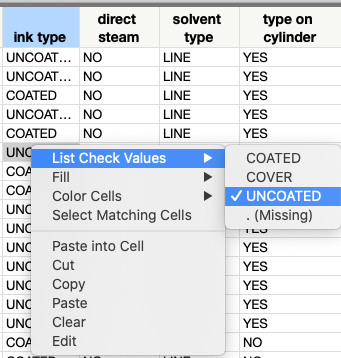
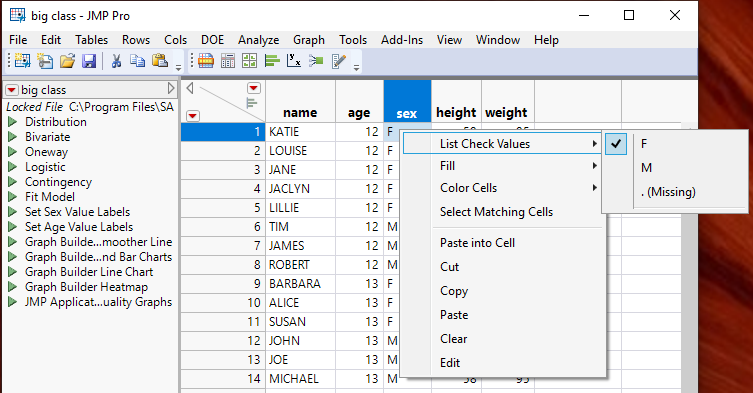
If you set the "List Check" column property for the columns in question, you can right click on a given cell and see the Approved values and select the value one wants.
 Community Manager
- Mark as New
- Bookmark
- Subscribe
- Mute
- Subscribe to RSS Feed
- Get Direct Link
- Report Inappropriate Content
Re: Column with a dropdown list
- Mark as New
- Bookmark
- Subscribe
- Mute
- Subscribe to RSS Feed
- Get Direct Link
- Report Inappropriate Content
Re: Column with a dropdown list
- Mark as New
- Bookmark
- Subscribe
- Mute
- Subscribe to RSS Feed
- Get Direct Link
- Report Inappropriate Content
Re: Column with a dropdown list
If you set the "List Check" column property for the columns in question, you can right click on a given cell and see the Approved values and select the value one wants.
- Mark as New
- Bookmark
- Subscribe
- Mute
- Subscribe to RSS Feed
- Get Direct Link
- Report Inappropriate Content
Re: Column with a dropdown list
Recommended Articles
- © 2026 JMP Statistical Discovery LLC. All Rights Reserved.
- Terms of Use
- Privacy Statement
- Contact Us