- JMP will suspend normal business operations for our Winter Holiday beginning on Wednesday, Dec. 24, 2025, at 5:00 p.m. ET (2:00 p.m. ET for JMP Accounts Receivable).
Regular business hours will resume at 9:00 a.m. EST on Friday, Jan. 2, 2026. - We’re retiring the File Exchange at the end of this year. The JMP Marketplace is now your destination for add-ins and extensions.
- Subscribe to RSS Feed
- Mark Topic as New
- Mark Topic as Read
- Float this Topic for Current User
- Bookmark
- Subscribe
- Mute
- Printer Friendly Page
Discussions
Solve problems, and share tips and tricks with other JMP users.- JMP User Community
- :
- Discussions
- :
- Character Date to numeric date

- Mark as New
- Bookmark
- Subscribe
- Mute
- Subscribe to RSS Feed
- Get Direct Link
- Report Inappropriate Content
Character Date to numeric date
I apologize because I see this question asked in other ways before but I can't seem to follow the solutions. Perhaps my date format is different enough and I'm not keen enough on scripting yet to figure out where I'm going wrong. I'm using JMP 17.
I've attached a simple table where you will see a column of Dates that looks like a correct format but JMP only recognizes it as character. I can change to numeric but when attempt to make it a m/d/y h:m type format then it reverts back to character. As a result I cannot get the column to sort properly.
How do I script this to modify from char to numeric m/d/y h:m type format?
Accepted Solutions


- Mark as New
- Bookmark
- Subscribe
- Mute
- Subscribe to RSS Feed
- Get Direct Link
- Report Inappropriate Content
Re: Character Date to numeric date
Hi,
You are on the right track.
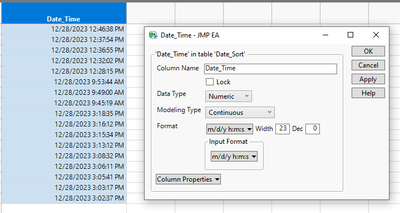
1) Specify the data type as Numerical and the Modeling type as Continuous
2) Set the desired appearance format as Time (e.g., m/d/y h:m:s)
3) Check that the Input Format is set to m/d/y h:m:s
Although the dates will appear in a formatted string (see step 2), you will be able to calculate differences using the "date_difference" formula and plot these values as a genuine time scale.
Note: however, if you want the raw time/date code, simply change step 2 to Best Fit
Best,
TS
- Mark as New
- Bookmark
- Subscribe
- Mute
- Subscribe to RSS Feed
- Get Direct Link
- Report Inappropriate Content
Re: Character Date to numeric date
Hi,
You are on the right track.
1) Specify the data type as Numerical and the Modeling type as Continuous
2) Set the desired appearance format as Time (e.g., m/d/y h:m:s)
3) Check that the Input Format is set to m/d/y h:m:s
Although the dates will appear in a formatted string (see step 2), you will be able to calculate differences using the "date_difference" formula and plot these values as a genuine time scale.
Note: however, if you want the raw time/date code, simply change step 2 to Best Fit
Best,
TS

- Mark as New
- Bookmark
- Subscribe
- Mute
- Subscribe to RSS Feed
- Get Direct Link
- Report Inappropriate Content
Re: Character Date to numeric date
Just wanted to confirm Thierry's approach. Make sure you include the seconds in the format.

- Mark as New
- Bookmark
- Subscribe
- Mute
- Subscribe to RSS Feed
- Get Direct Link
- Report Inappropriate Content
Re: Character Date to numeric date
Mine are still not working. This is what I see:


- Mark as New
- Bookmark
- Subscribe
- Mute
- Subscribe to RSS Feed
- Get Direct Link
- Report Inappropriate Content
Re: Character Date to numeric date
my suggestion is to create a new character column
Set the formula in the new column to
:collection date(formatted)Then remove the formula from the new column. You can do this in the Col Info window. Double click on the column header of the new column and it will open the Col Info window. Click on the formula column property, and then click on Remove
Now attempt to change the new column into a numeric date/time value. It will give you the same warning message. Go ahead and convert the data. Then compare your original column, Collection Date(formatted) to the new column, and see what values are different. That should give you a clue as to what the issue is with the conversion method you are using.
Recommended Articles
- © 2025 JMP Statistical Discovery LLC. All Rights Reserved.
- Terms of Use
- Privacy Statement
- Contact Us